






Excuses AI
Excuses AI: intelligent tools focused on improving the efficiency of AI.
Tags:AI improves efficiencyA one-sentence summary
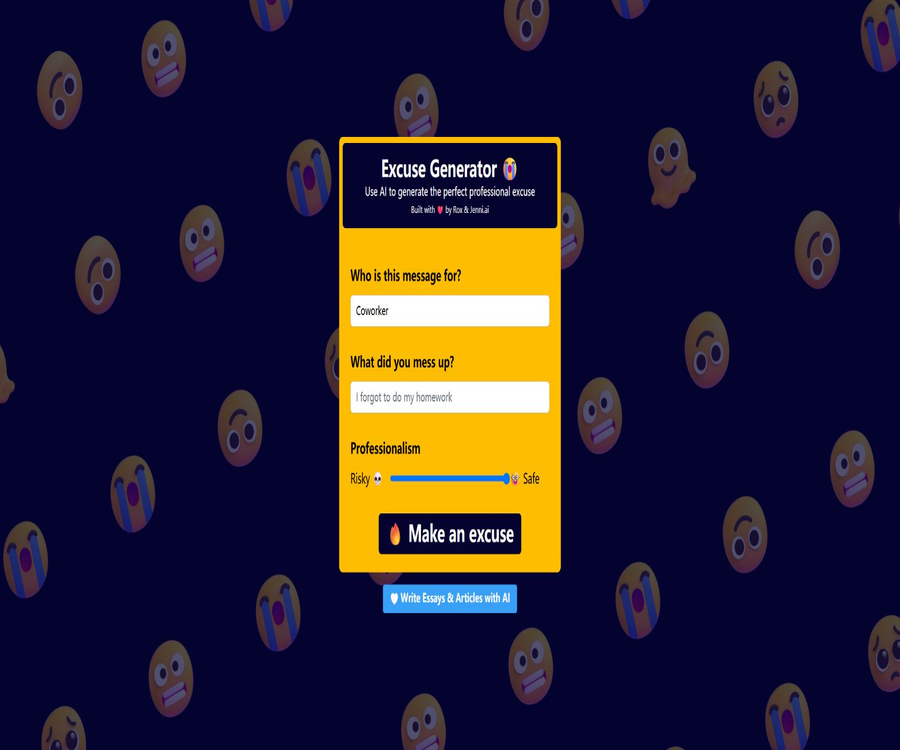
Excuses AI is a lightweight AI message generator: users specify the recipient of the message and the mistake that has occurred, and then adjust the level of formality, to obtain an English apology or excuse text.
Tool Introduction
Excuses AI was created in collaboration between Rox and Jenni.ai; it currently operates as a single-page website. Its main purpose is to help users quickly prepare an explanation in cases where they forget a task, miss a meeting, or experience delays in delivering something.
The product is more akin to a fun writing experiment rather than a formal system for human resources, customer service, or corporate communication. It lacks features such as accounts, projects, a template library, team management, and a history section.
Main functions
1. Custom message object
The “Who is this message for” field allows users to enter the recipient of the message freely, such as a colleague, supervisor, teacher, customer, or friend. It is not a fixed dropdown menu, so users can specify a more precise relationship.
2. Describe the mistakes that occurred.
The user needs to explain in one sentence what they have messed up; for example, forgetting to complete homework. The more specific the information provided, the more likely the generated text will contain explanations related to that situation.
3. Adjust the level of expertise
The page features a professionalism slider that ranges from 0 to 100; the left end of this slider is labeled “Risky” while the right end is labeled “Safe”. The default value is 100. This slider is used to determine the level of caution and formality in the text.
| Slider position | Page meaning | Suggested uses |
|---|---|---|
| Near 0 | Risky | It’s rather bold or imprudent; it’s only suitable as a creative draft. |
| Intermediate area | compromising tone | It is suitable for further manual adjustment based on personal relationships. |
| Near 100 | Safe | Give priority to generating more formal and cautious communication in work-related contexts. |
4. Generate excuse or apology messages
After clicking the generate button, the service will return an English text that can be sent to the specified recipient. The output may take the form of an email subject, a greeting, and a body text, and it may also include reasons that were not provided by the user.
5. Simulate the other party’s response
In addition to the main messages, the results screen also shows possible replies from the recipient, presented in the style of a mobile message conversation. This is merely an AI simulation; it cannot predict the actual attitude of a real person.
6. Copying, sharing, and taking screenshots
As a result, it is possible to use the device’s built-in sharing function; if sharing via the system is not available, the text will be copied to the clipboard. The interface also advises the user to scroll down and take a screenshot for saving.
7. Start over
Users can clear the currently generated results and fill them in again. The page does not keep any account-level history, so there is no need to rely on the platform to store previous content after leaving the page or refreshing it.
Input and output
| Project | Content | Restrictions |
|---|---|---|
| Message object | Free text, such as colleagues or supervisors | Do not enter your real name, email address, or other personal information. |
| Error description | Free text, such as missing a meeting or forgetting a task | Avoid entering customer secrets, health information, and details of internal events. |
| Level of expertise | Slider from 0 to 100 | Changing only the generation tendency does not guarantee the safety or accuracy of the content. |
| Main output | English excuses, explanations, or apology messages | It may be too long, contain fabricated reasons, or not fit the actual context. |
| Additional output | Responses from recipients simulated by AI | It cannot be used to predict the other party’s true reaction. |
| Saving method | Copy, share via the system, or take a screenshot | No projects, cloud history, or file export available |
Usage tutorial
- Enter the appropriate title in the message object field; do not include the recipient’s full personal details.
- Describe in brief facts the tasks you failed to complete, did incorrectly, or delayed.
- Adjust the professionalism slider to a level that suits the current relationship; in a professional setting, it is recommended to choose the Safe option.
- Click the generate button and wait for the main message and simulated response to appear.
- Remove the artificially fabricated reasons, and add actual facts, responsibility assignments, and time frames for corrective actions.
- After confirming the tone, date, name, and commitments, copy it to the actual communication tool.
Replace the excuse with a sincere apology.
The safest approach is not to tell lies, but rather to use drafts to clearly express the facts, the impacts, and the actions that can be taken to address them. In important relationships, it is advisable to avoid using language that serves to shift responsibility.
- First, acknowledge in one sentence what has happened; do not hide the key facts that could affect the other party’s judgment.
- Explain the impact caused and take responsibility for one’s own actions.
- Background information is added only when it is truly relevant; no fake emergencies or health issues are invented.
- Provide clear remedial actions, completion timelines, or alternative options.
- Ask the other party to confirm the new arrangements and to carry them out as promised.
- Save the final version that has been manually modified; do not send the unreviewed AI draft directly.
Which users are it suitable for
- Regular office users: Prepare draft English apologies after missing meetings or submitting tasks late.
- Student: Practice explaining omissions and suggesting remedies, but not using it to fabricate facts.
- English learners: Refer to the structure of formal messages and common expressions for apologies.
- Freelancer: Prepare a preliminary draft in case of a slight delay, and provide an accurate delivery schedule.
- Content creators: Generate ideas for humorous scenes, short script dialogues, or social media content.
- Product researcher: Observing the interactive design of early single-function generative AI web pages.
Typical use cases
- I forgot to reply to a non-urgent email; I need to resume communication.
- I missed the internal meeting; I hope to apologize and propose a new time.
- Minor delays have occurred with small tasks; it is necessary to explain the current situation and the delivery plan.
- Practice using expressions of varying levels of formality in English emails.
- Create apology or explanation dialogues between fictional characters.
- Compare the textual differences between Risky and Safe tones for the same event.
Product advantages
- The page has a focused set of functions; it can be created by filling in two text fields and a slider.
- No registration or payment method setup is required, making it ideal for quick trials.
- The proficiency slider provides an additional level of tone control compared to the single generate button.
- It displays both the main message and a simulated reply, allowing users to consider the other party’s perspective.
- It supports copying, system sharing, and screenshotting, with a short path to use on mobile devices.
- The current generation interface is still able to return results as usual.
Usage restrictions and risks
- AI may invent emergencies, responsibilities, or reasons, and the content it generates cannot be considered as genuine statements.
- Using false excuses to deal with work, school, or customer issues can damage trust and lead to disciplinary action or contractual risks.
- The website does not make its privacy policy and terms of service public; the rules regarding the saving, training, and deletion of entered text are unclear.
- The page has only an English interface, and the output is also primarily in English; there is no language selector available.
- There are no features for accounts, history, favorites, templates, bulk creation, or team approval.
- There are no public limits on usage or service guarantees; free APIs may experience rate limiting, failures, or discontinuation at any time.
- A simulated reply does not reflect the other party’s true intentions, and it should not be used as an indication that the communication has been resolved.
- This tool should not be relied on in matters related to law, medicine, safety incidents, academic integrity, financial responsibilities, and personnel disciplinary actions.
Free and priced
As of August 22, 2026, Excuses AI is available for direct use, without any need for logging in, subscription, payment processes, or a price page. The official website also does not specify the number of times it can be used per day or any limits on fair use.
| Project | Current status | Explanation |
|---|---|---|
| Web page generation | Free access | It is possible to submit a scenario and obtain results without the need for registration. |
| Free quota | Not disclosed | The page does not display the remaining number of attempts or the daily limit. |
| Paid plans | Not provided | There is no option for members or purchases per use. |
| Advertising or promotion | There is product promotion available. | The page will guide users to Jenni.ai’s writing product. |
| Refund rules | Not applicable | There is no payment process available at the moment. |
Supported platforms
| Platform | Support status | Explanation |
|---|---|---|
| Web page version | Support | Access directly using a modern browser. |
| Windows and macOS | Supported for use in browsers | There is no standalone desktop application. |
| Linux | Supported for use in browsers | No local software packages available. |
| iOS and Android | Supports mobile browsers | System sharing is available; no native applications were found. |
| Browser extensions | Not provided | There is no official extension page. |
| Interface language | English | There is no option to switch languages publicly. |
Actual output performance
Using the scenario of \"missing a project meeting and requesting a rescheduling\", the service successfully generated an English email containing a subject line, salutation, an explanation, and an apology, along with a simulated reply from a colleague.
The test results also revealed the main risks: the system added its own reasons, such as “addressing urgent issues in the handling department,” which were not provided by the users. These unverified details must be removed when the system is used in a real environment.
Privacy and data processing
The site does not provide a public privacy policy, information regarding cookies, details on the duration for which data is stored, or instructions on how to request its deletion. The page sends the information filled in by the user, along with any errors and details about the user’s proficiency level, to the server where an interface is generated.
- Do not enter real names, email addresses, phone numbers, or employee IDs.
- Do not submit customer information, unreleased projects, contracts, financial, or HR data.
- Do not describe events that could identify specific patients, students, or minors.
- When the page loads Google Analytics, the browsing behavior may be used for website statistics.
- Copying and system sharing take place on the user’s device; it is still necessary to check the target application before sharing.
- If the organization has a policy regarding the use of AI, it is necessary to first check whether sending work-related tasks to external services is permitted.
APIs, SDKs, and open-source status
Requests are handled within the web page using generated interfaces, but no API documentation, developer keys, billing rules, rate limits, or guarantees regarding stability are provided; as a result, it cannot be integrated as a public API.
As of the time of verification, no official GitHub repository or open-source license belonging to Excuses AI was found. The publicly available front-end files do not imply that the product is open source.
Differences from full writing tools
| Ability | Excuses AI | Complete AI writing platform |
|---|---|---|
| Main tasks | Generate an excuse or apology message at a time | Articles, emails, rewriting, research, and various templates |
| Accounts and History | None | Projects and history are usually provided. |
| Tone control | 0 to 100 professionalism slider | It often offers settings for tone, length, brand, and audience. |
| Collaborative review | None | Some platforms support comments, teams, and approval processes. |
| Privacy and Contracts | There is no public policy. | Mature products usually come with open protocols. |
| Developer integration | There is no public API. | Some platforms offer APIs or integration options. |
Basic information
| Project | Content |
|---|---|
| Tool name | Excuses AI |
| Page name | Excuse Generator |
| Creator identifier | Rox and Jenni.ai |
| Tool type | AI excuse, apology, and message generator |
| Enter | Recipient, description of the error, and level of expertise |
| Output | English messages and simulated recipient replies |
| Price pattern | Currently available for free. |
| Is registration required? | It’s not necessary. |
| Privacy Policy | Not disclosed |
| APIs and SDKs | Not disclosed |
| Is it open source? | No, no official open-source repository was found. |
| Main platforms | Web page version |
Recommendation score
Recommendation score: 3.2 / 5. Its interface is simple, and the tone slider along with the simulated responses are quite creative; it is suitable for creating drafts of English messages with low risk or for practicing writing skills.
The lack of a privacy policy, account options, content in Chinese, history of transactions, information on available credit limits, and clear commitments regarding stability are clear shortcomings. In cases involving genuine employment relationships, it is advisable to replace the provided response with an honest apology along with actionable remedies.
Frequently Asked Questions
Is Excuses AI free?
It is available for free at the moment, with no need for registration. The page does not specify a limit on the number of times it can be used, nor are there any paid plans.
Can Chinese excuses be generated?
The interface is available only in English, and the test results are also in English. There is no option to select an official language or any support for Chinese.
What information needs to be filled in?
Simply fill in the message object and the error that occurred, and adjust the level of professionalism on a scale from 0 to 100. Do not enter any real personal information or company secrets.
What is the purpose of the Professionalism slider?
It adjusts the tone of the text between Risky and Safe, with a default value of 100. Even when the Safe option is chosen, users still need to verify the accuracy and tone of the text.
How to save it after it’s generated?
It is possible to use the system’s functions for sharing, copying text, or taking screenshots. The website does not keep any record of accounts or saved projects.
Is the simulated response accurate?
It’s inaccurate. It is merely a possible response generated by AI; it cannot predict whether the actual person will accept that explanation.
Are APIs provided?
There are no public APIs. The internal interfaces of the website come without any documentation, keys, licenses, or service guarantees, making them unsuitable for formal integration.
Is Excuses AI open source?
It cannot be marked as open source; no official code repository or open source license was found.
Is the input content safe?
It cannot be confirmed with certainty. The website does not disclose its privacy policy or rules regarding data deletion; it should be assumed that any input data is sent to external servers, and only non-sensitive information is used.
Can I send the generated content directly to the boss?
It is not recommended. AI may invent reasons or make promises that it cannot fulfill; before sending anything, it is necessary to replace those with factual information, clear responsibilities, and specific plans for remediation.
Summary
Excuses AI is a single-function English generator that is still operational; it is suitable for quickly creating drafts of apologies or explanations, and the tone can be adjusted using a slider for controlling the level of formality.
It lacks the privacy, account management, and collaboration features found in mature commercial software. The safest way to use it is to enter non-sensitive summaries, use the output as inspiration for writing, and convey the final message in a truthful and responsible manner.
Tools similar to Excuses AI



 Guigong Network Security Registration No. 45132202000164