






Ecomail.app
Ecomail.app: a smart tool focused on improving efficiency through AI.
Tags:AI improves efficiencyA one-sentence summary
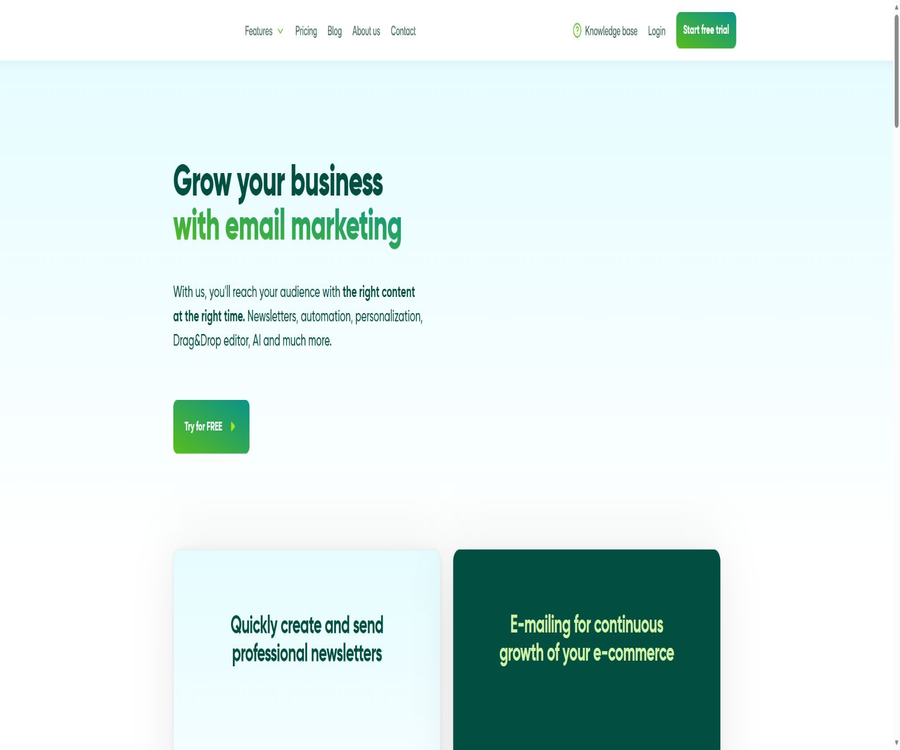
Ecomail.app is a marketing platform for emails and SMS messages, designed for businesses, e-commerce sites, and marketing teams; it enables contact management, email design, intelligent segmentation, automated communication, sending transaction-related emails, and analyzing the effectiveness of marketing campaigns.
Tool Introduction
Ecomail.app is operated by the Czech company ECOMAIL.CZ; it helps users create, send, and evaluate marketing campaigns from a web-based interface. It connects an email editor, subscription forms, a contact database, behavior tracking, and automated processes together.
The platform is not intended solely for sending mass emails. Businesses can also synchronize orders from their online stores with customer browsing behavior, create dynamic target audiences based on customer characteristics and various campaigns, and integrate marketing processes into existing systems through APIs, Webhooks, and third-party integrations.
Main functions
Drag-and-drop email editor
Ecomail.app offers a drag-and-drop editor along with over 170 ready-made templates for creating news briefs, promotional emails, event notifications, and automated messages. Users can also save custom content blocks or import their own HTML templates.
- Compose email content by combining text, images, buttons, separators, and product sections.
- Use ready-made design templates suitable for various business scenarios to create drafts quickly.
- Save frequently used brand blocks to reduce the need to edit headers, footers, and product modules repeatedly.
- Add online viewing and unsubscribe options to the template to meet the basic requirements for sending messages.
- Send a test email and check the links, variables, as well as the display on desktop and mobile devices.
AI copywriting assistance
The editor offers AI-powered theme lines, text preview, and text editing functions; it also provides AI chat assistance within the editing environment. It is suitable for creating drafts, altering the tone of text, and compressing text, but brand facts, prices, and compliance-related details still need to be checked manually.
Contact database
Users can import, export, and update contacts, and manage their audience using tags, custom fields, preference groups, and lists. Contacts who unsubscribe, are sent a hard bounce message, or file complaints about spam will become inactive and will no longer be counted toward the limit of active contacts in a paid plan.
Basic and advanced clustering
Contacts can be grouped dynamically based on name, address, registration date, tags, custom fields, preferences, email activities, and automated activities. After integrating with a website or e-commerce platform, Marketer+ can also take into account page visits, purchasing behavior, product categories, and time criteria.
| Criteria for grouping | Available data | Typical uses | Condition details |
|---|---|---|---|
| Contact attributes | Name, city, registration date, and custom fields | Regional activities, member tiers, and lifecycle communication | It is necessary to first collect and maintain the fields. |
| Tags and preferences | Channel tags, interest groups, and subscription preferences | Reach users based on content interests and acquisition channels | Multiple conditions can be combined. |
| Marketing campaigns | Open, click, unsubscribe, and automated participation | Active user management and reactivation of dormant users | The open rate is affected by the email privacy mechanisms. |
| Website behavior | Page visits, custom events, and browsing paths | Interest recognition and retargeting | Tracking integration is required; some features are limited to Marketer+. |
| Purchasing behavior | Orders, products, categories, amounts, and time | Repeat purchases, cross-selling, and customer segmentation | E-commerce data integration is required. |
Marketing automation
Automation consists of trigger conditions, waiting periods, decision branches, and action executions. Users can set it to run once for each contact, to be repeated, or to run again in parallel while the previous process is still in progress.
- A welcome email or a discount for the first purchase is sent upon a new subscription.
- Send reminders automatically based on birthdays, anniversaries, or custom dates.
- The process is initiated based on purchases, page visits, custom events, or API calls.
- Send emails or text messages within the process, wait, evaluate conditions, and proceed to the appropriate branch.
- Add or remove tags, modify contacts, write notes, and switch subscription lists.
- Send data to a Webhook, or trigger another automation.
- Add or remove audiences from Facebook Custom Audience.
Automation that relies on order data, website behavior, and advanced e-commerce metrics usually requires Marketer+ as well as effective integration. Any existing automation needs to be paused before modifications are made, and the testing mode reduces the waiting time needed to verify the process.
E-commerce marketing
Marketer+ is designed for e-commerce businesses that need order and behavior data; it offers support for product feeds, shopping behaviors, coupons, and advanced automation. Companies can use it to develop strategies for addressing issues such as abandoned purchases, first-time orders, repeat purchases, customer feedback, and bringing back inactive customers.
Transaction email
Transaction emails are used for one-to-one communications triggered by user actions, such as order confirmation, registration notifications, and account changes. Ecomail.app sends transaction emails via API; it also allows the use of templates already available on the platform, with the possibility of inserting dynamic variables and attachments.
To use transaction emails, it is necessary to prepay for a Marketer+ package or have an appropriate credit limit, as well as to complete domain verification. Marketing content and transaction notifications should be kept separate, so as to prevent marketing messages from being disguised as essential notifications.
Registration forms and customer acquisition
The platform offers subscription forms, pop-ups, and slide-out forms, and it can also accept contacts collected through Facebook Lead Ads. The fields in these forms can be used for subsequent segmentation, but businesses must clarify the purpose of subscription, the frequency of updates, and how the data will be processed.
Event report
The report tracks the number of recipients, deliveries, opens, clicks, bounces, unsubscribes, and spam complaints; it also allows users to view popular links, a map of clicks, information by region, as well as details related to email clients and operating systems. Once connected to an online store, it is possible to monitor conversion and revenue metrics as well.
| Indicators | Main meaning | Use reminders |
|---|---|---|
| Delivery | Mails that were not rejected by the receiving server | It cannot be equated with certain inclusion in the main inbox. |
| Open | Track images that have been loaded or emails on which a click has been made | Image blocking and email privacy protection can affect accuracy. |
| Click | The recipient visits the tracking link in the email. | Analysis should be conducted in conjunction with independent visitors, conversions, and link locations. |
| Reply with rejection | Addresses that cannot be received, either temporarily or permanently | Hard bounce emails should be handled promptly to maintain database quality. |
| Unsubscribe and Complaints | Identify contacts who should be removed or marked as spam. | Marketing campaigns must not be sent any longer to contacts who have opted out. |
| Transformation | After integration, the purchase behavior is attributed to the respective campaign. | The attribution window and external analysis tools may produce different results. |
SMS marketing
Paid subscription users can purchase SMS credits to send messages; those in the free plan cannot send SMS messages. There are separate custom pricing rates for SMS messages, and the actual cost is influenced by the country, the service provider, and the length of the message.
Automated triggers and actions
| Type | Representative capabilities | Suitable scenarios | Restrict or rely on |
|---|---|---|---|
| Subscriptions and tags | Add to list, add or remove tags | Welcome process and lead categorization | Depends on contact status and list settings |
| Date | Birthdays, anniversaries, and designated dates | Blessings, renewal reminders, and expiration alerts | The date field must be formatted correctly. |
| Email campaigns | Opening, clicking, and automated actions | Interest follow-up and dormant account reactivation | Statistics are not absolutely accurate. |
| Website events | Page visits and custom events | Content recommendation and retargeting | Tracking must be implemented and the package requirements must be met. |
| Trading behavior | Order placement, shopping cart, and product data | Abandonment, repurchase, and review invitations | E-commerce integration and Marketer+ are required. |
| API trigger | Automated initiation by the business system | Member, order, and internal event notifications | Key management needs to be developed. |
| Send action | Emails, SMS, and Webhooks | Cross-channel follow-up and data synchronization | Text messages and external services may incur additional fees. |
| Data actions | Modify contacts, tags, notes, and lists | Automatically maintain customer status | Incorrect rules may contaminate data in bulk. |
Workflow
- Register an account and determine the sender, business objectives, and legitimate contact channels.
- Import contacts or create subscription forms, and map fields, tags, and preference groups.
- Add the records required by the domain registrar and complete the domain verification process in the backend.
- Choose a ready-made template or use the drag-and-drop editor to create an email, adding the brand logo and an unsubscribe link.
- Use variables, dynamic content, and grouping rules to prepare relevant content for different audiences.
- Send a test email to check the subject, sender, links, variables, and display on mobile devices.
- Send it immediately, schedule a timed event, or incorporate the template into an automated workflow.
- View delivery, opening, click, bounce, unsubscribe, and conversion reports.
- Update the database, grouping criteria, messaging content, and sending frequency based on the results.
Usage tutorial
Send the first marketing email
- Organize the contacts for whom there is a legitimate basis for marketing, and remove those whose source is unknown or for whom consent cannot be verified.
- Create a new list in the contacts area, import the file, and correctly map the email addresses, names, and custom fields.
- Verify the sending domain name to be used for the plan, and wait until the necessary records take effect before proceeding.
- Create a new email campaign by entering the internal name, subject, preview text, sender, and reply address.
- Select a template and replace the text, images, buttons, and brand information.
- Verify that the unsubscribe link exists, and check all external links and dynamic variables.
- Send a test message to the internal email address, and check it in both the desktop email client and the mobile email app.
- Select the entire list or the verified groups, confirm the number of people, and then arrange for the sending.
- After sending, view the report and handle hard bounces, complaints, and unsubscribing contacts.
Create a welcome automation
- Create a contact list or form to collect new subscribers.
- Enter the automation area and select a new subscription as the trigger for the process.
- Set it so that each contact is allowed to enter only once, thereby avoiding the repeated sending of welcome messages.
- Add the first welcome email, explaining the content of the subscription and the expected frequency of deliveries.
- Add waiting steps and a second email with educational information or product details as needed.
- Use click or tag conditions to create branches, but avoid making the process too long.
- Enter test mode and go through all branches using the internal email address.
- Start the automation after confirming that cancellation, time zone, variables, and error handling are correct.
Access to online store data
- Check whether the current e-commerce platform offers any official plugins, modules, or available connection methods.
- Select the list of contacts that need to be synchronized, and clarify the difference between subscription agreements and orders placed by customers.
- Complete the plugin authorization or API configuration, and first synchronize a small number of contacts and orders for testing.
- Check that the order amount, products, categories, status, and contact information are correctly associated.
- When deploying website behavior tracking, configure Cookies and privacy consent mechanisms simultaneously.
- Create test groups to verify page visits, purchase data, and custom event data.
- Create additional automations for abandoned purchases, repeat purchases, or review requests, and set limits on the frequency of their activation.
- After going live, continuously check for duplicate orders, mismatched contacts, and subscription cancellation updates.
Send transaction emails using the API
- Prepare a suitable payment plan or credit limit, and complete the domain name verification process.
- The API key is generated in the account integration area and is stored only on the server side.
- Choose to submit the content directly or use a saved transaction email template.
- The incoming topic, sender, recipient, plain text or HTML content, and necessary variables.
- Add options for carbon copying, confidential sending, attachments, and click-tracking based on business needs.
- In the testing environment, normal transmissions, missing variables, invalid addresses, and service errors are covered.
- Safe retries are implemented for failed requests, to prevent the repeated sending of order or account notifications.
- After going live, transaction emails are used to report on deliveries, opens, clicks, and bounces.
Integration capability
Ecomail.app can connect to external systems through native plugins, automation platforms, tracking codes, APIs, and Webhooks. The specific functions available depend on the rules of the e-commerce platform, the packages offered, the region, as well as the policies of the third-party services themselves.
| Integrated categories | Represents a platform or method | Primary uses |
|---|---|---|
| E-commerce platform | Shopify, WooCommerce, PrestaShop, nopCommerce | Synchronize contact, order, cart, and product data |
| Regional e-commerce system | Shoptet, Upgates, Shoper, MyOnlineStore | Customer synchronization, purchase segmentation, and abandonment process |
| Automation platform | Zapier, Make | Connect CRM, spreadsheets, forms, and business applications |
| Customer acquisition tools | Facebook Lead Ads, Poptin, Lnk.Bio | Collect potential customer and subscription data |
| Website tracking | Tracking codes, custom events, and cart events | Behavioral segmentation, abandonment, and retargeting |
| Develop interfaces | APIs and Webhooks | Synchronization of contacts, events, statuses, and transaction emails |
| Analysis | Google Analytics | Additional traffic and conversion analysis |
Prices and packages
As of August 22, 2026, the English-language pricing page for Ecomail.app calculates the subscription fee based on the number of active contacts in the database. The figures shown on the page represent the minimum price in dollars; the cost increases as the number of contacts rises.
| Package | Price | Billing cycle | Core benefits or quota | Suitable for users |
|---|---|---|---|---|
| Free | $ | Free for a long time | Up to 200 contacts, with a maximum of 200 emails sent per month. | Testing products or conducting very limited-scale communications |
| Profi annual plan | $ | Paid annually | Unlimited email sending, drag-and-drop editor, over 170 templates, and AI-generated text | Regular news briefings and basic marketing |
| Profi monthly plan | Starting at $20 | Payment is made on a monthly basis, for a minimum of 3 consecutive months. | Rights correspond to Profi, and the price increases as the number of active contacts rises. | Teams that require more flexible payment options |
| Marketer+ annual plan | $ | Paid annually | Profi capabilities include e-commerce integration, coupons, behavior automation, and transaction emails. | E-commerce and data-driven marketing teams |
| Marketer+ monthly plan | Starting at $30 | Payment is made on a monthly basis, for a minimum of 3 consecutive months. | The price increases as the number of active contacts rises. | Short-cycle projects that require advanced automation |
| Large databases | Contact sales | Customization | Provide personalized service solutions for a large number of contacts. | More than 50,000 contacts or complex corporate needs |
Free version and trial period
The free version allows storing up to 200 contacts who can receive messages, as well as sending a maximum of 200 emails per month. Once either of these limits is exceeded, it is necessary to purchase a subscription or some other appropriate paid plan.
New users can take advantage of a 14-day trial period; the official documentation states that during this trial they can use all functions, send an unlimited number of emails, and have up to 40,000 contacts. The actual capabilities and sending limits after the trial period will be as indicated in the account settings.
Comparison of package features
| Ability | Free | Profi | Marketer+ |
|---|---|---|---|
| Contact person and sending | Up to 200 contacts, 200 messages per month | Send without restriction, categorized by active contacts | Send without restriction, categorized by active contacts |
| Drag-and-drop editing and templates | Support | Support | Support |
| AI topics and text editing | Support | Support | Support |
| Basic contact management | Support | Support | Support |
| E-commerce behavior integration | Some abilities can be tested. | Not considered a core right. | Support |
| Advanced behavior automation | Some abilities can be tested. | Not included | Support |
| Coupons | Some abilities can be tested. | Not included | Support |
| Transaction email | No free shipping benefit provided. | Not included | Support or purchase the appropriate credit limit. |
| SMS marketing | Sending is not supported. | Buy additional SMS credits | Buy additional SMS credits |
| API | The price comparison column is available for support. | Support | Support |
The pricing page shows some of the advanced features available in the free version, but free sending is still subject to limits on the number of contacts and emails per month. Before making a purchase, it is necessary to check in the account whether the desired functions can be activated officially, rather than relying solely on the interface during the trial period.
Additional notes on billing
- The payment amount depends on the number of active contacts, rather than the number of contacts in the list.
- Non-active contacts such as those who have unsubscribed, for whom hard bounces have been sent, or who have filed complaints about spam are not included in the payment limit.
- After purchasing a paid plan, it must be used continuously for at least 3 months.
- The package can be suspended at most once per year, for a maximum of 6 months; the specific conditions are subject to the account rules.
- Non-profit organizations can obtain a 50% discount on annual plans; they need to contact the authorities to verify their eligibility.
- Agents can create multiple sub-accounts and earn commission from customer referrals; pricing details should be obtained by contacting sales.
- Text messages have their own pricing and usage limits; they are not included in the price of the basic email subscription.
- The final amount varies depending on the contact’s tier, taxes and fees, currency, and payment method.
Which users are it suitable for
- E-commerce operations team: Synchronize order and browsing data, and establish processes for handling abandoned purchases, repeat purchases, and product recommendations.
- Small and medium-sized enterprises: Creating news briefs, event announcements, and emails for customer maintenance.
- Content and educational institutions: Use forms to gather subscribers and send series of content based on their interests.
- Marketing professionals: Continuously optimize campaigns through dynamic segmentation, automation, and reporting.
- SaaS and development teams: Send transaction notifications via APIs and synchronize contact statuses.
- Marketing agents: Manage multiple client sub-accounts under a single Agency account.
- Non-profit organizations: Apply for annual package discounts and manage communication with members and for organizing events.
Typical use cases
- Upon subscribing, new users automatically receive a welcome message, an introduction to the brand, and content navigation guidelines.
- A reminder is sent when a customer views products but does not complete the purchase.
- Send repeat purchase and after-sales emails based on the products purchased, amount, or date.
- Set scheduled reminders for birthdays, membership expirations, course start dates, and event commencements.
- Put contacts with emails that have not been opened for a long time into the reactivation process.
- Send notifications for order confirmation, successful registration, and account changes via API.
- Compare the performance of different marketing campaigns in terms of delivery, clicks, unsubscribes, and conversions.
- Use Webhooks to synchronize email activities and contact statuses back to the CRM.
Product advantages
- Email editing, contacts, forms, grouping, automation, and reporting are all available in the same backend.
- The free version and a 14-day trial with full features allow you to test the workflow before making a payment.
- Paid plans are billed based on the number of active contacts, and contacts who cancel their subscription or have their messages blocked do not count toward this quota.
- Marketer+ covers e-commerce functions such as orders, shopping carts, website behavior, and coupons.
- Over 170 templates and saveable blocks help reduce the cost of repetitive design work.
- APIs, Webhooks, transaction emails, and public PHP wrappers facilitate integration for developers.
- The report also covers email activities, contact behavior, links, and e-commerce conversions.
- Separate cooperation plans are provided for non-profit organizations and agents.
Usage restrictions and precautions
- The free version imposes limits on the number of active contacts and on the number of messages that can be sent per month, making it unsuitable for ongoing, large-scale campaigns.
- The cost increases as the number of contacts grows; it is not possible to rely on the lowest price shown on the home page for long-term budgeting.
- Profi does not include core e-commerce integration, coupons, or automation of customer behavior.
- Paid plans require continuous use for at least 3 months; short-term projects need to be planned in advance.
- Statistics on website visits, page opens, and clicks are affected by the browser, email client, and privacy settings.
- Activities cannot be sent without verifying the domain name; configuring domain record settings requires technical assistance.
- The topics and text generated by AI may contain errors, exaggerated claims, or inappropriate expressions.
- Incorrect automation rules may result in repeated deliveries, overwriting contact fields, or sending messages to the wrong audience.
- E-commerce plugins, Zapier, Make, and other third-party services may incur additional fees.
- A large number of complaints or unauthorized contacts can lead to account restrictions and affect the reputation of the domain name.
Privacy, Security, and Compliance
When handling the data of users registered on its platform, Ecomail.app may act as the data controller; when processing the data of email recipients on behalf of clients, it usually functions as a data processor. The client remains responsible for determining the channels for contacting contacts, establishing the legal basis for marketing activities, specifying the content to be communicated, and defining the rules for data retention.
- Do not purchase, acquire, or import marketing contacts for which a legitimate source cannot be proven.
- Select valid consent or another lawful basis for processing in accordance with the applicable laws.
- It is recommended to use two-factor confirmation for subscriptions and to keep records of consent that are traceable.
- Each marketing email should provide a functional unsubscribe link.
- When deploying website behavior tracking and cookies, appropriate notification and choice mechanisms should be provided.
- Only the fields required for marketing are synchronized, to prevent the import of health, identity, and other sensitive information.
- API keys should be stored on the server, with access restricted based on environment and application.
- Establish processes for handling requests to unsubscribe, delete, correct, export data, and meet the data subject’s requests.
- Before making purchases in cross-border or regulated industries, it is necessary to review the data processing agreements and the list of sub-processors.
Supported platforms
| Platform or method | Support status | Explanation |
|---|---|---|
| Web page version | Support | Used for creating, sending, automating, managing contacts, and generating reports |
| Desktop browser | Support | Complex editing and management tasks are better suited for larger screens. |
| Mobile browser | Accessible | The efficiency of full editing and the user interface experience should be tested in practice. |
| Shopify apps | Support | Used to synchronize data such as e-commerce contacts and orders. |
| Other e-commerce plugins | Support | Supports platforms such as WooCommerce and PrestaShop. |
| API | Support | Used for contacts, events, automation, and transactional emails |
| Webhooks | Support | Push contact status and activity events |
| PHP encapsulation | Support | Public code repositories installed via Composer |
| Official native mobile app | Unverified | No independent application was found to be explicitly offered on the official English website. |
APIs, SDKs, and open-source status
Ecomail.app offers APIs, Webhooks, as well as a public PHP API wrapper. API keys can be created in the account integration section; they are useful for managing contacts, events, automation processes, templates, domain names, transactional emails, orders, feeds, events, and coupons.
| Project | Current conclusion | Explanation |
|---|---|---|
| Official API | Provide | Capabilities such as handling marketing data and transactional emails. |
| Webhooks | Provide | Ability to receive contact status and activity events |
| PHP encapsulation | Provide | The package is named ecomailcz/ecomail, and it can be installed using Composer. |
| PHP version requirements | 5.3.2 or higher | cURL and JSON extensions are also required. |
| Encapsulated license | GNU GPL 3 | The license information is specified in the project configuration file. |
| Is the product open source? | No | Ecomail.app is a hosted business marketing platform. |
A publicly available PHP repository is merely an abstraction layer for API calls; it does not include the source code for the Ecomail.app server, the editor, or the automation platform. Even if this abstraction layer is covered by the GNU GPL 3 license, the entire commercial product cannot be labeled as open source.
Precautions for API integration
- Keys must not be written into the browser frontend, mobile application installation packages, or public code repositories.
- Before importing contacts in bulk, it is necessary to verify the format, approval status, and duplicate data.
- Automated trigger interfaces require idempotent control to prevent the same event from being processed multiple times.
- When retrying a failed transaction email, it is necessary to save the business event identifier to avoid duplicate notifications.
- Pagination, rate limiting, timeouts, and field changes should be handled in the integration code.
- The update schedule for publicly available PHP wrappers may differ from that of the API itself; it is necessary to check the interface documentation before deployment.
- When distributing under a GPL wrapper, the team should assess the corresponding license obligations.
Basic information
| field | Content |
|---|---|
| Tool name | Ecomail.app |
| English name | Ecomail |
| Operating company | ECOMAIL.CZ, s.r.o. |
| Tool type | Email marketing, SMS marketing, and marketing automation |
| Core competencies | Email editing, contact grouping, automation, e-commerce integration, and reporting |
| Price pattern | Free version, 14-day trial, tiered subscription for contacts, and enterprise quote request |
| Free quota | Up to 200 contacts, with a maximum of 200 emails sent per month. |
| Registration requirements | Registration is required. |
| Main platforms | Web, API, e-commerce plugins, and automated integrations |
| API | Yes |
| Webhooks | Yes |
| Public code | Yes, PHP API encapsulation is available. |
| Is the product open source? | No |
| PHP encapsulation license | GNU GPL 3 |
Recommendation score
Its rating is 4.3 out of 5 points. Ecomail.app covers the entire email marketing process, from acquiring customers, to designing messages, sending them, as well as handling automation and analysis tasks; Marketer+ offers useful capabilities for managing e-commerce orders and behavioral data.
The main shortcomings are that the price of the package increases as the number of active contacts rises, and it is necessary to carefully compare the capabilities of Profi and Marketer+. The free version allows for a limited number of messages to be sent, and domain verification, handling of compliant contacts, and automated testing also require time from the user.
Frequently Asked Questions
Is Ecomail.app free?
A free version is available on a long-term basis, allowing up to 200 contacts and 200 emails to be sent per month. Once these limits are exceeded, it is necessary to purchase a paid plan.
What is included in the free trial?
The official support documentation offers a 14-day trial period during which all functions can be used, messages can be sent indefinitely, and up to 40,000 contacts can be managed. This trial period is not equivalent to permanent free access; after it ends, the user must choose between the free version or a paid plan depending on the status of their account.
What is the difference between Profi and Marketer+?
Profi is suitable for creating and sending regular emails as well as for basic email management tasks. Marketer+ adds e-commerce integration, coupons, automation of customer behavior tracking, and transaction-related emails, making it more appropriate for online stores and data-driven marketing strategies.
What is the minimum payment amount?
On the English price page, under the default settings: Profi costs $16.67 per month on an annual plan, or $20 per month as a monthly subscription; Marketer+ costs $25 per month on an annual plan, or $30 per month as a monthly subscription. The actual amount depends on the number of active contacts.
Is it possible to purchase a paid plan for just one month?
The official help documentation states that a prepaid plan must be used continuously for at least 3 months. The details regarding renewal, suspension, and cancellation should be checked in the account rules before making a purchase.
Can I send text messages?
With a paid subscription, you can purchase SMS credits to send messages; the free account option does not allow sending SMS messages. There is a separate price for SMS services, and this price may vary depending on the destination country and the length of the message.
Are transaction emails supported?
It allows for the sending of transaction-related emails such as order confirmations, registration notifications, and account change alerts via API. Typically, Marketer+ or an appropriate credit limit is required, and the domain from which the emails are sent must first be verified.
Are APIs provided?
APIs and Webhooks are provided to handle data such as contacts, events, automation processes, templates, transaction emails, orders, and events. When integrating, it is necessary to protect the keys and manage pagination, errors, and duplicate events.
Is Ecomail.app open source?
The platform itself is not open source. The official GitHub repository contains the PHP API wrapper, licensed under GNU GPL 3; however, this only applies to the code library used for connecting to the commercial platform.
Do I need to verify the domain name being used for sending?
It is necessary. Domain verification must be completed before sending messages for the first time; messages cannot be sent if an unverified domain is used as the sending address.
Can any list of email addresses be imported?
It is not allowed. Users must ensure that the contact methods, the basis for marketing efforts, and the content sent comply with legal requirements and platform rules; lists obtained through purchase or extraction may lead to complaints, account suspension, and damage to reputation.
Is the email open rate accurate?
The open rate depends on tracking images and click inference; email privacy measures or image blocking can affect the statistical results. It is necessary to monitor click rates, conversion rates, unsubscribe rates, as well as other key business indicators.
Is it suitable for agents to manage multiple clients?
It’s suitable. An Agency account allows for the creation of multiple client sub-accounts, and commission can be earned from referrals; the specific prices and terms of cooperation need to be discussed with the sales team.
Summary
Ecomail.app is suitable for teams that wish to manage contacts, email design, dynamic segmentation, automation, e-commerce data, and transaction notifications in one place. The free version can be used for small-scale testing, Profi is ideal for regular email sending, while Marketer+ is better suited for e-commerce businesses that rely on order and behavior data.
Before making a choice, it is necessary to calculate the actual cost of subscription based on the number of active contacts, and to include in the budget the costs related to domain name configuration, SMS services, third-party integrations, and internal operational efforts. After the service is launched, ongoing maintenance is required for managing legitimate contacts, handling cancellation requests, maintaining automated rules, and ensuring the credibility of message deliveries.
Tools similar to Ecomail.app



 Guigong Network Security Registration No. 45132202000164