






Desku.io
Desku.io – an intelligent tool focused on improving AI efficiency.
Tags:AI improves efficiencyA one-sentence summary
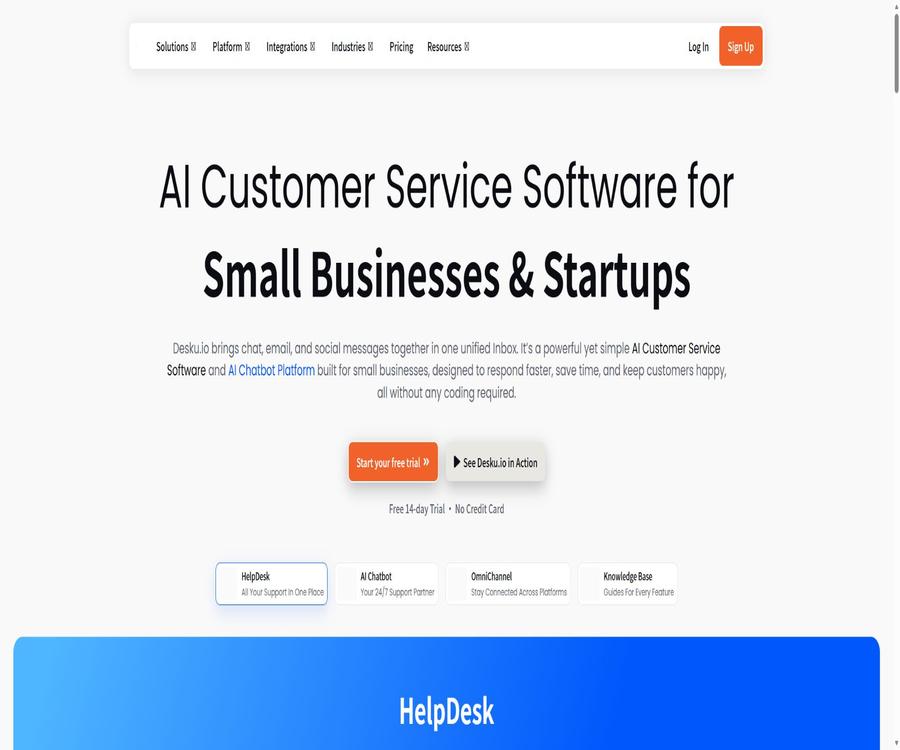
Desku.io is an AI-based customer support platform designed for small and medium-sized enterprises; it brings together emails, website chats, tickets, social media messages, and other communication channels in a single shared inbox, and uses EVA AI, Copilot, and code-free automation to handle repetitive inquiries.
Tool Introduction
Desku.io is operated by Desku Technologies and serves as an omnichannel customer service platform for startups, SaaS companies, D2C businesses, and e-commerce teams. It is not a standalone chatbot; rather, it integrates a help desk, online chatting, customer profiles, a knowledge base, AI-driven responses, ticket management rules, and analytics into one system.
The platform offers Web applications as well as chat components that can be embedded on websites. Paid plans provide access to additional features such as social media integration, e-commerce capabilities, white-labeling options, CNAME settings, SLA guarantees, and Webhooks. The free version allows for long-term use of the basic functions, and the official website also offers a 14-day trial period for any of these solutions; it is important to understand the difference between these two options.
Core product components
| module | Main function | Enter | Output or action |
|---|---|---|---|
| Shared Inbox | Process customer messages in a unified manner | Email, chat, and connected channels | Assignment, response, notes, and status |
| HelpDesk | Organize customer service tickets | Customer issues, priorities, and history | Tickets, queues, and collaboration records |
| Live Chat | Receive visitors in real time on the website | Chat components and visitor messages | Instant messaging and manual takeover |
| EVA AI | Automatically answer repeated questions | Knowledge base, FAQs, and approved content | Multilingual self-service answers and transfer to a human agent |
| Copilot | Assist live agents in responding to inquiries. | Current conversation and customer context | Draft replies and handling suggestions |
| Automation | Implement code-free customer service processes | Events, conditions, and customer attributes | Allocate, label, upgrade, or shut down |
| Analytics | Monitor service performance | Channel, ticket, agent, and satisfaction data | Response, resolution, CSAT, and SLA metrics |
| Integrations | Linking business systems with messaging systems | Stores, social, communication, and collaboration tools | Order context and cross-channel sessions |
Main functions
Shared inbox and ticket management
Shared Inbox brings together team emails, website chats, and messages from connected channels in a single interface. Agents can view customer history, tags, and context, and use internal notes to collaborate with team members, thereby reducing the need for multiple people to respond to the same question repeatedly.
- Group different support email addresses into shared inboxes, and set a limit on the number of such inboxes based on the package chosen.
- Convert customer messages into trackable tickets, setting status, priority, and responsible person.
- Retain historical messages, channels, and related information in the same customer profile.
- Leverage internal notes, member mentions, and assignment mechanisms to work together on complex issues.
- Business offers Ticket Collision to help teams identify situations where multiple people are working on the same session at the same time.
- Through filtering, queues, and rules, urgent, VIP, or topic-specific tickets are sent to the appropriate teams.
EVA AI customer service robot
EVA is a multilingual AI customer service robot built into Desku, which answers questions based on approved help articles, FAQs, public pages, and related knowledge. It can understand natural language, ask follow-up questions when necessary, and transfer the conversation to a human agent if it is unable to resolve the issue.
Official statements say that EVA is built on Azure OpenAI, but this does not mean that users have access to the underlying models or the source code of the platform. Companies should test rules related to knowledge retrieval, handling of incorrect responses, and diversion to human agents; they should not rely solely on the figures stated regarding the percentage of issues resolved automatically.
Copilot Agent Assistant
Copilot assists live agents in the shared inbox by generating context-related responses, which helps to reduce the time needed to write replies and ensures consistency in tone. It is an additional feature charged per agent, and only accounts of the Advance and Business types can purchase it.
BYOK model usage volume
Growth, Advance, and Business all indicate that unlimited use of EVA AI is possible through BYOK. BYOK means that the enterprise uses its own model API keys and is responsible for the costs associated with third-party calls; the subscription fees and the costs incurred by the model provider must be calculated separately.
Website chat component
Teams can add Chat Widgets to their website, store, or app pages for real-time chatting, guest assistance, and self-service via robots. The Free and Growth plans include 1 component each, while the Advance and Business plans include 2 components each.
Code-free automation
Automation carries out customer service processes through triggers, conditions, and actions, such as assigning tasks by topic, adding tags, upgrading cases, sending notifications, or closing them. The Growth and Advance categories represent limited automation, while the Business category includes 10 Advanced Rules.
Customer profiles and visit history
Customer Profiles are used to aggregate contact information, conversation details, and order context; the capacity of these profiles ranges from 200 to 200,000. All subscriptions include tracking of the current page for the first 250 visitors per month, while full tracking of browsing sessions and historical data is available in the Advance and Business plans.
Knowledge base and self-service
The team can create help articles and FAQs that customers can consult on their own, as well as use as a basis for providing answers through EVA. The public price comparisons also include information on features such as article feedback, custom domain names, site maps, and SEO metadata; the specific features available depend on the function set available in the account.
Analysis, CSAT, and SLA
The analysis module allows one to view metrics such as the number of channels in use, response time, resolution speed, the workload of agents, customer satisfaction levels, and session trends. Advance offers CSAT and visitor journey analytics, while Business provides SLA monitoring as well as various advanced operational capabilities.
Supported channels and integrations
| Category | Channels or tools | Minimum public package | Primary uses |
|---|---|---|---|
| Website | Chat Widget and Chat Bot | Free | Real-time consultation and AI self-service |
| Shared email inbox | Growth | The team works together to handle customer emails. | |
| E-commerce | Shopify and WooCommerce | Advance | View order and customer purchase context |
| Social networking | Facebook and Instagram | Advance | Processing social messages in the inbox |
| Message | WhatsApp and Telegram | Business | Centralized processing of instant messages |
| Collaboration | Slack | Business | Team notifications and workflow collaboration |
| Communication | Aircall | Business | Connect to phone customer service context |
| Custom system | Custom Apps | Advance | Expand internal enterprise functions or third-party functions |
| Event integration | Webhook | Business | Send customer service incidents to external workflows |
The website’s privacy policy provides examples of platforms that may be connected, such as HubSpot, but the pricing page does not list all possible integrations for each plan. Before making a purchase, it is necessary to check in the workspace to see whether the desired connections are available, whether additional subscriptions are required, and which fields can be synchronized.
Complete customer service workflow
- Connect to the team support email address, and set up shared inboxes for different brands, departments, or languages.
- Install the website chat component and set the welcome message, working hours, offline form, and rules for manual intervention.
- Import or create knowledge bases, FAQs, and product documentation to define the approved content that can be used in EVA.
- Connect e-commerce, social, or messaging platforms to consolidate orders and past conversations into a unified customer profile.
- Establish automation for allocation, tagging, prioritization, escalation, and SLAs, while retaining a manual approach for cases that cannot be resolved.
- Invite agents and assign permissions, then use test customers to go through the entire process involving emails, chats, robots, and handover to human agents.
- After going live, check for unresolved issues, response times, CSAT scores, and failed conversations with the robot, and continuously refine the knowledge base and rules.
Desku.io Usage Guide
Step 1: Create a workspace
After registering a workspace, fill in the brand, time zone, and support details first, then invite a small number of test users. Before adding all the agents officially, it is necessary to estimate the costs based on the number of agents included in the package and the rules regarding additional agents.
Step 2: Connect the email account and the chat feature.
- Create a Shared Inbox and connect it to the team’s customer service email addresses; check the sending domain name and the sender’s identity.
- Generate a Chat Widget and configure the colors, welcome message, visible pages, and online status.
- Place the installation code on the testing site to verify the display on desktop and mobile devices, as well as message delivery and offline form functionality.
- Test new sessions, assignments, internal notes, closing, and reopening as a visitor and as an agent, respectively.
- Verify that there are no duplicate or merged customer profiles, and check whether the historical records are visible to authorized members.
Step 3: Train EVA
- Organize the current valid help documents, FAQs, return and exchange policies, product descriptions, and upgrade procedures.
- Only approved content that does not contain unnecessary sensitive information is imported, and outdated or conflicting versions are deleted.
- Set the brand tone, the scope of responses, and a message to direct users to a human agent when issues cannot be resolved.
- Test the robot using real questions, spelling errors, multiple rounds of follow-up questions, and inappropriate queries.
- Check the facts cited by the robot, the boundaries of order processing, and its multilingual performance, then gradually increase the amount of traffic it can handle.
Step 4: Configure automation
- List repetitive tasks, such as assigning by topic, marking refunds, identifying VIPs, and upgrading overdue tickets.
- Define trigger events, conditions, actions, and exceptions for each process.
- First, establish low-risk rules and enable them in a small subset of mailboxes to observe any cases of mismatching or repeated triggers.
- Manual confirmation is required for high-risk actions, to prevent the AI from automatically approving refunds or making legal commitments.
- Adjust the rules based on ticket logs and SLA results, and record the version and responsible person.
Which users are it suitable for
- Individual entrepreneurs: Use Free to manage a website component, a bot, and basic customer conversations.
- Startup team: Uses Growth to integrate multiple support email addresses, and tests EVA as well as limited automation.
- SaaS customer service team: Uses a knowledge base, tickets, AI responses, and procedures for handling product usage issues to deal with repeated inquiries.
- Shopify and WooCommerce merchants: View order details in the customer service area to handle shipping, refunds, and pre-sale inquiries.
- D2C brands: Unify customer messages across websites, emails, Facebook, Instagram, and WhatsApp.
- Growth-oriented customer service department: Utilizes Business’s multi-channel, SLA, Webhook, and Ticket Collision guidelines to manage team operations.
- Service agents and multi-brand teams: Manage different customer access points through white labeling, CNAMEs, and multiple mailboxes.
- Enterprises that require BYOK: use their own model keys to control the EVA invocation accounts and manage the model budgets separately.
Typical use cases
- Pre-sales support in e-commerce: answering questions regarding sizes, inventory, delivery, and product differences, with escalation to a human agent for complex issues.
- Order support: Combines store orders with customer sessions to reduce the need for agents to switch between systems.
- SaaS support desk: Handles recurring issues such as passwords, bills, upgrades, team invitations, and feature settings.
- Social customer service: Consolidates messages from Facebook, Instagram, and WhatsApp into a single queue.
- Acquiring customers via the website: Collect customer information using chat components, and assign interested conversations to sales representatives.
- Self-service knowledge base: Allow customers to first consult articles or ask EVA, and then submit any unresolved issues as tickets.
- Service quality management: Identify bottlenecks using CSAT, response time, resolution speed, and SLAs.
- Cross-team collaboration: Use internal notes, assignments, Slack, and Webhooks to forward issues to the product or operations teams.
Product advantages
- Bring the help desk, live chat, robots, knowledge base, and automation together in the same workspace to reduce tool switching.
- Free includes 2 agents, an inbox, a component, and a bot, making it suitable for low-cost testing.
- Growth can accommodate 6 agents at a time, and it is suitable for teams that are just starting to adopt shared email and AI solutions.
- Advance includes e-commerce integration, social media accounts, white labeling, CNAME, and customer journey management, designed for businesses that are in growth phase.
- Business offers key messaging channels, SLAs, Webhooks, and Ticket Collision, covering more advanced customer service processes.
- EVA and Copilot serve customers through self-service options as well as human agents, with clearer roles than those of a single AI response system.
- BYOK allows enterprises to use their own model keys, but they still need to manage third-party costs and security separately.
- The monthly price is displayed based on the work area rather than just per basic seat, with a clear indication of the number of people involved.
Usage restrictions and precautions
- The EVA output may be incorrect, incomplete, or not suitable for the current customer; the guidelines require that AI-generated content be reviewed by humans before it can be used.
- The percentage indicated on the official website regarding automation levels is part of the product’s marketing material; the actual rate of problem resolution depends on the quality of the knowledge available, the language used, the complexity of the tasks, and whether assistance from human operators is involved.
- There are only 200 customer records in the Free plan, while there are 5,000 in the Growth plan; before reaching the limit, it is necessary to decide whether to archive, delete, or upgrade these records.
- Growth and Advance offer only limited automation; complex rules and key communication channels may require Business.
- Copilot is charged on a monthly basis per agent, and having a large number of agents can significantly increase the total cost.
- BYOK does not mean free AI; companies still need to cover the costs associated with the use of the models and protect their API keys.
- Website components, social media accounts, messaging platforms, and e-commerce integrations handle end-user data, and the deployers are required to provide appropriate privacy notices.
- With automatic renewal, cancellation only stops future renewals; according to the terms, payments that have already been made are generally not refundable and cannot be adjusted based on the unused time.
- Failures in third-party channels, changes in permissions, or adjustments to interface policies can affect message synchronization; therefore, backup access points should be available for critical support processes.
- The platform is a commercial hosting service; it cannot be regarded as an open-source help desk that can be deployed privately, based solely on its web components or Webhooks.
Data privacy and security
When handling account and website data, Desku may act as the data controller; whereas when processing customer tickets, messages, contacts, orders, and attachments, it usually functions as a data processor. The customer is still responsible for determining the purposes of processing, providing privacy notices, and ensuring that any integration and use of such data are lawful.
- The privacy policy states that customer data will not be used to train public, shared, or third-party foundation models.
- AI processes context such as the message body, conversation history, tags, timing, and customer-defined fields.
- When connecting to services such as Shopify, WooCommerce, WhatsApp, and Slack, data required for integration is exchanged.
- The platform lists security features such as 2FA and EU data hosting; the actual location and settings should be confirmed before making a purchase.
- Payments are processed by third-party payment service providers, and Desku states that it does not store the full card number or security code.
- Organizations should implement the principle of least privilege, 2FA, log auditing, and the removal of former members, while also restricting agents’ ability to export data.
- When international transfers, child data, or regulated information are involved, the DPA, sub-processors, and retention and deletion mechanisms should be reviewed.
- The privacy policy promises to use anonymization or pseudonymization where possible, but this does not mean that all customer service communications are inherently anonymous.
Prices and packages
The following are the official monthly prices as verified on August 22, 2026. The official website offers an annual subscription option, with the cost equivalent to two months’ fee waived; all plan pages provide a 14-day trial period. The final amount, taxes, and available features will be as indicated on the settlement page.
| Package | Monthly price | Includes seats | Customer profile | Inbox | Robots and components | Key capabilities |
|---|---|---|---|---|---|---|
| Free | $ | 2 people | 200 | 1 | 1 Bot, 1 Widget | Basic website chat and the first shared inbox |
| Growth | 39 dollars per month | 6 people | 5,000 | 5 | 1 Bot, 1 Widget | Shared mailboxes, EVA, BYOK, limited automation, and integration |
| Advance | $ | 12 people | 50,000 | No restrictions | 2 bots, 2 widgets | Copilot purchase eligibility, e-commerce integration, Facebook and Instagram, white labeling, CNAME, CSAT, and customer journey |
| Business | $ | 25 people | 200,000 | No restrictions | 2 bots, 2 widgets | 10 advanced rules, primary channels, SLAs, Webhooks, and Ticket Collision |
AI and expansion additional fees
| Additional items | Price | Included content | Applicable conditions |
|---|---|---|---|
| EVA AI Tokens | $ | Up to 5 million Tokens per month | Used for context-aware AI responses |
| Copilot | $ | With BYOK, there are no restrictions on the use of AI. | Only Advance and Business are available for purchase. |
| Live Visitor Basic Tracking | $ | Monthly visitor volume range of 10,000 to 100,000 | The first 250 visitors for each subscription get it for free. |
| Agent Seat | $ | Add members beyond those included in the package. | Only available for Business users. |
The package cost does not necessarily cover all fees related to AI and model providers, messaging channels, phone numbers, or third-party applications. When using BYOK, WhatsApp, telecommunications services, or external store services, the Desku subscription cost must be added to the costs associated with third-party services.
How to choose a package
| Team situation | Suggested solution | Selection criteria | When an upgrade is needed |
|---|---|---|---|
| 1 to 2 users, low traffic on a single website | Free | Basic robots, components, and a mailbox are available. | The archive contains more than 200 items, or a shared email account with AI is required. |
| Startup customer service for up to 6 people | Growth | 5 inboxes, 5,000 files, and EVA | Need e-commerce, social media, white-labeling, or more automation |
| E-commerce or growing SaaS | Advance | 12 seats, e-commerce integration, CSAT, and a complete visitor journey | WhatsApp, SLA, Webhook, or larger scale are required |
| Advanced customer service via multiple channels | Business | 25 seats, primary channels, advanced rules, and SLAs | Additional members, AI add-ons, or custom contracts |
Supported platforms
| Platform | Support status | Explanation |
|---|---|---|
| Web management interface | Support | The customer service team is responsible for managing inboxes, tickets, chatbots, and analytics. |
| Website chat component | Support | All packages include these items, with the quantity subject to the limits set by the plan. |
| Mobile interface | Clause coverage | The public page does not clearly list the standalone native app and the version available in stores. |
| Shopify and WooCommerce | Support | Include in the pricing plan under Advance. |
| Facebook and Instagram | Support | There is 1 account for Advance and the main channels are listed under Business. |
| WhatsApp, Telegram, and Slack | Support | Business included |
| Webhook | Support | Integration of Business open events |
| Public developer API | No complete self-service documentation is available. | The terms mention API, but the pricing page specifies that the development integration option available is Business Webhook. |
APIs, Webhooks, and open-source status
The Desku terms include APIs as part of the service offerings, but the current public product and pricing pages do not provide a complete, verifiable reference for self-service APIs, nor do they list the official SDK languages or the limits on API calls. Business version includes Webhook Access, which is useful for sending customer service events to corporate workflows.
No official GitHub organization, complete source code repository, or open-source license that could confirm the affiliation of this product with Desku.io’s customer service offerings was found. The Java-based interface projects with similar names that were discovered are unrelated to this customer service platform, and therefore cannot serve as evidence of Desku.io’s use of open source software.
| Development capability | Current conclusion | Usage suggestions |
|---|---|---|
| Webhook | Business clearly provides it. | Confirm events, signatures, retries, and rate limits before purchasing. |
| Custom Apps | Available in Advance and Business versions | Confirm the development entry points and review requirements. |
| Public API documentation | No verifiable complete public version was found. | Request the current interface documentation from the authorities. |
| Official SDK | No findings were detected. | Do not use third-party packages with the same name as a substitute. |
| Official GitHub | No findings were detected. | A warehouse with the same name does not necessarily mean it is official. |
| Open-source product | No | The terms explicitly reserve the rights to software, code, models, and algorithms. |
Basic information
| Project | Information |
|---|---|
| Tool name | Desku.io |
| Core AI | EVA AI and Copilot |
| Operating entity | Desku Technologies |
| Tool type | AI customer service, shared inbox, help desk, and online chat |
| Primary users | Startups, SaaS, e-commerce, D2C, and small to medium-sized customer service teams |
| Price pattern | Free version, 14-day trial, monthly or annual subscriptions, paid add-ons |
| Minimum payment amount | Growth costs $39 per month. |
| Primary channels | Email, website chat, Facebook, Instagram, WhatsApp, Telegram, and Aircall |
| E-commerce integration | Shopify and WooCommerce |
| Is registration required? | Yes |
| API | The terms state that no complete and publicly available self-help documentation is available. |
| Webhook | Provided by Business |
| Official SDK | No findings were detected. |
| Is it open source? | No |
Recommendation score
The recommendation score is 4.0 out of 5. Desku.io offers four distinct plans that cover shared email accounts, website chat functions, AI chatbots, e-commerce services, and multi-channel customer support; the Free plan includes 2 support agents, while the Growth plan costs $39 per month and is suitable for small teams starting out.
The main shortcomings are that the advanced channels, SLAs, and Webhooks are all concentrated in Business; Copilot and EVA Token require additional payment, and the information available regarding public APIs is incomplete. Before making a purchase, it is necessary to test the accuracy of EVA, its performance in Chinese, the location of the data, and the stability of integration using actual business examples.
Frequently Asked Questions
Is Desku.io free?
There is a long-term free plan that costs $0 per month; it includes 2 support agents, 200 customer profiles, 1 shared inbox, 1 chat component, and 1 robot. The official website also offers a 14-day trial of any plan – do not confuse this trial period with the duration of the free plan.
How much is the lowest priced subscription plan?
Growth costs $39 per month; it includes 6 support agents, 5,000 customer profiles, and 5 shared mailboxes. The annual subscription comes with two months free, but it is necessary to check the actual total amount and any taxes on the billing page.
What is EVA AI?
EVA is a self-service robot for Desku’s customers; it answers questions based on the knowledge base, FAQs, and support materials approved by the company, and transfers complex cases to human agents. It utilizes Azure OpenAI capabilities, but the company remains responsible for reviewing the content and controlling the scope of the knowledge available.
Is Copilot included in the package?
Advance and Business only grant the right to make purchases, while Copilot charges $29 per agent per month. With BYOK, unlimited use of AI is available, but the costs associated with calling external models are borne by the company itself.
Is it compatible with Shopify and WooCommerce?
Support is available; on the pricing page, these two e-commerce integration options are listed starting from Advance. Once connected, it will be possible to process orders, manage contacts, and work with transaction details. Those responsible for deployment should check the scope of permissions as well as the privacy policies.
Is WhatsApp supported?
Business lists the main communication channels such as WhatsApp, Facebook, Instagram, Telegram, Slack, and Aircall. The account verification processes, templates, phone numbers, and sending costs specific to these messaging platforms may apply separately.
Does Desku.io provide an API?
The terms consider the API to be part of the service, but currently no comprehensive public self-service documentation is available to clarify the endpoints, authentication procedures, and quotas. Business offers Webhooks explicitly, and API-related requirements must be confirmed in writing with the authorities before making a purchase.
Is Desku.io open source?
It is not open source. The terms of service explicitly reserve the rights to the software, source code, algorithms, AI systems, and models, and no official open-source repository for this customer service product has been found.
Will AI use customer data to train public models?
The current privacy policy states that personal data will not be used to train public, shared, or third-party base models; AI responses are generated based on the customer’s specific data and context. Companies should still review the DPA, the terms related to sub-processors, and the third-party models involved.
Can I get a refund if I cancel my subscription?
The terms state that cancellation will result in the cessation of future renewals; however, already paid subscriptions are generally not refunded, nor is any amount refunded proportionally for early cancellation or unused time. Cancellation must be completed before the renewal date, with a confirmation record kept.
Summary
Desku.io is suitable for small and medium-sized customer service teams that wish to manage emails, chats, tickets, AI functions, and e-commerce-related tasks in one place. The Free and Growth versions enable low-cost getting started, the Advance version is intended for e-commerce teams that are in growth phase, while the Business version offers more comprehensive messaging channels and service management capabilities.
Before going live, a 14-day trial period should be used to verify the functionality of real tickets, responses in Chinese, the transition from robots to human agents, and third-party integrations; thereafter, the total cost should be calculated based on factors such as agents, customer profiles, AI tokens, and additional services. As for key aspects such as refunds, data retention, and APIs, the terms specified in the current contract and workspace guidelines shall apply.
Tools similar to Desku.io



 Guigong Network Security Registration No. 45132202000164