






Client Hub
Client Hub: an intelligent tool focused on improving AI efficiency.
Tags:AI improves efficiencyWhat is Client Hub?
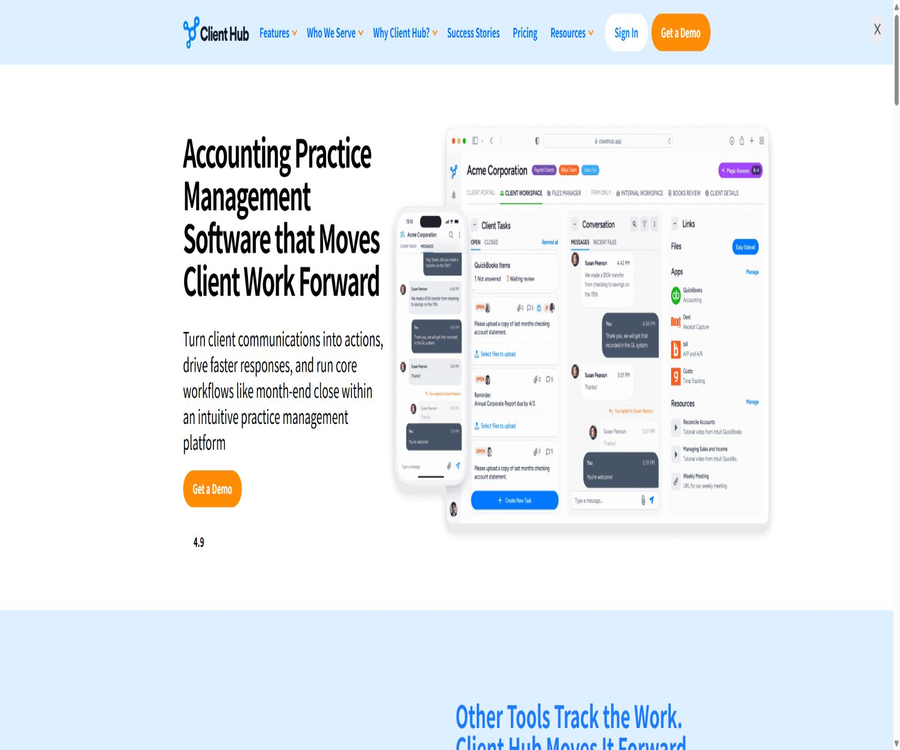
Client Hub is a cloud-based business management platform designed specifically for accounting firms, bookkeeping teams, tax agencies, and customer consultation services. It brings together internal tasks, client requests, emails, messages, files, hours logged, and accounting software processes in one single workspace.
The product is managed by Client Hub Solutions Inc., a company based in Florida, United States; the team has been working on developing solutions for the accounting industry since 2017. It is not a general-purpose chatbot, but rather a system for managing accounting firms and facilitating collaboration with clients, equipped with AI functions.
A one-sentence summary
Through the customer workspace, reusable workflows, a mobile customer portal, and AI assistance, Client Hub connects the tasks of accounting teams that are currently scattered across emails, task management tools, file storage services, and accounting software.
Main functions
Customer workspace and portal
The agency can create a separate Workspace for each client company and invite the client users to access the portal. Clients can view requests, answer questions, upload documents, send messages, access shared files, and complete electronic signatures.
- Each client company has its own dedicated workspace, which facilitates the separation of data and communication.
- Client Tasks can collect responses, files, and completion confirmations at the same time.
- Secure messages link customer communications to specific customers and tasks.
- The File Manager is used to store both internal documents of the firm and files shared with clients.
- Internal folders are visible only to authorized members of the firm.
- Customers can handle requests via mobile devices, reducing the waiting time required to log in to a computer.
Office workflow and job management
The platform represents monthly accounting, quarterly reviews, tax filing, onboarding, and project cleanup as Jobs. Teams can create templates for different services, define recurring cycles, deadlines, responsible persons, and sub-tasks, and then apply them to clients in bulk.
- Create one-time, recurring, and regular jobs, and set deadlines according to the service schedule.
- Use the card or list view to view status, expiration dates, and pending tasks.
- Place team tasks, client tasks, messages, and files within the same Job context.
- Assign the same template to multiple customers through batch operations.
- Take meeting notes and turn follow-up tasks into trackable actions.
- Use pinned items, filters, and dashboards to manage daily priorities in one place.
Magic Workflow and AI task generation
Magic Workflow enables users to describe a service or process, after which AI generates the job structure and the necessary sub-tasks. The team should use these generated elements as a draft template, and then verify the responsible persons, the sequence of tasks, and the deadlines in accordance with the firm’s standards, regulations, and client agreements.
Email synchronization and Magic Emails
Client Hub allows connection to Google Mail or Microsoft 365 accounts, enabling users to view customers’ emails on the platform and create jobs from those emails. Magic Reply can draft replies, summarize long email threads, shorten text, or adjust the tone of messages.
Email synchronization enables teams to see the context related to clients, but AI drafts may still overlook attachments, commitments, or professional judgments. Information related to taxation, finance, contracts, and payments must be reviewed by the responsible personnel before being sent.
Magic Client Tasks and Messages
Users can describe in natural language the tasks that need to be carried out by the client, allowing the AI to generate complete request texts and instructions for carrying out those tasks. This same capability can also help in drafting messages to clients, reducing the need to repeat information regarding format, deadlines, and next steps.
AI search, summarization, and intelligent insights
The AI page instructions indicate that it can be used to answer questions across emails, meeting transcripts, internal notes, and documents; it can also summarize action items from meetings, condense the content of documents, and analyze the sentiment in customer interactions. The scope of functionality, permissions, indexing time, and ways to reference results should be verified using an actual account.
Magic Books Review monthly review
Magic Books Review works with data from QuickBooks or Xero, and it can identify inconsistencies in expenses, transactions related to parent accounts, missing payees, as well as unusual changes in reports. It serves as a tool for initial checks and problem detection, but it cannot replace the accountant’s review, the basis for making adjustments, or the final signature.
Financial reports and client interpretation
The platform is able to deliver financial reports to clients, and it uses AI to summarize the significant changes in the income statement and balance sheet in a more understandable format. Before sending these reports, it is necessary to verify the period, accounting principles, unusual items, and conclusions, in order to avoid mistaking correlations for causes.
QuickBooks Online integration
Client Hub offers a deep integration with QuickBooks Online for accounting processes. Customers can address unresolved issues related to unbilled charges or deposits within their workspace; once the necessary actions are taken, they can return to their accounting records. The team can also carry out book reviews, generate reports, and manage the W-9 and 1099 forms.
Xero integration
Xero integration allows for the linking of customers to workflows, as well as for handling situations such as unclassified transactions. The specific functions available are not exactly the same as those in QuickBooks; therefore, it is necessary to test each feature individually based on the actual accounting setup of the firm.
Working hours, budget, and dashboard
The team can record working hours on jobs, and filter them by user, client, or date using the dashboard. The results regarding working hours can be used to compare actual efforts with the budget allocated, helping the firm to identify any delays and inefficient processes.
Document management and electronic signing
The File Manager is used for the centralized collection, sharing, and management of customer files, while electronic signing capabilities are provided by SignWell. Users can initiate signing processes within the Client Hub, check the status of these processes, and receive notifications once they are completed; however, the validity of such signatures and the documents involved must still be confirmed in accordance with local laws.
Complete workflow
- Create a Workspace for each client company, import contacts, and configure the folder structure.
- Invite customer users to the portal and ensure that they can only access their own messages and files.
- Create Job templates and recurring cycles for monthly bookkeeping, tax filing, or consulting services.
- Assign templates to customers in bulk, and set responsible persons, deadlines, and internal checkpoints.
- Connect to the office email address to place customer emails, draft replies, and pending tasks within a unified context.
- Connect QuickBooks Online or Xero as needed, and use test customers to verify data mapping.
- Send tasks to customers to collect responses, documents, electronic signatures, and descriptions of unclassified transactions.
- Track firm tasks, client inquiries, and overdue work in the Jobs Dashboard.
- Content is generated or summarized using AI, and then the accounting staff verifies it to complete the task.
- Review working hours, budgets, and accumulated data to adjust the templates and staffing allocation for the next cycle.
Getting started guide
Establish the infrastructure for the firm
- Schedule a product demonstration and request a guided trial, selecting 3 to 5 non-sensitive pilot customers.
- Create or import customer Workspaces in bulk to add customer contacts and service types.
- Set the default folder, firm logo, invitation email, and custom fields.
- Assign roles to team members and limit the range of clients and jobs they can see.
- Use a test account to check the actual content visible in the customer portal before sending an invitation.
Create repeatable workflows
- List the services that require consistent reuse, such as monthly billing, sales tax, or annual tax filings.
- In Templates, choose AI-generated, manually created, or built-in templates as a starting point.
- Separate internal tasks from customer tasks, and assign responsible persons and set deadline rules for each step.
- Add steps for handling exceptions such as missing information, customer delays, and returns due to revalidation.
- First, create a Job for one customer and complete the entire process, then assign it in bulk to other customers.
- After a cycle is completed, revise the template using the actual hours worked and any items that were overlooked.
Connect the email account to accounting software
- Connect to Google Mail or Microsoft 365 from Inbox and check the synchronization scope.
- The test involves creating a Job from a customer’s email, generating a Magic Reply, and recording the context.
- Connect to a test company using QuickBooks Online or Xero; do not start directly with high-risk accounts.
- Verify the mapping relationship between customers, account sets, transactions, and Workspace.
- Use simulated unclassified transactions to test customer responses, accountant reviews, and ledger updates.
- Expand the scope of use only after confirming permissions, performing audits, disconnecting, and restoring from errors.
Which users are it suitable for
- Independent bookkeeping professionals: Use a single-user solution to manage clients, documents, and repetitive tasks in a centralized manner.
- Accounting firms: Standardize jobs, deadlines, team collaboration, and client waiting times.
- Tax authorities: Collect information, signatures, and customer responses, and monitor the tax filing process.
- CAS and CAAS teams: integrate month-end closing, reporting, and customer communication into a continuous service.
- Outsourcing of the Controller or CFO team: Managing periodic reports and consulting tasks on a client-by-client basis.
- Remote and hybrid teams: Reduce tasks that are scattered across email inboxes, cloud storage, and personal task lists.
- QuickBooks ProAdvisor team: Provides direct access to unclassified transactions, month-end reviews, and the 1099 process.
- Accounting teams using Xero: reduce back-and-forth communication through integration and a customer portal.
Typical use cases
- Monthly, bank documents, responses to questions, and missing documents are collected from dozens of clients.
- Break down quarterly and annual tax filings into internal steps, customer requests, and review points.
- Create tasks directly from customer emails, so as to avoid requests getting lost in personal inboxes.
- Allow customers to upload files, answer questions, and sign documents on their mobile phones.
- Assign the same end-of-month closing workflow to multiple customers in bulk.
- Upon discovering unclassified transactions in QuickBooks, a request is sent to the corresponding customer for an explanation.
- Use AI to draft customer emails, workflows, and request documents, which are then reviewed by professionals.
- Compare the job budget with the actual hours worked to identify services that need to be repriced or optimized.
Product advantages
- Designed around accounting and bookkeeping firms, customer tasks and internal jobs can be interconnected.
- There are no separate limits set for the number of clients or for file storage under the public packages; the costs are primarily calculated based on the number of users in the firm.
- The web, iOS, and Android user experiences cover message, task, and file handling.
- QuickBooks Online integration extends to uncategorized transactions, month-end reviews, reports, and 1099s.
- The built-in AI takes advantage of the context of emails, tasks, notes, and files, offering more than just a blank chat box.
- Workflows, portals, email, time tracking, electronic signatures, and files are all integrated within one system.
- A 14-day guided trial is provided, with the option to connect to real pilot customers and accounting software.
- Role permissions, session monitoring, two-factor authentication, and internal folders help to control access.
Usage restrictions and precautions
- The product is primarily targeted at the English-speaking market; there is no official Chinese interface, Chinese help center, or commitment to provide customer service in Chinese.
- Solopreneur allows only single-user businesses and offers only an annual payment plan.
- Advanced integration with QuickBooks and Xero comes at a higher cost; it’s not appropriate to compare only the prices of the basic versions.
- The public pricing is based on fees charged to the users of the service, and as the team grows, the subscription cost increases in a linear manner.
- The AI-generated output is provided as it is; it may be inaccurate, incomplete, or outdated, and it cannot be used to make independent decisions regarding accounting and tax matters.
- The terms only commit to making reasonable efforts to select AI services that do not use customer data for training, and they do not constitute an absolute guarantee.
- Customer emails, financial documents, and transaction information are sent to third-party cloud services as well as integrated into data streams.
- The trial may require payment details, and it might automatically convert to a paid subscription upon expiration.
- Unless otherwise provided by law, the subscription fee is non-refundable; it is necessary to confirm the billing cycle and data export before canceling.
- The platform does not provide public developer APIs or SDKs, which makes it unsuitable for teams that rely on custom code for extensive customization.
- The AI review at the end of the month can only identify potential issues; the final accounting decisions and any adjustments to the accounts still need to be made by humans.
- Electronic signatures, Zapier, and other third-party integrations may be subject to their respective account requirements, pricing, and terms.
Prices and packages
The following are the prices in US dollars as verified on August 21, 2026. The official website displays both annual and monthly payment options; the basic Practice Manager version and the versions that include integrations with QuickBooks and Xero use the same package name. The table is provided to present the various features in a clearer manner.
| Packages and versions | Show price | Billing cycle | Primary interests | Suitable for users |
|---|---|---|---|---|
| Solopreneur | $ | Paid annually, for only 1 user | All basic functions and accounting software integration; unlimited number of clients and storage capacity | Independent bookkeepers or accounting professionals |
| Practice Manager Basics | $ | Paid annually | Office management, customer portal, AI, support and training | Teams that wish to make purchases on an annual basis |
| Practice Manager includes integration. | $ | Paid annually | Basic capabilities plus integration with QuickBooks and Xero | Teams that require advanced accounting software functionalities |
| Practice Manager Basics | $ | Pay monthly | Office management, customer portal, AI, support and training | Teams that wish to maintain monthly flexibility |
| Practice Manager includes integration. | $ | Pay monthly | Basic capabilities plus integration with QuickBooks and Xero | Teams with short-term changes or significant fluctuations in the number of members |
| Guided trial | $0 | Usually 14 days | Complete features, implementation guidance, and recommendations for 3 to 5 pilot customers | Verification process before official subscription |
| Concierge Onboarding | Extra charge applies | According to the service plan | For organizations that need additional assistance with migration and implementation. | Teams that are large or have complex processes |
What is included in all subscriptions?
- There is no limit to the number of customers, and no fees are charged based on the number of clients served.
- Unlimited file storage – it is stated that there are no limits on file size or quantity.
- AI features such as Magic Workflow and Magic Emails.
- Customer portal, mobile apps, messaging, files, and electronic signatures.
- Customer support, training, and learning activities via Client Hub Academy.
- There are no publicly listed setup fees or hidden additional charges.
Trial, renewal, and refunds
The price page on the official website offers a 14-day guided free trial; guidance is provided at no cost during the demonstration, trial, and trial period. The terms state that payment information may be required for the trial, and if a payment method has been assigned, the service may automatically switch to a paid version at the then-current price after the trial ends, unless cancellation is requested in advance.
Subscriptions are prepaid on a monthly or annual basis with automatic renewal, and the fees can be adjusted after the end of the current period. Unless required by law or due to billing errors, paid subscription fees are generally not refundable; according to the FAQs on the official website, any unused time within an annual plan can be refunded proportionally when a member quits the plan.
Version differences
| Project | Basic office management | Includes integration with QuickBooks and Xero |
|---|---|---|
| Workflow, Job, and Templates | Support | Support |
| Customer portal, messages, and files | Support | Support |
| Working hours, dashboard, and electronic signatures | Support | Support |
| AI features of the Magic series | Support | Support |
| Google Mail and Microsoft 365 | Support | Support |
| Anchor and Zapier | Support | Support |
| Unclassified transactions in QuickBooks | Not included | Includes |
| QuickBooks monthly review and reporting | Not included | Includes |
| QuickBooks W-9 and 1099 Manager | Not included | Includes |
| Unclassified transactions in Xero | Not included | Includes |
The content extracted from the official website is displayed repeatedly in some of the feature lists; therefore, before making a purchase it is necessary to ask the sales representative to specify exactly what aspects of the accounting software will be integrated as part of the order. The actual prices, taxes, seat arrangements, and benefits are subject to those specified on the settlement page and in the contract.
Platform support and integration
| Platform or integration | Support status | Primary uses |
|---|---|---|
| Web page version | Support | Office management, configuration, jobs, dashboards, and complete workflows |
| iOS apps | Support | Customers and teams handle messages, tasks, files, and links. |
| Android apps | Support | Customers and teams handle messages, tasks, files, and links. |
| Google Mail | Support | Synchronize customer emails, create jobs, and use Magic Reply |
| Microsoft 365 | Support | Synchronize emails with customer communications |
| QuickBooks Online | Paid integrated version | Unclassified transactions, Book Reviews, reports, and 1099 processes |
| Xero | Paid integrated version | Customer and transaction workflows, including unclassified transactions |
| Anchor | Support | Proposal, billing, and customer onboarding processes are connected. |
| Zapier | Support | Create or update customers and connect to other applications |
| SignWell | Built-in collaboration capabilities | Initiate and track electronic signatures |
| Windows and macOS | Use via a browser | No official instructions for the native desktop client are available. |
| Chinese interface | Not confirmed | The official website, application instructions, and help documents are primarily in English. |
APIs, SDKs, and open-source status
During this verification, no REST API documentation intended for developers, self-service API keys, Webhook specifications, or official language SDKs were found in Client Hub. The Zapier integration can be used to automate tasks such as creating and updating customers, but it cannot be considered a complete, open developer API.
No official GitHub organization, source code repository, or open-source license that can be associated with this product was found. The Client Hub web platform, mobile applications, and AI features constitute commercial, closed-source services; third-party projects with similar names cannot be considered as the official code for this product.
Privacy and data security
The client retains ownership of the content it uploads, and grants Client Hub a limited license to use, copy, transmit, store, and back up such content for the purpose of operating and improving the services. When uploading information about clients, employees, and contacts, the firm acts as the data controller, while Client Hub functions as a data processor acting under its instructions.
The platform collects account information, billing details, technical data, usage statistics, communication data, and content submitted by users; this data may be shared with service providers responsible for hosting, analysis, support, payment processing, and other necessary functions. Data from users located outside the United States and Canada may be transferred, stored, and processed in those two countries.
- The application logic relies on Google Cloud Platform, while file storage is handled by Amazon Web Services.
- Data transmission uses TLS 1.2 or a higher version, and storage files are encrypted with 256-bit encryption.
- The database uses firewalls and VPC rules to prevent unauthorized external access.
- User data is backed up daily, and there are processes in place for detection, classification, communication, and repair.
- A small number of essential employees have access to production data on a minimum basis; such access requires multi-factor authentication and is subject to monitoring.
- The account can enable two-factor authentication via SMS, and it is possible to view the IP address, device sessions, as well as to cancel sessions remotely.
- Role permissions can restrict employees’ access to specific customers, files, or jobs.
- Users can request access to, correction of, or deletion of their personal information, but legal obligations may require that certain records be retained.
- The privacy policy does not specify a uniform and fixed deadline for the deletion of all business data.
- The official website states that personal information is not sold, but data is still provided to third parties required for the operation of the services.
What should be considered when using AI data?
The terms of service state that Client Hub will make reasonable efforts to ensure that customer data is not used for training AI models, but it does not assume any responsibility regarding the processing of data by third-party AI service providers. This is not a guarantee of zero data use for training purposes; further contractual specifications must be obtained before processing tax IDs, banking information, or documents subject to confidentiality obligations.
How should compliant wording be understood?
The security page states that the cloud provider holds various ISO and SOC certifications; it also mentions that the platform is subject to evaluation by security partners designated by Intuit. The available information does not specify the exact SOC 2 or ISO certification numbers for Client Hub, so the cloud provider’s certifications cannot be considered as certifications of the product itself.
Security checklist before the launch of the office
- Illustrate the data flow between email accounts, customer portals, accounting systems, Zapier, and AI services.
- Confirm the data roles, sub-processors, storage locations, and methods of cross-border data transfer specified in the contract.
- Configure minimum permissions, multi-factor authentication, and post-employment account recovery for administrators, employees, and customers.
- Use masked data to validate AI emails, file summaries, and Books Reviews.
- Confirm the procedures for restoring backups, exporting data, handling deletion requests, and managing contract terminations.
- Ask the supplier for the current terms regarding security audits, penetration testing, and incident notification.
- Establish rules for manual review of AI-generated results, reporting of errors, and prohibition of sensitive data from being used.
Basic information
| field | Content |
|---|---|
| Tool name | Client Hub |
| Operating company | Client Hub Solutions Inc. |
| Construction begins | 2017 |
| Location of the company | Florida, United States |
| Tool type | Accounting firm management, client portal, and AI workflow platform |
| Key customers | Accounting, CPA, tax, CAS, and consulting teams |
| Core competencies | Job workflows, customer collaboration, email, files, time tracking, and accounting integration |
| AI features | Processes, emails, messages, customer tasks, file summaries, and Book Reviews |
| Price pattern | 14-day trial, monthly or annual payment based on the number of users in the firm |
| Number of customers | All public plans offer unlimited customers |
| File storage | All public plans offer unlimited storage. |
| Main platforms | Web, iOS, and Android |
| Chinese support | No official Chinese localization instructions were found. |
| Public API | No findings were detected. |
| Official SDK | No findings were detected. |
| Official GitHub | No findings were detected. |
| Is it open source? | No, commercial closed-source services |
Recommendation score
The recommendation score is 4.4 out of 5. Client Hub has a good understanding of client waiting times, repeated tasks, emails, and QuickBooks workflows in accounting firms; it also integrates the customer portal with internal processes within the same system.
The main shortcomings are the high cost associated with team seats, the high price required for integrating accounting software, the lack of proper support in Chinese, as well as the absence of public APIs. Organizations that handle sensitive financial data should also carry out additional verification when making purchases, checking third-party AI solutions, data retention practices, and the compliance of the products themselves.
Frequently Asked Questions
What is the Client Hub used for?
It is used to manage accounting firms’ clients, jobs, deadlines, emails, messages, files, hours worked, and client requests, and it can be connected to QuickBooks Online or Xero.
Is there a free version of Client Hub?
There is no publicly available permanent free option. The official website usually offers a 14-day guided free trial, and the content as well as the duration of this trial may vary.
Is it necessary to link a payment method for the trial?
The pricing page states that demonstrations and trials are free of charge, while the terms of service indicate that payment information may be required for trials. If a subscription is already in place, the trial may automatically convert to a paid service upon its expiration; therefore, it is necessary to check the actual instructions at the time of starting the trial.
How much is Client Hub?
The annual subscription for Solopreneur costs $49 per month, and it is intended for a single user only. The basic team version costs $59 per user per month for an annual subscription, or $79 per month; the versions that include integration with QuickBooks and Xero cost $79 and $99 respectively. The final price will be as indicated on the payment page.
Is the package priced based on the number of customers?
No. The public pricing is based on the number of users or team members in the firm, and it includes unlimited clients; adding more clients does not result in an additional fee for extra seats.
Does Client Hub support Chinese?
There is no official Chinese interface, Chinese help center, or commitment to localized customer support. It is necessary to conduct actual tests during the trial period to determine whether Chinese customer data can be processed reliably in AI summaries and drafts.
Does Client Hub support mobile phones?
iOS and Android apps are supported. Clients and team members can handle messages, tasks, files, and links on their smartphones; however, more complex configurations are better handled via the web version.
Can Client Hub connect to QuickBooks and Xero?
It’s possible, but deeper integration with accounting software comes at a higher cost. QuickBooks handles unclassified transactions, month-end reviews, financial reporting, and 1099 forms, while Xero offers a relatively limited set of features.
Will AI replace accountants in performing reviews?
No. Magic Books Review, draft emails, and smart summaries can only help in identifying issues and preparing content; ultimately, financial matters, tax issues, and customer communications still need to be checked by qualified personnel.
Are customer data used to train AI?
The terms merely state that reasonable efforts will be made to use AI services that do not rely on customer data for training, and they provide a waiver of liability regarding any processing carried out by third parties. Organizations that require a strict guarantee of no training at all should obtain a written contract, as well as details regarding the sub-processors and the flow of data.
Does Client Hub provide APIs?
No public developer APIs, SDKs, or self-service keys were found. The platform offers Zapier and various pre-built integrations, but these capabilities do not equate to a fully open API.
Is Client Hub open source?
It is not open source; no official source code repository or open source license has been found. The web platform, mobile applications, and AI features all constitute commercial services.
Will I get a refund after canceling the subscription?
Unless required by law or in the event of an error on the bill, subscription fees are generally not refundable. For members of the annual plan who leave, the website states that any unused time can be credited proportionally; however, the details shall still be determined in accordance with the bill and the contract.
Summary
Client Hub is suitable for accounting, bookkeeping, and tax teams that wish to establish a genuine connection between internal tasks and customer responses. It is particularly appropriate for organizations that make extensive use of QuickBooks Online, need to continuously collect customer information, and want to reduce the amount of email correspondence required.
When making a selection, it is necessary to compare the cost per seat, the level of accounting integration, the adoption rate among customers, and the costs associated with data management. It is recommended to first test the monthly process with a small number of actual customers before deciding whether to migrate all users.
Tools similar to Client Hub



 Guigong Network Security Registration No. 45132202000164