






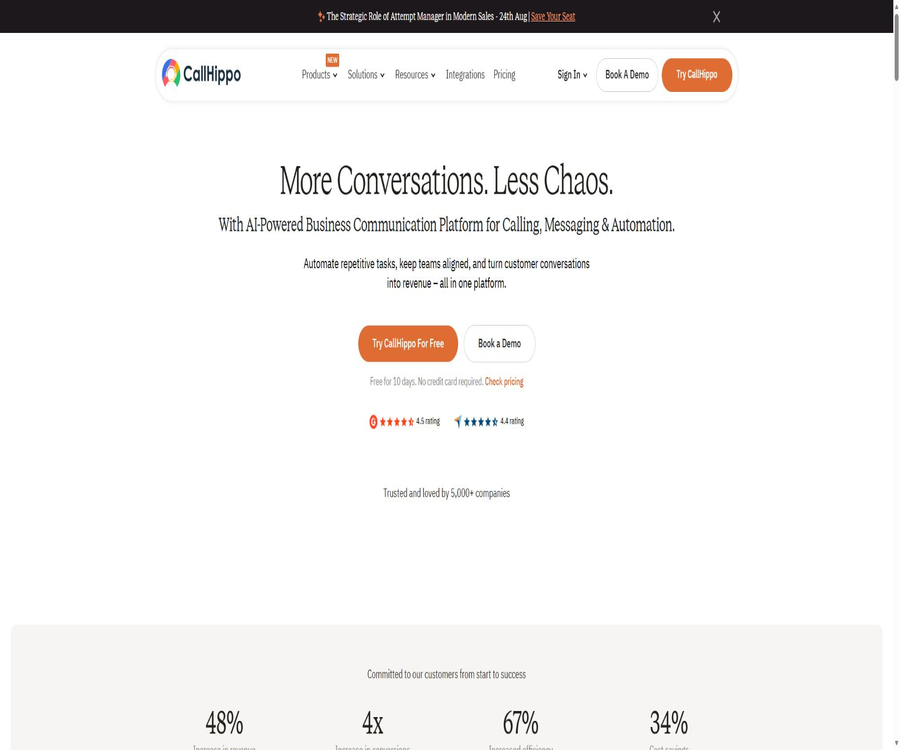
CallHippo
CallHippo: an intelligent tool focused on improving AI efficiency.
Tags:AI improves efficiencyWhat is CallHippo?
CallHippo is a cloud communication platform designed for enterprise sales, customer service, and remote teams; its features include virtual phone numbers, VoIP calls, call centers, multi-channel messaging, automatic dialing, and AI voice agents. Teams can receive and make business calls using a browser, desktop application, or mobile device.
It is not a telephone software that comes with just one unified package. The official website currently offers AI Business Phone System, Pro Suite, AI Voice Agent, Outcome-Based AI Agent, Omnichannel Inbox, WhatsApp Business API, and Parallel Dialer as products that can be purchased together.
A one-sentence summary
CallHippo brings together corporate phone calls, text messages, multi-channel conversations, CRM data, and AI-driven automation on a single platform, enabling the management of incoming calls, outbound calls, lead follow-up, appointments, customer service quality, and team performance.
Product portfolio
| Products | Primary uses | Typical user |
|---|---|---|
| AI Business Phone System | Virtual numbers, daily phone calls and messages, routing, SMS, and integration | Small and medium-sized enterprises and distributed teams |
| Pro Suite | High call volume, supervisor monitoring, automatic dialing, and agent management | Sales team and call center |
| AI Voice Agent | Automatic answering, outbound calls, eligibility checking, scheduling, and transfer to a human agent | Teams that require 24/7 automation |
| Outcome-Based AI Agent | AI agents are hosted by the authorities, and charging is based on successful bookings. | Companies that place emphasis on sales results rather than the number of calls made |
| Omnichannel Inbox | Centralized management of voice, SMS, email, and social media channels | Customer service, sales, and social media management teams |
| WhatsApp Business API | Template messages, campaigns, team inboxes, and automation | Companies that need to conduct large-scale communications via WhatsApp |
| Parallel Dialer | Parallel dialing, machine detection, and time zone dialing | High-frequency outbound calling team |
Main functions
1. Virtual phone number
Companies can purchase local, international, and free phone numbers, and assign them to users or teams. The availability of such numbers, the documents required, the time it takes to activate them, and the call costs vary depending on the country, the type of number, and regulatory requirements.
2. Browsers and softphones
Agents can work using a web dialer, as well as Windows, macOS, iOS, and Android apps; there is no need to install traditional PBX hardware. Click to Dial also allows calls to be placed directly from numbers on web pages or within CRM systems.
3. IVR and intelligent routing
The system supports business hours settings, call forwarding, simultaneous ringing, multi-language IVR, multi-level IVR, holiday routing, skill-based routing, and Smart DID Routing. Higher-tier packages also allow the use of CRM data to assign VIP callers or those who call repeatedly to the appropriate responsible person.
4. Recording, transcription, and summarization
The Professional and higher-tier packages include call recording; other products also offer recording capabilities, as well as functions for pausing and resuming recordings and ensuring compliance with relevant regulations. AI features enable text transcription from speech, generation of call summaries, and identification of topics and emotions, but certain of these functions may require a specific package or an additional fee.
5. Real-time supervision capabilities
Pro Suite is designed for teams with a high volume of calls; it offers management features such as real-time monitoring, agent status tracking, call handling, post-call tasks, role permissions, and leaderboards. Managers can use it for guidance and quality control, while specific permissions for monitoring, whispering, or inserting comments depend on the chosen package.
6. CRM and help desk integration
The platform can be connected to services such as Salesforce, HubSpot, Pipedrive, Zoho, Zendesk, Freshdesk, Intercom, Slack, and Zapier. Calls, text messages, notes, handling results, and recordings can be written back into the business system based on the integration settings.
7. Omnichannel inbox
Omnichannel Inbox is used to handle conversations from Gmail, SMS, WhatsApp, Telegram, Facebook Messenger, Instagram, and other platforms in a centralized manner. The paid versions offer shared inboxes, automation features, bulk messaging, an AI chat assistant, data export options, and a chat button for websites.
8. Automatic dialing and outbound calls
CallHippo offers various outbound calling functions such as Power Dialer, Auto Dialer, Speed to Dial, and Parallel Dialer; these functions take into account factors like time zones, dialing patterns, and machine detection in order to reduce unnecessary waiting times. Automatic outbound calls are subject to regional laws, user consent, DNC lists, and the platform’s policies regarding fair use.
9. AI Copilot and call analysis
AI Copilot can analyze the emotion of conversations, the balance between speaking and listening, as well as the performance of agents, and generate summaries, action items, and subsequent steps to take. Teams should first verify the criteria used for scoring, in order to avoid making decisions regarding performance or staffing based solely on AI-generated metrics.
10. AI Voice Agent
AI voice agents can handle incoming and outgoing calls around the clock, understand natural language, route calls based on intent, assess the suitability of leads, schedule appointments, send reminders, and transfer calls to human operators. The pricing page also lists options such as multiple languages, custom greetings and scripts, voice transcription, detection of negative emotions, and CRM integration.
11. Automation after the call
After the call ends, the system can generate a summary and synchronize the records with Salesforce, HubSpot, or Pipedrive, while also creating action items or initiating follow-up sequences. Before enabling automatic data entry, it is necessary to define field mappings, handle duplicate records, and set up mechanisms for retrying failed attempts.
What can AI voice agents do?
- It automatically answers common questions and routes to different conversation paths based on the user’s intent.
- Process new leads in any time zone, and inquire about budget, requirements, timeline, and qualifications.
- Connect to the calendar to check available times, and reserve, reschedule, or cancel meetings and appointments.
- Outbound calls are used for reminders, follow-ups, tracking leads, order communications, or service notifications.
- In complex, sensitive situations or when requested by the user, the call is transferred to a human agent, along with the relevant context already available.
- Generate recordings, transcripts, summaries, results, and mood indications for each call.
- Sync clue scores, appointments, and action items to CRM or subsequent workflows.
- A single agent can handle up to 5 calls simultaneously; for larger scales, additional agents or customized solutions are required.
Core cloud phone workflow
- Register for a 10-day trial account, and select the country where you will primarily use it, the number of members in your team, and the product lines you need.
- Submit the required corporate, address, or identification documents along with the application number, and wait for the operator to conduct a review.
- Add users and agents, and configure roles, devices, business hours, and call display.
- Create IVR, queue, skill, or CRM routes, and set up no-answer and holiday rules.
- Connect to CRM, help desks, Slack, or Zapier, and define fields for syncing call records and contacts.
- Configure recording, notifications, data retention, and user consent prompts to complete the legal review.
- Use test numbers to cover incoming calls, outgoing calls, call forwarding, voicemail, and abnormal network scenarios.
- After a limited rollout, monitor the connection rate, call drops, sound quality, agent load, and cost per minute.
AI Voice Agent Configuration Tutorial
- Choose specific tasks, such as answering product inquiries, assessing eligibility, or scheduling appointments, rather than trying to handle all customer service needs at once.
- Organize the approved product information, business hours, eligibility rules, prohibited phrases, and conditions for transferring to a human agent.
- Configure voice, language, greetings, dialogue scripts, branches, and alternative responses.
- Connect phone lines, CRM, and calendars, and set minimum permissions for personal data.
- Simulate different accents, noise, silence, interruptions, rejections, sensitive questions, and emergencies.
- Check the script, summaries, CRM entries, and appointment results for each test, and adjust the prompts and rules as necessary.
- First, launch it in scenarios with low risk and low traffic, and set thresholds for concurrency, budget, and manual intervention.
- Continuously conduct random checks on recordings and failed cases, and retest major process changes.
CRM Integration Tutorial
- Verify that both the CallHippo package and the target CRM version allow the required integrations and API access.
- The administrator handles OAuth, API keys, or other forms of authorization; personal long-term credentials are not shared.
- Select the contact matching fields to define rules for creating, updating, handling duplicates, and resolving conflicts.
- Maps fields for call direction, number, duration, recording, summary, handling actions, and responsible person.
- Use test contacts to make calls, initiate outbound calls, check for missed calls, and handle transfers, in order to verify two-way synchronization.
- Limit recording and the visibility of sensitive fields, and set up functions for revoking access rights and issuing alerts in case of failures.
Which users are it suitable for
- Sales team: Make calls directly from CRM, follow up on leads in bulk, and record the results of those calls.
- Customer support team: Uses queues, IVR, recording, and supervisor functions to manage service quality.
- Remote and cross-border teams: Conduct distributed business communications via local numbers and multi-device applications.
- Small and medium-sized enterprises: Use Basic or Starter to establish basic business phone and messaging capabilities.
- Call center: Utilizes Pro Suite, automatic dialing, real-time monitoring, and role-based permission management to handle high volumes of calls.
- Reservation-based businesses: Use AI agents to handle inquiries, eligibility assessments, calendar reservations, and reminders.
- Healthcare and financial institutions: Implement controlled communication processes when contracts, permissions, and compliance measures meet the required standards.
- E-commerce and service companies: Aggregate calls, text messages, WhatsApp messages, and social media communications in a single inbox.
Typical use cases
- Local business numbers are established for different countries, with calls eventually being routed to a centralized customer service team.
- A phone call is initiated immediately after the new lead submission form is filled out, and the results are synchronized to the sales CRM.
- Use AI agents to answer common questions, filter inquiries, and schedule demonstrations outside business hours.
- The sales team uses parallel dialing and machine detection to increase the effective duration of conversations.
- The customer service supervisor randomly checks recordings, summaries, actions taken, and sentiment indicators to provide quality guidance.
- Handle SMS, WhatsApp messages, emails, and social media messages uniformly through a unified omnichannel inbox.
- Play recorded statements or consent prompts during calls to comply with local legal requirements.
- Back up call records to Google Drive or Amazon S3, and control access based on permissions.
Product advantages
- There are various pathways for expansion, ranging from basic business phones to call centers with high call volumes and AI agents.
- It supports Web, Windows, macOS, iOS, Android, and Chrome extensions, offering flexibility for remote teams.
- Calls, text messages, WhatsApp messages, and social media messages can be managed together within a unified dashboard.
- More than 100 integrations are available, covering popular CRM, help desk, collaboration, and automation tools.
- AI summarization, transcription, sentiment analysis, and workflow automation reduce the need for manual recording after calls.
- The AI Voice Agent enables scheduling, rating, and transfer to a human agent, and offers independent concurrency and usage models.
- A 10-day trial is available without the need for a credit card, allowing you to test the number, sound quality, and workflow first.
- The higher-tier packages offer SSO, custom integrations, a dedicated manager, as well as SLA and compliance support.
Usage restrictions and precautions
- The total cost includes not only seats but also numbers, calls, text messages, recordings, AI minutes, and additional features.
- The unlimited call feature indicated in the package is subject to restrictions based on location, type of number, legitimate commercial use, and fair usage policies.
- A Starter plan requires at least 2 users, and the billing is based on the number of seats purchased rather than the actual number of active users.
- If the number of seats is not reduced in a timely manner after a user is deleted, the unused seats may continue to incur charges.
- Automatic renewal cannot be disabled; users must cancel or adjust their subscription properly before the next billing date.
- Activating a number or transferring it to another network may require an address, identification proof, or corporate documents, and is subject to approval by the local operator.
- Call recordings, automated outbound calls, SMS marketing, and AI-generated voice messages are all subject to laws regarding consent, privacy, and anti-harassment.
- AI voice systems may mishear requests, give incorrect responses, or schedule appointments wrongly; therefore, a mechanism for switching to a human operator and for manual verification is necessary.
- Downtimes, permissions, and pricing issues related to third-party CRM and messaging platforms can affect the overall workflow.
- The prices on the official website vary dynamically depending on the currency, region, team size, and whether a monthly or annual payment is chosen.
Price of AI Business Phone System
As of August 21, 2026, the official website presents the following core plans under the annual billing terms for the United States and Canada. The prices are calculated on a monthly basis per user; the Starter plan requires at least 2 users, while taxes, phone numbers, and additional communication costs are charged separately.
| Plan | Annualized conversion price | Core quota and capacity | Suitable for users |
|---|---|---|---|
| Basic | $ | Basic calling features; charges are applied based on the actual number of calls made; no free call minutes included | Low-frequency use and functional verification |
| Starter | $ | 1,000 minutes of calls to the United States and Canada per month, 100 text messages, basic analytics, and 1 month’s worth of call logs | Small teams with low to moderate call volumes |
| Professional | $ | Unlimited calls between the United States and Canada, recording, multi-language IVR, and additional CRM integrations | Growth-oriented sales and support team |
| Ultimate | $ | Multi-level IVR, intelligent routing, 1000 text messages, summaries, SSO, and custom integrations | Teams that require advanced control |
| Enterprise | Contact sales | At least 50 users, unlimited calls across 48 countries, SLA, custom reports, API, and developer support | Global companies and large call centers |
On the official website, it is possible to switch between monthly and annual payment plans; the annual plan page indicates that it can save approximately 3 months’ worth of fees. The table above provides only a reference for conversion within the current year; the actual amount in currency, the destination, the number, SMS services, and any additional fees are determined according to the account settlement page.
AI Voice Agent and pay-per-result
| Plan | Price | Included content | Additional fees or conditions |
|---|---|---|---|
| AI Voice Agent | $ | 100 minutes, up to 5 concurrent connections per agent, transcription, summarization, scheduling, and CRM integration | Calls are charged at $0.25 per minute; quote available for more than 50 agents. |
| Regional additional items display | In some areas, the rate is 4,400 Indian rupees per agent per month. | Additional capabilities of similar AI voice agents | Due to differences in currency and account location, it cannot be interpreted by combining it with the dollar price. |
| Outcome-Based AI Agent | Charged based on successful reservations | Built, trained, and maintained by the authorities; includes a free proof of concept. | There is no fixed rate for one-time appointments that are not public; it is necessary to contact the sales team. |
For pay-per-result services, no charges are applied per call, per line, or for setup fees; costs are incurred only after a reservation is confirmed. The official website states that a free proof of concept usually takes 2 to 4 weeks, and the specific success criteria, rules for canceling reservations, invalid leads, and attribution rules must be specified in the contract.
Prices of other products
| Products | Plan | Current public price | Explanation |
|---|---|---|---|
| Parallel Dialer | Basic | $ | Unlimited calls between the United States and Canada, call screening, queueing, and dialing by time zone |
| Parallel Dialer | Ultimate | $ | To meet higher call-out demands, specific expansion options require contact with sales. |
| Omnichannel Inbox | Basic | Up to 3 users can use it for free. | Contacts, files, multiple accounts, and basic metrics |
| Omnichannel Inbox | Bronze | $ | Shared inbox, timeline, analytics, API, and Webhooks |
| Omnichannel Inbox | Silver | $ | Automation, mass messaging, AI chat assistants, export, and website chatting |
| Omnichannel Inbox | Gold | Contact sales | Unlimited contacts and processes, customized onboarding, and enterprise security |
| WhatsApp Business API | By account and usage | Contact sales | Fees for Meta sessions or templates may be charged separately. |
The price page on the official website shows the original price marked with a line, the discounted price, and the currency applicable in that region; promotions may end at any time. Companies should ask their sales staff to provide a comprehensive quote that includes information on seats, numbers, minutes of usage, SMS services, recording capabilities, storage space, AI features, and support services.
Charging and cancellation rules
CallHippo charges based on the number of seats, with one user occupying one seat by default; even if a seat has no active users, a fee will still be incurred as long as the number of seats isn’t reduced before the billing date. Adding new users automatically increases the number of seats and updates the bill accordingly.
Subscriptions are on automatic renewal, and the official documentation states that this automatic renewal feature cannot be disabled. Users need to cancel or adjust their plan within their account, and they must also take care of matters related to the phone number, balance, additional services, data export, and audio recording retention.
Supported platforms
| Platform | Support status | Explanation |
|---|---|---|
| Web | Support | Management backend and browser dialer |
| Windows | Support | Official desktop application |
| macOS | Support | Official desktop application |
| iPhone and iPad | Support | The official App Store applications are continuously updated. |
| Android | Support | Official Google Play app |
| Chrome extensions | Support | Used for functions such as dialing by clicking within a browser |
| Physical desktop phone | Depends on the configuration. | It is primarily designed as a cloud-based soft phone; for hardware and SIP-related requirements, please seek consultation. |
Integration, APIs, and Webhooks
CallHippo offers more than 100 different integration options, and its packages specify features such as Webhooks, embedded dialers, custom integrations, and API-related functions. The Auto Dialer can also generate specific interface addresses, enabling external CRM systems to push new leads into the dialing list.
Not all solutions provide full access to APIs and Webhooks; Enterprise also offers separate options for custom API usage and developer support. No complete public interface reference that can be accessed without logging in has been found, so before integrating with such systems, companies should verify with the vendor regarding endpoints, authentication methods, rate limiting, logging, and versioning policies.
Suggestions for development and integration
- First, list the objects and events that need to be read from or written to, such as contacts, calls, recordings, tasks, or auto-dial lists.
- Verify that the target plan supports APIs, Webhooks, or embedded dialers, and obtain written confirmation of the available call quota.
- Use credentials with the minimum required permissions to verify signatures, retry operations, ensure idempotency, and handle error responses in test accounts.
- Encrypt phone calls, recordings, and personal data, implement access control and auditing, and avoid storing keys on the client side.
- After going live, monitor the failure rate, latency, duplicate writes, and version changes, and prepare an manual compensation process.
GitHub and open source
No official open-source product repositories or SDK licenses maintained by CallHippo, Bueno Technologies, or Appitsimple were found. The repository labeled as a price guide with the same name in the search results is third-party content and not official code.
CallHippo should be considered a closed-source commercial cloud service. The provision of APIs, Webhooks, Chrome extensions, and custom integrations does not mean that the source code of the platform is made available.
Security, Privacy, and Compliance
The official security page lists the capabilities related to SOC 2 Type II, ISO 27001, GDPR, and HIPAA; the data processing appendix describes access control, two-factor authentication, encrypted backups, intrusion protection, as well as transmission and static encryption. When making a purchase, companies should still request valid certificates, information on the scope of audits, and any contract attachments.
DPA defines customer content as something that may include email bodies, recipients, text, voice, video, images, and communication logs. Enabling recording, transcription, emotion analysis, and third-party integrations expands the scope of data processing; the principle of data minimization should be followed.
Compliance with call recording regulations
Different countries and states have varying regulations regarding unilateral or bilateral consent, automatic outbound calls, marketing messages, and the retention of recordings. CallHippo offers features such as disclaimer playback, recording capabilities, pause/resume functions, number masking, and audit tools; however, it is still the responsibility of the customer to configure these settings and use them in a lawful manner.
Basic information
| Project | Information |
|---|---|
| Tool name | CallHippo |
| Main body of the contact page | Bueno Technologies Inc. and Appitsimple Technologies LLP |
| Tool type | AI cloud telephony, call centers, omnichannel communication, and voice agent platforms |
| Core products | Business Phone, Pro Suite, AI Agent, Inbox, WhatsApp and Dialer |
| Price pattern | Free Basic Version, Subscription by seat, Per-minute pricing, Additional options, and Enterprise quotes |
| Free trial | 10 days, no credit card required |
| Core initial payment | The annual rate is equivalent to 18 dollars per user per month, with a minimum of 2 users. |
| AI voice agent | $ |
| Main platforms | Web, Windows, macOS, iOS, Android, and Chrome |
| API and Webhook | The capabilities and limits available depend on the product and package. |
| Official SDK | No public SDK was found. |
| Official GitHub | No findings were detected. |
| Is it open source? | No |
Recommendation score
The recommendation score is 4.5 out of 5. CallHippo offers everything from basic virtual phones to agents capable of handling high volumes of calls, as well as full-channel messaging and AI-powered voice agents; it provides comprehensive integration with CRM systems, making it suitable for growing teams that need unified communication solutions and automation.
The main shortcomings are the complexity of the product lineup and cost structure; automatic renewal of service subscriptions, as well as additional fees related to numbers and usage levels, require careful management. Moreover, AI and recording functions bring about significant compliance issues. It is recommended to try the service for 10 days in order to assess the quality of sound, the functionality of the numbers, the level of integration, and the overall cost.
Frequently Asked Questions
Is CallHippo free?
The core phone system offers a Basic plan at $0 per user, but the number and actual calls may require payment. The platform also provides a 10-day trial period without a credit card; other products come with separate free versions or proof-of-concept options.
Is CallHippo an AI voice robot?
That’s not all. AI Voice Agent is just one part of the product range; CallHippo also includes cloud telephony, call centers, SMS, a multi-channel inbox, WhatsApp, and automated dialing.
How much does an AI Voice Agent cost?
The current price for the dollar-based plan is $45 per agent per month; this includes 100 minutes of usage and up to 5 simultaneous calls. Additional calls are charged at $0.25 per minute. The currency used in different regions may vary, as well as the pricing for bulk purchases.
Can I pay based on the result of the reservation?
Yes. The Outcome-Based AI Agent is charged based on the number of successful appointments; the vendor is responsible for its development and maintenance and provides a free proof of concept, but the fee per appointment and the criteria for what constitutes a valid appointment need to be determined by contacting sales.
Is there really no limit to unlimited calls?
It is not absolutely unlimited. It is subject to restrictions such as the designated country, standard numbers, legitimate commercial use, fair use, and prohibitions on automatic dialing; special and premium numbers may incur additional fees.
Which devices are supported?
It supports Web, Windows, macOS, iPhone, iPad, Android, and Chrome extensions. The actual quality of the call depends on the network, microphone, browser permissions, and the local service provider.
Is Chinese supported?
The platform offers multilingual IVR and AI voice capabilities, but the quality of the full Simplified Chinese interface as well as all AI functions in this language has not been verified. Companies should conduct trials using actual scripts and accents.
Is an API provided?
It offers capabilities related to APIs, Webhooks, custom integrations, and embedded dialers; however, the scope of access and the number of calls that can be made depend on the product and package chosen. Complete interface documentation is limitedly available, and it should be obtained from the official sources before establishing a connection.
Is CallHippo open source?
No. No official open-source product repository or license was found; the GitHub repositories with the same name owned by third parties do not contain official code.
Can it be used for medical calls?
The authorities list the capabilities related to HIPAA, but healthcare institutions should not rely solely on marketing information. Before implementation, it is necessary to ensure that the BAA, the scope of the services offered, the handling of recordings, the third-party service providers, and the infrastructure available within the institution all meet the required standards.
How to prevent continued charging after a user is deleted?
After deleting a user, it is necessary to check and reduce the number of seats purchased before the next billing date, as the system charges based on the number of seats rather than the number of active users. It is important to keep a record of these changes and to review the next invoice.
What will happen to the data after it is canceled?
Before cancellation, it is necessary to export the numbers, contacts, logs, recordings, and reports, and to verify the number portability, remaining balance, as well as the retention and deletion deadlines for the data. Different products and contracts may require different handling procedures.
Summary
CallHippo is suitable for companies that wish to integrate their business phone systems, CRM tools, messaging channels, and AI automation solutions. There are products available for every need, ranging from basic virtual numbers to voice agents and call centers capable of handling high volumes of calls. The key factors to consider when making a choice are the volume of calls, the target countries, the number of seats available, compliance requirements, and the level of integration needed.
When quoting a price, the seat, number, call minutes, SMS messages, recording functions, AI services, storage capacity, and support all need to be included in the total cost; pilot projects using actual services should be carried out. AI can help reduce repetitive communications, but manual intervention, data management, and compliance with communication regulations remain essential for successful deployment.
Tools similar to CallHippo



 Guigong Network Security Registration No. 45132202000164