






Beb AI
Beb AI: an intelligent tool focused on improving the efficiency of AI.
Tags:AI improves efficiencyA one-sentence summary
Beb AI is an online tool that allows users to train custom avatar models by uploading photos of individuals or brands, and then generate images with various backgrounds, themes, and marketing styles in bulk.
Tool Introduction
Beb AI is aimed at individuals with their own brands, content creators, small businesses, and marketers. Its focus is not on general image generation, but rather on ensuring that the same person, animal, or product maintains relatively consistent visual characteristics across various creative assets.
The official website currently requires the upload of 20 to 30 photos taken from different angles, in various locations, and showing different expressions; the training of the model can take up to 24 hours. Once this is completed, the service provides 72 new photos per week, organized into 9 different themes.
What can Beb AI do?
- Learn the main visual characteristics of people, animals, or products by examining multiple reference photos.
- Generate image pictures with different backgrounds, compositions, clothing styles, or creative themes.
- Create a picture resource library with a consistent style for social media.
- Create images for advertisements, events, holidays, and daily brand communication.
- It reduces the need for frequent arrangements regarding photography, locations, and post-production design.
- Continue to create new image directions by using custom prompts.
Main functions
Exclusive avatar training
The user first submits 20 to 30 photos of the subject, after which the system learns the recognizable features. The more diverse the reference photos are in terms of angle, expression, lighting, and setting, the better it is for the model to understand the subject rather than memorizing a single pose.
Batch generation of theme images
The official website currently describes the service as generating 72 images per week, distributed across 9 different themes. The actual available themes, the frequency of image generation, and the duration for which they are retained can be found on the account page after logging in.
Custom prompt creation
Current payment plans all claim to allow the creation of images using an unlimited number of prompts. These prompts can describe scenes, clothing, emotions, camera angles, backgrounds, and intended uses; however, the official website does not disclose any information regarding concurrent usage limits, measures to prevent abuse, or reasonable usage thresholds.
Brands and marketing materials
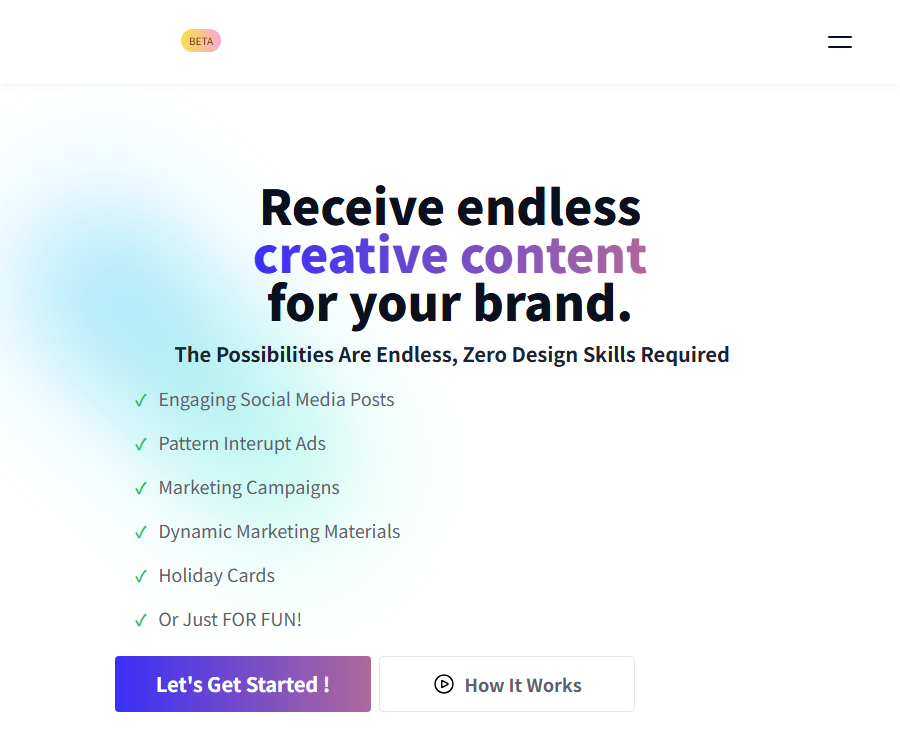
- Social media posts: Creating images needed for various topics and sections.
- Advertising creativity: Experiment with various visual approaches for the same person or product.
- Marketing campaigns: Create materials related to themes, seasons, or promotional periods.
- Holiday greeting cards: Place the brand’s logo against a festive background.
- Personal entertainment: Try out exaggerated, humorous, and fantasy-style visuals.
Community and counseling
Both the Standard and Premium price pages list community access, monthly live coaching sessions, feedback on product development, and new features added each month. The Hero Pack page also shows these same items, but it does not specify for how long access to them via a one-time purchase will be valid; therefore, it should not be considered a permanent entitlement.
Requirements for reference photos
- Prepare 20 to 30 clear photos, with the subject clearly visible in the image.
- It includes frontal, side, close-up, and distant perspectives, avoiding the use of only one angle.
- By using different locations, backgrounds, and lighting conditions, the likelihood of the model treating the background as a key feature is reduced.
- Character training can include various expressions and emotions, but the use of heavy filters should be limited.
- Photos that are severely blurred, obscured, overexposed, contain multiple people in the frame, or have too low a resolution are excluded.
- Only upload images for which you possess the rights or have obtained explicit permission.
Complete workflow
- Determine whether the subject to be trained is a person, an animal, or a product, and gather legitimate and available reference photos.
- Create a Beb AI account and select the appropriate payment method.
- Upload 20 to 30 photos from different angles, with various expressions, in different locations, and using different compositions.
- Wait for the system to train a dedicated generator; the official website indicates that this process may take up to 24 hours.
- View the first set of theme images and identify consistency in appearance as well as any obvious errors.
- Use the prompt to generate content suitable for social media, advertisements, or events.
- Check the portrait, brand, copyright, factual accuracy, and platform advertising guidelines before publishing.
Usage tutorial
Create the first avatar model
- You can register using an email address, or you can choose to use a Google or Facebook account instead.
- Select one subject; do not include multiple similar individuals in the same training set.
- Select 20 to 30 photos based on criteria such as clarity, angle, lighting, and expression.
- Before uploading, check again to ensure the photo does not contain any unrelated people, addresses, or sensitive information.
- Submit the training task and wait for the completion notification; do not create the same project multiple times during training.
- After the training is completed, various themes are compared first, before deciding whether to use them as official brand materials.
Write image prompts
- First, specify the purpose of the image, such as a cover for a personal homepage, a post for a holiday, or an advertisement for fitness.
- Add scenes, costumes, actions, emotions, lighting, and camera distance.
- Specify the requirements for horizontal, vertical, or square layout, and reserve space for the text area.
- Change only one key variable at a time, so as to determine which description has an effect.
- Save the prompt phrases that yield good results, and then create a series of images based on color, background, and posture.
Input and output
| Project | Content | Precautions |
|---|---|---|
| Training input | 20 to 30 photos of people, animals, or products | It should be clear, presented from multiple perspectives, and come with usage rights. |
| Text input | Keywords for scene, style, composition, clothing, and purpose | The more specific it is, the easier it is to control the direction. |
| Theme output | Generated images with various backgrounds and themes | The official website claims 72 images per week, across 9 themes. |
| Marketing output | Social media, advertising, event, and greeting card materials | Manual review is required before publication. |
| Files and sizes | The information available on the official website’s public pages is incomplete. | Check the format, resolution, and watermark before downloading. |
Which users are it suitable for
- Personal brand managers: need to continuously update their profile pictures, cover images, and content visuals.
- Content creator: hopes to build a multi-theme material library around the same character.
- Coaches and consultants: Prepare professional headshots for courses, events, and social media.
- Small businesses: They do not have a dedicated design team, but they need to create marketing images on a regular basis.
- E-commerce brands: Explore creative backdrops and event visuals around the product itself.
- Pet account managers: Create fun or holiday-themed images for animals.
Typical use cases
- Create a set of personalized photos with a consistent style for LinkedIn, Instagram, or other platforms.
- Test various ad compositions and backgrounds within the same campaign.
- Create themed materials for holidays, promotions, course launches, or brand anniversaries.
- Place the product in imaginary or creative scenarios that are difficult to create in reality.
- Use generated images to explore clothing, colors, and visual directions before formal photography.
- Add lightweight image content to blogs, emails, and community posts.
Product advantages
- Training focused on a specific subject places more emphasis on identity consistency than fully generic text-to-image generation.
- The three-step process outlined on the official website is simple, and it does not require users to have expertise in complex design software.
- Batch topic output is suitable for maintaining social media accounts and personal brands on a continuous basis.
- It supports various themes such as characters, animals, products, and humorous ideas.
- The paid plan promotes unlimited prompt usage, making it suitable for repeated exploration of visual options.
- The subscription plan includes access to the community and monthly coaching, and is suitable for users who need inspiration for running their businesses.
Usage restrictions and precautions
- Training a dedicated model can take up to 24 hours, making it unsuitable for urgent needs.
- The faces, hands, text, accessories, and product details generated by AI may be distorted.
- Consistency in appearance cannot be guaranteed; important brand materials still require manual selection and photo editing.
- The public page does not provide complete information regarding the output size, file format, watermark, and the retention period for downloads.
- The public page does not clearly outline the procedures for commercial use licensing of images and the deletion of training data.
- The duration and scope of the benefits associated with the Hero Pack are not clearly specified; it is necessary to check these details before making the payment.
- The official website does not provide information on APIs, team collaboration, bulk export, or enterprise security.
- The so-called unlimited generation may still be subject to rules regarding fair use, queues, and prevention of abuse of services.
- Uploading photos of faces and brands involves sensitive privacy and portrait rights issues; one should not focus solely on the quality of the resulting images.
- Do not use other people’s photos to create content intended for deception, harassment, or unauthorized commercial purposes.
Prices and packages
The prices displayed on the official website as of August 20, 2026, are shown below. The website does not provide clear information regarding taxes and fees, refunds, limits on reasonable usage, or the duration of the benefits associated with the Hero Pack; therefore, the actual terms should be based on the payment page and the service agreement.
| Package | Official website price | Billing method | Public equity | Suitable for users |
|---|---|---|---|---|
| Standard | 225 dollars | On a monthly basis | Unlimited prompt inputs, monthly coaching, community, development feedback, and new features | Short-term intensive users |
| Premium | That amounts to 100 dollars per month. | A fee of $600 is charged every 6 months. | The same public benefits as Standard; the official website indicates a savings of over 50% | Users willing to use it continuously for half a year |
| Hero Pack | 35 dollars | One-time payment | The benefits listed on the page are the same as those of the subscription, but the duration is not specified. | Consider it only after confirming the settlement rights. |
Areas that require special attention on the price page
- Premium is not paid monthly; instead, a fee of $600 is charged every 6 months.
- Standard and Premium have the same list of features; the main differences lie in the payment terms and discounts.
- The Hero Pack is significantly cheaper, yet offers the same benefits; the official page does not specify a duration for its use.
- The official website does not clearly indicate whether there is a free version or a free trial available.
- Before making a purchase, check the total amount due, auto-renewal options, cancellation procedures, and refund policy.
Supported platforms
| Platform | Support status | Explanation |
|---|---|---|
| Web page version | Support | Registration, uploading, training, and generation are all carried out through a browser. |
| Google login | Support | The registration page offers the option to continue using a Google account. |
| Facebook login | Support | The registration page offers the option to continue using a Facebook account. |
| Windows and macOS | Through a browser | No standalone desktop client was found. |
| iOS and Android | No official application instructions are available. | You can try moving the browser; you need to verify this on your own. |
| Browser extensions | No official explanation available. | No extensions are available on the public page. |
| APIs and SDKs | No publicly available version found. | The choice of developer platform should not be made based on that factor. |
Accounts and Logging In
The registration page accepts emails and passwords; it also offers login options via Google and Facebook. Using third-party login services involves the involvement of those service providers in the processing of authentication data, so users who prioritize privacy may want to consider using a separate email address.
Data privacy and the right to one’s portrait
Beb AI requires the upload of multiple photos of individuals or subjects for model training; such data may include biological features, location information, family background, and other identifiable details. The current public page does not provide sufficient details regarding the storage and deletion of training data, as well as the lifecycle of the models.
- Only upload photos of yourself, your company’s own products, or those for which you have explicit permission.
- Remove identification documents, house numbers, license plates, minors, and unrelated third parties.
- Avoid uploading images that contain customer data, medical information, office whiteboards, or other confidential content.
- Before use, confirm with the service provider the retention period for the original image, the trained model, and the generated image.
- Confirm whether deleting an account also results in the deletion of the original images, derived models, backups, and generated results.
- Retain character licensing, product rights, and manual review records for commercial advertising.
Commercial and copyright considerations
- The public page does not clearly specify the scope of commercial licensing for the generated images; payment does not automatically mean unlimited commercial use.
- The prompt should not ask for the imitation of protected characters, brand identifiers, or the unique style of living artists.
- When trademarks, product packaging, or text appear in the generated images, they should be checked one by one.
- Ads must not use generated images to fabricate product features, user reviews, or actual experiences.
- When it comes to endorsements by certain individuals, sensitive industries, or political content, more stringent verification of accuracy is required.
- Different social platforms and advertising networks may have their own rules regarding the disclosure of AI-generated content.
How to improve the generation quality
- Use high-quality reference photos that are unobstructed and feature diverse backgrounds.
- Do not include multiple entities in a single training project.
- Use specific scenarios and compositions to describe it, instead of the vague phrase ‘create attractive images’.
- Generate a small number of variants first, and once the direction is confirmed, expand the same series.
- Inspect the eyes, teeth, fingers, text, jewelry, and product structure.
- The selected images are cropped, color-adjusted, formatted with the brand’s style, and have their facts verified.
API, GitHub, and open-source status
As of the time of verification, Beb AI’s official website does not provide access to any APIs, SDKs, or a GitHub account; nor is it indicated that its core platform is open source. The repositories with similar names such as Beb, BeeAI, and others that were found do not have any verifiable official connection to this image generation service, and therefore Beb AI cannot be considered open source.
Basic information
| field | Content |
|---|---|
| Tool name | Beb AI |
| Tool type | Custom avatar training and AI image generation |
| Main inputs | 20 to 30 main photos along with text prompts |
| Main output | Multithematic creative images of people, animals, or products |
| Training time | The official website indicates that it may take up to 24 hours. |
| Content rhythm | The official website claims 72 images per week, across 9 themes. |
| Price pattern | Monthly, semi-annual, and one-time purchase |
| Free version | The official website does not provide this information explicitly. |
| Account method | Email, Google, or Facebook |
| API | Not made publicly available |
| Open-source status | The core services are not open source; no official code repository has been found. |
Recommendation score
The comprehensive recommendation score is 3.5 out of 5 points. Beb AI features an intuitive training process, making it suitable for users who wish to generate creative images continuously around the same person or brand.
However, there is a clear lack of information regarding public assistance, privacy, permissions, and package details; the benefits associated with the Hero Pack also require further clarification. It is recommended to first check the terms related to data deletion and payment before uploading important facial images or commercial material.
Frequently Asked Questions
What is Beb AI mainly used for?
It trains a dedicated image generator using a set of subject photos, and then creates images with various themes and backgrounds.
How many photos need to be uploaded?
The official website currently recommends uploading 20 to 30 photos taken from different angles, in various locations, showing different expressions and emotions.
How long does training take?
The official website indicates that it may take up to 24 hours; the actual time required depends on the task queue and the quality of the materials.
How many images are generated each week?
The official website claims that 9 themes are offered each week, resulting in 72 new photos; the actual rules for accessing these photos once logged in are specified on the account page.
Is there a free version of Beb AI?
The current price page does not clearly list a permanently free version or a free trial.
How is Premium priced?
The official website indicates that the cost is equivalent to $100 per month, but it is charged at $600 for a period of 6 months.
Is the Hero Pack available for permanent use?
The public page only states that a one-time payment of 35 dollars is required; it does not clearly explain whether unlimited generation is possible, nor how long community support and tutoring will be available. These details must be confirmed before making the payment.
Can product images be generated?
The official website lists the product as one of the entities that can be trained, but the product’s structure, packaging, and accompanying text may still be distorted.
Can it be used for commercial purposes?
The public page does not provide clear enough information regarding commercial licensing; it is necessary to review the license and terms of service at the time of settlement before using it officially.
Are APIs provided?
As of the time of verification, no public APIs or SDKs were found.
Is Beb AI open source?
There is no evidence indicating that the core services are open source, nor has any official GitHub repository been found.
Is it safe to upload facial photos?
Any face training involves privacy risks; users should first determine the rules regarding the storage and deletion of the original images, models, backups, and the results generated.
Tools similar to Beb AI



 Guigong Network Security Registration No. 45132202000164