






Avtrs
Avtrs, an intelligent tool focused on improving AI efficiency.
Tags:AI improves efficiencyWhat is Avtrs?
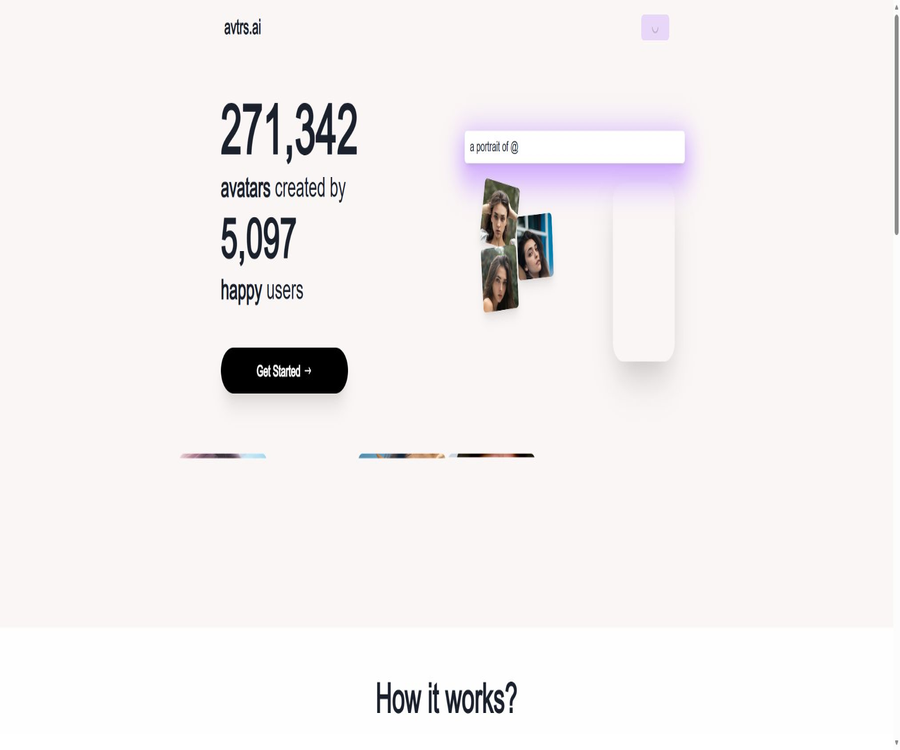
Avtrs is a tool for creating personalized AI avatars; it can also be accessed at avtrs.ai. After users upload selfies from various angles, the system creates a dedicated AI Studio, which then generates new avatars based on preset styles or custom prompts.
It is suitable for creating social profile pictures, fantasy characters, artistic portraits, and styled personal images. It is available both as a web version and as apps for iPhone, iPad, and certain Apple devices.
Main functions of Avtrs
- Selfie training: Create a personalized AI model based on multiple portraits taken from different angles.
- Predefined styles: Choose from the style library options such as realistic, vintage, fantasy, and digital art.
- Custom prompt: Use text to describe the clothing, environment, lighting, and style of the image.
- @me identity tag: Reference the pre-trained version of one’s own avatar in the prompt.
- Batch generation: A single set of avatars can produce 25 or 100 candidate images.
- High-definition results: The Premium Set offers high-quality, watermark-free profile pictures.
- Inspiration Gallery: Browse example prompt phrases and the generation results in various styles.
- For use on mobile devices: Create, save, and share profile pictures using Apple apps.
- Delete function: It is possible to delete the profile picture separately or the entire training Studio as a whole.
- Multiple frame sizes: The Apple app allows users to choose the number of avatars as well as different aspect ratios.
How does Avtrs work?
- Log in to Avtrs using your email address, and create a new profile picture in Studio.
- Prepare several selfies of yourself from different angles, with various expressions and compositions.
- Upload a photo and wait for the platform to create a personalized character model.
- Choose a preset style, or use the @me tag to create custom prompts.
- Submit the generation task and wait for the image processing to be completed.
- Check for similarity between characters, details, and content safety, then download the available avatar.
- Delete the profile picture, Studio, or the entire account data when it is no longer needed.
Suggestions for preparing photos
- Use portraits with even lighting, a clear focus, and no significant compression.
- Different angles are provided: front, side, and with a slight head turn.
- Add various expressions and backgrounds to prevent all photos from being identical.
- Make sure that the subject of the photo is only the person who needs to be trained.
- Avoid sunglasses, masks, strong filters, and large coverings over the face.
- Do not upload photos that are nude, pornographic, or for which no usage rights exist.
- Explicit consent must be obtained before generating avatars for others.
Create the first AI Studio
- On the web version, go to the login page and enter your email address.
- Log in using the Magic Link received.
- Create a new Studio and verify that the photos belong to you or that you have permission to use them.
- Upload clear selfies from different angles as required by the interface.
- Select Free Set or Premium Set and submit the training.
- After the Studio is ready, generation begins from the style library.
Use @me to write prompts.
Avtrs uses the @me tag to represent a personalized avatar that has been trained; for example, it can depict the person on a beach, wearing specific clothing, or in a fictional scenario. The other words are used to control the style of the image, its composition, the environment, and the lighting.
- Start by writing @me to indicate that the main element in the image is from a personal studio.
- Add characters, costumes, poses, and expressions.
- Include elements of location, era, background, and environment.
- Specify media such as realistic photography, oil painting, animation, or 3D rendering.
- Additional requirements are imposed in terms of lenses, composition, color, and lighting.
- Use negative prompts to reduce blurriness, distortion, and extra limbs.
- Test in small quantities first, then retain the prompt structure that shows stable performance.
Realism and 3D prompts
- Photography style: film, DSLR, studio portraits, macro, or Polaroid.
- Camera language: depth of field, fish-eye, ultra-wide angle, close-up, or full-body composition.
- Rendering style: Octane Render, Unreal Engine, V-Ray, or Cinema 4D style.
- Image quality description: sharp focus, cinematic lighting, film grain, and high detail.
- Realism requirements: natural-looking skin, proportionate facial features, and a background that conforms to perspective principles.
- Avoid stacking a large number of descriptive terms together; first ensure that the main description is clear.
2D art prompts
- Digital painting, concept art, oil painting, and detailed line drawings.
- Anime, comics, tarot cards, and character design.
- Pop art, vintage posters, and halftone printing effects.
- Symmetrical composition, golden ratio, and decorative details.
- Fantasy, surrealism, sacred or celestial themes.
- Maintain a consistent style through color, brushstrokes, and medium.
Environment and lighting control
- Environment: city streets, tropical beaches, deserts, forests, or a fantasy world.
- Perspective: aerial view, street-level view, panorama, top-down view, or close-up.
- Lighting: Soft light, hard shadows, rim lighting, volumetric lighting, or backlighting.
- Colors: vivid, low-saturation, monochrome, vintage, or psychedelic palettes.
- Atmosphere: fog, glow, bioluminescence, or a cinematic feel.
- In the same prompt, try to avoid conflicting requirements regarding light and color.
How to use negative prompts
Negative cues are used to indicate the defects that the model should try to avoid. Examples given in the official guidelines include low resolution, blurriness, cropping, repetition, incorrect proportions, extra limbs, abnormal fingers, and distorted faces.
- Give priority to addressing the three to six most common types of questions.
- For character avatars, there are strict restrictions on multiple faces, facial distortions, and asymmetrical eyes.
- The full-body view focuses on restricting extra limbs, fingers, and incorrect body proportions.
- When a clean profile picture is needed, text, watermarks, and complex backgrounds should be avoided.
- Negative prompts cannot guarantee the elimination of all errors; manual screening is still required.
Pre-set styles and custom generation
| Method | Advantages | Restrictions |
|---|---|---|
| Predefined style | The selection is simple, and the direction of the results remains relatively stable. | The adjustable space is limited, which makes it easy for the results to be similar to those of others. |
| Custom prompt | It allows control over characters, backgrounds, lighting, and artistic direction. | Multiple tests are required, resulting in higher randomness. |
| Example prompt for rewriting | Modifications can be made starting from the already displayed results. | It is advisable to avoid copying descriptions that refer to specific individuals or protected styles. |
Which users are it suitable for
- Ordinary users who wish to create social media avatars.
- Players who need fantasy, anime, or game character designs.
- Design enthusiasts who wish to try out personal AI-based art creation.
- Content creators who need to develop various visual identities for their creative accounts.
- We are looking for users who are willing to try out different hairstyles, outfits, and photography styles.
- Developers who study personalized diffusion models and AI avatar products.
Typical use cases
- Generate various personal avatars for social media platforms.
- Create character images for game communities, forums, and chat tools.
- Create vintage, sci-fi, fantasy, and artistic portraits.
- Test different backgrounds, lighting, and clothing combinations.
- Create and share images for birthdays, holidays, or themed events.
- Create personal creative works from custom prompts.
The advantages of Avtrs
- The website offers a free collection of avatars, allowing you to test the similarity between faces first.
- The Premium Set is available at a lower price and includes 100 high-resolution results.
- It offers both preset styles and the ability to generate prompts freely.
- The @me tag reduces the difficulty of referencing personal models in custom prompts.
- The authorities provide a more detailed classification of prompt categories as well as guidelines for negative prompts.
- The web version and the Apple app are available on a variety of Apple devices.
- It supports deleting Studio data, profile pictures, and account data.
Usage restrictions
- Free Set requires at least a two-hour wait, and it includes ads and watermarks.
- AI avatars may have faces that do not resemble the actual person, incorrect fingers, and distorted bodies.
- Training requires uploading multiple sensitive portrait photos.
- The fact that Premium has started processing does not mean that all images will be completed immediately.
- The prices on the website may differ from those for in-app purchases and benefits within Apple’s apps.
- The most recent public version of the Apple app was updated in 2024, and it will be necessary to keep an eye on its level of maintenance activity.
- The privacy policy on the official website was last updated in 2022, and circumstances regarding third-party handling may have changed.
- The service relies on third-party infrastructure such as Replicate, and its availability is not entirely under Avtrs’ control.
Common issues with generated results
- The features of the characters are similar, but their overall age or face shape changes.
- The hairstyles, eye colors, and clothing vary from one image to another.
- Earrings, glasses, teeth, and hands are prone to structural defects.
- Complex backgrounds may blend in with the hair or the edges of the body.
- When there are too many prompts, the model may ignore some of the requirements.
- A single angle for training photos reduces the stability of side views and full-body images.
Portrait upload and authorization
The official terms require users to upload their own photos and to have the rights to those photos; naked or pornographic content is prohibited. When creating a Studio for someone else, explicit consent from the person in the photo is necessary, as well as confirmation that they meet the age requirements for using the service.
- Do not upload photos of strangers downloaded from social media sites.
- Do not create portraits of colleagues, clients, or celebrities without their consent.
- Avoid using ID cards, passports, and photos containing addresses for training.
- Photos of minors require the consent of a guardian and additional protection.
- It is prohibited to use the generated results to impersonate others or carry out deceptive activities.
Deletion of photos, models, and data
According to the official privacy policy, deleting a Studio also results in the deletion of the photos and datasets associated with it. Once the points allocated to a Studio are exhausted, the corresponding model will be deleted automatically within 24 hours; users can also request the deletion of their account and related data by contacting the support email address.
- First, download the avatar that needs to be kept.
- Find the corresponding Studio in the account and proceed with deletion.
- Check whether the profile picture and dataset are no longer present in the account.
- To completely cease using the service, apply for the deletion of the entire account.
- Also check the Apple subscription and in-app purchase records.
Third-party services and privacy
According to the Avtrs terms, the website relies on the Replicate service for carrying out various operations, so users need to take into account the terms set by third parties as well. The platform may also disclose the information necessary to provide its services to service providers responsible for hosting, storage, advertising, and analysis.
- Read the data processing rules for Avtrs and Replicate before uploading.
- Be aware that portrait processing may take place in infrastructure located in different countries or regions.
- Understand the retention times for photos, training data, models, and outputs respectively.
- The free version may include ads that relate to device identification and usage data.
- The App Store reveals that certain identifiers and usage data may be used for cross-app tracking.
- Do not use highly sensitive or subject to confidentiality agreements images for testing.
Web package prices
| Package | Price | Number of items generated | Style and rights |
|---|---|---|---|
| Free Set | Free | 25 pieces | 6 styles, minimum waiting time of 2 hours, includes ads and watermarks |
| Premium Set | 1.99 dollars | 100 high-definition profile pictures | 30 styles, start using them right away – no ads or watermarks |
Apple in-app purchase prices
The App Store currently offers a variety of avatar and Token-based in-app purchases, with prices ranging from $0.99 to $9.99. Different in-app purchases may correspond to previous versions, different numbers of items generated, or different Token systems; it is necessary to follow the instructions provided within the application when making a purchase.
| In-app purchase example | App Store reference price |
|---|---|
| 25 Avatars | 0.99 dollars |
| 100 Avatars | $ |
| 250 Avatars | $ |
| 500 Avatars | 4.99 dollars |
| 100 Tokens | 1.99 dollars |
| 250 Tokens | 3.99 dollars |
| 500 Tokens | $ |
| 1000 Tokens | 9.99 dollars |
Supported platforms
| Platform | Requirements or instructions |
|---|---|
| Web page version | Use a modern browser and a stable internet connection. |
| iPhone | iOS 16.0 or higher is required. |
| iPad | iPadOS 16.0 or a later version is required. |
| Mac with Apple chip | MacOS 13.0 or a later version is required. |
| Apple Vision | VisionOS 1.0 or a higher version is required. |
Open source and GitHub status
The GitHub link in the database points to developer Okaris’s personal account, but that account’s public repositories do not contain any source code for the Avtrs website or Apple app. Therefore, the Avtrs product itself cannot be classified as open source.
Developers have made public or forked various diffusion models, image processing, and avatar-related projects; these repositories reflect technical interests, but their licenses are not applicable to Avtrs’ commercial services.
API and self-hosting
Avtrs does not provide any public generation APIs, SDKs, or documentation for developers. The terms state that Replicate only outlines the service dependencies; it does not mean that users can access the underlying model APIs directly through their Avtrs account.
Basic information
| field | Content |
|---|---|
| Tool name | Avtrs / avtrs.ai |
| Developer | Okaris; the seller on the App Store is Omer Karisman. |
| Tool type | Personalized AI avatar and artistic portrait generator |
| Usage method | Selfie training, preset styles, and custom prompts |
| Login method | Email Magic Link |
| Price pattern | Free version with watermark, as well as one-time payment and in-app purchases |
| Supported platforms | Web, iPhone, iPad, Macs with Apple chips, and Apple Vision |
| Is registration required? | It is necessary. |
| Is it open source? | No, the developer GitHub has not made the Avtrs source code available publicly. |
| Whether API is provided | No public API is available. |
Recommendation score
The comprehensive recommendation score is 3.9 out of 5 points. Avtrs offers a low price, supports free testing and custom prompts; however, aspects such as the ability to upload portraits, the old privacy policy, the frequency of application updates, and the stability of output require careful evaluation.
Frequently Asked Questions
What does Avtrs mainly do?
It trains a personalized AI model using multiple selfies, and then generates custom avatars in various styles.
Is Avtrs free?
A Free Set is available; it allows for the creation of 25 profile pictures in 6 different styles, all of which include watermarks and display advertisements.
How much is the Premium Set?
The current price of this webpage is $1.99; it includes 100 high-resolution avatars and 30 different styles.
How long does it take to generate something for free?
The official website states that for the Free Set option, at least two hours of waiting is required; however, the actual time may also be affected by the task queue.
What does @me mean?
It involves referencing the labels of the model that was trained by the individual within custom prompts.
Will the photos be deleted?
Associated photos and datasets can be removed by deleting the Studio; models whose credits are exhausted will be deleted within 24 hours.
Can I upload someone else’s photos?
Photos should only be uploaded when ownership rights exist and explicit consent from the person in question has been obtained.
Which Apple devices are supported?
It is compatible with iPhone, iPad, Macs equipped with Apple chips, and Apple Vision; the system version must meet the requirements set by the store.
Is Avtrs open source?
It is not open source; the developer’s GitHub account does not make the source code of the Avtrs product available to the public.
Is an API provided?
There are no public Avtrs developer APIs, SDKs, or self-hosted solutions available.
Can the generated result be used for ID photos?
It is not recommended; AI-generated avatars may alter one’s true appearance and do not meet the requirements of most identity documents.
Tools similar to Avtrs



 Guigong Network Security Registration No. 45132202000164