






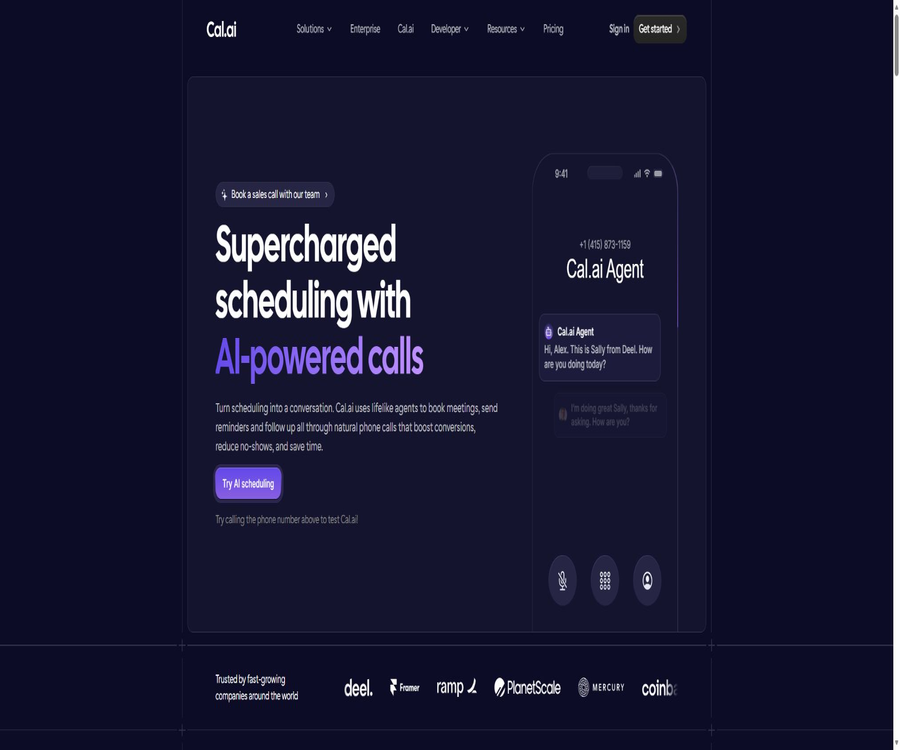
AI-Powered Phone Calls for Automated Scheduling
AI-Powered Phone Calls for Automated Scheduling – an intelligent tool that leverages AI to improve efficiency.
Tags:AI improves efficiencyWhat is Cal.ai?
Cal.ai is an AI-powered phone booking agent built into Cal.com; it can make calls automatically based on predefined workflows, and uses natural language to handle tasks such as scheduling appointments, confirming them, sending reminders, rescheduling, and performing follow-up actions. It connects voice calls directly to Cal.com’s calendar, event types, and automated processes.
A one-sentence summary
Cal.ai can automatically call the contact before and after making a reservation, using the conversation to confirm interest and available times, and then sync the results of those calls back to Cal.com.
Core functions
- Use an anthropomorphized voice to initiate automated calls.
- Check available booking times during the call.
- Help contacts schedule meetings.
- Reminders and confirmation of attendance are sent before the event.
- Follow up on sales leads for which appointments have not been made.
- Initiate a new appointment for contacts who were not present.
- Save call records, transcripts, and performance metrics.
- Set the trigger conditions through Cal.com Workflows.
Natural voice calls
- Continue the conversation based on the other party’s responses.
- Use custom opening phrases and task objectives.
- Configure a tone that is professional, friendly, or patient, etc.
- Handle common intents for confirmation and rescheduling in conversations.
- Reduce interruptions caused by rigid keyboard menus.
- Complex requests still need to be escalated for manual processing.
Reservation integrated with calendar
Cal.ai is not an independent, general-purpose outbound calling platform; its core value lies in the ability to make use of the available hours, event types, and scheduling infrastructure provided by Cal.com. Agents can create or adjust appointments only when they have the necessary permissions and under the rules set for such activities.
- Read the available booking times corresponding to the activity type.
- Check for time zone and calendar conflicts.
- Collect necessary information such as names, email addresses, and phone numbers.
- Create appointments that comply with the event rules.
- Write the results to the Cal.com reservation record.
- Comply with the minimum lead time, buffer limits, and reservation caps.
Automatic reminders and confirmations
- Automatically make a reminder call at a specified time before the meeting.
- Verify whether the participants can still attend.
- Cancel or reschedule based on the response.
- Combine voice reminders with emails and text messages.
- Use different call prompts depending on the type of activity.
- Track completion, missed, and appointment results.
No one was present to follow up.
- Triggers when the meeting is marked as unattended.
- Use polite wording to ask about the willingness to reschedule.
- Provide the new available times directly.
- Associate the new appointment with the original event workflow.
- Reduce manual sales or customer service callbacks.
- Avoid continuing to harass those who have clearly refused.
Follow-up on sales leads
- Initiate a phone call promptly after the form is submitted.
- Verify whether the lead is interested in making a reservation.
- Select the meeting time based on availability guidelines.
- Leave the unanswered status to the subsequent workflow.
- Assign appropriate team members based on the routing form.
- High-risk sales statements must use approved wording.
Native integration of workflows
Cal.ai, which is an action embedding within Cal.com Workflows, allows calls to be initiated based on appointments, cancellations, no-shows, or custom times. Teams can automate the integration of AI-driven calls with emails, text messages, and other communications, without the need to create external orchestration systems.
- A welcome or confirmation call is triggered after the reservation is created.
- Make reminder calls at times such as 24 hours before the meeting.
- After cancellation, confirm the reason or reschedule.
- Carry out follow-up actions after failure to show up.
- Select different Agents based on the type of event.
- Set the waiting time between multiple actions.
Custom AI Agent
- Set the Agent name and business identity.
- Write the opening message and general prompt.
- Define the goals of the call and the scope permitted for processing.
- Adjust personality, tone, and style of expression.
- Add the necessary identity disclosure and recording prompts.
- Set clear boundaries for prohibited promises and sensitive topics.
- Continuous optimization using real call samples.
Phone number
During setup, it is necessary to assign a phone number for outbound calls; the official website indicates that a dedicated number can be used or an existing number can be imported. The cost of purchasing the number, availability in certain regions, monthly fees, and verification requirements may be calculated separately from the cost per minute of calls.
- Select an appropriate number based on the target country.
- Complete the number ownership verification as required.
- Confirm whether importing existing numbers is supported.
- Check the caller ID display and the way calls are returned.
- Find out about the monthly fee for the number and the costs imposed by the carrier.
- Export the records that need to be retained before the number is deactivated.
Call records and analysis
- Check the status of each call in the Cal.com backend.
- Play saved call recordings.
- Read the transcript of the call.
- Track call connections, completions, and appointment conversions.
- Analyze customer emotions, intentions, and engagement.
- Compare the performance of different prompt phrases.
- Recording and emotion analysis must comply with local laws.
Supported call scenarios
| Scene | Common triggers | Agent objectives |
|---|---|---|
| Schedule a new meeting | Form submission or lead entry | Find some time and make an appointment. |
| Remind in advance | Designated time before the meeting | Confirm attendance and reduce those who are absent. |
| Reservation confirmation | After the reservation is created | Verify information and next steps |
| Cancel follow-up | After the reservation is canceled | Understand the willingness and reschedule as needed. |
| No one was present to follow up. | Did not attend the meeting | Reschedule the time |
| After-sales follow-up | After the service is completed | Collect feedback or arrange follow-ups |
Basic reservation functionality on Cal.com
- Create an unlimited number of event types and booking pages.
- Connect multiple calendars to avoid duplicate appointments.
- Automatically detects the participants’ time zones.
- Support cancellation, rescheduling, and reservation confirmation.
- Teams can use polling and group activities.
- Use the routing form to assign contacts to the appropriate members.
- Use Webhooks, APIs, and application integrations for expansion.
APIs and developer capabilities
Cal.com offers API v2, command-line tools, OAuth, Webhooks, embeddable Atoms, and MCP servers. Developers can enable other AI Agents to check availability, create appointments, cancel or reschedule them, and there are also interfaces for organizing team calls.
- Query users or teams’ available time slots through the API.
- Create, cancel, and reschedule appointments.
- Use an API key or OAuth for authentication.
- Listen to events for booking creation, update, and cancellation.
- Embed the booking component in a website or application.
- Connect compatible AI clients via MCP.
- Set permissions, verification, and usage controls for the phone interface.
Which users are it suitable for
- Sales teams that require frequent appointment confirmations.
- Service providers that wish to reduce the rate of no-shows.
- Marketing teams that need automated callback for lead forms.
- Manage the recruitment team responsible for scheduling interviews.
- Organizations that offer reservations for courses, consultations, or demonstrations.
- Teams that are already using Cal.com Workflows.
- Developers who wish to create a voice booking process using APIs.
Typical use cases
- Call immediately after the form is submitted to arrange a sales demonstration.
- Confirm the customer’s attendance the day before the reservation.
- Provide personalized phone reminders for high-value consultations.
- A new time is automatically proposed if someone fails to attend the meeting.
- After canceling the appointment, collect the reason and offer an alternative date.
- Provide telephone assistance to users who are not accustomed to making reservations via web pages.
- Create multi-channel reminders by combining emails and text messages.
It’s not very suitable for which situations
- A complete call center needed to handle complex customer service issues.
- Businesses that require large-scale unsolicited marketing calls.
- Only individual users who need a free calendar link.
- Regions where call recordings are strictly restricted and consent cannot be obtained.
- Organizations that must run voice models and telephone infrastructure locally.
- Scenarios that require urgent medical, legal, or financial advice.
- Teams that lack mechanisms for manual intervention and complaint handling.
Cal.ai call pricing
As of August 2026, the official price listed on Cal.ai’s website is $0.29 per minute, with charges calculated based on 29 credits per minute. The total cost may also include fees related to Cal.com packages, phone numbers, text messages, taxes, and other communication services.
| Billing items | Public price | Explanation |
|---|---|---|
| AI phone calls | $ | 29 credits are consumed per minute. |
| Cal.com Personal Edition | Free | 1 user, basic reservation |
| Teams | The annual fee is equivalent to 12 dollars per user per month. | 14-day trial |
| Organizations | The annual fee is equivalent to 28 dollars per user per month. | 14-day trial |
| Enterprise | Custom quote | Annual contracts and corporate support |
| Phone number | Refer to the account page. | There may be additional charges for other numbers. |
Comparison of Cal.com plans
| Package | User and team capabilities | Safety and corporate capabilities | Suitable for |
|---|---|---|---|
| Individuals | 1 person, no restrictions on activities or calendar | Basic account features | Personal appointment |
| Teams | 1 team, polling, group activities, routing | Custom APIs and analytics | Small team |
| Organizations | Unrestricted sub-teams, attribute-based routing | SAML, SCIM, role permissions | Medium to large organizations |
| Enterprise | According to the enterprise’s needs | Dedicated databases, SLAs, and engineering support | Large enterprises |
Cost estimation
- First, calculate the estimated number of calls per month.
- Estimate the number of minutes of conversation using the average duration of the connection.
- The rules for unanswered calls, voicemail redirection, and redialing need to be confirmed.
- Calculate the basic seat fee and telephone charges separately.
- Include costs for numbers, text messages, taxes, and exchange rates.
- Reserve sufficient credits before peak activity.
- Compare the cost of each effective reservation through pilot tests.
How to choose a Cal.com plan
- Individuals can use the free version by making only basic reservations.
- It is necessary to share availability and use polling for optional Teams.
- SSO, SCIM, and role-based permissions are required, along with optional Organizations.
- For dedicated databases and SLAs, please inquire with Enterprise.
- Check whether Cal.ai is available for the selected workspace.
- Do not mistake the cost per minute of call for the total cost.
Tutorial for creating a Cal.ai Agent
- Create a Cal.com account and connect it to your work calendar.
- Create an event type for phone reservations.
- Add or import outbound numbers in Cal.ai.
- Set the Agent name, opening phrase, tone, and goals.
- Restrict the reservation actions and sensitive content that can be processed.
- Use internal numbers to test various normal and abnormal conversations.
- Go live after checking appointment, transcription, and fee records.
Tutorial on setting up reminder calls
- Open the Workflows for the target activity type.
- Select a specific time before the meeting as the trigger condition.
- Add the Cal.ai phone action.
- Verify that valid phone numbers are collected in the participant form.
- Create prompts for reminders, confirmations, and rescheduling.
- Set the rules for retrying and stopping after a call goes unanswered.
- Enabled when the test time zone conflicts with the actual calendar.
Tutorial on configuring lead follow-up
- Create a compliant lead form with a phone number field.
- Record the contact approval, region, and allowed time period.
- Connect the submitted event to the Cal.com workflow.
- Add AI calls and restrict them to scheduled tasks.
- Configure scheduled teams and routing rules.
- Manual intervention is provided for rejections, complaints, and complex issues.
- Monitor the connection rate, reservation rate, and cancellation requests.
Suggestions for prompt design
- At the beginning, clarify the company’s identity, the agent’s identity, and the purpose of the call.
- Gather the necessary information step by step using brief questions.
- Do not invent times that do not exist in the calendar.
- Identify the business and professional questions that cannot be answered.
- Settings for handling denial, silence, and unclear audio.
- Repeat the key dates, times, and time zones for confirmation.
- Indicate the channels for future notifications before ending the call.
Telemarketing and consent
Automatic voice calls, recording, marketing communications, and caller ID are subject to different regulations in various countries and regions. Companies should determine the legal basis, methods of obtaining consent, permitted calling hours, lists of numbers to be blocked, and mechanisms for exiting such services before putting them into use.
- Retain the time, scope, and source of user consent.
- Reveal the AI identity and recording in applicable areas.
- Comply with the national and regional lists of numbers from which calls are prohibited.
- Provide clear refusal and ways to stop contact.
- Limit the number of retries and respect local time.
- It is forbidden to fake the caller ID or misrepresent one’s identity.
- High-risk industries should be reviewed by legal professionals.
Recording, Transcription, and Privacy
- Records and transcripts of the call content may be generated.
- The purpose of the data and its retention period should be clearly communicated.
- Only the information required to complete the reservation is collected.
- Do not allow the agent to request passwords or complete payment details.
- Restrict employees’ access to call records and emotion analysis.
- Set up the processes for deletion, export, and data subject requests.
- Sensitive industries need to determine the specific packages and compliant configurations.
Safety and corporate capabilities
The pricing page on Cal.com lists for Organizations the capabilities related to SAML SSO, SCIM, role-based permissions, as well as compliance with standards such as SOC 2, HIPAA, and ISO 27001; Enterprise plans include additional features such as dedicated databases and SLAs. Before using Cal.ai to process sensitive information, it is necessary to ensure that calls, recordings, and third-party voice processing are all covered by the relevant provisions.
Product advantages
- Native integration with Cal.com calendars and scheduling rules.
- It is possible to make reservations and change dates directly during a call.
- Configure trigger conditions quickly using Workflows.
- It supports customizing identities, tones, and task objectives.
- Provides audio recording, transcription, and call quality metrics.
- The public price is clear every minute.
- Cal.com offers an ecosystem of APIs, Webhooks, CLI, and MCP.
- The core code of Cal.com can be publicly reviewed and self-hosted.
Product restrictions
- The call charges do not cover all Cal.com and communication costs.
- The availability of regions, numbers, and languages needs to be tested in practice.
- AI may mishear names, email addresses, dates, or time zones.
- Complex problems require human intervention.
- There are strict compliance requirements for automated outbound calls and recording.
- Emotion analysis cannot be used as a reliable method for assessing personality or intentions.
- High-frequency calls can quickly deplete credits.
- Cloud-based Cal.ai is not equivalent to a fully localized voice service.
- Open-source core and enterprise features are subject to different licensing terms.
GitHub and the open-source status
Cal.com boasts verified official GitHub repositories that follow an open-core model; the core components are primarily licensed under AGPLv3, while the enterprise versions include commercial licensing options. The repositories contain configurations related to Cal.ai Agent, phone subscriptions, and voice services, but for self-hosting it is still necessary to set up one’s own voice provider, phone services, keys, and infrastructure.
Considerations for self-hosting
- The fact that the source code is available publicly does not mean that the Cal.ai service can be copied for free.
- Voice Agents rely on external voice service configurations.
- Buying phone numbers requires the capabilities of a communications service provider.
- The enterprise directory feature is subject to commercial licensing restrictions.
- The self-hosting party is responsible for security updates, backups, and availability.
- Producing telephone services also requires compliance with regional communication regulations.
- Before upgrading, read the current repository license and deployment documentation.
Basic information
| Project | Content |
|---|---|
| Tool name | Cal.ai |
| Platform affiliation | Cal.com |
| Tool type | AI phone booking agent |
| Primary uses | Reservation, confirmation, reminders, rescheduling, and follow-up |
| Call pricing | $ |
| Measurement | 29 credits per minute |
| Development capability | API v2, Webhooks, CLI, Atoms, and MCP |
| Open-source status | Cal.com offers an open core along with commercial licenses for enterprise features. |
Recommendation score
Recommendation score: 4.5 / 5. Cal.ai is particularly suitable for sales, recruitment, and service teams that are already using Cal.com and wish to use automated calls to increase the conversion rate of appointments and reduce the rate of no-shows.
Before official deployment, it is essential to verify the number region, recognition accuracy, the cost per valid reservation, consent for recording, and the process for manual intervention.
Frequently Asked Questions
Is Cal.ai free?
It is not a free phone service; the official website charges $0.29 per minute at present, while the basic personal version of Cal.com can be used for free.
How many credits are consumed per minute?
The official website indicates that 29 credits are consumed per minute.
Can Cal.ai be used to schedule meetings directly?
Yes, the Agent can arrange appointments by taking into account Cal.com’s availability and the relevant rules for events.
Can it be used to send reminders before a meeting?
Yes, it is possible to set automatic calls to be made at a specified time before the meeting within Workflows.
Is call transcription supported?
Supported: It is possible to view the call status, recordings, transcriptions, and related performance metrics from the backend.
Are APIs provided?
Cal.com offers API v2 as well as interfaces for making phone calls, and it also supports Webhooks, CLI, and MCP.
Can Cal.ai be self-hosted?
The core of Cal.com can be hosted independently, but the voice agents rely on telephone and voice service providers as well as certain configurations; therefore it cannot be considered an equivalent to cloud services that can be replicated with just one click.
Is Cal.com completely open source?
The open core model is adopted; the core part is based on AGPLv3, while the enterprise directory and certain functions are subject to commercial licenses.
Is user consent required to use a automatic phone?
Many regions have strict regulations regarding automated outbound calls, marketing, and recording; it is necessary to obtain the required consent based on the location of the contact person.
Tools similar to AI-Powered Phone Calls for Automated Scheduling



 Guigong Network Security Registration No. 45132202000164