






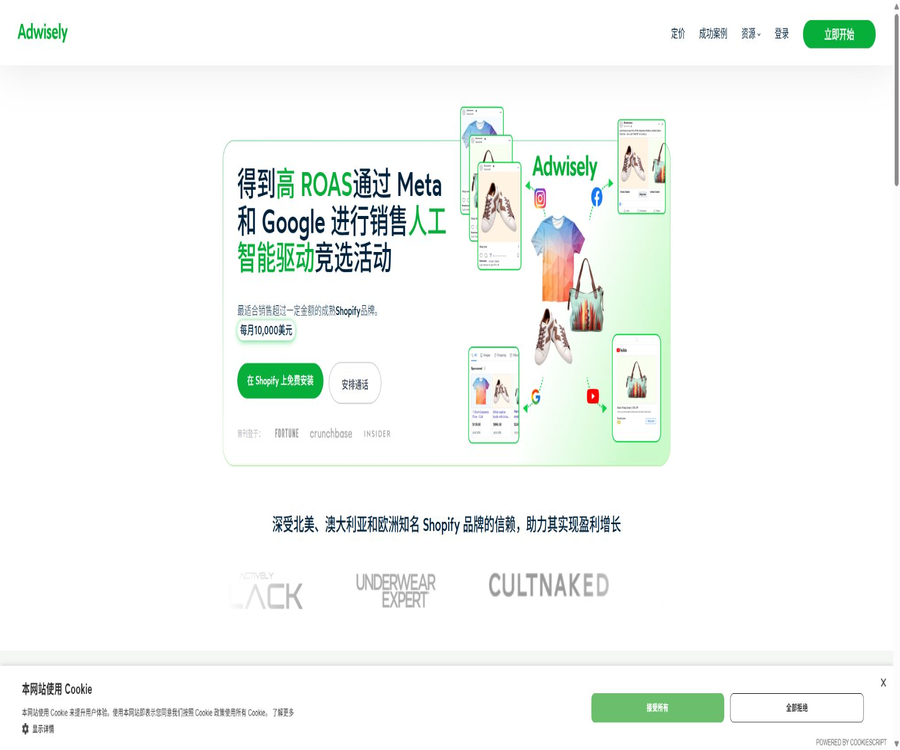
Adwisely
Adwisely: an intelligent tool focused on improving AI efficiency.
Tags:AI improves efficiencyWhat is Adwisely?
Adwisely is an automated platform for Meta and Google advertising, designed specifically for Shopify e-commerce brands; it was developed by Ad Intelligence Inc. This platform synchronizes product catalogs and conversion data, automatically creates product ads, selects target audiences, and continuously optimizes the advertising campaigns.
The product is not merely a tool for generating advertising images; it is an operational tool that connects stores, advertising accounts, product feeds, pixels, and advertising campaigns. Users can opt for the fully automated Self-Serve option, or they can use the Concierge service, which includes experts from Meta and Google Ads.
Main functions of Adwisely
- Shopify store connection: Synchronize product, price, inventory, and catalog information.
- Meta AI ads: Run product promotions based on Advantage+ and Smart Catalog.
- Google AI Ads: Utilizes Performance Max to reach various Google advertising channels.
- Automatic product selection: Relevant products are displayed based on purchasing behavior and conversion probabilities.
- Automatic audience targeting: Businesses primarily select the target countries, while the system handles the additional targeting tasks.
- Dynamic asset combination: Use product images, titles, and descriptions to create advertising assets.
- Budget optimization: Allocate more budget to products that are more likely to generate sales.
- Ongoing monitoring: Track purchases, revenue, expenses, and advertising returns.
- Re-marketing: Reaching out to users who have viewed products, added them to their shopping lists, or visited the social media page.
- Customer acquisition campaigns: Identifying new users whose behaviors and interests are similar to those of existing customers.
- Product exclusion: Use Shopify tags to prevent specific products from appearing in the ad feed.
- Human experts: Concierge is regularly reviewed and optimized by experts from Meta and Google.
Meta AI-powered Campaign
- Use Meta Advantage+ in combination with the Adwisely Smart Catalog strategy.
- Ads can be displayed on Facebook, Instagram, Messenger, and Audience Network.
- By default, the full product catalog is used, with products being selected automatically based on potential buyers.
- It reaches new customers, website visitors, existing customers, as well as similar audiences.
- Smart Catalog allocates more budget to products that are expected to be more profitable.
- The official recommendation is a minimum budget of $30 per day.
- Suitable for established stores that already have orders and stable conversion data.
Google AI-powered Campaign
- Run automated e-commerce campaigns based on Google Performance Max.
- It covers areas such as Google Search, Display, YouTube, and Gmail.
- Targeted at new customers, website visitors, product viewers, those who add items to their carts, and buyers.
- Ads are automatically combined and distributed using product catalogs and conversion signals.
- It can run in parallel with Meta campaigns to enhance cross-platform reach.
- The official recommendation is a minimum budget of $20 per day.
- When the purchase volume is insufficient, intermediate conversion signals such as adding to cart and starting checkout may be used temporarily.
Meta Prospecting customer acquisition campaign
- It is used to attract new potential customers who have not visited the store before.
- Identify similar audiences based on the current customers’ interests and behaviors.
- It covers Facebook, Instagram, Messenger, and Audience Network.
- By default, all compliant products in the store are promoted.
- It is initiated with the assistance of Ad Expert, based on the conditions of the store.
- The official minimum budget is $25 per day.
- Typically, at least 100 additional purchases within the past 180 days are required.
Meta Retargeting – Repositioning ads to target previously interested users
- Re-engage with those who visited the website or social profile but did not complete a purchase.
- Potential customers can be shown the specific products they have viewed or interacted with.
- Suitable for users who abandon shopping carts, browse products, and engage in social interactions.
- It is initiated by Ad Expert based on the amount of data and account details.
- The official minimum budget is $20 per day.
- It is generally required to have at least 200 orders recorded over the past 90 days.
- It is necessary for pixels, directories, and website events to function properly.
Advertising channels
| Advertising system | Coverage location | Primary uses |
|---|---|---|
| Meta | Facebook Feed and Stories | Product discovery, customer acquisition, and retargeting |
| Meta | Instagram Feed and Stories | Visual product display and conversion |
| Meta | Messenger and Audience Network | Expand automated outreach |
| Search | Meet clear intentions for shopping and brand searching | |
| Shopping and product display | Display product information based on the Feed. | |
| YouTube | Videos and cross-channel outreach | |
| Display and Gmail | Display ads and re-engagement |
How Adwisely’s AI optimizes things
- The content to be displayed is selected automatically based on product, user, and conversion data.
- Automatically configure the audience and ad slots within the limits permitted by the advertising platform.
- Continuously compare the actual performance of different combinations of products and materials.
- Redirect the budget to products that are more likely to generate the desired advertising returns.
- Enhance the allocation of budget for products within the catalog through Smart Catalog.
- After collecting data during the learning period, adjustments to the deployment are made gradually.
- Concierge experts will examine AI actions in light of business objectives.
- The ultimate outcome still depends on the product, price, profit, the website, and market competition.
How to connect a Shopify store
- Install Adwisely from the Shopify App Store and approve the app’s permissions.
- Choose Self-Serve or Concierge and complete the store eligibility check.
- Connect Meta Business Manager, ad accounts, product catalogs, and pixels.
- Connect Google Ads, Merchant Center, and the corresponding conversion tracking.
- Verify that the product title, price, inventory level, images, and policy status are correct.
- Select the target country, daily budget, and advertising platforms to use.
- Check the ad details and create the first Meta or Google campaign.
- Maintain the stable operation of the activity and wait for review by experts.
Meta asset permissions
| Assets | Required permissions | Uses |
|---|---|---|
| Meta ad account | Partial access; activities can be managed. | Create, run, and optimize ads |
| Meta product catalog | Complete management directory | Synchronize and promote Shopify products |
| Meta Pixel | Manage pixels | Read purchase and e-commerce events |
| Facebook page | Create advertising-related permissions | Place ads for representative brands |
| Business Manager | Asset sharing among partners | Centralized management of permissions and account relationships |
Is it suitable for shops to use Adwisely?
Adwisely is currently more suitable for Shopify stores that already have stable sales and conversion data. The official requirements are an active Shopify store with at least 100 online orders in the past 90 days, or a monthly online revenue of $10,000.
- The store needs to be open for regular business and able to handle online purchases.
- At least 100 orders in the last 90 days, or a monthly online revenue of at least $10,000.
- Install the Meta Pixel correctly using the Facebook and Instagram apps.
- Install the Google Tag correctly using the Google and YouTube apps.
- The product catalog should include accurate prices, inventory levels, images, and landing pages.
- Stores that are close to meeting the requirements but have not yet done so can apply for manual review.
- Stores that have just been launched and have almost no sales data may find it difficult to take advantage of automation.
How to launch the first advertising campaign
- First, determine the target country, the acceptable daily budget, and the main profit goals.
- Check pixels, Google Tags, purchase events, and product feeds.
- Gift cards, out-of-stock items, products with low profit margins, and those restricted by advertising policies are excluded.
- Choose Meta or Google AI-powered Campaign.
- Let the system use the directory to generate initial ad and product combinations.
- Publish after confirming the ad copy, brand name, and target page.
- Observe the entire learning phase at least, to avoid frequent pauses and restarts.
- Adjustments are made based on actual sales, profits, and expert advice.
Learning phase and stable operation
AI-driven campaigns typically require 14 to 30 days to collect data and optimize their delivery. Frequent pauses, restarts, or major changes can disrupt the learning process; therefore, early fluctuations should not be judged based on performance on a single day alone.
- Allocate sufficient budget and time for the learning phase.
- Avoid changing the audience, budget, and product range every day.
- When the results are below expectations, first check the tracking and feed data, and then assess the advertising strategy.
- Concierge users should first consult with Ad Expert to avoid conflicting changes.
- Compare at least one full business cycle, taking into account the effects of weekends and promotions.
- Even after completing the learning process, it is still necessary to continuously monitor creative fatigue and changes in profits.
Product catalog and automatic assets
- By default, the full catalog of the store is used, allowing the system to identify products with greater potential.
- The material is primarily derived from product images, titles, descriptions, and price information.
- Changes to products are synchronized to the ad feed through the Shopify catalog.
- The system tests the compatibility between different products and users.
- Gift cards, out-of-stock items, or products that are not suitable for promotion should be excluded in advance.
- Images, copy, and landing pages must comply with Meta and Google’s policies.
- If a brand needs high-concept videos or UGC, it still has to rely on independent creative production.
How to exclude specific products
- Find the products that should not appear in ads in the Shopify admin panel.
- Add the exclusion tags required by Adwisely to the product.
- Save the product and wait for the catalog and ad feed to synchronize.
- Confirm that the products have been removed from Meta and Google’s product feeds.
- Check whether the same exclusion applies to all variants.
- Regularly review products that are out of stock, have low profits, are seasonal in nature, or are subject to regulatory restrictions.
Self-Serve and Concierge prices
Adwisely uses a pricing model in which the higher of the minimum monthly fee and 10% of the advertising expenses is applied, with a maximum charge of $3,250 per store per month. The percentage charged for Self-Serve and Concierge is the same; the main differences lie in the minimum fee and the access to dedicated advertising expert services.
| Package | Minimum monthly fee | Pay per usage | Monthly fee cap | Main services |
|---|---|---|---|---|
| Self-Serve | 49 dollars | Spend 10% of your advertising budget wisely. | 3250 dollars | AI activities, continuous optimization, data tracking, email and chat support |
| Concierge | 249 dollars | Spend 10% of your advertising budget wisely. | 3250 dollars | Self-serve capabilities, along with experts exclusive to Meta and Google |
Concierge advertising expert services
- Each platform has its own expert assigned to it, with Meta and Google managing them respectively.
- Within 24 hours of the ad going live, check the pixels, conversions, catalog, copy, and budget.
- Each platform expert spends at least 5 hours per month on average.
- Keep AI systems running and optimize marketing and retargeting campaigns.
- Regularly send updates on performance, issues, and recommendations for the next steps.
- Gradually narrow the range of products, focusing the budget on those that are more valuable.
- Plan in advance for Black Friday, the fourth quarter, and other peak periods.
- Contact the seller promptly if you encounter any issues with tracking, the catalog, or the account.
How are the costs calculated?
| Manage advertising expenses monthly through Adwisely. | 10% calculation result | Self-Serve fees | Concierge fee |
|---|---|---|---|
| 300 dollars | 30 dollars | Minimum fee of $49 | Minimum fee of $249 |
| 1000 dollars | 100 dollars | 100 dollars | Minimum fee of $249 |
| 2500 dollars | 250 dollars | 250 dollars | 250 dollars |
| 3000 dollars | 300 dollars | 300 dollars | 300 dollars |
| 10,000 dollars | 1000 dollars | 1000 dollars | 1000 dollars |
| 32,500 dollars | 3250 dollars | 3250 dollars | 3250 dollars |
| 50,000 dollars | 5000 dollars | The maximum amount is 3,250 dollars. | The maximum amount is 3,250 dollars. |
The figures above take into account only the costs associated with the Adwisely platform; the budget for advertising on Meta and Google still has to be paid directly by the merchants. For each Shopify store, the expenses related to Google and Meta ads are calculated separately.
Method of deducting usage fees
- The minimum monthly fee for the package is usually charged at the start of the billing cycle.
- The 10% fee is calculated based on the actual advertising expenses incurred during that period.
- When the cumulative usage fee reaches $1,000, deductions may be made in installments throughout the period.
- High-cost stores may see multiple usage bills within a single cycle.
- The total monthly fee remains subject to a ceiling of $3,250.
- Shopify users usually make payments using the payment methods associated with their store account.
- Platform fees and media expenses are two distinct types of costs.
7-day free trial
- Each Shopify domain can only receive a trial once.
- The trial period begins when the first Meta or Google campaign is created.
- The trial period lasts for 7 days, and the timing does not stop even if the promotion is suspended.
- No fee is charged for the Adwisely platform during the trial period.
- Businesses still have to pay for the actual advertising costs on Meta and Google.
- Before starting, it is necessary to confirm tracking, the feed, and the budget to avoid wasting the limited trial period.
Daily budget rules
- The budget for a particular day represents the maximum amount that can be spent on preparations within 24 hours.
- The budget for general event days must be no less than $10.
- Officials generally recommend setting a threshold of at least $30 per day to obtain more comprehensive data.
- Meta and Google recommend a starting price of $20 to $30 for their respective strategies.
- Once the campaign is approved and launched, the budget can be modified in Adwisely.
- A maximum of 5 budget modifications are allowed per day; any additional modifications may not take effect.
- The terms of service allow the platform to temporarily increase the daily budget by up to 25% in certain situations.
- Companies should understand this authorization and establish acceptable limits for payments and risks.
Which users are it suitable for
- Established Shopify brands: they have consistent orders as well as available conversion data.
- E-commerce founder: Hope to reduce the time needed to learn the advertising platforms of Meta and Google.
- Small marketing team: Needs automated directory advertising and basic optimization.
- Multi-product store: Uses a complete catalog and algorithms to automatically match products.
- Cross-border e-commerce brands: Run Meta and Google campaigns in multiple target countries.
- Brands seeking manual support: Use the Concierge expert service.
- Stores with high advertising expenses: can take advantage of a monthly limit of $3,250.
It’s not very suitable for which types of stores
- There are no platforms without a Shopify store or those for which the current integration process is not supported.
- A new store that has just been launched, with no orders yet and no stable traffic volume.
- Businesses with too low profit margins are unable to afford media budgets and a 10% service fee.
- Stores where pixels, Google Tags, and purchase events do not function properly.
- The product catalog contains a large number of products that violate regulations, are out of stock, or have incorrect information.
- Advanced advertisers who need to manually control bids, audiences, and ad slots one by one.
- Teams that only want to purchase advertising assets without the need for account management for campaigns.
- Companies that are unwilling to share advertising accounts, catalogues, and pixel management permissions.
Key performance indicators
| Indicators | Uses | Precautions |
|---|---|---|
| Advertising spending | Measuring media investment | Does not include the Adwisely platform fee. |
| Revenue from purchases | Sales generated by targeted advertising | Refunds and discounts need to be deducted. |
| ROAS | Revenue divided by advertising expenses | It is not equal to net profit. |
| Actual ROAS | Include platform fees in the costs. | The figures should be consistent with the internal financial records. |
| Customer acquisition cost | Compare the cost per new customer | It is necessary to distinguish between new customers and those who make repeat purchases. |
| Conversion rate | Check that the traffic matches the website. | Affected by page, price, and inventory. |
| Māori contribution | Determine whether an activity is truly profitable. | It is closer to the actual business results than simply ROAS. |
| Incremental sales | Assess the new benefits brought about by advertisements | It needs to be verified through controlled or regional experiments. |
Differences in Google data
When a store makes fewer than about 10 purchases per week, Google may not have enough purchase data available. Adwisely uses intermediate conversion steps such as adding items to the cart and starting the checkout process to help the intelligent bidding system learn, which is why the data in Google’s system might differ from the purchase data provided by Adwisely.
- Google Ads may include intermediate conversions in its optimization and reporting.
- The Adwisely dashboard highlights actual purchases and the ROAS of those purchases.
- It is possible that the ROAS shown by Google in the early stages was around 20% higher temporarily.
- As the actual purchase data increases, the intermediate conversions will be gradually removed.
- Financial decisions should be based on actual orders, revenues, and profits.
- When long-term differences are detected, the attribution window, currency, and conversion settings should be checked.
Product advantages
- Designed specifically for Shopify product catalogs and e-commerce conversion processes.
- It covers both the Meta and Google advertising ecosystems.
- After installation, it can synchronize product, catalog, and conversion information.
- There is no need to manually set up complex target audiences or numerous event structures.
- Smart Catalog can allocate budgets based on the profit potential of products.
- Dynamic ads can automatically combine product images, titles, and descriptions.
- Self-Serve reduces the initial costs associated with basic automation.
- Concierge combines AI with real advertising experts.
- The cost varies depending on the advertising spending, with a monthly limit set.
- The public help center provides more detailed explanations regarding policies, budgets, and billing rules.
Usage restrictions and precautions
- The current product is designed to serve established Shopify stores, with specific thresholds set for orders or revenue.
- The 10% platform fee needs to be calculated along with the gross profit of the product, refunds, and media costs.
- Meta and Google advertising costs are not included in the Adwisely subscription fee.
- Automation cannot resolve issues such as a lack of demand, unreasonable prices, or a poor website experience.
- Algorithm learning usually takes 14 to 30 days, and performance may be inconsistent in the initial stage.
- Frequent pauses and modifications can affect learning outcomes.
- The platform requires advertising accounts, catalogs, pixels, and permissions for Google assets.
- The merchant is primarily responsible for the deviations in results caused by tracking errors.
- The terms allow the system to temporarily increase the daily budget by up to 25% under specific circumstances.
- The complete catalog is included in the advertising campaign by default; items with low profit margins or restrictions must be excluded manually.
- Platform reports and advertising network reports may use different definitions of conversions.
- The case studies on the official website and the average ROAS do not constitute a guarantee of the performance of any specific store.
Security and permission recommendations
- Only the advertising accounts, catalogs, and pixels corresponding to the target store are shared.
- Regularly review partner permissions in Meta Business Manager.
- Limited administrative permissions required for use with Google Ads.
- Enable multi-factor authentication to secure the Shopify and advertising platform administrator accounts.
- Logs budget changes, activity creation, and product exclusion actions.
- After canceling the service, check whether the partners, directories, pixels, and Google access have been removed.
- Do not include customers’ personal data in advertising copy or unnecessary fields.
GitHub and the open-source status
During this verification, no GitHub repositories for the core products, which are maintained publicly by Adwisely or Ad Intelligence Inc., were found. Advertising automation, Smart Catalog, Shopify apps, and optimization services should be considered commercial, closed-source platforms.
| Components | Status | Explanation |
|---|---|---|
| Adwisely Shopify app | Commercial closed-source | The source code of the core applications is not made public. |
| Smart Catalog optimization | Commercial functions | The budget allocation logic is not open source. |
| Meta connected to Google | Platform integration | Interface access does not imply that the source code is made available. |
| Ad Expert service | Business and industrial services | Only Concierge includes it. |
| Official GitHub | Not verified. | Third-party code with the same name cannot be considered official. |
Basic information
| field | Content |
|---|---|
| Tool name | Adwisely |
| Development company | Ad Intelligence Inc. |
| Tool type | Shopify’s platform for automated e-commerce advertising and expert management |
| Advertising platforms | Meta and Google |
| E-commerce platform | The current focus is on Shopify. |
| Primary users | Established e-commerce brands that have reached the required order or revenue thresholds |
| Price pattern | The minimum monthly fee is the higher of the two values: 10% of the advertising expenses, with a monthly maximum set. |
| Free trial | 7 days, once per Shopify domain |
| Is account permission required? | Yes, access to stores and advertising assets is required. |
| Is it open source? | No, no official core source code repository was found. |
Recommendation score
4.4 / 5. Adwisely is suitable for established Shopify brands that wish to run automated ads for Meta and Google products; its pricing and expert services are clear. However, the 10% fee, account permissions, learning curve, and budget limits all need to be carefully considered before starting use.
Frequently Asked Questions
What does Adwisely do mainly?
It connects the Shopify product catalog with Meta and Google advertising accounts, automatically creating, running, and optimizing e-commerce advertising campaigns.
Is Adwisely suitable for newly opened Shopify stores?
It is generally not suitable for new stores that have no data at all; the authorities require at least 100 orders in the last 90 days, or an online revenue of $10,000 per month.
How much is Adwisely?
Self-Serve costs a minimum of $49 per month, while Concierge costs a minimum of $249 per month; both services charge 10% of the amount spent on advertising, with a maximum charge of $3,250 per month.
Is the advertising budget included in the platform fee?
Not included. The costs for Meta and Google ads are paid directly by the merchants, while the fees associated with the Adwisely platform are calculated separately.
How long is the free trial period?
The trial period is 7 days, starting from the creation of the first Meta or Google campaign; each Shopify domain can be used only once.
What is the difference between Self-Serve and Concierge?
Self-Serve is based on automation, while Concierge provides experts specialized in Meta and Google, as well as proactive monitoring and monthly manual optimization.
Will Adwisely automatically select products?
Yes. By default, the system uses the full directory and automatically looks for more suitable products; it is also possible to exclude specific products using Shopify tags.
Why is a learning period of 14 to 30 days required?
Meta’s and Google’s algorithms require data on impressions, interactions, and conversions; frequent pauses can reduce the stability of their learning process.
Can Adwisely modify the daily budget?
Users can adjust the budget after the campaign starts, and the terms allow the platform to temporarily increase the daily budget by up to 25% in certain situations.
Is Adwisely open source?
No. No official core source code repository was found during this verification; Shopify applications and automation systems are commercial, closed-source services.
Tools similar to Adwisely



 Guigong Network Security Registration No. 45132202000164