






AdScan.ai
AdScan.ai: an intelligent tool focused on improving AI efficiency.
Tags:AI improves efficiencyWhat is AdScan.ai?
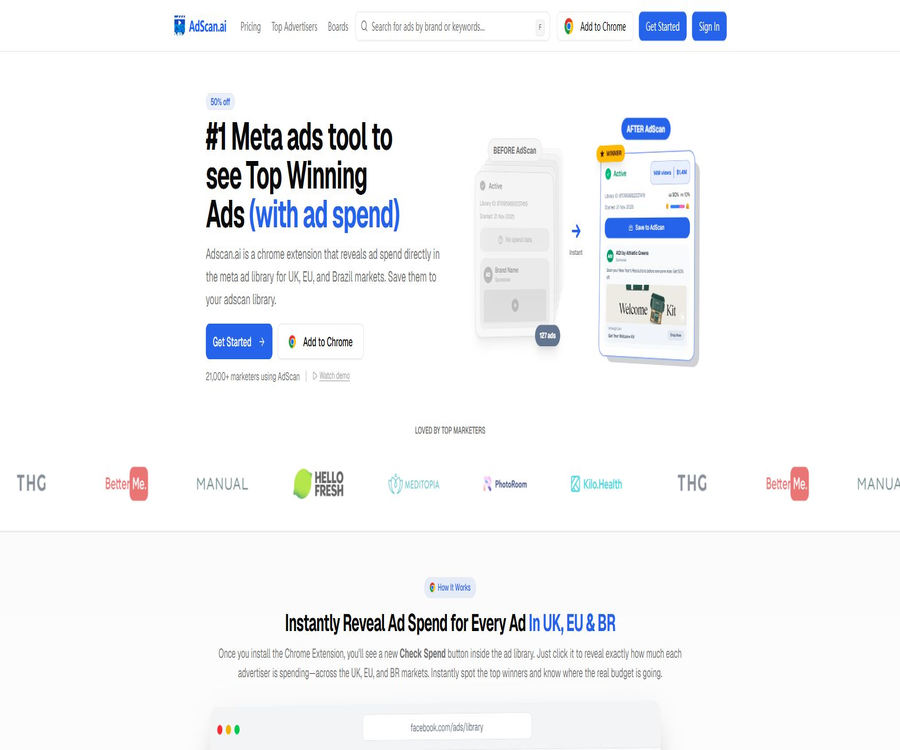
AdScan.ai is a competitive advertising research tool designed for media buyers, performance marketing teams, and creative strategists. It integrates ad discovery, spending insights, asset management, competitor analysis, and AI-driven creative rewriting into a single workflow.
The product has been integrated into the AdManage system; the browser extension is currently available under the name AdManage AdScan. Users can still examine advertisements through the AdScan.ai web interface, and use the selected materials for creative analysis and subsequent testing.
Main functions of AdScan.ai
- Meta ad spending query: It displays estimated costs, impressions, reach, and audience information in areas where transparency data is available.
- Competitor ad search: Find ads that are currently being run, by brand, category, ad library, and asset status.
- Cost sorting: Filter out the materials that are more likely to be seeing increased usage, based on estimated costs and engagement metrics.
- Cross-platform collection: Save ads from Meta, TikTok, YouTube, and LinkedIn to your personal asset library.
- Advertising billboards: Organize saved content by customer, industry, product, funnel stage, or creative theme.
- Video transcription: Extracts the spoken words and text from video ads to facilitate the analysis of the script structure.
- AI script rewriting: Generate new hooks, angles, and draft scripts by referencing the structure of existing ads.
- Visual cloning: Creates new static ad variations based on reference materials for creative testing.
- Competitor Overview: Provides a summary of the number of ads, reach, target audience, ad format types, and scheduling timeline.
- Notifications and monitoring: Follow the company and set up rules to keep track of changes in competitors’ advertisements.
- Developer API: Access to dashboard data, saved ads, insights on competitors, trends, and notification data.
How to interpret Meta’s advertising spending data
The costs shown by AdScan are estimates only; they are not exact figures from the advertising accounts of competitors. The platform makes use of the data on reach, impressions, and demographics provided by Meta in the UK, the European Union, and Brazil, in order to generate cost figures that can be easily compared.
- It is suitable for determining relative strength, for example, which ads of the same brand receive more budget.
- It is suitable for identifying materials that allow for continuous deployment and achieve a high level of reach, to be used as clues for determining research priorities.
- Financial statements or precise purchase amounts that are not suitable to be used as direct competitors.
- Different countries, time periods, audiences, and billing environments can affect the estimation results.
- When the platform lacks transparency data, some metrics may be missing or unavailable for verification.
Supported platforms and data range
| Platform | Key capabilities | Explanation of data range |
|---|---|---|
| Meta | Search, save, expense checking, audience reach analysis | The costs and efforts are focused on the UK, the EU, and Brazil. |
| TikTok | Save advertisements and create a material library | The transparency metrics vary depending on the region and the availability of the page. |
| YouTube | Save ads and organize ideas while browsing | Not every ad provides complete cost data. |
| Save sponsored content and view the ad library | The completeness of the data depends on the information made available by the platform. | |
| AdScan web library | Search for brands, view popular ads and public boards | There are differences between the public page and the features available after logging in. |
How to use Chrome extensions to track advertising expenses
- Install the current AdManage AdScan browser extension and check the publisher and extension name.
- Log in to your AdManage or AdScan account to enable the spending inquiry and cloud bookmarking features.
- Open the Meta Ads database and search for the target brand, keywords, or advertiser.
- On the ad card, select Check Spend and wait for the system to provide an estimate of the costs and information regarding reach.
- Using criteria such as cost, time spent on delivery, and type of content helps in identifying advertisements that are worth further study.
- Save the ad to the specified board, and add tags for industry, perspective, and creative stage.
- Return to the web interface to compare materials from the same brand, and identify verifiable creative hypotheses.
How to create a database of competitor’s advertising materials
- First, establish a clear dashboard structure based on brand, direct competitors, cross-industry inspirations, and platforms.
- Only collect materials related to the target audience, product price range, and targeting regions.
- Record the upload time of the material, its duration, estimated cost, as well as the hooks and action buttons.
- Compare images, videos, sliders, and landing pages from the same advertiser.
- Review new materials on a weekly basis, as well as those that are being increasingly used and those creative ideas that have been discontinued.
- Organize the observation results into a plan for the next round of scripting, visual design, and audience testing.
AI script rewriting and visual cloning
AdScan can extract the creative structure from saved ads and assist in creating new scripts and static image variations. It is better suited for accelerating creative development and internal drafts, rather than copying competitors’ work verbatim.
- Extract the hook, pain points, promises, evidence, and call to action at the beginning.
- Rewrite the same structure from different product, user, or marketing perspectives.
- Generate multiple script versions for testing short videos and static ads.
- Use the reference image to create new variations in composition, color, or layout.
- Save the generated content and place it in the same dashboard as the original inspiration materials.
- Before publication, manually check brand guidelines, factual accuracy, and intellectual property risks.
AI image generation capability
- It supports generating images from text, allowing advertisers to describe the visuals in natural language.
- Reference image conversion is supported, allowing for the creation of new visual variations in conjunction with brand assets.
- It offers common ad formats such as vertical, square, horizontal, and ultra-wide.
- Multiple variants can be generated at once, which facilitates filtering and conducting A/B tests.
- The generated images are automatically saved to the account, making them easy to download and manage via dashboards.
- The brand logo, product appearance, and textual details still require manual verification.
Competitor research workflow
- Define the research objectives, such as finding new hooks, verifying the format of materials, or observing the growth pace of competitors.
- Search for three direct competitors and three brands from other industries that invest heavily.
- Filter ads by estimated cost, reach, launch date, and duration of deployment.
- Categorize the candidate materials based on user pain points, benefits, evidence, and visual format.
- Extract common patterns, while noting any deviations that may be caused by brand awareness.
- Use AI to create differentiated drafts, and add your own product evidence and brand language.
- Test click-through rate, conversion rate, customer acquisition cost, and incremental impact with a small budget.
Which users are it suitable for
- Media pitcher: Quickly determine which competing ads have stronger budget signals.
- Performance marketing team: Create a cross-platform asset library and plan the next round of tests.
- Advertising agencies: Create collaboration dashboards and competitor briefs based on clients or industries.
- E-commerce brands: Study the product’s selling points, promotional strategies, visual design, and the structure of the landing pages.
- Creative strategist: Extract scripts and visual patterns from continuously uploaded content.
- Content production team: Transcribes video ads and breaks them down into actionable shooting scripts.
- Developers and data teams: Synchronize dashboards, advertising insights, and competitor analysis via APIs.
It is not very suitable for which types of needs
- A financial audit is required, including accurate advertising bills from competitors as well as backend conversion data.
- Countries or niche advertising platforms that only conduct research without providing data on transparency.
- Teams that hope to determine the creative direction entirely automatically, without any human intervention.
- Companies that require offline operation, private deployment, or complete open-source code.
- Managed devices that do not allow the installation of browser extensions or that prevent such extensions from accessing website content.
Prices and packages
AdScan.ai offers a free version, a Pro version and a Team version, as well as packages that can be combined with AdManage. As of the time of verification, the paid subscription plans are available at 50% off for a limited time; after the promotion ends, the prices, benefits and payment methods will be those specified on the purchase page.
| Package | Current monthly fee | Primary interests | Suitable for |
|---|---|---|---|
| Free Forever | $ | Up to 25 ads can be saved, public dashboards can be viewed, extensions can be used, along with certain inspection and AI functions. | Personal experiences and preliminary research |
| Pro | $ | Unlimited storage, unlimited spending checks, regional data, sorting and filtering, AI rewriting and cloning, 2 members | Professional pitchers and small teams |
| Team | $ | Includes Pro features, collaborative dashboards, priority support, customized onboarding, and unlimited members | Agents and large teams |
| AdManage combination | 499 dollars | Full features of AdManage, AdScan Team, unlimited number of members, and AI-driven ad creation | Teams that need to integrate research with advertising efforts |
Rules for the free version and trial period
- The free version can be used indefinitely, but the number of items that can be saved and certain advanced features are limited.
- The paid plan offers a 3-day trial, and a card is required to start the trial.
- Before the trial period ends, check the renewal date, monthly fee, and cancellation options.
- The 50% discount shown on the page is part of a promotional offer and should not be considered a permanent fixed price.
- The free version shows which spending data may be affected by the saved ads and account status.
- Before making a purchase, the team should assess the data coverage in the target area and on the relevant platform.
How to choose a package
| Usage status | It is recommended to choose | Basis for judgment |
|---|---|---|
| Occasionally collect ads for competing products. | Free Forever | First, verify the extensions, dashboards, and data coverage. |
| Study Meta ads every day. | Pro | Requires unlimited collection, cost checking, and advanced filtering. |
| Multiple agents working together | Team | A member-unlimited collaborative dashboard and priority support are required. |
| Manage and publish ads at the same time | AdManage combination | Link material research, AI generation, and deployment. |
| Only a data interface is required. | First, consult about API permissions. | Public documents do not mean that all packages include all usage amounts by default. |
Browser extension information
| Project | Current information |
|---|---|
| Name | AdManage AdScan | Save Ads & Reveal Spend |
| Version | 2.1.3 |
| Recent updates | August 12, 2026 |
| Size | Approximately 1.88 MiB |
| Language | English |
| Number of users | About 5,000 |
| Store rating | 3.5 points, 28 ratings |
| Data disclosure | It can handle website content. |
Notes on privacy and permissions
- The extension reads the advertisement database or the content of websites on pages in order to insert buttons for saving and checking costs.
- Before installing enterprise equipment, administrators should verify the scope of permissions, privacy policies, and data flow.
- Do not include any client confidential information or sensitive personal data in ad notes, board names, or prompt words.
- Team members and API keys should be removed promptly after leaving the job, changing roles, or ending external collaborations.
- Public dashboards may reveal the subjects of study and creative strategies; sensitive projects should be kept private.
- The scope of synchronization between Expansion, the web interface, and AdManage accounts should be verified using actual account details.
API and automation capabilities
AdScan offers a programmed interface that uses API keys for authentication, enabling the reading and management of dashboards, saved ads, competitor companies, trends, and notifications. This interface is suitable for synchronizing advertising data into internal reports, research databases, or creative workflows.
| Interface module | Tasks that can be completed | Application examples |
|---|---|---|
| Boards | List, create, modify, and delete dashboards | Automatically create a research space for each customer. |
| Ads | Search for ads, obtain details, add to dashboards, and view cloning parameters | Synchronize assets and metadata |
| Companies | Follow or unfollow a company | Create a list for monitoring competitors |
| Brand Spy | Read the brand overview, copy, title, landing page, and timeline. | Generate a weekly report on competitors |
| Trending | Read popular tags and advertisers | Discover recent creative trends |
| Notifications | Manage notifications and rules | Trigger a new ad reminder |
API usage recommendations
- Different keys are used for development, testing, and production environments.
- Only grant the necessary permissions, and store the keys in secure server configurations.
- Control the request frequency, log failure statuses, and design retry and deduplication mechanisms.
- Save the original ad identifier and the time of capture, to prevent historical data from being mistaken for real-time information.
- Before disclosing competitor data to the public, review the platform’s terms and local advertising transparency rules.
- First, verify the permissions for using the package, the associated limits, and the conditions for commercial use, before proceeding with the actual integration.
Product advantages
- Convert the transparency information in Meta’s ad library into more intuitive metrics regarding costs and reach.
- It is possible to check and save the materials directly on the ad browsing screen, thereby reducing the need to switch between different tools repeatedly.
- It covers popular advertising platforms such as Meta, TikTok, YouTube, and LinkedIn.
- It offers dashboards, tags, and team collaboration, making it suitable for building a creative knowledge base over time.
- Sorting by cost helps prioritize the investigation of ads that may be generating traffic.
- Research on video transcription, script rewriting, and visual cloning, as well as creative production.
- A overview of competitors and a timeline are useful for quickly establishing a profile of brand marketing efforts.
- Public APIs can support internal reporting and automated research processes.
- Integration with AdManage enables further connection between ad creation and delivery.
Usage restrictions and precautions
- The costs are estimated values and cannot replace the actual expenses in competitors’ advertising accounts.
- Meta’s detailed transparency data focuses on the United Kingdom, the European Union, and Brazil.
- The cost, reach, and audience fields for other platforms may be incomplete.
- High costs do not equate to high profits, high conversion rates, or a brand that is suitable for one’s needs.
- Competitor materials may rely on popularity, promotions, target audience, and landing pages; it’s not enough to consider only the visuals.
- AI cloning and script rewriting carry risks of trademark, copyright, and creative infringement.
- Browser extensions need to process website content, and installation on managed devices may be restricted.
- Promotional prices, free benefits, and API permissions may change depending on the product.
- The team should verify its conclusions through its own advertising tests, rather than relying on rankings.
GitHub and the open-source status
During this verification, no official GitHub repository maintained by AdScan.ai or AdManage for releasing the source code of their core products was found. The web platform, browser extensions, cost estimation tools, and API services should be considered as commercial, closed-source products.
| Components | Status | Explanation |
|---|---|---|
| AdScan web platform | Commercial closed-source | The source code of the core platform is not made public. |
| Chrome extensions | Distribution at stores | It can be installed and used, but that does not mean it is open source. |
| Cost estimation model | Not disclosed | The algorithm and training details have not been fully made available. |
| Developer API | Open interface | Providing documentation does not mean that the server-side source code is open source. |
| Third-party warehouse with the same name | It does not represent the official party. | It is not possible to determine the product license based on this. |
Basic information
| field | Content |
|---|---|
| Tool name | AdScan.ai |
| Current brand relationship | It has been integrated into the AdManage system. |
| Tool type | Research on competitor ads, ad asset libraries, and AI creative tools |
| Main platforms | Meta, TikTok, YouTube, and LinkedIn |
| Core data regions | Meta’s Transparency Market in the UK, the EU, and Brazil |
| Main entrance | Web browser and Chrome extension |
| Whether API is provided | Yes |
| Does it support team collaboration? | Yes, the Team and combination approaches are more comprehensive. |
| Price pattern | Free version, monthly subscription, and combo packages |
| Is it open source? | No, no official core source code repository was found. |
Recommendation score
4.3 / 5. AdScan.ai is suitable for media planners and agencies that conduct in-depth research on the advertising strategies of Meta’s competitors; it offers seamless integration between spending analytics, asset dashboards, and AI-driven creative functions. However, data region limitations and estimated attributes must be specified at the time of use.
Frequently Asked Questions
Can AdScan.ai see the actual advertising costs of competitors?
It shows estimated costs based on publicly available transparency data, and not the exact bills for competitors’ advertising accounts.
In which regions are the Meta spending data more complete?
The authorities provide priority support to the UK, the European Union, and Brazil; the transparency data related to Meta ads in these regions can be used to estimate costs, reach, and target audiences.
Is AdScan.ai free?
There is a free version called Free Forever, which allows saving up to 25 ads and using basic extensions and dashboard features; advanced functions require payment.
How much is the Pro package?
The verification page shows that the promotional price is $99 per month, while the original price is $199; the end date of the promotion and the actual price to be paid will need to be confirmed at the time of purchase.
Who is the Team package suitable for?
Team is designed for agents and large teams, offering collaboration dashboards, priority support, customized onboarding, and no limit on the number of team members.
Are there free trials available for paid plans?
The paid plan offers a 3-day trial period and requires a payment card to be linked; users should check the rules regarding renewal and cancellation before starting use.
Which platforms’ ads can be saved?
The extension allows for the saving of ads from Meta, TikTok, YouTube, and LinkedIn; however, the available data fields vary across different platforms.
Can AdScan.ai generate advertising materials?
AI can be used to rewrite scripts, clone static designs, and create image variations, but manual verification of the brand, facts, and copyright is still required before publication.
Does AdScan.ai offer an API?
It is available for managing dashboards and ads, as well as for accessing data on competitors, trends, and notifications; the specific permissions and usage limits depend on the account settings.
Is AdScan.ai open source?
No. No official core source code repository was found during this verification, and the presence of public APIs and installable extensions does not equate to an open-source product.
Tools similar to AdScan.ai



 Guigong Network Security Registration No. 45132202000164