






expensesorted
@expensesorted – an intelligent tool focused on improving AI efficiency.
Tags:AI improves efficiencyWhat is Expense Sorted?
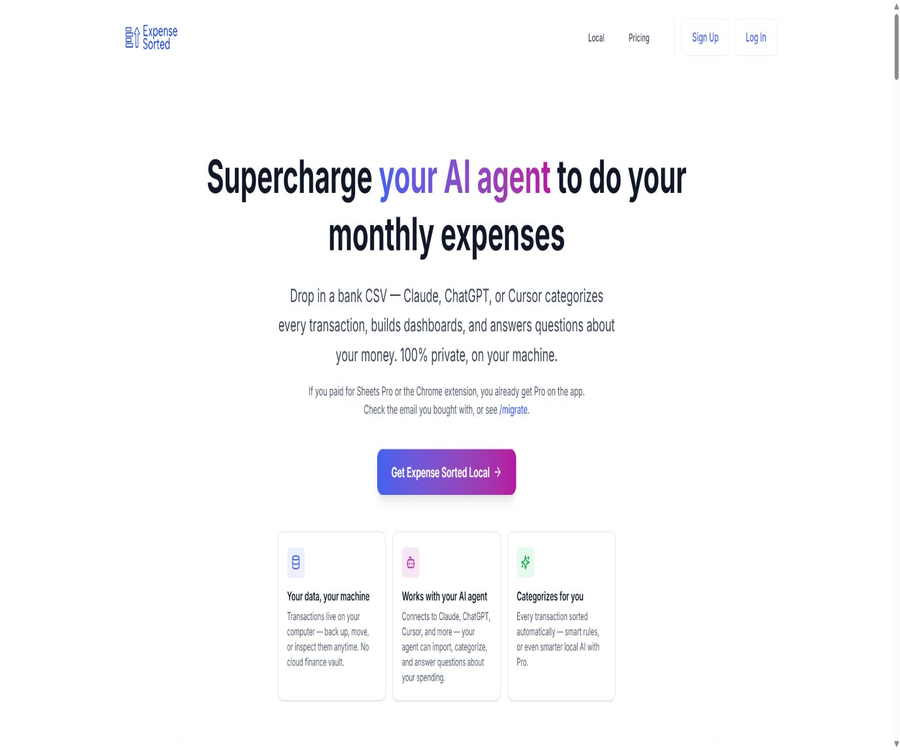
Expense Sorted Local is a tool for organizing expenses with a local-first approach. Users export CSV files from their banks, import the transactions into an SQLite database on their computers, and then use rules or local machine learning models to classify them automatically.
It also provides command-line and MCP tools that enable AI agents such as Claude, ChatGPT, and Cursor to query, categorize, summarize, and interpret local transactions. The main product does not require a connection to a bank account, nor does it upload transaction records to Expense Sorted’s cloud-based categorization service.
Shift from cloud-based products to local applications
In its early stages, Expense Sorted relied on Google Sheets add-ons, hosted classification interfaces, and monthly AI subscriptions. By 2026, the product evolved into a local desktop application; new users can now choose between a free local version or a one-time payment of $49 for Local Pro.
| Phase | Main products | Current status |
|---|---|---|
| Early stage | Google Sheets templates and add-ons | Free templates are still available. |
| Early stage | Monthly cloud AI plans and hosting categories | Sales to new users will cease, with gradual discontinuation. |
| Current | Expense Sorted Local | Main products |
| Current | Local Pro lifetime license | $ |
Core functions
- Import the CSV transaction files exported by the bank
- Save the transaction history in a local SQLite database.
- Use free rules to automatically identify common merchants and categories.
- Use the Pro local model to learn classification patterns.
- Find transactions based on their meaning using semantic search.
- Generate category, month, and merchant analysis.
- Connect to AI agents via the command line and MCP
- Export, back up, and migrate your own databases
Local SQLite database
The transaction data is stored in SQLite files on the user’s computer, rather than in the manufacturer’s cloud-based financial database. Users can copy, back up, migrate the data, or use standard database tools to examine it.
- Save bank transactions and classification results offline
- It does not rely on a continuous manufacturer cloud account.
- It makes it easy to create one’s own backup strategy.
- The database can be migrated when changing computers.
- Provides the same data source for the command line, desktop interface, and agents
CSV import
The main way to import data into Local is through CSV exports from banks; it is not necessary to provide the bank’s login credentials to the aggregation service. Different banks may use different column names, date formats, signs for amounts, and currency formats, so it is necessary to check the mappings during the first import.
- Download the CSV of transactions for the specified period from the online banking system.
- Select files in the local application and map fields.
- Identify date, description, amount, and account information
- Preview first before writing to the local database.
- Duplicate imports of the same batch of transactions are avoided through deduplication rules.
Rule classification
The free version maintains rule classification based on merchants and conditions, making it suitable for routine transactions that occur frequently. The rules are more stable than those used in free conversations, ensuring that the same merchant is assigned to the same category consistently.
- Match categories based on the merchant name.
- Establish rules for fixed subscriptions and billing.
- Transactions that do not match are kept in a pending review status.
- Reprocess the relevant transactions after adjusting the rules.
- No need for cloud models or per-use token fees
Local Pro local AI classification
Local Pro adds local neural network classification on top of rules, in order to learn the classification habits of merchants and users. The model runs on the user’s computer, so there is no need to send transaction data to the cloud-based AI of Expense Sorted.
- New merchants not covered by the identification rules
- Improve subsequent classification based on historical corrections
- Process a large number of transactions in batches while maintaining consistency.
- It reduces the need to paste the entire bank statement into the chat window.
- There is no charge for models based on the number of classifications.
Semantic search
Pro’s semantic search finds transactions based on their meaning, using local embeddings, rather than relying solely on identical keywords. Users can search for travel expenses, office software, or certain types of living costs, even if the descriptive text is not exactly the same.
- Search for similar transactions by consumption value
- Identify similar fees across different merchants
- Records of missed detections and incorrect categorizations in auxiliary examinations
- Provide a more relevant set of local transactions for AI-based Q&A.
MCP and AI agents
Expense Sorted features MCP capabilities, which allow compatible clients to use their local financial databases as tools. The agent retrieves and aggregates data through structured commands, which is a more reliable method than repeatedly pasting CSV files in chats.
- Import local CSV file
- Operating rules or Pro category
- Search for transactions by time, category, and merchant.
- Generate expense summaries and simple dashboard data
- Answer natural language financial questions
- Allow multiple compatible clients to use the same local ledger.
Why not just give the CSV to the chat model?
Thousands of rows of data may exceed the limits of the chat context or be processed in batches by the model; this can lead to classification drift when attempts are made to repeat the processing. Expense Sorted first handles the batch processing using a deterministic local database and classification engine, and then relies on agents for interaction and interpretation.
| Method | Data processing | Consistency | Privacy features |
|---|---|---|---|
| Paste the chat directly | The model reads from the context. | It may change depending on the round. | The data will be sent to the corresponding chat service. |
| Expense Sorted rule | Local condition matching | High | Cloud-based classification is not required. |
| Local Pro model | Local models and embeddings | High, and it can be learned. | Run on a computer |
| MCP query | The agent invokes local tools. | Based on a complete database | The query content is still subject to the client’s privacy rules. |
Desktop applications and command line
- Provides macOS desktop applications
- Provides Windows desktop applications
- Use a local database instead of a remote server.
- Command-line tools are suitable for automation and advanced users.
- The MCP configuration allows connection to AI clients that support tool calls.
How to organize monthly expenses
- Export a CSV for the same period from each bank and credit card account.
- Create or open a local database in Expense Sorted Local.
- Import the files one by one and check the date, description, amount, and account mapping.
- Run free rule classification or enable Pro local AI classification.
- Special attention is given to reviewing unclassified transactions, those with high amounts, and transactions with low confidence levels.
- Adjust the categories and establish consistent rules for duplicate merchants.
- View monthly category, merchant, and trend summaries.
- After completion, back up the SQLite database and the original bank export files.
How to connect an AI agent
- First, complete the CSV import and basic classification to prevent the agent from having to process dirty data directly.
- Enable or install the MCP tool in Local.
- Generate local configurations suitable for the target AI client.
- Only the local tools and paths required by Expense Sorted are authorized.
- Restart the client and check whether the tool can read the local database.
- First, use read-only queries to test searches by month, category, and merchant.
- When writing or reclassifying is required, verify each tool parameter individually.
- Do not allow the agent to automatically delete transaction records or overwrite databases that have not been backed up.
Which users are it suitable for
- Privacy-conscious users who do not wish to connect to bank aggregation services
- Users who organize their personal expenses in CSV format on a monthly basis
- Those who need a local database rather than fragile tables
- Users who wish to have Claude, ChatGPT, or Cursor analyze their expenses
- Freelancers who do not want to keep paying for subscription-based accounting services
- Small business owners who are willing to back up and verify their financial data on their own
Typical use cases
- Batch classification of bank and credit card transactions at the end of the month
- Search for expenses related to subscriptions, meals, travel, and software.
- Compare consumption changes across different months and categories
- Calculate how many months of expenses can be covered by the savings.
- Organize the basic cost categories for tax preparation
- Let the AI agent answer questions related to local ledgers.
- Create a personal expenses database without connecting to a bank account.
Product advantages
- The bank transaction records are stored on the user’s own computer.
- No bank login or third-party account aggregation is required.
- The free rule categorization can be used indefinitely.
- Pro offers a one-time lifetime license rather than a monthly fee.
- Local AI and semantic search are not charged based on the number of calls.
- The SQLite format facilitates backup, inspection, and migration.
- MCP allows multiple AI clients to share the same reliable data source.
Usage restrictions
- It mainly relies on manual export and import of bank CSV files.
- It is not a complete double-entry accounting or corporate accounting system.
- It does not replace invoices, receipts, or tax compliance software.
- Different banks’ CSV formats may require manual mapping and cleaning.
- Local storage means that the user is responsible for backups and device security.
- The agent client may send the query content to its model provider.
- The model accuracy of Local Pro still requires manual verification.
Privacy boundaries
\"Running locally\" means that the transaction database, rules, and optional Pro categorizations of Expense Sorted are processed on the computer; this does not imply that all connected chat clients are completely offline. When asking questions to external AI systems, the specific questions and the responses provided by those systems are still subject to the data policies of those clients.
- Give priority to having the agent execute aggregate queries rather than returning all transaction records.
- Do not reveal the full account details and identity information in the prompts.
- Check whether the AI client saves or trains conversations.
- Enable disk encryption and login protection for the computer.
- Create encrypted backups of the SQLite database.
- Safely remove financial data before selling or disposing of equipment.
Data ownership and backup
- Retain the original bank CSV as the basis for import.
- Regularly copy the SQLite database to a secure backup location.
- Create snapshots before major imports and bulk corrections.
- Verify that the backup can be restored and opened in another directory.
- Log changes to custom categories and rules
Free version and Local Pro
| Functions | Free Local | Local Pro |
|---|---|---|
| Bank CSV import | Support | Support |
| Local SQLite database | Support | Support |
| Rule classification | Support | Support |
| Basic queries and exports | Support | Support |
| Local AI classification | Not included | Support |
| Semantic search | Not included | Support |
| Pro Agent Tool | Not included | Support |
| Price | Free | $ |
Price and trial version
Local Pro offers a 14-day free trial without the need for a credit card. After the trial period ends, the Pro features are suspended, but the free categorization and local data can still be used.
| Plan | Price | Deadline | Explanation |
|---|---|---|---|
| Expense Sorted Local | Free | Long term | Rule classification and local database |
| Local Pro trial | Free | 14 days | Obtain a trial license via email |
| Local Pro | $ | Lifetime license | Local AI, semantic search, and Pro MCP tools |
| Google Sheets template | Free | Long term | Suitable for beginners who do not want to install desktop applications |
What should be taken into account for a lifetime license?
\"Lifetime\" usually refers to the long-term validity of the current product license; it does not imply that the manufacturer provides absolute guarantees for all future features, operating system versions, or unlimited support. It is advisable to keep the order confirmation, the license email, and the documentation detailing the functions available at the time of purchase.
- Confirm the number of devices permitted under the license.
- Save the license key and purchase email address
- Learn about the methods for reinstallation and activation on a different device.
- Distinguish between current functions and potential new services that may be added in the future.
- Do not consider a one-time license to be professional financial advice.
Migration of old plans
The older monthly subscription plan for hosted AI is no longer available for new users, and existing cloud access will be phased out during the migration period. Eligible users of Sheets Pro, the old lifetime AI version, or those with a valid monthly subscription can obtain a Local Pro license.
- Use the original purchase email to check migration eligibility.
- Contact official support if no permission is received.
- Export your data before the cloud service stops operating.
- Stop citing the old prices such as $2 per month or $25 for lifetime access to AI.
Free Google Sheets templates
The authorities still provide free Google Sheets templates for users who want to get started quickly, need to collaborate, or do not wish to install desktop applications for the time being. The data in these templates is stored in the user’s own Google account, rather than in the Expense Sorted Local database.
- Copy the template to your own Google Drive
- Use formulas and category columns to organize expenses.
- Collaborate with family members or accountants by sharing permissions
- Migrate to Local only when local SQLite and agent tools are required.
It’s not anything.
- It is not a platform for automatic synchronization of bank accounts.
- It is not a tool for making payments or transfers.
- It is not a complete general ledger for corporate accounting.
- It is not a service related to tax filings or audit assurance.
- It is not an investment advice or financial planning service.
- It is not an open-source self-hosted server project.
GitHub, APIs, and open-source status
As of this verification, no official GitHub repository was found that had been confirmed by the Expense Sorted website; therefore, the local desktop application should not be labeled as open source. Old API documentation related to previous classification systems is still available on the website, but the current main focus is on the local application and MCP – old hosting interfaces should not be considered the main product for new users.
| Project | Status | Explanation |
|---|---|---|
| Local desktop application | Closed source | Runs natively on macOS and Windows |
| SQLite database | Open standard format | It does not mean that the application’s source code is open source. |
| Command-line tools | Provide | Used for local automation |
| MCP tool | Provide | Connect to AI-compatible clients |
| Old cloud API | There are still historical documents. | New sales have shifted to Local. |
| Official GitHub | No findings were detected. | Similar open-source budgeting applications are not official. |
Basic information
| field | Content |
|---|---|
| Tool name | Expense Sorted Local |
| Tool type | Classification of local AI expenditures and agent tools |
| Data input | Bank CSV |
| Data storage | Local SQLite |
| Platform | macOS, Windows |
| Free features | Import, rule classification, and local database |
| Pro price | $ |
| Free trial | 14 days, no credit card required |
| Is MCP supported? | Yes |
| Whether a command line is provided | Yes |
| Is it open source? | No |
Recommendation score
4.4 / 5. Expense Sorted Local is suitable for CSV accounting users who value privacy, data ownership, and one-time payments; the combination of local SQLite and MCP gives it a distinctive feature. However, it lacks the capability for automatic bank synchronization and a complete accounting system.
Frequently Asked Questions
Is Expense Sorted free?
Free access is available to Local CSV import, SQLite databases, and rule categorization; there are also free Google Sheets templates.
How much is Local Pro?
The current price is $49 for a one-time, lifetime license; there is no monthly fee, and it includes local AI classification, semantic search, and Pro agent tools.
Is a credit card required for the trial?
It’s not necessary. By entering your email address, you can obtain a 14-day Pro trial license; even after the trial period ends, you can continue to use the free features.
Will the bank transaction records be uploaded to the cloud?
The Local product process stores transactions in an SQLite database on the computer, organizing them locally without uploading them to the Expense Sorted cloud-based financial database.
Is it necessary to connect a bank account?
It is not necessary. Currently, transactions are mainly imported using CSV files exported by the user from the bank.
Which AI clients are supported?
The official website lists clients such as Claude, ChatGPT, and Cursor that can connect to MCP tools; actual support depends on the MCP capabilities of those clients as well as the capabilities of their local tools.
Is it completely offline?
Databases and classification engines can run locally, but external AI clients may send issues or query results to the model service provider.
Can it be used for tax filing?
It can assist in organizing expense categories, but it cannot replace accounting documents, tax software, or the review by professionals.
Is it still possible to purchase the Old Moon payment plan?
No. The old monthly subscription plan for hosting is no longer available for purchase; new users should choose either the free Local version or the Local Pro version at $49.
Is Expense Sorted open source?
It is not open source; no official source code repository confirmed through the official website has been found. SQLite uses an open format, but this does not mean that the desktop applications associated with it are open source.
Tools similar to expensesorted



 Guigong Network Security Registration No. 45132202000164