






3D Product Visualization Services & Software
3D Product Visualization Services & Software – intelligent tools focused on enhancing efficiency through AI.
Tags:AI improves efficiencyWhat is Zolak?
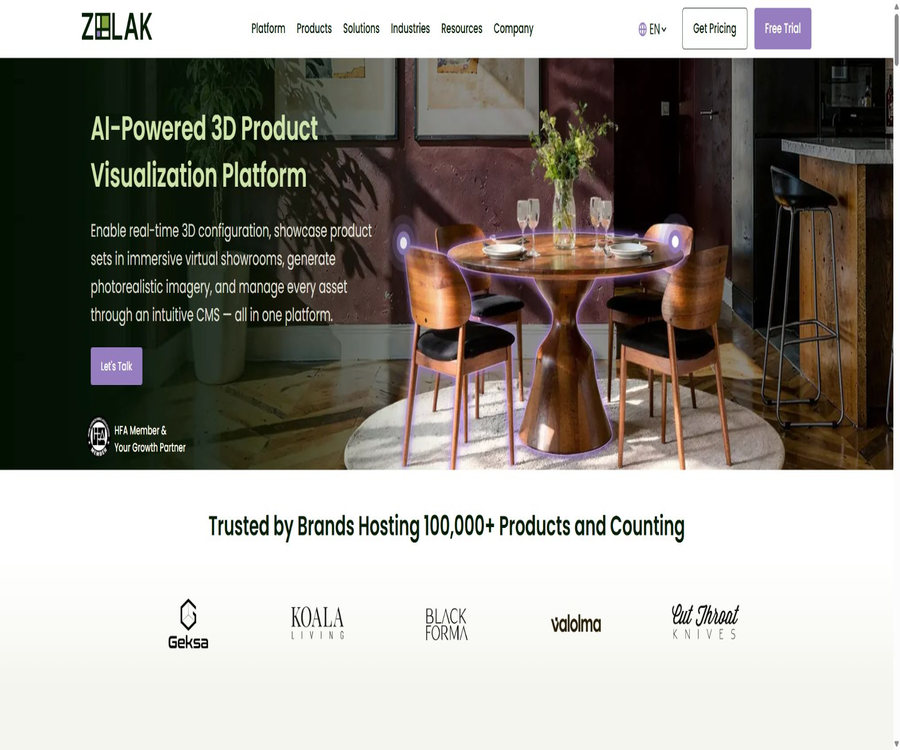
Zolak is an AI and 3D product display platform designed for visual e-commerce; it helps brands transform static product pages into interactive experiences that allow for rotation, customization, and placement in a real-world setting. It is particularly suitable for furniture, home goods, fashion, jewelry, industrial equipment, and other products whose dimensions, materials, or combination aspects need to be displayed.
The company was founded in 2021, with its headquarters located in Delaware, United States; it has teams based in both the United States and Europe. Zolak not only provides software modules but also offers services such as 3D modeling, material creation, platform setup, integration, and custom development.
Platform composition
| module | Key capabilities | Typical uses |
|---|---|---|
| 3D Viewer | Rotate, scale, and view material details | Product details page |
| 3D Configurator | Real-time switching of color, size, material, and components | Configurable product sales |
| WebAR | Preview products in proportion in real space | Try out furniture, equipment, and home products |
| Virtual Showroom | Combine multiple products in a digital room | Series combinations and immersive exhibition halls |
| User Interior Visualization | Upload or scan a room and replace the existing items. | Try out products in the user’s own space |
| Render Studio | Use 3D assets to create static renderings. | Product images, catalogs, and marketing materials |
| AI Studio | It is possible to create visuals from ordinary photos without the need for 3D models. | Images with a white background and lifestyle scenes |
| CMS | Centralized management of models, materials, scenes, and content | Multi-channel asset management |
Core functions
- 360-degree product rotation and detailed zooming are available on the webpage.
- Switch colors, fabrics, materials, sizes, and components in real time.
- Rules are used to prevent invalid or unproduced combinations.
- Update product prices automatically based on changes in options.
- Use WebAR to place the configured products in the real world.
- Combine, move, hide, and replace products in the preset rooms.
- Allow consumers to upload their own rooms and remove existing furniture.
- Generate static images, videos, and interactive experiences from a set of 3D assets.
- Centralized management of 3D models, PBR materials, scenes, and product data.
- Connects e-commerce, inventory, shopping cart, ERP, and CRM systems.
3D product viewer
The 3D Viewer allows customers to examine products from various angles, and to view textures, seams, hardware, and structure by using zoom functions. It is suitable for products whose design is relatively fixed, but whose visual details play a role in purchasing decisions.
- Supports 360-degree rotation and responsive scaling.
- It displays realistic materials, lighting, and reflections.
- Adaptive rendering performance across different devices.
- Establish a correspondence between product codes and variants.
- The WebAR entry point can be placed within the same viewing module.
3D Product Configurator
The configurator is suitable for products with a large number of options and combination possibilities; each time the consumer makes a change, the visual appearance and price update accordingly. The backend rules should be synchronized with data related to manufacturability, inventory, and orders.
- Switch colors, materials, fabrics, finishes, and sizes.
- Add or remove optional components.
- Restrict mutually exclusive and dependent options according to the rules.
- Real-time updates to 3D visuals and prices.
- Pass the final configuration to the shopping cart and checkout process.
- Save the configuration code for use in production, sales, and customer service.
- It supports furniture, jewelry, shoes, cars, and industrial equipment.
WebAR real-world preview
WebAR can be opened directly in supported mobile browsers, without the need for users to install any dedicated applications. Users can place furniture, doors, windows, devices, or other items in a real environment on a proportional scale.
- Check the proportion between the items and the room.
- Compare the effects of different colors and configurations in an environment.
- Reduce the uncertainty arising from relying solely on size charts.
- Start the preview via the product page or QR code.
- Test different phones, browsers, and lighting conditions before going live.
Virtual exhibition hall
Virtual Showroom allows consumers to combine multiple products within a digital space, rather than viewing individual products in isolation. Brands can use predefined scenarios to display sets, combinations, and related products.
- Move and rotate products in indoor scenes.
- Add, delete, hide, or replace different products.
- Switch the scene background and display layout.
- Save and share the designed rooms.
- Connect the combined result to the product details or shopping cart.
- Provide an experience on web pages or corporate mobile apps.
User indoor visualization
Consumers can upload photos of rooms or use mobile devices to obtain information about the space; AI analyzes the room’s layout and allows for the removal of existing items so that the brand’s 3D products can be placed there. The results serve as a reference for shopping, but they should not replace professional measurements and on-site assessments.
- Identify the ground, walls, and main spatial relationships.
- Remove existing objects such as furniture, decorations, and even doors and windows.
- Place multiple items in the user’s own room.
- Adjust the position, direction, and combination.
- Provides references for purchasing, matching, and sales consultation.
- Important dimensions still need to be manually verified before placing an order.
AI Studio and Render Studio
| Tools | Enter | Output | Main differences |
|---|---|---|---|
| AI Studio | Photos of ordinary products | Images with a white background and lifestyle photos | There is no requirement to create a 3D model first. |
| Render Studio | The already created 3D models and materials | Multi-angle realistic product rendering | It is more suitable for maintaining geometric and variant consistency. |
| Professional rendering services | Brand information and project requirements | The advanced rendering package has been delivered. | Produced by the Zolak team. |
Unified 3D asset library
Based on a centralized 3D asset library, Zolak enables the same models and materials to be used in viewers, configurators, exhibition halls, AR applications, and static renders. By modifying the assets, it becomes possible to avoid repetitive creation of content and inconsistencies across different platforms.
- Manage product models, variants, and product identifiers.
- Save reusable PBR materials.
- Organize exhibition hall scenarios and configuration rules.
- Stores 2D renderings and AI-generated content.
- Distribute assets to websites, marketing, and sales channels.
- Release versions through permission and process control.
3D modeling and material services
Brands that do not have ready-made 3D models can submit the dimensions, technical specifications, and photos from various angles; the Zolak team will then create a digital twin suitable for use on websites. The complexity of a model is generally classified as simple, medium, complex, or extremely complex.
- Reconstruct the accurate geometry based on dimensions and photos.
- Create PBR materials for wood, fabric, metal, glass, and more.
- Model optimization for web page loading and interactivity.
- Create color, size, and component variants.
- Add the completed assets to the brand-specific CMS.
- Enable the same asset to be reused for AR, configuration, and rendering.
E-commerce and enterprise system integration
Zolak is integrated into existing e-commerce systems at the visual layer; the product information, inventory levels, prices, and orders remain sourced from the brand’s original systems as the authoritative data sources. For simple scenarios, code snippets can be used, while for more complex scenarios, SDKs and interfaces are available.
| Platform or system | Common connection methods | Content that can be synchronized |
|---|---|---|
| Shopify | Theme code or theme editor | Product variants and checkout process |
| Magento | Template embedding and mapping of product attributes | Numbering, variants, and price rules |
| WooCommerce | Short code or front-end hook | SKU, options, cart, and checkout |
| BigCommerce | Theme or script injection | Product options and checkout |
| Salesforce Commerce Cloud | Template or headless frontend embedding | Product ID, variants, and price |
| PrestaShop, Shopware, Wix | Templates, CMS blocks, or frontend embeds | Product identification and visual modules |
| ERP, CRM, PIM, and custom-built systems | Customized interface | Catalog, inventory, prices, and business data |
How to deploy Zolak
- Choose a product line and clear business objectives.
- Prepare the product dimensions, photos, material, variants, prices, and inventory rules.
- Schedule a demonstration and select the combination of Viewer, Configurator, Showroom, or Studio.
- Apply for a trial to test the effectiveness using a small number of representative SKU items.
- Review existing 3D assets, or commission Zolak to create digital models.
- Create models, materials, variants, and configuration rules in CMS.
- Embed the visual module in the test store and map the product codes.
- Connects the shopping cart, inventory, and dynamic pricing.
- Test phones, desktops, AR, speed, and invalid combinations.
- Launch with a low volume of traffic and continuously monitor interactions, conversions, and returns.
Online acceptance process
- Check the model’s dimensions, proportions, and structure item by item.
- Check the color, texture, and reflection on the calibration screen.
- Verify all configuration combinations and mutual exclusion rules.
- Verify that the price on the page matches the price on the backend.
- Simulate stockouts, price changes, and product removal from the catalog.
- Check whether the shopping cart can retain its complete configuration identifiers.
- Test performance under standard mobile phones, browsers, and network conditions.
- Verify the AR scale, ground recognition, and spatial placement.
- Confirm the privacy notice and deletion process for uploaded room images.
- Maintain monitoring, rollback, and customer support mechanisms after going live.
Price and trial version
Zolak does not currently have a publicly available, standardized list of SaaS packages; instead, quotes are determined based on the number of products, the desired features, the complexity of modeling, system integration needs, and the extent of customization required. The official quote page asks for business-related information, and the most suitable solution is identified through personalized demonstrations and trials.
| Cost items | Price method | Main influencing factors |
|---|---|---|
| Platform subscription | Custom quote | Modules, quantity of products, traffic, and number of environments |
| 3D modeling | Quotation based on model complexity | Geometry, details, references, and variants |
| Material production | Quotation based on material complexity | Texture, layers, reflection, and precision |
| Directory configuration | Quotation based on range | Number of SKUs, variants, and rules |
| Technical integration | Quotation by project | E-commerce, shopping carts, inventory, ERP, and CRM |
| Professional rendering | Quotation based on the delivery package | Number of images, scenes, resolution, and timeline |
| Custom development | Quotation by project | Dedicated interface, logic, and platform scalability |
How to interpret publicly available price information
The official blog once used $140 per month as an example of the cost for a SaaS virtual showroom, but the current official pricing page does not list this amount as a fixed package that can be purchased. This figure should not be presented in the catalog as the standard price available to all customers.
- The official quote and contract issued as part of the sales process shall prevail.
- Confirm whether the subscription includes Viewer, AR, Configurator, and Showroom.
- Separate one-time modeling costs from ongoing platform fees.
- Check the traffic volume, number of products, number of environments, and the maximum usage limits for interfaces.
- Clarify the trial period, the number of samples, and the costs after the trial period.
- Ask about annual commitments, renewal, scaling, and exit policies.
How to estimate the total cost
| Cost layer | Contents that need to be calculated | Parts that are easy to overlook |
|---|---|---|
| Initial assets | Model, material, scene, and product data | Rework and lack of standard documentation |
| Platform services | Subscriptions, modules, traffic, and storage | Traffic during peak seasons and multiple stores |
| System integration | E-commerce, inventory, prices, and shopping cart | Maintenance of legacy systems and custom interfaces |
| Content operation | Add new SKUs, variants, and marketing renders | Ongoing updates to materials and scenes |
| Quality assurance | Device testing, color and size verification | Browser upgrades and model drift |
| Exit migration | Asset export and alternatives | Format, licensing, and data deletion |
Which users are it suitable for
- Brands that have a large selection of furniture and home goods SKUs.
- Companies that sell products whose color, material, and components can be customized.
- E-commerce teams that wish to add 3D and AR features to product pages.
- Departments that need to generate multiple angle product images in bulk.
- Manufacturers that lack an in-house 3D team but need digital assets.
- Companies that need to link their visual configurations to inventory and orders.
- Brands that display jewelry, shoes, equipment, and building materials.
- Real estate and home improvement companies that need virtual rooms and space planning.
Typical use cases
- Allow customers to customize the fabric, size, and module combination of the sofas.
- Preview tables, chairs, lighting fixtures, or doors and windows in a real room.
- Displays options for jewelry metals, gems, and engraving.
- Configure the shoe color, sole, and material.
- Displays the components and technical options of industrial equipment.
- Generate images with a white background and lifestyle renderings from the same model.
- Sell complete furniture sets in the virtual exhibition hall.
- The final configuration and price are directly entered into the shopping cart.
Product advantages
- Bring 3D viewing, configuration, AR, exhibition halls, and content creation together on one platform.
- The same 3D asset can be reused across multiple sales and marketing channels.
- It supports app-less WebAR, thereby reducing the barriers to use for consumers.
- Configuration rules can prevent combinations that cannot be produced.
- Dynamic pricing and inventory linkage reduce inconsistencies between the front end and back end.
- AI Studio allows for the creation of visual content for products that don’t have 3D models.
- We offer complete modeling, material, and professional rendering services.
- It can be integrated with existing systems through lightweight code, SDKs, or APIs.
- Covers major e-commerce platforms and headless architectures.
- A centralized CMS facilitates the management of large-scale product assets.
Usage restrictions and precautions
- There are no standard packages available; a sales assessment is required to determine the initial budget.
- High-quality 3D assets require accurate dimensions and references from multiple angles.
- Complex models, materials, and configuration rules increase costs and project duration.
- Web 3D may affect loading speeds and the experience on low-end devices.
- Errors may still occur in AR scaling and spatial recognition.
- Differences in monitors can affect the assessment of colors and materials.
- AI removal of furniture and indoor reconstruction may generate incorrect structures.
- Dynamic prices and inventory levels depend on reliable backend synchronization.
- Incorrect configurations can enter the order and production processes.
- The room photos uploaded may contain people or sensitive family information.
- The official data on conversion rates and reduction in returns do not guarantee that every merchant will achieve similar results.
- No complete public development documentation or open-source platform was found.
Privacy and data
The Zolak service is often integrated into customers’ websites; as a result, consumers are subject to both the retailer’s and Zolak’s data policies. The privacy policy states that photos of indoor areas uploaded by users serve as important input for the AI system, and it advises against uploading images that contain faces, identification documents, or other personal data.
- Retailers should provide a clear privacy notice before uploading.
- Room photos should avoid showing people, identification documents, and sensitive items.
- The policy states that any content containing personal data will be deleted immediately and not included in the datasets.
- Interior images without personal information can be used to improve AI models.
- Companies should specify in the contract the boundaries for training, retention, and deletion.
- Check cloud assets, API keys, and backend account permissions.
- Requests regarding consumer rights need to be coordinated between the retailer and Zolak.
GitHub and the open-source status
As of this verification, no official GitHub organization or open-source repository that can be confirmed through Zolak’s official website was found. Platforms, CMSs, AI models, 3D engines, and business integrations that are delivered via official SaaS services should not be labeled as open source.
| Project | Open state | Explanation |
|---|---|---|
| Zolak platform | Not open source | Enterprise SaaS and professional services |
| SDKs and embedded components | Provided to customers | Used for project integration; it is not open source. |
| Data interface | Provide business endpoints | Cart, inventory, and catalog synchronization |
| AI models | Not disclosed | The company states that it is developing its own indoor understanding model. |
| Official GitHub | No findings were detected. | There are no verifiable public organizations. |
| Self-hosting | Not disclosed | It is necessary to confirm with sales the enterprise delivery options. |
Basic information
| field | Content |
|---|---|
| Tool name | Zolak |
| Date of establishment | 2021 |
| Headquarters | Delaware, United States |
| Tool type | AI, 3D, and AR-based visual e-commerce platforms |
| Main modules | Viewer, Configurator, WebAR, Showroom, and Studio |
| Applicable industries | Furniture, e-commerce, fashion, jewelry, industry, and real estate |
| Free trial | A trial version can be requested after the demonstration. |
| Platform price | Custom quote |
| Whether an interface is provided | Yes, it is aimed at project integration. |
| Is it open source? | No |
| Is a 3D model needed? | Some modules require it; AI Studio can use photos directly. |
Recommendation score
4.5 / 5. Zolak covers the entire process, from the creation of digital assets to 3D, AR, configuration, exhibition spaces, and e-commerce integration – making it suitable for companies that rely heavily on visual elements. However, the project budget, the quality of the assets, and the complexity of system integration need to be thoroughly evaluated through pilot projects.
Frequently Asked Questions
What does Zolak do?
It helps brands create products in 3D and AI-based visual formats, and offers features such as rotation, customization, AR previews, virtual showrooms, and indoor visualization on web pages.
How much is Zolak?
The official website currently offers customized quotes; the cost depends on the modules, the number of items, the complexity of modeling, traffic volume, integration requirements, and any custom development needed.
Is there a free trial?
You can apply for a trial period after the demonstration. Some configuration pages mention a one-month trial, but the exact duration and scope shall be as specified in the proposal provided by the sales team.
Is there no 3D model available?
3D models can be created using Zolak, or AI Studio can be employed to generate certain static visuals from ordinary product photos; Viewers, Configurators, and AR typically require 3D assets.
Which e-commerce platforms are supported?
It supports Shopify, Magento, WooCommerce, BigCommerce, Salesforce Commerce Cloud, PrestaShop, Shopware, and Wix, as well as allowing integration with custom-built systems.
Do consumers need to install the app?
WebAR and web-based 3D experiences can be used directly through supported browsers, without the need to install separate applications; however, specific compatibility still requires testing on actual devices.
Can prices be updated automatically?
Configuration options can be linked to price rules; the price is updated when the customer changes the material, components, or dimensions, and the resulting price is sent to the shopping cart.
Is it safe to upload room photos?
The privacy policy requires that images containing faces, identification documents, or other personal information not be uploaded. Companies should also determine the procedures for using such images in training purposes, the period for which they are retained, and the process for deleting them.
Does Zolak provide an API?
It offers business interfaces and SDKs for shopping carts, inventory, catalogs, and enterprise systems, but no self-service developer packages intended for the general public are available.
Is Zolak open source?
It is not open source, and no official open-source repository has been identified. The platform is delivered through SaaS, SDKs, and professional services.
Tools similar to 3D Product Visualization Services & Software



 Guigong Network Security Registration No. 45132202000164