






MetaGPT
MetaGPT: an intelligent tool focused on improving the efficiency of AI.
Tags:AI improves efficiencyWhat is MetaGPT?
MetaGPT is an open-source multi-agent framework maintained by FoundationAgents; its goal is to enable multiple large language model agents to work together in accordance with standard procedures in order to complete complex tasks. One of the most typical uses of this framework is to assign a software requirement to virtual product managers, architects, project managers, and engineering teams, so that they can progressively develop the requirements, designs, code, and project documentation.
MetaGPT is not a regular chat website that can be used without any setup; rather, it is a Python framework intended for developers and researchers. Users are required to install the necessary runtime environment on their own, configure the model services, and take responsibility for the generated code, the permissions of the tools, as well as the costs associated with their use.
Core concept: Code = SOP(Team)
MetaGPT encodes team collaboration processes as SOPs, ensuring that different roles receive messages in a defined order, carry out actions, and produce structured results. Compared to allowing multiple agents to communicate freely, this approach places more emphasis on defining role boundaries, the format of the outputs, and repeatable workflows.
- Role: Defines the identities and responsibilities of entities such as product managers, architects, and engineers.
- Action: Describes the specific tasks that a role is capable of performing, such as writing requirements or designing interfaces.
- Message: Transfers tasks, context, and interim results between roles.
- Environment: Provides a shared runtime environment and a space for message-based collaboration for the team.
- Team: Organizes roles, budgets, and the process of task execution.
- SOP: It specifies under what conditions a role should perform certain actions and what documents should be produced.
Main functions
1. Multi-role software development
The framework incorporates corporate-style collaboration processes; it allows for the creation of user stories, competitor analyses, requirement documents, system designs, data structures, interface specifications, and code, all starting from natural language descriptions of requirements. The resulting outputs can be saved in the project workspace, making it easier for developers to review and make modifications.
2. Custom agents and actions
Developers can inherit the role and action components available in the framework, and define prompts, tools, scope of observation, and output structure. This allows MetaGPT to be utilized not only in software development but also in research, operations, data processing, and corporate workflows.
3. Data Interpreter
Data Interpreter is designed for data analysis and code execution tasks; it allows users to plan steps, write and run code, and make adjustments based on the feedback from its execution. The official examples cover scenarios such as data visualization, machine learning, and using custom tools for preprocessing.
4. Tools and search enhancements
After installing the optional dependencies, the framework gains the ability to handle RAG, OCR, search functions, and browser automation. Since these tools interact with files, web pages, or the local environment, it is necessary to restrict permissions and keep a record of all operations when deploying them in a production setting.
5. Command-line and Python invocation
Users can enter their requirements via the command line, or they can integrate MetaGPT as a Python library into their own programs. The command line is suitable for quick testing, while using the library is better suited for creating custom roles, integrating business systems, and building services.
6. Docker and local deployment
The official documentation provides installation options such as PyPI, the source code development approach, and Docker. Self-hosting allows control over the runtime environment and data boundaries, but it still requires handling model connections, dependencies, browser components, logging, and maintenance tasks.
What results can be generated?
- User stories, requirement analysis, and competitor research.
- Product requirements document and feature breakdown.
- System architecture, data structures, and interface design.
- Project tasks, code files, and testing suggestions.
- Flowcharts, sequence diagrams, and other Mermaid charts.
- Data analysis code, charts, and conclusions.
- Structured deliverables for custom Agent workflows.
What use cases are suitable?
- Software prototype: Quickly transform a product idea into requirements, designs, and an initial version of functional code.
- Requirement review: By comparing the outputs of various roles, deficiencies were identified in terms of scope, interfaces, and dependencies.
- Teaching experiment: Understanding how products, architectures, project management, and development roles work together.
- Agent research: Testing SOPs, multi-role communication, memory, and tool invocation mechanisms.
- Data analysis: Let Data Interpreter plan and carry out exploration, modeling, and visualization tasks.
- Enterprise automation: Developing dedicated roles and actions around fixed business processes.
- Open-source secondary development: Modify the framework’s source code to create an internal Agent platform.
What situations are not very suitable
- Ordinary users who hope to obtain a stable final product simply by opening a web page and who lack the skills for technical configuration.
- Projects that are unable to provide large-model APIs or a local inference environment.
- It involves high-risk scenarios in which the generated code is required to be deployed directly in the production system without any review.
- Organizations that contain confidential data but have not yet completed the security assessments for their model services and logs.
- Critical systems that require the vendor to provide SLAs, managed operations, and formal commercial support.
- Teams with a very low budget but that need to run multiple high-cost model characters for an extended period of time.
MetaGPT Installation Guide
Install the stable version using PyPI
- Prepare an environment with Python versions 3.9 to 3.11, and ensure that the system can properly use Python as well as package management tools.
- Create an independent virtual environment to avoid conflicts with dependencies from other projects.
- Install the metagpt software package, and select optional modules such as RAG, OCR, or search depending on the task.
- Run the initialization configuration command to generate a configuration file template.
- Enter the model type, service address, and API key; do not submit the key to the code repository.
- First, use a small example to verify model connection, directory permissions, and output results.
- After confirming the cost and security boundaries, proceed with the full multi-role task.
Deploy using Docker
- Install Docker and create separate directories for configuration and the workspace.
- Pull the official image and obtain the configuration template from it.
- Enter the model configuration on the host machine, and restrict access to the configuration file.
- Map the configuration directory and project workspace to the container.
- Start the container using a small task to check file output and network access.
- Increase resource limits, logging, key management, and failure restart policies as needed.
- The image version is fixed before production use, without relying directly on the latest tag.
From source code development
- Clone the official repository and switch to the version or commit you intend to use.
- Create a controlled Python environment and then install the project in development mode.
- Read example configurations, roles, actions, and sample code from software companies.
- Run project tests and minimal examples to establish a reproducible baseline.
- When adding new roles or tools, use the minimum required permissions and write tests.
- Record changes to the upstream code to facilitate subsequent upgrades and merges.
System and version requirements
The validation environments listed in the official installation documentation include macOS 13, Windows 11, and Ubuntu 22.04, with Python 3.9 being used as an example. The requirements specified by PyPI metadata are that Python version should be 3.9 or higher but below 3.12; therefore, Python 3.12 and later versions are not considered part of the official compatible range.
| Project | Current requirements or status | Explanation |
|---|---|---|
| Python | 3.9 to 3.11 | PyPI specifies a version of 3.9 or higher, but below 3.12. |
| Operating system | Windows, macOS, Linux | The official documentation lists the specific versions that have been verified through examples. |
| Node.js | Complete chart functionality is required. | Used in components such as the Mermaid command line. |
| Browser environment | Some charts and automation features are required. | Methods such as Playwright can be used. |
| Large models | Users configure it themselves. | A cloud API or a compatible local model service is required. |
| Work area | Local write permissions are required. | Documents, code, and charts generated will be saved in the directory. |
Optional modules and scalability
| module | Uses | Precautions for installation and use |
|---|---|---|
| RAG | Retrieval-enhanced generation and vector storage | Additional dependencies, indexing, and data governance are required. |
| OCR | Identify the text in the image. | The accuracy is affected by image quality and language. |
| Search expansion | Connect to the search service | A third-party key may be required, and there are limits on the amount that can be used. |
| Selenium | Web automation | It is necessary to control browser permissions and mitigate the risks associated with page changes. |
| Mermaid | Generate flowcharts and architecture diagrams | You can choose between local or online rendering. |
| Custom tools | Connect codes, files, or business systems | Parameters, directories, and execution permissions must be restricted. |
Price and actual usage cost
The MetaGPT framework is licensed under the MIT license, and there are no software licensing fees based on the number of users. The actual costs arise mainly from the use of large models, servers or GPUs, external services such as search and vector databases, as well as the labor required for development and maintenance.
| Cost items | Charges for the MetaGPT project | Actual costs that may arise | Factors affecting it |
|---|---|---|---|
| Framework license | Free | 0 yuan | Just comply with the MIT license. |
| Cloud-based large models | No unified packages are available. | According to the model supplier’s invoice | Input/output tokens, models, and number of calls |
| Local model | No charge | GPUs, storage, power, and operations and maintenance | Model size, concurrency, and runtime |
| Server | No charge | Cloud servers or internal infrastructure | CPU, memory, network, and availability |
| Search and RAG | No charge | Costs for search APIs, embeddings, and vector databases | Data volume, refresh frequency, and number of queries |
| R&D and operations maintenance | Community support is the main focus. | Investments in engineering and safety | Customize depth, monitoring frequency, and upgrade frequency |
Multi-agent tasks involve multiple agents that each read the context and invoke models, which generally results in higher costs compared to a normal conversation. Budget control should be based on the actual numbers of tokens, tool calls, and retry attempts recorded in the logs; fixed estimates from third-party websites should not be used.
How to control model costs
- First, validate the process using small tasks and low-cost models, then add roles and context.
- Set the available budget and maximum number of execution rounds for the team.
- Reduce irrelevant background information to avoid having each character read the entire details repeatedly.
- Assign simple classification and formatting tasks to smaller models.
- Cache stable data to reduce repeated searches and incorporations.
- Record the Token for each role, the number of failures, and the cost of the tools.
- Set stop conditions for infinite loops, repeated messages, and abnormal retries.
The differences between MetaGPT and Atoms
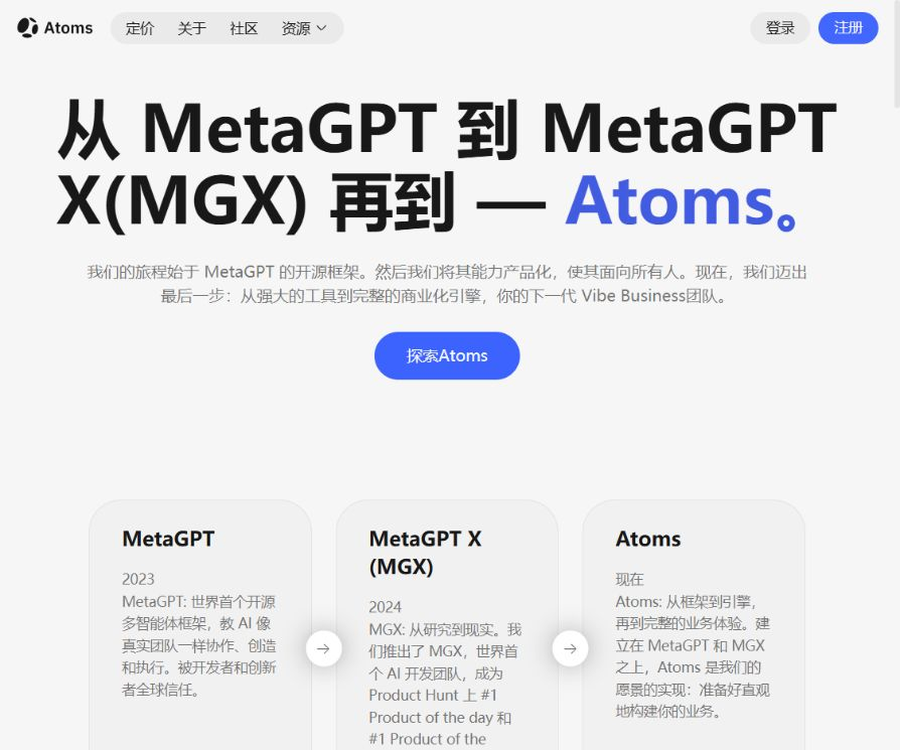
MetaGPT is an open-source development framework that can be installed and modified; Atoms, on the other hand, is a hosted AI development service offered by FoundationAgents to its users. The user experience, responsibilities regarding services, and pricing models for these two options differ, so the price of Atoms’ packages cannot be equated to that of the MetaGPT open-source framework.
| Comparison items | MetaGPT | Atoms |
|---|---|---|
| Form | Python open-source frameworks | Managed online products |
| Deployment | Run locally on the user’s device or on a server | The services are provided by the platform. |
| Configuration | Connect models and tools on your own. | Based on the product interface and platform capabilities. |
| Costs | The framework is free; external resources require payment. | In accordance with the platform’s current plans and limits. |
| Customization | The source code and roles can be modified. | Due to limitations in the platform’s open functions |
| Operation and maintenance | The user is responsible. | It is mainly the responsibility of the platform. |
Product advantages
- Using SOPs to organize multi-role collaboration makes the process clearer than informal conversations.
- It includes built-in company roles and common deliverables, making it suitable for quickly creating prototypes.
- It supports command-line usage, Python libraries, source code development, and Docker deployment.
- Roles, actions, tools, messages, and environments can be customized.
- Data Interpreter handles data analysis and code execution tasks.
- The MIT license is permissive, facilitating research and commercial derivative development.
- The community is large, and the public repository contains numerous examples and discussions.
- It can connect to various model services as well as local deployment solutions.
Usage restrictions and precautions
- Python, dependency management, model configuration, and debugging skills are required.
- The current PyPI version requires Python to be lower than 3.12.
- Multiple roles increase the costs associated with tokens, latency, and retry attempts in case of failures.
- The generated requirements, architecture, and code may be incorrect or inconsistent with one another.
- Code execution, browsers, and file tools can pose security risks.
- The cloud-based model receives the prompt words and business-related data; confidential data must first be assessed.
- Open-source projects do not entail the provision of commercial SLAs or managed operations.
- The release schedule for documents, PyPI, and GitHub may vary.
- The latest official GitHub release tag does not match the PyPI stable version number.
- The MetaGPT framework cannot be used in combination with the pricing and services of the Atoms commercial product.
Security deployment recommendations
- Store the API key in a dedicated key management system, rather than in the repository.
- Use isolated containers and non-administrator accounts to generate code.
- Only the directories required for the mounting task are mounted; access to unrelated files is prohibited.
- Restrict external domain names, download types, and the scope of command execution.
- Add manual approval for tool parameters, file writing, and code execution.
- Retain role messages, model calls, tool operations, and cost logs.
- Regularly update dependencies and check for known vulnerabilities and licenses.
- Tests, code reviews, and security scans are carried out before the production release.
GitHub and the open-source status
The official MetaGPT repository is maintained by FoundationAgents and is licensed under the MIT license. At the time of verification, the repository had around 69,000 stars and more than 8,800 branches; the current stable version available on PyPI is 0.8.2, while the latest official release tag on GitHub remains 0.8.1.
Version numbers and repository data are subject to constant changes; therefore, when installing a package, it is necessary to check the PyPI metadata, GitHub commits, release notes, as well as the dependency configuration. Production projects should not rely directly on the main branch or the latest version image.
Basic information
| field | Content |
|---|---|
| Tool name | MetaGPT |
| Maintenance organization | FoundationAgents |
| Tool type | Multi-agent frameworks, AI programming, and data analysis |
| Development language | Primarily using Python |
| Current PyPI version | 0.8.2 |
| Requirements for Python | Not less than 3.9 and less than 3.12 |
| Installation method | PyPI, source code, Docker |
| License | MIT |
| Framework price | Free and open source |
| Model cost | Determined by the supplier selected by the user or by local computing resources. |
| Is self-hosting supported? | Yes |
| Is it suitable for ordinary users? | Certain development and operation capabilities are required. |
Recommendation score
4.6 / 5. MetaGPT offers mature abstractions for roles, actions, and SOPs to support multi-agent software development and Agent research, and it comes with a relatively permissive open-source license; however, installation and configuration, model costs, code security, and operational maintenance still require the involvement of a professional team.
Frequently Asked Questions
Is MetaGPT free?
The framework itself is free and is licensed under the MIT license, but costs may apply for model APIs, GPUs, servers, search functions, and maintenance services. The project developers do not offer unlimited free access to the models.
Can MetaGPT generate complete software directly?
It can generate drafts of requirements, designs, code, and documentation, but it cannot guarantee that the software will be complete, secure, or deployable. Developers still need to run tests, fix errors, review dependencies, and carry out the tasks required to make the product ready for use.
Does MetaGPT support Windows?
The official installation documentation provides examples of compatibility with Windows 11 and Python 3.9. In practice, it is necessary to install the appropriate dependencies depending on the graphics software, browser, and code execution capabilities used.
Which large models are supported?
The framework can be configured to connect to various cloud-based or interface-compliant model services, and it can also integrate with local model solutions. The specific names of the models and their parameters are determined by the current configuration documents and code.
Are MetaGPT and Atoms the same product?
They are not the same type of product. MetaGPT is an open-source framework, while Atoms is a product offered by a managed AI development service; the accounts, packages, and services available need to be checked separately.
Can it be used for commercial projects?
The MIT license generally permits commercial use and modification, but it is necessary to retain the license and copyright notices. The team must also comply with the terms applicable to the underlying models, data, third-party tools, and dependencies.
Why doesn’t it work even after installation?
Common causes include incompatible Python versions, missing model keys, absent dependencies, uninstalled Node or browser components, and insufficient workspace permissions. It is advisable to start by running a minimal example to identify the issue one by one.
Is MetaGPT suitable for enterprise production environments?
It can serve as a foundation for developing enterprise agents, but an open-source installation does not inherently offer production-grade security and stability. Enterprises need to add features such as identity management, isolation, auditing, monitoring, cost control, and fault recovery.
Tools similar to MetaGPT



 Guigong Network Security Registration No. 45132202000164