






Goblin Tools
A lightweight AI toolkit to help break down tasks, adjust tone, and reduce execution pressure
Tags:AI improves efficiencyWhat is Goblin Tools?
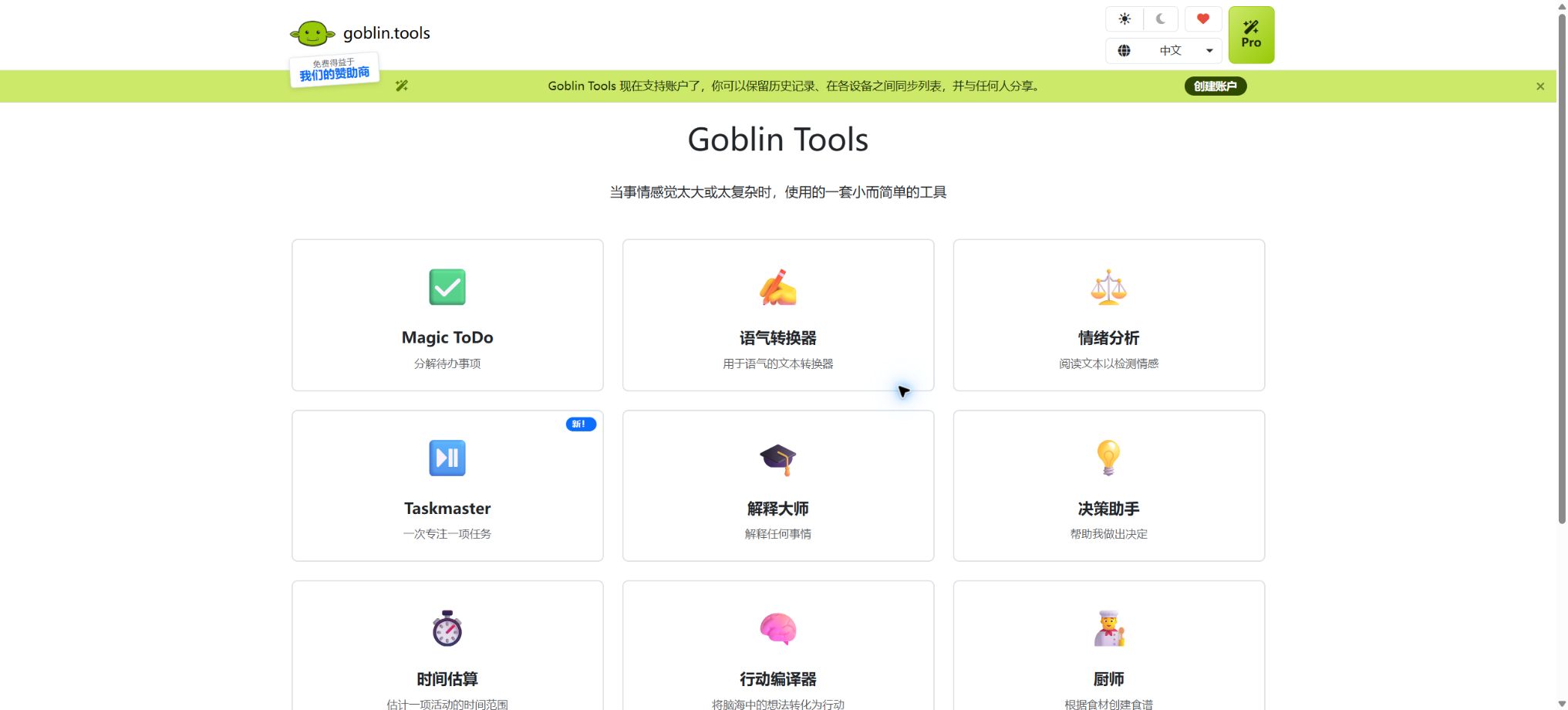
Goblin Tools is a set of small, specialized AI-assisted tools designed to help users deal with everyday tasks that are too complex, difficult to initiate, or stressful. These tools take into account the needs of people with ADHD, autism, executive function disorders, chronic illnesses, and low energy levels, but they can be used by anyone.
It does not aim to create an all-powerful chat assistant; instead, it breaks down tasks into separate functions such as tone understanding, time estimation, organizing thoughts, and generating recipes. The web version remains free, ad-free, and without any paywalls, while the official mobile app and Pro subscription are used to support its ongoing operation.
Main tools of Goblin Tools
| Tools | Main function | Suitable scenarios |
|---|---|---|
| Magic ToDo | Automatically break large tasks down into executable small steps | Household chores, studying, working, and launching complex projects |
| Formalizer | Change the formality, friendliness, conciseness, or directness of the text | Emails, messages, and sensitive communications |
| Judge | Analyze the tone, emotion, and intention that the message may convey. | Understanding social cues and reducing misunderstandings |
| Professor | Explain complex topics in a way that is easier to understand. | Learning new concepts and organizing knowledge |
| Taskmaster | Focus on one step from the to-do list at a time | Reduce the stress associated with task switching and startup. |
| Consultant | Compare options to assist in making decisions | Choosing difficulties and weighing pros and cons |
| Estimator | Estimate the time required for the activity roughly | Schedule management and time perception support |
| Compiler | Transform the chaotic thoughts in one’s mind into an action list. | Thought overload and project organization |
| Chef | Suggest recipes based on available ingredients, equipment, and capabilities | Reduce the burden of making cooking decisions |
Magic ToDo’s task management capabilities
- Spice level:Users indicate the difficulty or level of stress associated with a task by the amount of chili used; the higher the spiciness, the more detailed the breakdown usually is.
- Continue to break it down:Each generated sub-task can be further broken down until it becomes an action that is easy to carry out.
- Classification and filtering:The top-level task automatically assigns emoji categories; it is possible to filter categories or hide tasks that have been completed.
- Sorting and time estimation:Drag tasks to adjust their order, and use the Estimator to estimate the time required.
- Multiple exports:It supports Markdown, iCal, printing, and copying; it can also be exported to tools such as Todoist, Asana, Notion, and TickTick.
- Synchronization and sharing:Accounts and Pro features allow for the saving of history, synchronization of lists across devices, and sharing of lists.
Price of Goblin Tools
The basic tools available on the official website remain free of charge; the official mobile app can be purchased at a low price, while a subscription is required for the Pro version, which offers continuous online access. Price differences can arise due to different app stores, regions, and taxes, so it is important to purchase the official apps listed on the official website.
| Version | Current reference price | Included content |
|---|---|---|
| Web version | Free | The main AI tools come with a guarantee from the developers that they will be ad-free and free of paywalls. |
| Official iOS app | In the United States, it costs $2.99 for a one-time purchase. | The main tool for mobile devices; it is purchased to support free websites. |
| Official Android app | The store page shows around $3.49, and this amount can vary depending on the region. | Main tools for mobile devices; Pro in-app purchases may also be available. |
| Goblin Tools Pro | 3 dollars, 3 euros, or 3 pounds per month | 1-week free trial, device synchronization, templates, sharing, history, and custom tones |
Pro can be canceled at any time, and the basic tools will remain free despite the introduction of Pro. There are unofficial applications in the store that have similar names and icons; it is not possible to determine whether an application is the official version just by looking at its name “Goblin Tools”.
Comparison between the free version and Pro
| Ability | Free version | Pro |
|---|---|---|
| Core single-task tool | Available | Available |
| Advertising and paywalls | The official website has no ads and no paywalls. | Subscriptions support connected services. |
| Continuous synchronization across devices | The basic local or traditional synchronization methods may be adjusted. | Continuous account synchronization |
| To-do template | Basic list | Create and reuse templates |
| List sharing | Available export methods | Share the created list directly |
| Formalizer customization | Predefined tone | Customize the tone and use your own style of expression. |
| History record | Due to the limitations of current devices and functions | History of access across tools |
Magic ToDo Usage Guide
- Enter a task that you find difficult to start with; write down the goal first, without needing to outline all the steps.
- Choose the level of spiciness based on your stress levels, concentration, and physical strength.
- Let the system generate sub-tasks, and remove any steps that are not applicable, have incorrect order, or are too general.
- Continue to break down the sub-tasks that are still difficult to start, until actions can be taken within a few minutes.
- Use time estimation and drag-and-drop sorting to plan the tasks for the day, keeping only those that can actually be completed.
- When it is necessary to switch to another system, choose to export in Markdown, iCal, or the target platform format.
Tutorials for Formalizer and Judge
- Paste the text that needs to be rewritten in Formalizer; do not include passwords or highly sensitive information.
- Choose a tone that is formal, friendly, concise, direct, etc., and adjust the degree of intensity accordingly.
- Check whether the rewritten version still retains the original intent, facts, and necessary boundary expressions.
- When receiving messages that are difficult to interpret, the non-sensitive parts can be given to Judge to analyze the possible tone.
- Treat the analysis as a second opinion; do not consider the AI’s predictions to be the true intentions of the sender.
- In cases involving relationships, work conflicts, or safety issues, it is preferable to clarify things directly or seek reliable support.
Tutorials for using Compiler and Chef
- Enter your random ideas, concerns, and tasks in the Compiler, and let the system first organize them into action items.
- Remove the items that are beyond control, and transform the remaining content into specific steps that begin with verbs.
- Transfer the results to Magic ToDo to continue breaking them down, sorting them, and estimating the time required.
- When using Chef, list the actual ingredients, quantities, kitchen equipment, time, and cooking capacity.
- Add information on allergies, dietary restrictions, and ingredients to avoid, then generate a recipe.
- When checking food safety, don’t rely solely on AI recommendations when it comes to assessing doneness and allergy risks.
Which users are it suitable for
- ADHD and users with difficulties in executive functions:Transform large, vague tasks into smaller steps with less pressure.
- Users with autism and needs in social communication support:It helps to understand the tone and to adjust the way words are expressed.
- Users with chronic diseases and low energy levels:Break down tasks according to an individual’s physical capacity in order to reduce the decision-making burden.
- Students and knowledge workers:Organize thoughts, estimate time, and explain complex concepts.
- Home users:Handling household chores, shopping, cooking, and scheduling.
Product advantages
- Each tool addresses a specific problem, features a simple interface, and requires little time to learn.
- The breakdown of tasks can be adjusted according to an individual’s level of stress, and it is not required that all users use the same level of detail.
- The official website is free to use indefinitely and ad-free, and its basic functions are easily accessible;
- It takes into account everyday situations such as tasks, communication, decision-making, learning, and eating.
- It supports over 70 languages and offers web versions as well as iOS and Android apps;
- The to-do list offers various standard formats as well as the possibility of exporting tasks using third-party tools.
Usage restrictions and precautions
- Task steps, time estimates, and tone assessments are all predictions made by AI, and they may not be accurate.
- A judge cannot read minds, nor can they determine the true emotions or malicious intentions of others.
- Chef lacks the ability to perceive sensations or make medical judgments; allergies and food safety issues must be checked manually.
- Complex health, legal, financial, and crisis-related decisions should not rely on consultants.
- The synchronization system will be updated, and important lists should be exported as backups on a regular basis;
- Pro requires an account and makes use of third-party identity and payment services; sensitive information should be entered as little as possible.
- There are counterfeit products in app stores; it is necessary to install the applications through the official links provided on the official website.
Privacy, Synchronization, and Data Information
According to the official privacy page, Pro logins are handled by Clerk; the service itself does not see or store users’ passwords. Subscription payments are processed by Polar as the merchant record-keeper, while cross-device synchronization and historical data functionality require online storage.
- Creating an account provides the identity service with an email address and login credentials;
- Do not paste passwords, medical records, or confidential materials in Formalizer, Judge, or Compiler;
- The older version of Magic ToDo used usernames and passwords for encryption on the device side, but the official source indicated that this system would be replaced.
- Save a local backup before enabling the new synchronization, to prevent loss of the list due to migration issues or problems with credentials.
- The disclosure of data collection by mobile apps varies depending on the platform, version, and Pro features.
API and open-source information
Goblin Tools does not offer a general generation API that is available to ordinary developers; requests made from within the web interface should not be considered stable interfaces. When automation is needed, it is advisable to use the Markdown, iCal formats, as well as export functions provided by third-party task management tools offered by Magic ToDo.
The current product is not an open-source platform that can be fully self-hosted. The code repositories with the same name that have been mentioned online do not prove that the Goblin Tools service provides full source code; it is necessary to follow the instructions available on the official website when using it.
Frequently Asked Questions
Is Goblin Tools free?
The main tools available on the official website are free, and the site promises to be ad-free and without any paywalls. The official mobile app requires a low-cost purchase; features such as cross-device synchronization, templates, sharing, and access to a complete history are available only in the Pro version.
How much is Goblin Tools Pro?
The official price listed is $3, 3 euros, or 3 pounds per month, with a 1-week free trial available. Taxes and prices at stores may vary depending on the region.
What does the heat level mean?
It is not an exact score indicating the difficulty of a task, but rather a way to tell the system how difficult and stressful that task is for you. The higher the level of spiciness, the more detailed steps Magic ToDo will typically generate.
Is Goblin Tools suitable for medical use?
It can serve as a aid for daily functional tasks, but it is not intended for medical diagnosis, treatment, or crisis services. For health and safety issues, one should consult qualified professionals.
Is Goblin Tools open source?
The current complete product should not be labeled as open source, and there is no officially supported fully self-hosted solution available. Repositories with the same name or that are historically related cannot replace the official open source declaration for this product.
Tools similar to Goblin Tools



 Guigong Network Security Registration No. 45132202000164