






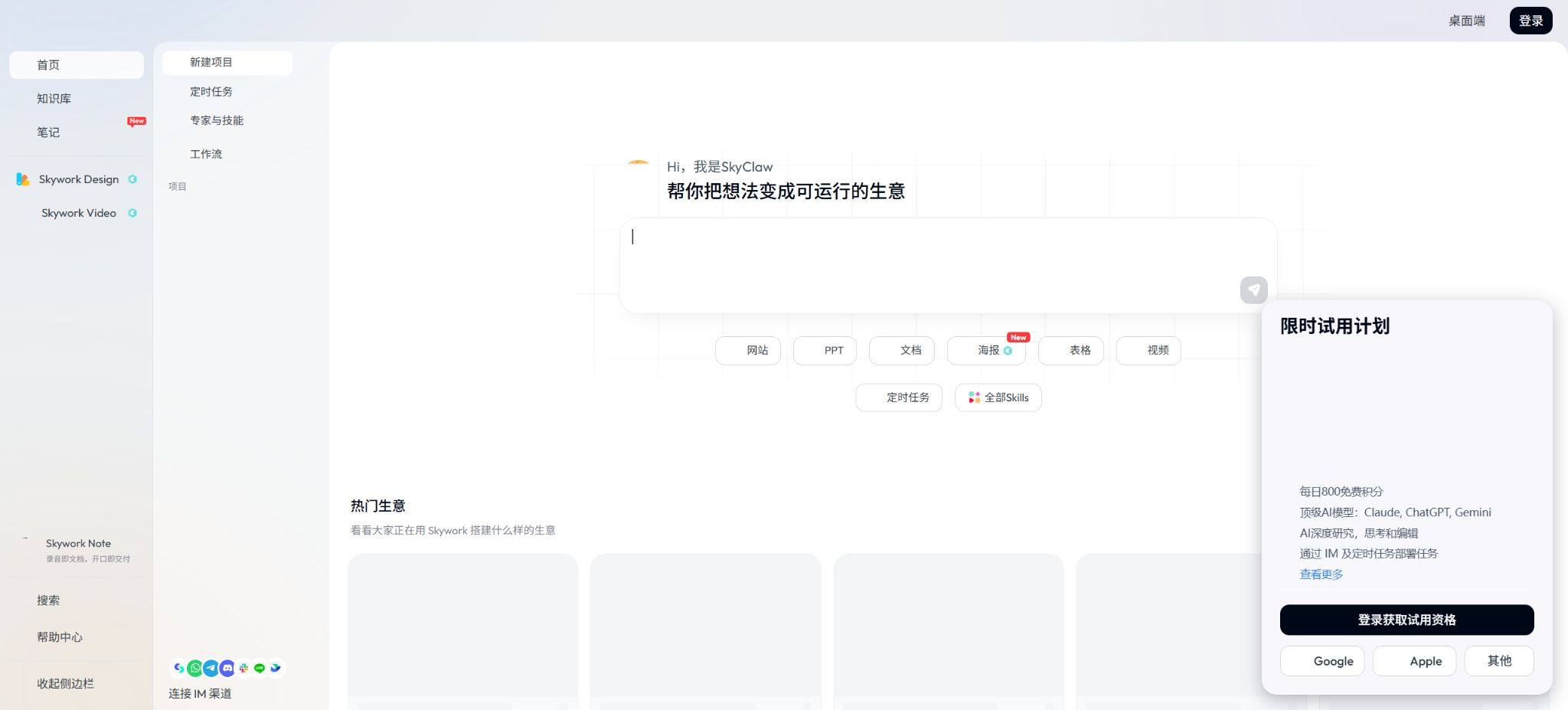
Skywork
A multi-modal AI office agent capable of generating documents, slides, and research reports
Tags:AI improves efficiencyWhat is Skywork?
Skywork is an AI Super Agents platform designed for research, analysis, and the creation of office-related content. It can start from a specific topic to search for relevant information, and then generate finished products such as documents, slides, tables, podcasts, web pages, images, and videos.
The platform emphasizes structured output and traceable citations, making it suitable for reports, proposals, and research-based content. Citations do not necessarily mean that the conclusions are correct; it is still necessary to consult the original materials to verify the key data.
Core functions of Skywork
General Agent
A General Agent is capable of understanding complex tasks and coordinating different capabilities, making it suitable for carrying out multi-step workflows starting from requirement analysis. The instructions should specify the target audience, objectives, delivery format, time frame, and any materials that must be used.
Documents document Agent
Documents allows for the creation of reports, articles, plans, and research documents, as well as for organizing titles, data, and citations. Users can modify the structure and text further, before exporting the content in formats such as DOCX or PDF.
Slides slide agent
Slides allows for the creation of outlines, page content, charts, and visual layouts based on a theme or material. The resulting documents can be saved in Google Slides format, but it is necessary to manually check the values in the charts, any font changes, and any issues related to page overflow.
Sheets spreadsheet Agent
Sheets are used to organize data, conduct analyses, and create tables and charts. AI may misinterpret fields or formulas; therefore, recalculations are necessary when dealing with financial, operational, or statistical results.
Podcasts Podcast Agent
Podcasts allow research materials to be transformed into audio programs, which are suitable for internal briefings and for reusing the content. After creation, it is necessary to check proper nouns, numbers, citations, pronunciation, and the licensing of background music.
Websites page Agent
Websites can transform topics and content into browsable pages, making them suitable for quickly presenting reports or information about events. Before going live, it is necessary to check the responsive layout, forms, privacy policies, external resources, and the accessibility of the pages.
Images and Videos
The image and video capabilities allow for the creation of visual materials, covers, and short videos, which helps in delivering multimedia content. More complex creations require more credits, and elements such as characters, text, trademarks, and video continuity need to be checked frame by frame.
Professional Data and In-depth Research
Skywork enables research by combining professional data sources and online materials, and it includes citations in the results. The scope of the available materials, their update frequency, and access rights can affect the outcomes; the absence of results should not be interpreted as an indication that such information does not exist.
SkyBot and scheduled tasks
SkyBot focuses on long-term memory and 24/7 assistance, enabling it to carry out complex tasks based on a single message. The paid version also offers a limited number of scheduled tasks for recurring reports and information updates.
Comparison of Skywork membership prices
The following shows the structure of individual subscriptions as per the official price details. The price for the first month of the promotion, regional taxes, and the total amount due may change; it is necessary to verify these details again before making the payment.
| Plan | Price | credits | Validity period and instructions |
|---|---|---|---|
| Free first month | $ | 500 per day | Log in to claim it – valid for the same day; used to experience the core Agent. |
| Free from the second month | $ | 500 per week | Issued weekly, valid for 7 days |
| Monthly | $ | 7,000 per month | Renewal is on a monthly basis; the subscription credits are valid for 1 month. |
| Quarterly | $ | According to the monthly rules for packages | Quarterly subscription; the specific details are subject to the account page. |
| Yearly | $ | According to the monthly rules for packages | Annual subscription; the details are subject to the account page. |
The official details of the paid plan state that 7,000 credits are available per month; under normal usage this amount is sufficient to complete around 100 tasks, though the cost of each task varies. In-depth research, long documents, PPTs, as well as images and videos result in significantly different numbers of tasks that can be completed.
Comparison of paid benefits
| Equity | Paid plan verification value | Instructions for use |
|---|---|---|
| Subscribe for credits | 7,000 per month | Valid for 1 month; additional top-ups are possible. |
| Professional Database | Complete access direction | Database coverage and licensing depend on the specific source. |
| Intelligent image analysis | Unlimited direction | Still subject to fair use and technical restrictions. |
| AI cover | Up to 30 per month | Used for document and content covers |
| Scheduled tasks | Up to 10 | Suitable for repeated research and automated reporting |
| DOCX export | Up to 1,000 copies per month | Check the styles, references, and fonts after exporting. |
| PDF export | Up to 1,000 copies per month | Check pagination, charts, and hyperlinks. |
| Save in Google Slides | Up to 1,000 copies per month | Authorization from a corresponding Google account is required. |
Skywork Document Generation Tutorial
- Select Agent:Documents are used for reports, Slides for presentations, and Sheets for data analysis.
- Define the task:Describe the audience, purpose, length, time frame, structure, and delivery format.
- Upload materials:Provide authorized documents, and indicate which content must be used and which is for reference only.
- Set the research boundaries:Give priority to official, primary, and up-to-date sources, and make a distinction between facts, opinions, and assumptions.
- Review outline:First, confirm the chapter structure and the order of the arguments, then use credits to create the complete content.
- Verify citation:Check each item to see whether the author, date, figures, context, and the original text support the conclusion.
- Manual modification:Standardize terminology, tone, chart presentation, and brand style, and remove redundant and vague content.
- Export for reinspection:Check the page layout, font, images, and citation formatting in Word, PDF, or Slides.
Skywork PPT creation tutorial
- First, specify the duration of the presentation, the audience, the number of pages, and the decisions that need to be made.
- Upload reports, data, and brand templates, and avoid providing only a general topic.
- It is required that each page present only one main idea, and the data sources should be indicated in the charts.
- First, preview three to five pages to confirm the visual direction before generating the complete set.
- Check the facts, numbers, fonts, image copyrights, pacing of the speech, and safety margins.
Skywork Note hardware combination
Skywork also sells the Skywork Note AI recording device together with an AI subscription package. The Basic annual package available in the official store includes 15,000 AI credits per month, and it offers unlimited transcription and summarization in over 99 languages.
A hardware setup combined with a pure software personal subscription is not the same product; the price may also include costs for the equipment, shipping, and taxes. Before making a purchase, it is necessary to check information regarding delivery in the respective region, return policies, laws related to recording, cloud storage options, and the start date of the subscription.
Is Skywork open source?
The Skywork Super Agents online platform is not an entirely open-source product. The official GitHub repository of SkyworkAI makes available DeepResearchAgent, Skywork-Skills, SkyReels-V2, as well as various model research projects; it is necessary to consider the license associated with each repository separately.
Open-source research projects differ from the functional features, deployment requirements, and support services offered by the commercial areas on official websites. Publicly available code does not indicate that a paid platform can be deployed in a private environment, nor does it mean that all models can be used for commercial purposes without any restrictions.
DeepResearchAgent and Skywork-Skills
DeepResearchAgent is a hierarchical multi-agent research framework in which higher-level planning agents coordinate specialized sub-agents. It is suitable for developers to study task decomposition, as well as the management of tools, environments, memory, and model resources.
Skywork-Skills offers various Agent Skills such as documents, PPTs, designs, Excel files, search functions, and music-related tools. Some of these skills rely on Skywork’s cloud interfaces and require keys or quotas; it is advisable to read the repository instructions before installation.
Privacy, copyright, and accuracy
Before uploading files, recordings, and data, it is necessary to verify the copyright status, as well as the permissions regarding confidentiality and the handling of personal information. Meeting recordings must comply with local rules regarding notification and consent; protected conversations cannot be recorded secretly.
AI-generated documents and slides may contain fictional citations, incorrect data, and inaccurate charts. Materials used for medical, legal, financial, academic, and business decision-making must be reviewed by qualified professionals.
The commercial use of images, videos, music, and templates is subject to the account terms and the licensing rules for those materials. The ability to export files does not mean that all content automatically has commercial usage rights.
Which users are it suitable for
- Knowledge workers who prepare research reports, industry analyses, and consulting materials;
- Professional users who need to create PPTs, documents, and data charts quickly;
- Creators who wish to turn the same research into podcasts, web pages, and videos;
- Individuals and teams that need to carry out tasks related to information collection and reporting on a regular basis;
- Developers interested in researching open-source Agent frameworks and models.
Advantages and usage limitations
- The advantage of Skywork is that it covers various types of content such as documents, PPTs, tables, podcasts, and web pages, and it allows in-depth research and citation to be integrated into the creation process from the very beginning.
- A platform can reduce the need to transfer content between various office tools;
- The limitation is that credits are used up quickly when dealing with complex tasks, and the quality of the output depends on the available materials and prompts.
- Automatic citations, charts, and multimedia content do not exempt the need for manual verification, and the free quota has a limited validity period.
Frequently Asked Questions
Is Skywork free?
There is a free credit quota available. According to the official guidelines, new users receive 500 credits per day during the first month, and 500 credits per week starting from the second month; the rules regarding the expiration of these credits vary.
How much is the membership for Skywork?
According to the official information, the monthly fee is 14.99 dollars for the first month, followed by 16.99 dollars per month thereafter; the quarterly fee is 39.99 dollars, and the annual fee is 149.99 dollars. The actual amount will be as indicated on the payment page.
Can Skywork generate PPTs?
Yes. Slide Agent can create outlines, pages, charts, and visuals, and it supports saving them to Google Slides.
Is the citation from Skywork reliable?
Citations facilitate tracking, but they may still be mismatched, outdated, or insufficient to support conclusions. Important information must be verified by consulting the original source.
Is Skywork open source?
The entire commercial platform is not open source. The official GitHub offers certain models, research agents, and Skills projects, each with its own licensing terms and functionalities.
Tools similar to Skywork



 Guigong Network Security Registration No. 45132202000164