






Sogou Translation
An online translation tool that supports the mutual translation of texts and documents in multiple languages.
Tags:AI improves efficiencyWhat is Sogou Translate?
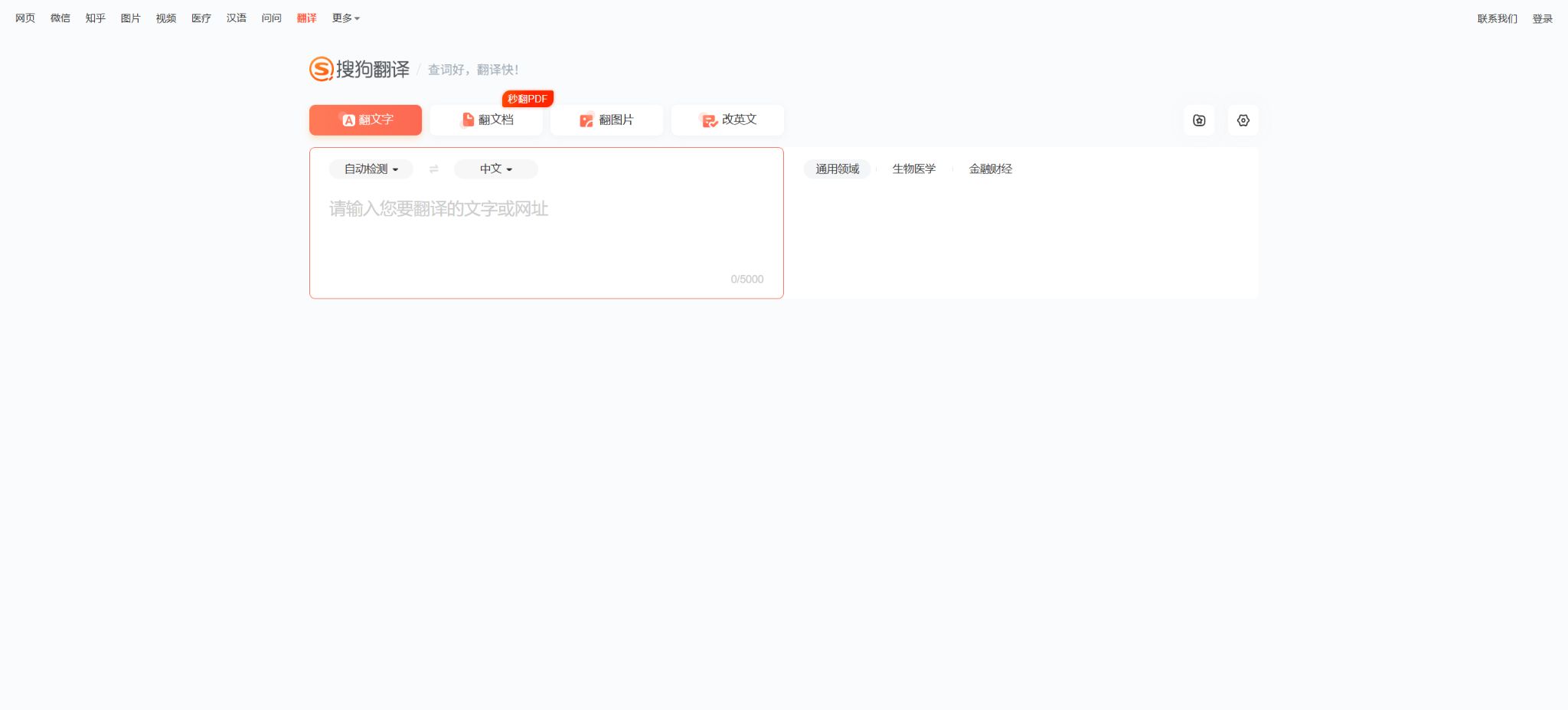
Sogou Translate is an online neural network-based machine translation tool provided by Sogou. The official website still offers services for translating text, documents, images, as well as for correcting English texts. It is suitable for quickly looking up words, translating short passages, reading foreign language documents, and checking the accuracy of English expressions.
Sogou Translate has no connection with products that share similar names such as “Translation Dog” from third parties. When using it, one should refer to the official Sogou Translate website; the membership details and prices of other applications should not be included in this tool.
Core functions
1. Text translation
The web version allows text to be entered or pasted, and it can automatically detect the source language; the current limit for a single entry is 5,000 characters. Users can choose from general, biomedical, or financial fields to ensure that technical terms are translated in a manner that best suits those specific contexts.
The domain model provides only a direction for optimization and does not guarantee the accuracy of all medical and financial information. Drug dosages, diagnoses, investment data, as well as numerical values and negative statements must be verified manually.
2. Word lookup and syntactic analysis
For short words and sentences, the translation results can be viewed; the page also provides a tool for syntactic analysis, which helps in understanding the structure of English sentences. A syntactic tree is useful for learning complex sentences, but it may give incorrect analyses in cases of complex omissions, spoken language, or non-standard spelling.
3. Document translation
Document translation currently supports two-way translation between English and Chinese, Korean and Chinese, as well as Japanese and Chinese. You can upload PDF, Word, PPT, Excel, CSV, and TXT files; each document must be less than 25 MB in size, have no more than 500 pages, and contain no more than 1 million characters.
The system will strive to preserve the original layout, including book sections, the mixing of images and tables, etc., and provide translations or bilingual versions for download; the common output formats are Word or PDF. Complex formulas, scanned documents, annotations, animations, and embedded objects may still be lost or misaligned.
4. Comparison reading with the original translation
Once the document is completed, it is possible to compare each sentence of the original text with its translation side by side; word selection and copying, as well as lookup of words, are available. This feature is suitable for reading papers, reports, and materials in foreign languages. The comparison mode can help identify sentences that were missed by machine translation, but it cannot replace page-by-page proofreading.
5. Image and photo translation
Image translation involves first reading the text in the image and then generating the translation. The historical official privacy policy for mobile devices also states that it supports taking photos, accessing photos from the album, as well as recognizing handwritten text using a writing assistant.
Images may contain names, identification numbers, addresses, and business-related data; it is necessary to confirm that one has the authority to process them before uploading. OCR performance can be affected by blur, reflections, tilting, and complex backgrounds, and the numbers and proper nouns in the translated text should correspond to those in the original image.
6. English correction
The “Rewrite in English” option is used to check English expressions and text issues; it’s suitable for making initial improvements to emails, assignments, and short texts. The suggestions provided may change the tone or the original meaning of the text, and formal business, academic, and legal documents still require manual review.
7. Voice translation
The official mobile privacy policy describes the voice translation feature: the app captures audio from the microphone, processes it in real time, and provides the translated result; the policy states that such audio is not stored. On the web version, text, documents, images, and English corrections are the main elements displayed, and the availability of voice translation functionality depends on the client software and its version.
8. Quick translation and on-screen translation
The historical Android versions included floating windows and auxiliary services that were used to read the content on the screen and provide quick translation. These auxiliary services had broad permissions; it was necessary to check the origin of the application and the system notifications before enabling them, and they should be turned off whenever they are not needed.
Language support
The official privacy policy explicitly states that texts can be translated into languages such as Chinese, English, Japanese, and Korean; the document platform currently supports translation between Chinese and English, Chinese and Korean, as well as Japanese and Chinese.
The range of languages supported for different functions varies; therefore, the list of languages available for text input cannot be applied directly to documents, images, or audio.
Specialized fields
The official website currently offers three text domains: general, biomedical, and financial. The document pages also display general, medical, and financial models. These models help to ensure consistency in terminology within their respective domains, but for specialized texts it is necessary to check glossaries and the context.
Price and account
As of August 2026, Sogou Translate’s web version does not display any fixed membership plans or pricing based on the number of characters; access to basic text and document functions is available directly, while submitting and downloading content may require logging in. The pricing information should not reference the subscription costs of third-party applications with similar names.
If the page displays information regarding fees, usage limits, or promotions before processing a request, those details shall apply to that specific order. The absence of publicly listed prices does not mean that free access or unlimited use is guaranteed forever.
Privacy and data processing
For text translation, the text to be translated needs to be uploaded; for document and image functions, the files selected by the user need to be read.
Voice translation requires microphone permissions. The data may include personal communications, photos, and sensitive information; one should not use the corresponding cloud services if they do not wish to upload such data.
According to official policies, voice content is processed in real time and not stored; anonymized data may be used for research, statistics, product improvement, and model training. Highly sensitive contracts, medical records, identification documents, and confidential data should be handled using methods approved by the organization.
Mobile devices can also be integrated with WeChat, QQ, one-click login, sharing, and push SDKs. Users can turn off the camera, album, microphone, floating windows, and additional services, but the corresponding functions will then be unavailable.
Current status of the product
Sogou has been integrated into Tencent’s ecosystem, but its official translation website and document translation page remain accessible as of the time of verification. The available support resources, client store, and API documentation are relatively limited; therefore, the information presented on these pages should be taken as current, and historical promotions or third-party reviews should not be considered as current commitments.
API and open-source status
Sogou’s current public data platform is aimed at search data, website verification, and access for website owners; there is no public Sogou translation API available for ordinary developers, along with defined pricing. For enterprise integration, it is necessary to consult separately, as it cannot be assumed that web interfaces allow automated data extraction.
The models, web interfaces, and client applications of Sogou Translate are not open-source projects. Even if there are third-party scripts available on the Internet, this does not mean that they have official authorization, nor that they are stable or compliant.
Supported platforms
- Translation of web page text;
- Translation of web documents;
- Translation of web images and correction of English text;
- Features of historical Android and iOS clients are subject to what is available in current app stores.
Sogou Translate User Guide
Complete a basic task.
- Clarify the issue, time frame, location, source priority, and output format;
- On Sogou Translate, upload materials for which you have permission to use or enter search queries;
- First, establish a framework through text translation, and then supplement the evidence with word lookup and syntactic analysis.
- It is necessary to distinguish between factual information from the source, the author’s opinions, and AI-generated conclusions.
- Check each item for dates, numbers, the original location, and any conflicting evidence;
- The conclusions are manually revised, the verification time is recorded, and then they are published;
Create reusable professional workflows
- Break down complex topics into four categories of questions: background, data, comparison, and conclusions;
- Combined text translation, word lookup, syntactic analysis, and document translation constitute the standard research steps;
- Give priority to using the official website, research papers, regulatory documents, and raw data;
- A second person is assigned to review conclusions that are considered high-risk;
- Save queries, evidence, versions, and unresolved issues;
- Re-run after the data changes and update the conclusions;
Which users is it suitable for?
- Ordinary users who translate short sentences and website text on a temporary basis;
- Students and professionals who read documents in Chinese-English, Chinese-Japanese, or Chinese-Korean;
- Readers who need models of biomedical or financial terminology;
- Users who wish to have the original translation alongside it in Word or PDF format;
- Learners who are checking English syntax and expression.
Product advantages
- The web-based text and document interfaces can be used without any installation required;
- Offering programs in biomedical and financial fields;
- The document supports various office formats and bilingual content;
- The maximum size for a single file is 25MB, 500 pages, or 1 million characters, making it suitable for longer documents;
- It integrates image translation, syntactic analysis, and English correction.
Restrictions and Precautions
- A single text entry can contain up to 5,000 characters, and document translation is supported only for conversions between Chinese and English, Chinese and Korean, and Chinese and Japanese.
- Complex document formatting and scanned pages may not be processed completely;
- At present, there are no clearly published membership prices or pricing for public APIs; it is not possible to refer to the prices of third-party applications with the same name, nor should any promise of permanent free access be made.
- Machine translation may produce errors in terms, numbers, negations, and context.
- Medical, financial, legal, and formally published content must be reviewed by professionals;
Frequently Asked Questions
Is Sogou Translate free?
The basic entry point for the website can be used directly; the official website does not currently specify a fixed membership price. Specific details regarding logging in, available quotas, and fees associated with tasks are indicated on the page itself.
How much text can be translated at once?
The maximum character count for the text field on this page is 5,000.
What formats are supported for documents?
It supports PDF, Word, PPT, Excel, CSV, and TXT files; each file should be less than 25 MB in size, with a maximum of 500 pages or 1 million characters.
Which document languages are supported?
Currently, two-way translation between Chinese and English, Chinese and Korean, and Chinese and Japanese is explicitly supported.
Does Sogou Translate have an API?
No public translation API available that includes the current documents and prices; companies should consult the official sources for integration, as it is not possible to use web interfaces as a substitute.
Is Sogou Translate open-source?
It is not open source; the source code for its translation models, web services, and client applications is not made publicly available in its entirety.
Tools similar to Sogou Translate



 Guigong Network Security Registration No. 45132202000164