






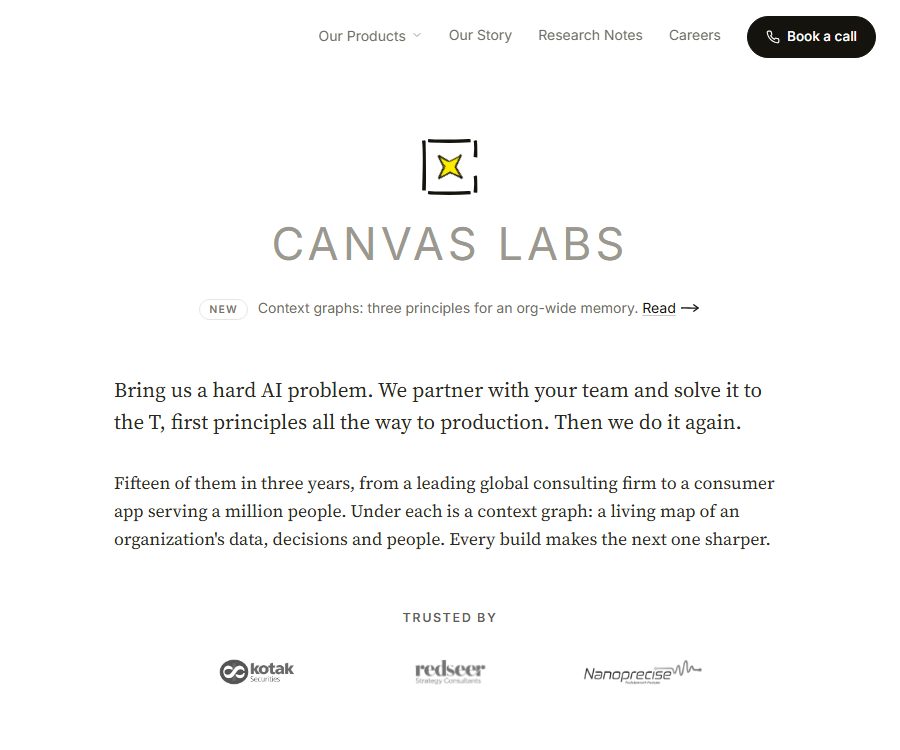
What is Canvas Labs?
Canvas Labs is an AI application laboratory operated by Isometry AI Private Limited in Bangalore, India. The team starts from business challenges, data, and costs, and approaches the design, development, deployment, and handover of AI systems as a complete project.
It is not a single chat tool; its current products include Canvas Connectors and Sketch, while the Fine-Tuning Lab was discontinued in earlier stages. The lab also develops Context Graph and industry-specific AI systems in collaboration with companies.
Product portfolio and current status
| Products or services | Current status | Primary uses | Usage method |
|---|---|---|---|
| Canvas Connectors | Available now | Provides built-in tools for AI agents, over 3,000 application integrations, as well as permissions and auditing capabilities. | MCP, API, managed, self-hosted cloud, or isolated deployment |
| Sketch | Available now | A second brain and workflow assistant for organizations across Slack, WhatsApp, and email | Managed subscriptions or declarations can be self-managed. |
| Context Graph | Platform and project capabilities | Connects organizational data, people, projects, decisions, and history to provide context for agents. | For customized collaborations or as the foundation of a product |
| Joint development by enterprises | Accept the project | From research, prototyping, production reinforcement to team handover | Schedule a consultation to determine the scope and get a quote. |
| Fine-Tuning Lab | Retired | Early model fine-tuning products | It should no longer be recommended based on the current services. |
Main functions of Canvas Connectors
Built-in proxy tool
- File tools: Read, create, overwrite, and precisely edit files to which the agent has access.
- Execution tool: Run commands within a sandbox, thereby limiting interactions with the production system.
- Search tools: search for file contents, find files by name, and retrieve live web pages.
- Web tool: Reads text from web pages and handles websites that require script rendering.
Unified connection to over 3,000 applications
Connectors use a consistent approach to authorization, parameter structure, and auditing in order to link messages, documents, projects, customer relationships, customer service functions, data warehouses, and code platforms. Examples of such connectors include Slack, WhatsApp, Teams, Gmail, Notion, Jira, Salesforce, HubSpot, ServiceNow, Snowflake, and GitHub.
Permissions, approvals, and auditing
Administrators can set permissions based on organization, agent, user, and action; for example, they can restrict access to a customer relationship system to read-only mode or allow messages to be sent only to specific Slack channels. Actions that have side effects may require manual approval, and agents cannot expand their authorities on their own.
Each call is logged, including the tool used, parameters, authorized user, time, and response; rejected calls are also recorded. The audit data can be queried and exported to the enterprise logging system.
MCP and API integration
Connectors can be used to connect MCP servers to Claude Code, Cursor, or other MCP clients; their standard APIs can also be invoked by any proxy framework. They serve as a tool and governance layer, and there is no requirement for users to change their proxy framework.
Usage process of Canvas Connectors
- First, test the built-in tools and a few connectors in a free sandbox.
- Define the read-only, write, message-sending, and command-execution boundaries for specific agents.
- Connect to a low-risk application and save the credentials in a controlled key system.
- Execute a rollback action via MCP or API, and check the audit logs.
- Add manual approval for write, send, delete, and create commands.
- Verify reliability, invocation costs, error retries, and third-party throttling through pilot testing.
- Choose between managed, self-hosted cloud, self-managed, or fully isolated production deployment.
Connector deployment and data boundaries
| Deployment method | Appropriate stage | Data and credentials | Price status |
|---|---|---|---|
| Sandbox | Development, evaluation, and examples | Use a test connector within a limited scope. | Free |
| Managed production | Development teams that hope to launch quickly | The tool’s results are returned through a proxy; the specific area needs to be confirmed. | Based on the volume of usage, the unit price is not disclosed. |
| Customer-owned cloud | Enterprises that need to control networks and credentials | Connectors and credentials are placed in the customer’s environment. | The platform fee is added based on the number of calls; contact sales for details. |
| Complete isolation | Banks, governments, and highly sensitive projects | Tools, credentials, and audit logs remain within the customer’s network. | Charges are applied based on the environment; contact sales for details. |
The platform indicates that customer data remains in the original business system; the Connectors tool processes the data and returns the results to the proxy. In the self-hosted and fully isolated modes, credentials and audit logs can be kept within the customer’s network.
What can Sketch do?
- Answer organizational questions and carry out cross-system tasks via Slack, WhatsApp, and email.
- Use the Context Graph to link people, projects, historical messages, and business decisions.
- It connects over 3,000 integrations and enables the execution of an unlimited number of workflows and scheduled tasks.
- Teams are allowed to use their own keys from Anthropic, OpenAI, or other model providers.
- Credits are consumed based on the complexity of the task; reusing contexts can reduce this consumption through caching.
Sketch price
The hosted version of Sketch is charged based on credits, with no additional fee per user; the official website currently offers only monthly billing. Any unused credits are reset at the end of each month and are not carried over to the next period.
| Package or version | Price | Billing cycle | Core benefits or quota | Suitable for users |
|---|---|---|---|---|
| Startups | 99 dollars | Monthly | 5000 credits, up to 20 members, three channels, over 3000 integrations, no restrictions on workflows, BYO keys and email support | Small teams that have started using AI workflows |
| Startups extension pack | $ | Monthly | 10,000, 20,000, or 50,000 credits – the functions remain the same. | Start-up teams that require a higher volume of tasks |
| Business | 199 dollars | Monthly | 15,000 credits, up to 50 members, full integration with workflows, priority email support | Growth-oriented teams |
| Business extension file | $ | Monthly | 30,000, 60,000, or 100,000 credits | Larger amounts of tissue |
| Self-hosted version | The page states it’s free. | Bear the costs of infrastructure and models yourself. | The page states that all functions are licensed under MIT, with custom keys being used. | A team with the capability to deploy and maintain systems. |
How to consume credits
- Examples of quick tasks range from 10 to 200 credits, such as generating summaries, updating fields, or sending follow-up emails.
- Examples of complex workflows cost between 100 and 300 credits, such as compiling reports across multiple systems.
- A complete project example costs between 500 and 750 credits; for instance, auditing the sales pipeline and creating dashboards.
- The actual consumption varies depending on the model, context, tool calls, and task complexity.
Sketch trial, cancellation, and refund
Sketch offers a 30-day trial period without the need for a credit card; if no upgrade is made, the account becomes inactive automatically. The subscription can be canceled at any time by contacting support via the account email, and it remains valid until the end of the current billing cycle.
- A refund can be requested within 7 days from the date of the first deduction; refunds can also be considered in cases of repeated deductions or system errors.
- After more than 7 days, refunds are generally not provided for partially used billing cycles.
- After the account becomes invalid or is canceled, the workspace data is retained for 90 days before being permanently deleted.
- The annual subscription has not yet been launched; the page only indicates that discounts are planned to be offered in the future.
Prices for Canvas Labs and Connectors
There is no fixed public price for custom projects at Canvas Labs; the scope, timeline, SLAs, delivery procedures, as well as rules regarding cancellation and refunds are specified in the individual order. Canvas Connectors offers a free sandbox environment, while production use is billed based on the number of calls made, in addition to a fee for the deployment platform.
| Package or version | Price | Billing cycle | Core benefits or quota | Suitable for users |
|---|---|---|---|---|
| Connectors Sandbox | Free | Development phase | Complete set of built-in tools and a few available connectors | Development and evaluation |
| Used in Connector production | Contact sales | Based on the number of calls | There is no seating arrangement, and the specific price for each call is not disclosed. | Agency development team |
| Self-hosted or isolated environment | Contact sales | Charged according to the environmental platform fee | Customer network deployment, credentials, and audit controls | Companies with high requirements in terms of security and compliance |
| Corporate AI collaboration projects | Custom quote | Subject to the project order. | Research, development, production of reinforcement and handover | Organizations facing complex AI challenges |
API, GitHub, and open-source status
| Project | Current status | Licenses and boundaries |
|---|---|---|
| Canvas Connectors API | Available now | Business services that offer unified tool invocation. |
| Canvas Connectors MCP | Available now | The ability to connect to MCP clients does not mean that the server side is open source. |
| Connectors cookbook | Public warehouse | The example is readable, but the standard license is not clearly identified. |
| CGMformer Research Repository | Public | The MIT license applies only to that research code. |
| Sketch self-hosted version | The clause states MIT | The specified public repository was not accessible during this verification; the availability of the code and license files needs to be confirmed again. |
| All products from Canvas Labs | It’s not a unified open-source solution. | Warehouses, examples, Sketch declarations, and commercial platforms must be evaluated separately. |
Privacy, security, and copyright
- The general policies apply to the Canvas Labs website and to our overall relationship; if products such as Sketch have their own separate policies, those product-specific policies shall take precedence.
- The platform may handle names, email addresses, companies, roles, account identifiers, customer-shared documents, messages, error logs, and account data.
- Payments are processed by Stripe and Razorpay; Canvas Labs does not store complete card or bank account details.
- The general policy states that Sketch’s real-time messages are not retained after processing, whereas project-related materials are stored, deleted, or returned in accordance with the terms of the contract.
- Once an account is deleted or a request is made, personal data is usually removed within 30 days, except for those data whose retention is required by law.
- Public measures include TLS, static encryption, access control, and regular security audits, but they do not guarantee zero risk.
- The customer retains ownership of the content entered and grants a limited license for processing it as necessary to provide the service.
- AI outputs may contain errors, biases, or omissions; significant business, medical, and compliance decisions must be verified manually.
Summary
Canvas Labs is suitable for companies that wish to integrate AI agents into their actual business systems, within an organizational context and within processes that allow for auditing. Canvas Connectors handle tool invocation and governance, while Sketch facilitates collaboration across different channels. Before making a purchase, it is necessary to check the number of invocations, the cost of the deployment platform, the amount of Sketch credits available, as well as the level of privacy protection offered by the product, in addition to reviewing the open-source terms and the availability of the code in the relevant repositories.
Tools similar to Canvas Labs





 Guigong Network Security Registration No. 45132202000164