






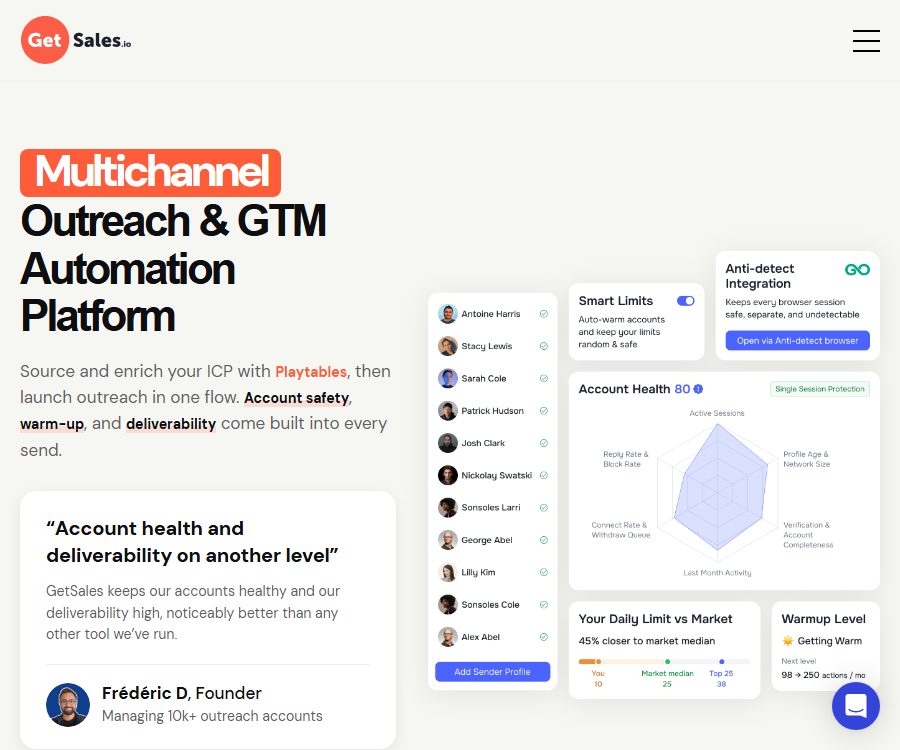
What is GetSales.io?
GetSales.io is an automated multi-channel engagement platform designed for B2B sales, customer development, and GTM teams. It brings together LinkedIn, email, lead enrichment, AI assistants, a unified inbox, and outreach CRM in one workspace.
The platform places emphasis on team-level sender management and account security; each LinkedIn account operates within its own separate cloud session. Users can schedule communication actions through a visual interface, and handle responses as well as subsequent tasks in one place.
The main features of GetSales.io
Reaching out through multiple channels, including LinkedIn and email
- It is possible to create automated workflows that include data access, invitations, messages, InMail, emails, and manual tasks.
- The Enrich and Scale solutions offer multi-channel inboxes and email sequencing features.
- Sender rotation allows leads to be distributed across multiple accounts, which is suitable for teams and agencies aiming to expand their reach.
AI templates, agents, and responses
- AI templates can generate personalized messages by incorporating variables, thereby reducing the time required to modify each message individually.
- AI agents can assist in generating responses, handling common conversations, and monitoring team status.
- AI conditional nodes can determine the path based on available clues, thereby directing contacts to different engagement steps.
Clue discovery and data enrichment
- Potential clients can be imported from LinkedIn search results, with additional information added during the process.
- Email search employs cascading searches across multiple data providers, and email verification also makes use of several services.
- The Playtables project aims to integrate clue discovery, scoring, data enrichment, and networking into a single process; the official website still indicates that it is about to be launched.
Account security and delivery rate
- Each account uses its own independent and ongoing cloud browser session, which reduces the impact of one account on another.
- Smart Limits controls daily activity and gradually increases the amount of messages that new accounts can send.
- Account health monitoring tracks various risk indicators and alerts to activities that may need adjustment.
Automated editing and team management
- The code-free process editor supports branching, delays, filtering, API calls, and manual tasks.
- Running processes can be modified, and teams can also use different workspaces, senders, and permissions.
- The task planner is used to view contact status, failed nodes, transitions, and pending tasks.
CRM, API, and MCP
- The built-in external CRM supports lists, tags, custom fields, and task management.
- The official platform offers over 130 API endpoints, and it supports Webhooks as well as API call nodes for automation.
- It can be connected to HubSpot, Salesforce, Pipedrive, as well as other CRMs via APIs.
- The native MCP allows compatible AI clients to call the GetSales function, but this does not mean that the platform itself is open source.
Which users are it suitable for
- SDR and sales team: Carry out an outreach process that combines LinkedIn, email, and manual tasks.
- GTM Engineer: Builds sales systems using APIs, MCP, data enrichment, and automation nodes.
- Lead generation agents: Provide centralized management of multiple clients, teams, and sender information.
- Founder and small team: Establish basic LinkedIn networking and gradually expand email outreach.
- Large-scale sales organizations: Utilize seat discounts, white labeling, and priority support to achieve large-scale outreach.
GetSales.io prices
The following are the monthly prices for the official help center as of August 28, 2026. The pricing is based on the number of sender seats; the more seats there are, the lower the cost per seat.
| Package | 1 seat | 5 seats | 10 seats | Main differences |
|---|---|---|---|---|
| Send | 69 dollars per seat per month | 39 dollars per seat per month | $ | Basic LinkedIn outreach and team inbox |
| Enrich | 89 dollars per seat per month | 49 dollars per seat per month | $ | Rich AI features, multi-channel inbox, 3 email addresses per account |
| Scale | 119 dollars per seat per month | 69 dollars per seat per month | 55 dollars per seat per month | High quota, 20 email addresses per account, and priority support |
With the 6-month plan, payment is made for 6 months but access is available for 7 months; with the 12-month plan, payment is made for 12 months but access is available for 15 months. The default pricing shown on the website’s price page may indicate different unit prices, and the actual cost shall be based on the figures displayed on the settlement page after selecting the desired plan duration.
Monthly main limit per seat
| Limit | Send | Enrich | Scale |
|---|---|---|---|
| LLM Credits | 10 | 1,000 | 2,000 |
| GetSales Enrich | 10 | 500 | 1,000 |
| Email Finder | 10 | 10 | 500 |
| Email Validate | 10 | 10 | 500 |
According to the official guidelines, 1 LLM Credit is equivalent to 1,000 model tokens, and this quota is reset on a monthly basis. Teams should choose a solution based on factors such as personalized messages, data richness, and the volume of email searches, rather than merely comparing prices.
How to use GetSales.io
- Create a workspace and select a trial plan based on the team size.
- Connect to the LinkedIn sender’s profile, and set up a separate cloud session as well as the account’s location.
- For email outreach, connect to your email account and set the domain name, sender, and delivery rate.
- Import leads or obtain contacts from search results, then fill in and verify the key data.
- Use visual nodes to design processes for messages, emails, conditions, waits, and manual tasks.
- Set the sending schedule, Smart Limits, rotation rules, and stop conditions.
- Start with small-scale operations to check responses, account health, and errors, then gradually increase the scale.
Implementation suggestions
- Do not use high levels of activity on the new account right away; allow the system to warm up gradually.
- Messages should be personalized based on real clues to avoid sending large amounts of irrelevant templates.
- Even after searching for and verifying via email, rejected messages still need to be dealt with, and domain reputation should be monitored continuously.
- Set automatic shutdown rules for contacts who have responded, declined to be contacted, or do not meet the criteria.
- Comply with the privacy, anti-spam, and platform usage rules of the target region, and provide a way to opt out.
Product advantages
- Integrate LinkedIn, email, AI, CRM, and data seamlessly into a single process.
- Independent cloud sessions, intelligent quota settings, and health monitoring help in managing account risks.
- It supports multiple sender rotation, team workspaces, and a unified inbox.
- APIs, Webhooks, MCP, and custom nodes are suitable for complex GTM systems.
- Tiered prices are offered based on the number of seats, to facilitate choices for teams of different sizes.
Usage restrictions and precautions
- Automation cannot eliminate the risks posed by LinkedIn’s restrictions, email credibility issues, and regional regulations.
- The package is priced based on the number of sender seats, and the total cost for a team with multiple accounts will be significantly higher than the price per seat.
- AI responses may contain inaccurate or inappropriate content; important conversations require human oversight.
- The amount of data available and the email quota vary significantly among different plans; it is necessary to check the balance before exceeding the limits.
- As of the verification date, no open-source license was found to be in use by the GetSales.io business platform; public APIs and MCPs do not equate to an entirely open-source product.
Frequently Asked Questions
Does GetSales.io support LinkedIn and email?
Supported. Send is primarily designed for basic LinkedIn outreach, while Enrich and Scale add features related to multi-channel email inboxes and mailing sequences.
How does GetSales.io charge?
The platform charges based on the number of sender seats and on a monthly basis; the more seats a team has, the lower the cost per seat usually is, and additional months of use can be obtained by committing to a longer usage period.
Does GetSales.io offer AI features?
Available. The platform offers features such as AI templates, intelligent responses, AI-based conditional routing, account monitoring, and lead enrichment.
Does GetSales.io have an API?
Yes. The official platform offers over 130 API endpoints, Webhooks, nodes for automated API calls, as well as native MCP support.
Is GetSales.io an open-source tool?
It is not an open-source platform that has been officially recognized. It is offered in the form of a commercial SaaS service, and its APIs, MCP, and integration capabilities are not considered to be part of an openly available complete product source code.
Tools similar to GetSales.io: A multichannel outreach & GTM automation platform





 Guigong Network Security Registration No. 45132202000164