






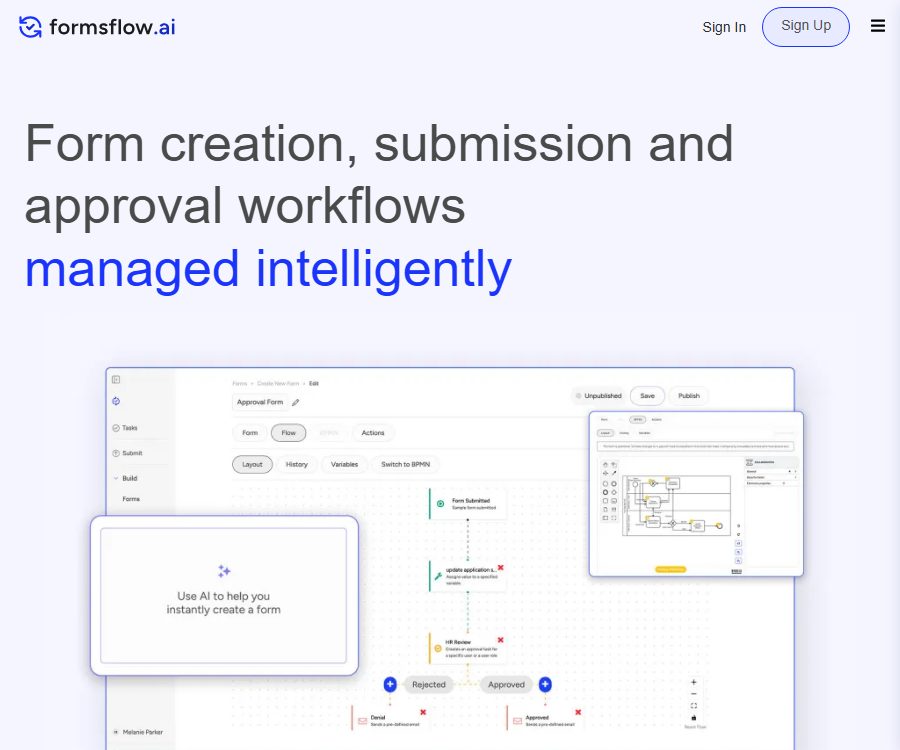
What is formsflow.ai?
Formsflow.ai is a low-code platform for forms, workflows, and data analysis, designed to integrate data collection, approval processes, reviews, and cross-departmental workflows into digital applications. It offers both a community version that can be deployed independently, as well as cloud-based and enterprise solutions managed by the company itself.
The platform is maintained by AOT Technologies, with its core components available on GitHub. Its technical stack incorporates tools such as Form.io, Camunda, Keycloak, and Redash, with an emphasis on open standards, data portability, and reducing vendor lock-in.
Main functions of formsflow.ai
Drag-and-drop form design
Users can create online forms using visual components, and configure conditional fields, data validation, file uploads, signatures, as well as step-by-step guides. Developers can also add custom logic and brand-specific styles.
Flow-E AI-assisted development
Flow-E can generate draft forms based on textual requirements, with further adjustments possible through subsequent instructions. The official website includes native AI and MCP form creation as part of its public cloud packages; however, the specific models, quotas, and data processing methods must be confirmed before activation.
BPMN workflow
The platform supports BPMN 2.0 processes, enabling the orchestration of manual tasks, approval steps, and automated actions. Business users can use a simplified process designer, while developers can create comprehensive models for more complex scenarios.
DMN rule engine
The DMN capability is used to create decision tables and business rules, thereby separating qualification assessments, routing decisions, and approval criteria from the program code. Upon deployment, it is still necessary to establish governance processes for rule versions, exceptions, and manual reviews.
Form packaging and version management
Multiple related forms can be combined to provide a unified submission experience, thereby reducing the need for applicants to fill out information repeatedly on different pages. Form version management facilitates the iteration of fields while preserving the historical versions required for the process.
Identity and access management
The built-in identity layer supports role-based permissions, and can be integrated with Keycloak, OpenID Connect, SAML, and OAuth2. The enterprise packages also offer features such as SSO and audit logging; the exact scope of these features depends on the deployment option chosen and the terms of the contract.
Data analysis and dashboards
The platform allows the creation of dashboards based on the number of submissions, processing status, and outcomes of the processes. The analytical views are useful for operational monitoring, but when critical decisions need to be made, it is still necessary to consult the original records.
Integration and automated APIs
Formsflow.ai supports Webhooks, APIs, and application connectors, enabling data exchange with existing business systems. Forms can also be embedded in other applications to quickly create entry points for customers or internal employees.
Multi-tenant and multiple deployment options
Companies can choose to use public clouds, isolated private clouds, or deploy solutions in their own clouds or on local systems. The multi-tenant capability allows for providing separate spaces and access addresses for different departments, business units, or customers.
Formsflow.ai usage process
- Clarify the responsibilities of applicants, reviewers, administrators, and system services.
- List the form fields, attachments, validation rules, and data retention requirements.
- Create forms using drag-and-drop components, and configure conditional display as well as step-by-step wizards.
- When generating a draft using Flow-E, delete the sensitive fields that do not need to be collected.
- Use BPMN to draw the processes for submission, review, document supplementation, approval, and rejection.
- Use DMN decision tables to configure rules for eligibility, routing, or risk assessment.
- Set user roles, SSO, tenant boundaries, and minimum access permissions.
- Connect to the Webhook or API, and test retry on failure as well as repeated submissions.
- Conduct accessibility, mobile, permission, and stress testing before deployment.
Which users are it suitable for
- Establish government agencies for online applications, licensing, and public service processes.
- Enterprises that require cross-departmental approval, as well as the processing of work orders and the collection of relevant documents.
- A technical and compliance team for self-hosted low-code platforms is desired.
- Consulting firms and integrators that deliver process applications to clients.
- Organizations that need to manage forms, rules, identities, and analytics in a unified manner.
- Developers who wish to study BPMN and open-source low-code architectures.
Product advantages
- Forms, processes, rules, identities, and analytics are all consolidated on a single platform.
- The community version’s source code is available publicly and can be used under the Apache 2.0 license.
- It supports open standards such as BPMN, DMN, and OpenID Connect.
- Public clouds have no limit on the number of users; they are primarily differentiated based on the volume of requests and the capabilities of the enterprise.
- It can be deployed in public clouds, private clouds, on-premises, or in proprietary clouds.
- Form definitions, process models, and data can be transferred between deployment methods.
- It takes into account both the visual operation capabilities for business users and the flexibility for developers to make extensions.
Usage restrictions and precautions
- The community version and the enterprise version differ in terms of features and level of support.
- Self-hosting requires maintaining a database, identity services, a workflow engine, and a container environment.
- Complex BPMN, DMN, and system integration still require professionals for design and testing.
- The forms generated by Flow-E cannot replace the review of privacy, compliance, and business rules.
- Free public cloud instances may be suspended if no form submissions are made over an extended period of time.
- The number of submissions is calculated based on the new process instances, and it is not equal to the number of individual approval steps.
- White-label partners, distributors, and technical partners are not subject to the standard public prices.
- Before migration, custom code, attachments, identity configurations, and historical data should be verified.
Formsflow.ai pricing
The following are the public cloud options displayed on the official pricing page as of August 26, 2026. Switching between monthly and annual payment plans affects the price for the Professional plan; the final cost and benefits are subject to those indicated on the settlement page or in the corporate quote.
| Plan | Reference price | Monthly submission volume | Main features |
|---|---|---|---|
| Go | Free | Up to 250 times | Infinite forms, native AI and MCP form creation, workflows, APIs, and basic support |
| Professional | $ | Up to 2500 times | Designed for growing teams, including advanced business support. |
| Enterprise | Get a quote by contacting us | No restrictions | Complex logic, AI forms and BPMN construction, SSO, audit logs, and priority SLAs |
| Private Cloud | Annual custom licensing | In accordance with the contract | Isolated computing along with database capabilities, data residency, and white-labeling options |
| Self-Hosted | Annual custom licensing | Based on server or enterprise usage | Deployed on proprietary infrastructure, allowing for internal customization. |
The official website still allows access to the pages for the former subscription plans such as Premium Start, Leap, and Max; the price structures on those pages differ from those on the current main pricing page. When making a purchase, do not consider the old pages as representing the current prices – instead, ask the sales team to provide written confirmation of the version, quantity ordered, implementation details, support options, and renewal terms.
Open source and deployment instructions
The core repository of formsflow.ai is licensed under the Apache 2.0 license, making it a true open-source project. The community version can be used for personal projects and self-deployment, but advanced enterprise features, official hosting, SLAs, upgrade support, and commercial licenses must be purchased separately.
Open source does not mean that the entire deployment is cost-free. The team needs to take into account the costs associated with servers, databases, backups, monitoring, security updates, identity management, email services, as well as the labor required for maintenance.
Security and governance recommendations
- Access to forms, processes, and data is restricted through SSO and role-based permissions.
- Establish separate roles for administrators, designers, reviewers, and applicants.
- Set retention and deletion rules for attachments, identification documents, and financial fields.
- Record the version of the process model and decision table, as well as the approver and release date.
- Implement signing, key rotation, and replay protection for Webhooks and APIs.
- Before upgrading open-source components, check the compatibility and security announcements first.
- Regularly export form definitions, BPMN models, and key business data.
Frequently Asked Questions
Can formsflow.ai be used for free?
Yes. The public cloud Go solution is free; up to 250 submissions are allowed per month, and the community version of the source code can also be deployed by users themselves.
Is formsflow.ai an open-source project?
Yes. The official core repository is licensed under Apache 2.0, but not all advanced enterprise features and official services are free of charge.
Does formsflow.ai support self-hosting?
It is supported and can be deployed on AWS, Azure, GCP, local servers, or isolated environments; however, the user is responsible for carrying out the maintenance tasks.
What can Flow-E do?
Flow-E can generate draft forms based on textual instructions and assist with further adjustments; the enterprise version also offers AI-powered support for BPMN creation.
How is billing handled for a single submission?
Creating a new process instance is typically considered one submission, regardless of the number of approval steps or automatic actions contained within that process.
Can public cloud data be migrated?
Officials state that it is possible to export form definitions, BPMN process models, and data, for later importation into a private cloud or self-hosted instance.
Tools similar to the Best Low Code Form Automation Platform | formsflow.ai





 Guigong Network Security Registration No. 45132202000164