






What is AutoAgentX?
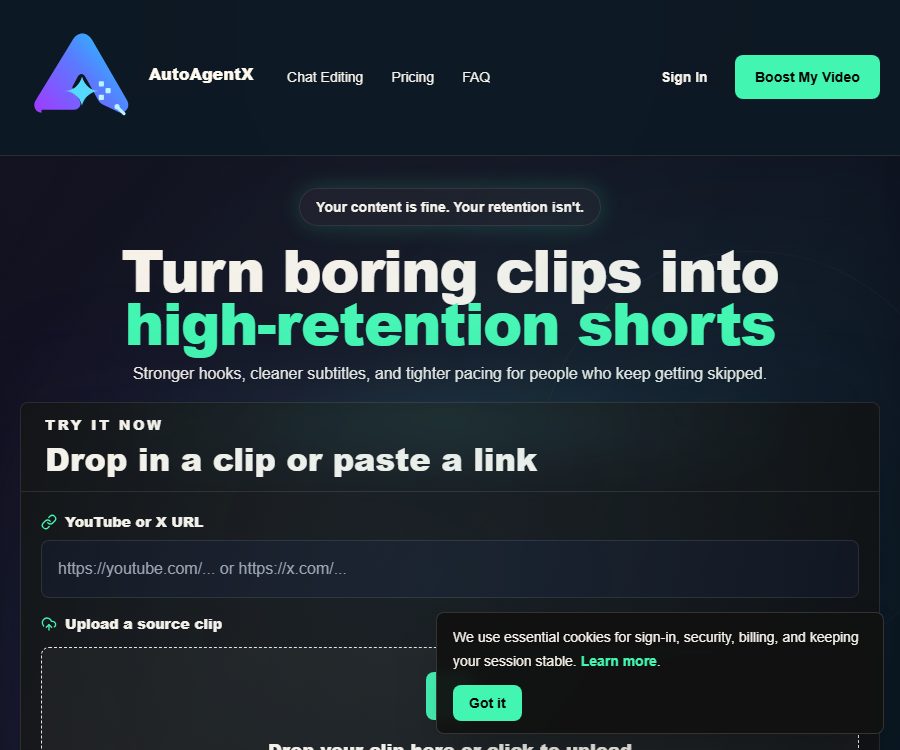
AutoAgentX is a lightweight AI video editor designed for short-video creators, with a focus on optimizing the first-second appeal of the video, subtitle presentation, and the viewing rhythm. It is not a platform for creating AI agents, nor is it a professional editing software equipped with a full timeline.
Users can upload local videos or paste URLs of videos from YouTube and X that are supported, and then describe in natural language the parts that need improvement. The system will generate a version suitable for viewing on mobile devices as short videos.
Main functions of AutoAgentX
Rewriting of short-video hooks
The tool helps to shorten those lengthy openings and tries to provide a clearer reason for watching right from the first few seconds. The hook should be consistent with the content that follows; making excessive promises can undermine trust and lead to viewers abandoning the content.
Subtitle cleaning and beautification
AutoAgentX can organize subtitles, increase font size, boost contrast, and improve readability on mobile devices. However, automatic subtitles may still misinterpret proper nouns, numbers, accents, and overlapping voices.
Rhythm optimization
The platform will tighten up those slow beginnings and unnecessary pauses, making the videos more concise. Emotional expressions, pauses used for teaching purposes, or dramatic pacing may not be suitable for automatic acceleration; manual review is required in such cases.
Chat-based video editing
Users can directly enter requests such as “Make the first second more impactful” or “Increase the size of the subtitles”. The chat-based approach reduces the time required for learning, but it offers less precise control compared to professional timeline and keyframe editors.
Video upload and link import
Currently, MP4, MOV, M4V, and WebM formats are supported, and it is possible to paste links from YouTube or X. The free version allows files up to 20MB in size to be uploaded, while the paid plans offer a higher file size limit.
Boost quota
Each submission of Boost consumes one unit from the quota, and the dashboard shows the remaining amount for the current period. Failed tasks will attempt to return some of the reserved quota if they meet the relevant conditions.
AutoAgentX Usage Guide
- Register for a free account, and first prepare a short vertical video that you have the rights to use.
- Upload MP4, MOV, M4V, or WebM files, or paste a link to a supported video.
- In the options for emphasis, select Hook, Subtitles, Rhythm, Opening, or Mobile Readability.
- Specify the problem with a concrete instruction, such as the slow start or too small subtitles.
- Submit the Boost request and wait for it to be processed; keep in mind that each submission consumes one quota.
- Compare the original version with the output to check whether the promises given at the beginning are consistent with the main text.
- Check the subtitles sentence by sentence, and verify the cropping, font size, contrast, and safety area.
- If the results are not satisfactory, reduce the scope of the modifications and submit it again.
- Keep the original footage and the final version before publishing, and verify the platform and licensing for the materials.
Methods to improve processing efficiency
- It is designed for inputting short videos that already exist in large quantities; it should not be used as a tool for creating content from scratch.
- Pose one or two clear questions at a time to facilitate the assessment of the effects of the changes.
- Place the key information in the first few seconds, but avoid false or exaggerated titles.
- Prepare the correct subtitles for names, brands, and numbers and perform manual replacement.
- Check on different phone screens to see if the subtitles cover the characters and interface elements.
Which users are it suitable for
- Individual creators who need to optimize YouTube Shorts quickly.
- Social media managers who create short videos for X, Reels, or TikTok.
- There are podcasts and interview teams that already possess the original material but lack the time for editing.
- A small content team that aims to improve the readability of subtitles and the pace of the opening sequence.
- Agencies and corporate operation teams that handle batch processing of brand short videos.
Product advantages
- It focuses on functionality, so there is no need to learn complex professional editing interfaces.
- Chat commands are suitable for quickly expressing the intention to make changes.
- The free plan allows two tests of Boost without the need for a credit card.
- It supports two ways of inputting content: local videos and links from YouTube and X.
- The four-tier package covers everything from occasional trials to bulk processing by teams.
- The Privacy and Terms page explains the handling of accounts, media, and failure limits.
Usage restrictions and precautions
- It is not a full-fledged video editor; it does not offer a multi-track timeline or advanced keyframing capabilities.
- The free upload limit is 20MB, so it is not suitable for uploading large, long videos directly.
- Each use of Boost consumes quota, and repeated trial and error will quickly deplete the monthly balance.
- AI may accidentally delete meaningful pauses or alter the original tone of expression.
- Subtitles, cropping, and pacing must be manually reviewed before release.
- Importing a link does not automatically grant the right to download and republish it.
- External processing engines, storage, and payment services can affect speed and availability.
- The old versions of the PDFs related to customer acquisition and managed services do not represent the current SaaS subscription benefits.
Price of AutoAgentX
The following are the current monthly prices as shown on the official website as of August 26, 2026. Taxes, file size limits, queue priorities, and promotions may change; the final amounts will be those displayed on the settlement page and in the account.
| Plan | Price | Monthly Boost | Queue and file limits |
|---|---|---|---|
| Free | $ | 2 times | Standard queue, lower file limit; the entry limit is indicated as 20MB. |
| Creator | $ | 150 times | Standard queue, for larger file uploads |
| Pro | $ | 350 times | Priority labeling, limit for large files |
| Business | $ | 2500 times | Priority labeling and maximum limits, intended for teams |
One Boost is used for each submission for processing, and the cost is not calculated on a per-minute basis for videos. Plans for upgrades, refunds, payment failures, and declines may affect the paid features and quotas; payments are handled by Gumroad.
Data and Privacy
The privacy policy states that the platform retains only the minimum amount of account, billing, and task data necessary for operating its services, including identity information, plan status, task records, uploaded metadata, and limited logs. The source files and output references are linked to accounts and are not used for public enumeration.
Media processing may rely on trusted third-party storage or processing infrastructure, and some operational metadata is processed through such services. The policy does not specify a fixed deadline for file deletion; it only states that efforts will be made to minimize the retention of files once they are no longer needed.
Accounts and Deletion
Users can request data export through their account settings, or they can submit a deletion request. During the process of deletion, the account is locked, and necessary logs may be retained for security, Webhook, billing, and fault recovery purposes.
Product transformation explanation
The same domain name was previously used to promote a service for acquiring customers through meetings as well as a management service for YouTube Shorts; corresponding PDF documents can still be found on the internet. The home page, pricing information, and privacy and terms pages now all point to the Short Video Boost editor, so the prices of those old services cannot be applied to the current products.
Is AutoAgentX open source?
No official source code repository for the AutoAgentX video editing service has been identified; therefore, it should be considered a closed-source commercial product. On GitHub, there are several projects with names similar to AutoAgent, AgentX, and AutoAgents, but no verifiable connection to this website exists.
Frequently Asked Questions
Is AutoAgentX an AI Agent platform?
No. The current product is a tool for optimizing short videos; it focuses on improving elements such as hooks, subtitles, and pacing, rather than creating or organizing agents.
Can AutoAgentX be used for free?
Yes. The Free plan includes 2 Boost sessions per month; no credit card is required, and the file size limit specified for uploading is 20MB.
What does a single Boost modify?
It can strengthen the opening hook, improve the presentation of subtitles, and tighten the rhythm; the specific results depend on the material and the user’s instructions.
Which video formats is AutoAgentX compatible with?
The current upload options include MP4, MOV, M4V, and WebM; it also supports pasting URLs of videos from YouTube or X.
How much is AutoAgentX?
The monthly fees for Creator, Pro, and Business plans are 14.99, 27.99, and 199.99 dollars respectively, and these plans include 150, 350, and 2500 Boosts.
Is AutoAgentX an open-source tool?
No. No official source code repository has been identified at present, and a GitHub project with the same name cannot serve as evidence that the service is open-source.
Tools similar to AutoAgentX





 Guigong Network Security Registration No. 45132202000164