






What is Nelly?
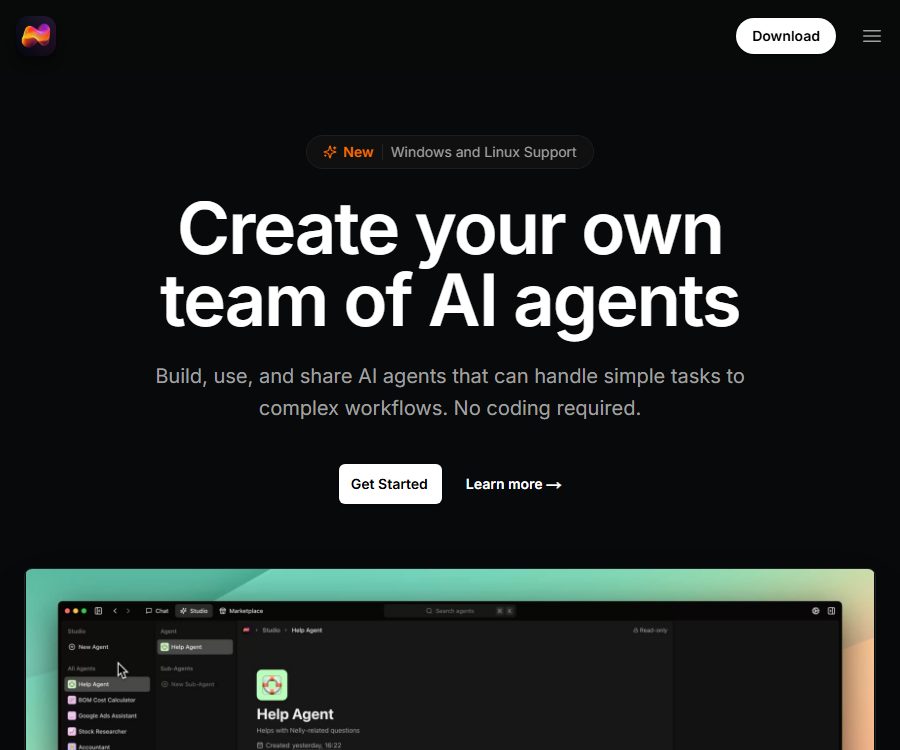
Nelly is a desktop AI agent platform developed by Pine Enterprises AB. Users can describe tasks, objectives, and rules in natural language to create AI agents that are capable of invoking tools and sub-agents, without the need to write any code.
The platform consists of components such as Nelly Studio and Nelly Chat; it enables the creation and testing of agents, as well as allowing those agents to carry out actual tasks. The product is still in the Beta stage, and its features, message quotas, and prices may change upon its official release.
A one-sentence summary
Nelly is a code-free AI agent platform that allows for the creation, testing, and use of multi-agent teams on the local desktop, as well as integration with custom large models.
Main functions
Creating intelligent agents with natural language
Users can create custom agents by simply specifying the agent’s role, tasks, limitations, and output requirements. Instructions support structures such as headings and lists, which make it possible to organize business rules into maintainable descriptions.
Built-in tools
Agents can use tools such as browsers and databases to carry out research, data entry, and query tasks; the authorities state that more tools will be added in the future. Before granting access to these tools, it is necessary to test them first on test data and accounts with limited permissions.
Sub-agents and task decomposition
The main agent can break down complex tasks and delegate them to specialized sub-agents, thereby enabling multi-agent collaboration. Calls made by the sub-agents consume additional message quotas, and they may also increase costs, lead to delays, and cause errors in message transmission.
Agent testing
Nelly Studio allows testing of agent behavior using natural language, with the possibility to adjust instructions repeatedly. Tests should include scenarios such as normal inputs, missing information, conflicting requirements, prompt injection, and tool failures.
Threads and contexts
Conversations can be organized by thread, which helps to maintain the context of tasks and the boundaries between different projects. Long-running threads may still accumulate irrelevant information; important tasks should be summarized regularly to create a clean context.
Department and team organization
Users can drag and drop agents into different departments to simulate research, marketing, operations, or support teams. Departments are merely a way of organizing things; they do not automatically create actual corporate permissions or approval processes.
Movement trajectory
The platform can display the tools used by agents, browser screenshots, and the progress of step-by-step execution, which makes it easier to understand what is taking place. Activity logs enhance observability, but they do not prove that the results are accurate or that the actions were carried out with authorization.
Custom large model providers
The paid plans allow connection to OpenAI, Anthropic, OpenRouter, and LM Studio. By using your own provider, you are not subject to Nelly’s built-in message quota limits; however, you are constrained by the pricing, speed, context limits, and policies of the model provider.
Local execution architecture
The official FAQ states that agents, tools, and data are operated and stored on the user’s computer, while conversation histories and context are sent to the selected large model. Nelly claims that such conversation contents are not saved, but the model provider may handle them according to its own policies.
Features that have not been officially provided yet
- Nelly Marketplace: The official website indicates that it is about to be launched, so it cannot be promoted based on its current features.
- Monetization of agents and tools: This is part of Marketplace’s future plans.
- Custom MCP server: It is indicated on the official website as something that will be released soon.
- A team of intelligent agents that can operate autonomously on a continuous basis: this is part of the long-term vision for the product, but it is not something that can be guaranteed at present.
Which users are it suitable for
- Individual knowledge workers: tools for research, writing, and information organization.
- Small teams: Use departments to organize AI assistants with different responsibilities.
- Operations staff: Organize the steps related to the browser and database into a proxy workflow.
- Product manager: Quickly create agent prototypes and observe the execution process.
- Non-technical users: Create and modify proxy instructions using natural language.
- Local model users: Connect to the models they are running via LM Studio.
- Developers and testers: Verify sub-agents, tool usage, and task decomposition approaches.
Packages and prices
As of August 24, 2026, Nelly offers three public plans: Free, Pro, and Pro+, while also accommodating custom requirements for enterprise clients. All three plans allow users to create an unlimited number of AI agents; the main differences lie in the amount of messages that can be processed and the capabilities of the proprietary models available.
| Plan | Price | 30-day message quota | Proprietary models | Other equity interests |
|---|---|---|---|---|
| Free | $ | 30 items | Not supported | No credit card required |
| Pro | $ | 100 items | Supported; Nelly allows unlimited messages. | Priority support and early access to new features |
| Pro+ | $ | 250 items | Supported; Nelly allows unlimited messages. | Priority support and early access to new features |
| Enterprise | Custom quote | As required | In accordance with the contract | Higher limits or specific features |
The prices and quotas mentioned above are applicable to the Beta phase; the official party has made it clear that they may change in the final version. Fees, currency types, automatic renewal options, and enterprise features shall be subject to the information provided on the purchase page or in the contract.
How are messages counted?
Each message sent by a user to the proxy is counted, and messages sent by the proxy to sub-proxies are also counted. For example, when a user sends a request and the main proxy then consults a sub-proxy, two messages in total are used.
- The quota is calculated based on a rolling 30-day window starting from the first message.
- Unused messages cannot be carried over to the next window.
- During the beta phase, additional message packages cannot be purchased separately.
- Complex multi-agent workflows may consume multiple quotas per request.
- When using your own model, the Nelly quota does not apply, but the model provider will still charge a fee or impose restrictions on usage.
Subscriptions and refunds
Nelly does not offer refunds for payments made for subscriptions. Users can cancel at any time, and their benefits will remain valid until the end of the current billing cycle.
Before making a purchase, it is necessary to use Free to verify compatibility with the local system, the stability of the tool, and the effectiveness of its workflow. If custom models are used, the cost of the Nelly subscription, as well as the costs associated with the model APIs or local hardware, must also be taken into account.
Model vs Cost Comparison
| Method | Model source | Nelly message limits | Additional costs and considerations |
|---|---|---|---|
| Built-in model | Nelly is currently using Claude Sonnet 4. | Counted by package | No additional API is required, but the model may be changed. |
| OpenAI | The user’s own account or API | Not applicable | Charged based on OpenAI usage and policies |
| Anthropic | The user’s own account or API | Not applicable | Charged based on Anthropic usage and policies |
| OpenRouter | Unified model routing | Not applicable | The model prices, availability, and data policies vary. |
| LM Studio | Local machine or LAN model | Not applicable | Sufficient memory, video memory, and local operational resources are required. |
Quick Start Tutorial
- Download Nelly according to your operating system, and make sure that the installation package comes from the official website.
- Create a free account by starting with simple tasks that do not involve sensitive data.
- Create a new agent in Studio, specifying the role, target, input, output, and restrictions.
- Do not grant permissions to the browser or database yet; only test text-related functionality.
- Prepare a set of normal, blurred, conflicting, and malicious inputs for testing.
- View the activity trail, tool calls, and browser screenshots to identify the erroneous steps.
- When complex tasks are required, add a dedicated sub-agent and monitor message consumption.
- Before paying to connect to your own models, set the API budget, rate limits, and logging policies.
- Before beginning actual operations, establish procedures for manual verification, permission management, backup, and rollback.
Prompt structure for creating reliable agents
- Role: Explains what the agent is responsible for and what it is not responsible for.
- Goal: Define the acceptable final outcome, rather than a vague notion of “doing it well”.
- Input: Lists the available data, files, and tools.
- Steps: Specify the sequence in which checks must be carried out before taking action.
- Restrictions: It is prohibited to send, delete, pay for, or access unauthorized data.
- Output: Specify the fields, format, length, and evidence requirements.
- Failure handling: Stop and report when encountering permission, data, or tool errors.
- Review: Manual confirmation is required before performing high-impact actions.
Suggestions for sub-agent design
- Each sub-agent is responsible for a single, well-defined area, thereby avoiding overlapping responsibilities.
- The primary agent transmits only the minimum necessary context, thereby reducing privacy concerns and messaging costs.
- The sub-agent is required to return structured results, items of uncertainty, and the reasons for failure.
- Limit the depth of recursive calls to prevent proxy loops from consuming quotas.
- Set permissions separately for browsers, databases, and external accounts.
- Use activity logs to randomly check whether the primary agent correctly understands the results from the secondary agents.
Local data and cloud models
The proxy configuration, tools, and related data are stored on the local device, but this does not mean that all processing takes place offline. When using the built-in Claude, OpenAI, Anthropic, or OpenRouter, the conversation history, task context, and necessary data are sent to the corresponding cloud-based models.
Connecting to LM Studio allows compatible models to run on the local machine, but browsing, accessing external websites, and other integrations may still require network communication. Users should verify the data boundaries through actual network and permission tests.
Key points of the privacy policy
The privacy policy was last updated on April 8, 2025; the entity responsible for its management is Pine Enterprises AB in Sweden. The platform processes email addresses, IP addresses, device information, browser details, as well as usage and diagnostic data, and may share this information with payment service providers, service providers, affiliated companies, and business partners.
The policy states in the CCPA section that personal information is not sold in its usual sense, but certain acts of sharing for financial gain may be considered selling under the law; it lists categories such as identifiers, business information, and online activities that could fall under this category over the past 12 months. California users can request to stop such sales or sharing, as well as to have the use of sensitive information restricted.
Suggestions for using privacy settings
- Do not include passwords, keys, customer lists, or confidential information in the proxy instructions.
- Check the policies of OpenAI, Anthropic, OpenRouter, or the local model according to the selected model.
- Database tools first use a read-only test database and accounts with minimal permissions.
- Regularly delete local threads, screenshots, caches, and proxy data that is no longer needed.
- Before use, enterprises should verify the data processing agreements, the sub-processors for the models, and matters related to cross-border data transfer.
- Exercise the right to withdraw from the sale or sharing of data, as well as to impose restrictions on sensitive information, when necessary.
Platform and system support
| Platform | Public status | Explanation |
|---|---|---|
| macOS | Support | The App Store version requires macOS 12 and an Apple M1 or later processor. |
| Windows | Beta | Supports Windows 10 or later. |
| Linux | Beta | A 64-bit version is available. |
| Web version | Not used as the main operating terminal | Agents and tools run as desktop applications. |
| Mobile version | No official version has been found yet. | It is currently classified as a desktop application. |
Support for Windows and Linux was announced in June 2025, and the download page still indicates it as Beta. Before using it in production, it is necessary to test system permissions, browser automation, database drivers, and sleep/resume functionality.
Product advantages
- Agents created using natural language, ideal for non-programmers to get started quickly.
- Agents, tools, and data are primarily run and stored on the local machine.
- It supports the division of tasks among sub-agents and a departmental organizational structure.
- Activity trails, browser screenshots, and tool logs are easy to review.
- Paid users can connect multiple cloud models to LM Studio.
- The Free plan allows one to test basic functionalities without the need for a credit card.
- It supports the three major desktop operating systems: macOS, Windows, and Linux.
Usage restrictions and precautions
- The product is still in beta phase, and its price, quotas, and features may change.
- Free offers only 30 messages; multiple agent calls will quickly deplete this quota.
- Unused messages are not carried over, nor can additional message packs be purchased.
- Subscriptions are non-refundable.
- The cloud-based model still receives the conversation history and task context.
- Browsers and database tools may perform incorrect operations or actions beyond their authorized scope.
- Custom MCP servers and Marketplace are still upcoming.
- The Windows and Linux versions are still marked as Beta.
- The record of an agent’s activities does not equate to the fact that those results have been verified.
Open source and GitHub status
As of this verification, no official GitHub repository containing the source code for the Nelly desktop application, Studio, Chat, or the agents, along with any open-source licensing documents, was found. The main platform of this product should be labeled as not being open source.
The ability to connect to LM Studio or other open-source models does not mean that Nelly itself is open source. Future support for MCP servers is merely an extension of the protocol’s capabilities; it cannot be used to determine the licensing terms for the platform’s code.
Basic information
| Project | Content |
|---|---|
| Tool name | Nelly |
| Development company | Pine Enterprises AB |
| Founder | Timothy E. Johansson |
| Tool type | Code-free desktop AI agent platform |
| Core module | Nelly Studio and Nelly Chat |
| Built-in model | Currently it is Claude Sonnet 4; adjustments may be made. |
| Native model connection | OpenAI, Anthropic, OpenRouter, and LM Studio |
| Price pattern | Free version, monthly subscription, and enterprise customization |
| Product stage | Beta |
| Is it open source? | No |
| Recommendation score | 4.2 points |
Frequently Asked Questions
Is Nelly free?
There is a free option that allows creating an unlimited number of proxies; up to 30 messages can be sent per 30 days, and no credit card is required. Calling sub-proxies for complex tasks incurs additional message costs.
Are all the proxy data stored locally?
The agents and data are stored on the local device, but the conversation history and context are sent to the selected large model. Further reduction of cloud-based data transfer is possible only when connecting to a local model and controlling other network tools.
Can I use my own API?
Yes, the Pro and Pro+ versions support OpenAI, Anthropic, OpenRouter, and LM Studio. The message limit associated with Nelly no longer applies, but model providers still impose fees and restrictions.
Is it compatible with Windows and Linux?
Support is available; Windows requires version 10 or higher, while Linux offers a 64-bit version – both of these are still marked as Beta at the moment. A official version for macOS is also available for download.
Is MCP server support available?
The official website currently marks the custom MCP server as soon to be released, so it cannot be used with its existing functions. It is necessary to wait for the official release of the product and to review the instructions regarding security permissions.
Is Nelly open source?
No, no official source code or open-source license has been found yet. Using local open-source models does not change the licensing status of the Nelly platform itself.
Summary
Nelly is suitable for users who wish to create proxy teams using natural language on the desktop, monitor the execution of various tools, and integrate their own models. At present, it should be regarded as a beta tool; testing should start with tasks that require limited permissions, while paying close attention to message usage, the transfer of model data, tool permissions, and the risk of no refund.
Tools similar to Nelly · A complete AI agent platform





 Guigong Network Security Registration No. 45132202000164