






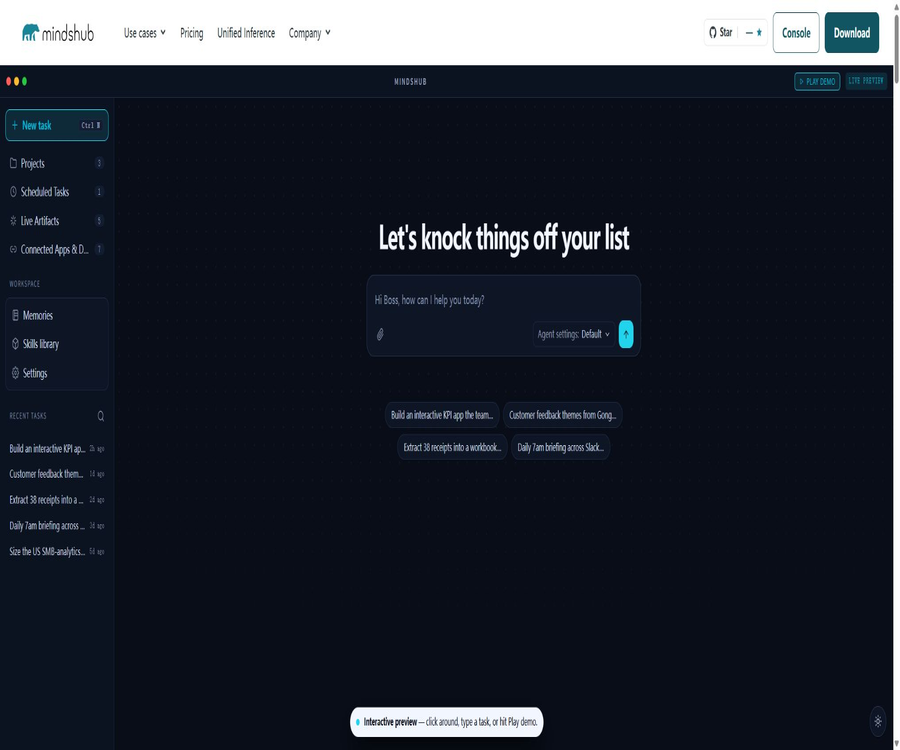
What is MindsHub by MindsDB?
MindsHub is an open-source AI agent platform developed by MindsDB, Inc.; its core workspace is called Cowork. It enables knowledge workers to assign tasks such as research, analysis, reporting, application development, and scheduled operations using natural language, and to collect the results of these tasks for sharing.
By 2026, the product will switch its main brand interface from MindsDB to MindsHub, though the development company will remain MindsDB. The data querying capabilities of the original MindsDB will continue to be available as an optional Query Engine; the current platform places more emphasis on open agents, model routing, connectors, and the deployment of applications.
Main functions
- Task assignment: The user describes the overall goal, and the Anton or Hermes agents are responsible for planning the steps, invoking tools, reading files, and generating results. This approach is suitable for multi-step knowledge-based tasks, but it is still necessary to define clear success criteria and rules regarding prohibited actions.
- Open agent switching: Cowork uses Anton by default, but it is also possible to switch to Hermes, with the workspace, data, and outputs remaining intact. The fact that the agent framework is open-source does not mean that all external models are subject to the same licensing terms.
- Project workspace: Organize conversations, files, connectors, skills, memories, and outputs within a project to avoid confusion between different tasks. Teams should isolate credentials and sensitive information by project.
- Product creation: It is possible to create web applications, dashboards, reports, and documents, and preview them within a project. The hosted version also allows the creation of sharing links; however, any secret information, personal data, or internal paths must be removed before the content is made public.
- Scheduled tasks: Use standard cron expressions and time zones to run commands on a regular basis, in order to generate weekly reports, monitoring summaries, or process details. It is necessary to set up alerts for failures, handle repeated executions, and clean up tasks that have expired.
- Connector: Projects can be linked to external data and tools, and the agents read from or manipulate these systems during operation. The connection credentials are stored in an encrypted vault specific to each connection.
- Custom skills: Task methods are expanded through skill descriptions and available tools, enabling agents to follow organizational processes. These skills must undergo code review, and their access to the network, files, and external systems should be restricted.
- Free model selection: You can use your own model provider’s key, or leverage models from families such as Claude, GPT, Gemini, Grok, Kimi, DeepSeek, Qwen, and GLM through the MindsHub Model Router.
- Automatic failover: Pro Routing attempts to use alternative models in the order they are listed when the provider is unavailable. This switching helps ensure continuity, but the style of the output, its contextual capabilities, and costs may change.
- MindsHub Air: This is another name for a model that offers a dynamic balance between performance and cost; it is not a fixed version of a model. A free quota applies to this alias, and the underlying configuration can be adjusted.
- Unified Inference: It provides developers with a unified model endpoint as well as a prepaid balance, and is compatible with common chat interface formats. It uses the same model pricing as Cowork Pro, in addition to a 5% platform fee.
- MindsDB Query Engine: An optional data query engine that enables agents to access over 200 different data systems using standard SQL, thereby reducing the need to copy data. The actual capabilities of the connector as well as the licensing requirements must be checked per component.
Input, execution, and output
| Stage | Content | Results can be generated. | Main boundaries |
|---|---|---|---|
| Task input | Natural language objectives, file, and project context | Execution plan and work records | Vague goals amplify deviations. |
| External connection | Email, calendar, cloud storage, databases, and business tools | Retrieve information or perform actions | Minimum permissions and an undo mechanism are required. |
| Agent execution | Anton, Hermes, tools and skills | Research, analysis, automated processes | Tool calls may fail or cause side effects. |
| Model inference | Bring your own key or Model Router | Text, code, and structured content | The model terms and costs vary. |
| product | Applications, dashboards, reports, and documents | Preview, publish, or share with the team | Public links may expose the content. |
| Scheduled execution | cron, time zones, and task prompts | Periodic reports and monitoring results | Retries and repeated executions need to be handled. |
Usage process
- Choose between a web-based version, Windows, macOS, or self-hosted deployment, and decide whether to use MindsHub Air, Model Router, or your own model keys.
- Create a project, specifying the task objectives, delivery format, time frame, quality standards, and the actions that require manual confirmation.
- Upload the necessary files and connect to the business system, granting only the read or write permissions required for the current project.
- Choose Anton or Hermes, add the appropriate skills, and first test the tool’s functionality and the model’s outputs using low-risk samples.
- Submit the complete task and observe the execution plan, file changes, external actions, tokens, and error recovery.
- Check the generated applications, reports, documents, or dashboards to verify facts, calculations, permissions, and copyrights.
- When repeated execution is required, create a scheduled task and set the time zone, frequency, responsible person, failure handling procedures, and shutdown date.
- Select the access scope before releasing the product; sensitive results should be kept private, and unused connections and keys should be revoked on a regular basis.
Suitable for users and scenarios
- Research and strategy specialists: collect data, compare options, produce analyses, and generate reports for sharing.
- Operations team: Creates summaries of the production cycle, monitors business information, and automatically updates dashboards.
- Content team: Research topics, draft content, convert it into different formats, and organize repetitive processes.
- Sales, support, and finance teams: They use business data to create reports, follow-up materials, or exception reports.
- Developers: Use the unified model interface via Unified Inference, or call the APIs for projects, conversations, outputs, plans, and connectors in Cowork.
- Organizations that place emphasis on deployment control: They run open-source stacks on-premises or in a VPC, and use their own model endpoints.
- Unverified agents should not be used directly in areas related to life safety, critical infrastructure, or other high-risk activities.
Prices and billing
| Package or version | Price | Billing cycle | Core benefits or quota | Suitable for users |
|---|---|---|---|---|
| Cowork Free | 0 dollars | Refreshed monthly | 5 million MindsHub Air tokens per month, or any custom model key; the ability to publish products; available for Windows and macOS. | Personal experiences and users with their own keys |
| Cowork Pro | Model Fega: 5% fee, plus platform fee | Deducted on a pay-as-you-go basis from the prepaid balance | Complete model catalog, access control for private products, automatic failover, balance top-up, and ticket support | Professional and team users |
| Unified Inference | Model Fega: 5% fee, plus platform fee | Deducted on a pay-as-you-go basis from the prepaid balance | Unified API Key, shared model pricing, and prepaid balance | Application developers |
| Enterprise solutions | Contact sales | Contractual agreement | Enterprise SLAs, bulk usage discounts, and custom deployments | Large organizations |
| Self-hosted open-source version | There is no subscription fee for the software. | Bear the resource costs yourself. | It can operate on-premises or within a VPC; users provide their own models, storage, as well as handling operations and support. | Teams that require infrastructure control |
Cowork does not require a subscription fee or a minimum spending amount; the balance in the Pro plan can be topped up manually or through automatic top-ups with a monthly limit set. Once top-ups are stopped, the account returns to the Free plan, while taxes, external model accounts, and self-hosted infrastructure come at additional cost.
Representative pay-as-you-go rate
| Project | Enter price | Output price | Billing unit | Additional explanation |
|---|---|---|---|---|
| MindsHub Air | 0.20 dollars | 1.20 dollars | Every 1 million tokens | The first 5 million tokens are available for free each month; a higher price applies for more tokens. |
| Claude Sonnet 5 | 2.00 dollars | 10.00 dollars | Every 1 million tokens | There are also rates for cache reading and writing. |
| Web search | 7.00 dollars | $ | Every 1,000 times | Search and page scraping are charged separately. |
In addition to the representative rates, there are also costs related to caching, long contexts, different models, and failover rules; model versions may change as updated by the provider. The actual costs shall be based on the pricing in effect at the time of use and on the usage records of the account. Platform fees do not apply to free tiers or calls using self-provided keys.
Platform comparison
| Platform | Installation method | Primary uses | Precautions |
|---|---|---|---|
| Website Cowork | Browser login | Managed workspace that requires no installation | The data is processed by hosting services. |
| Windows | Desktop installer | Local desktop experience | The application may update automatically. |
| macOS | Desktop installation package | Local desktop experience | It is necessary to verify the system version and signature. |
| Linux | From code build | Development and self-hosting | No confirmed installation package for the finished desktop available yet. |
| Self-hosting | Deployment on the local machine or in a VPC | Control data, models, and runtime environment | Users are responsible for operation, security, and upgrades. |
APIs, SDKs, and open-source licenses
- Cowork Server offers versioned REST APIs that cover conversations, projects, outputs, scheduled tasks, connectors, and skills; some of its response formats are compatible with the OpenAI Responses API.
- Unified Inference offers a unified chat interface that facilitates switching between models using a single key. The family of models will automatically point to the current version, and production systems should keep track of the actual model being used for responses as well as the associated costs.
- The main repository of the MindsHub platform is licensed under the MIT License; it combines desktop or web frontends, a Cowork Server, Anton, and a Query Engine through various sub-modules.
- Sub-modules are governed by their own licenses; it is not sufficient to rely on the MIT license of the main repository to assume that all components are identical. In particular, the core of the Query Engine and the integrations folder follow different licensing schemes.
- The Python SDK is a separate MIT-component of the MindsDB Server; it should not be confused with the Cowork API or Unified Inference as part of the same SDK.
- Self-hosting allows open-source code to run on one’s own devices or VPCs, but model weights, external services, and connectors may still be subject to additional licensing and commercial restrictions.
Privacy, security, and content rights
- The managed version stores the account information required to run the services, the credentials for encrypted connections, the memory of agents and the generated outputs, and sends the necessary inputs to the model provider chosen by the user.
- MindsDB states that it does not sell customer content, nor does it use such content to train its own models or those of third parties. When a key is provided by the user, the processing of models is governed by the agreement between the user and the provider.
- Users retain the right to input data, provide prompts, upload files, and view the generated output; they are granted limited processing rights necessary to operate, protect, and support the service.
- When releasing a product publicly, the user is responsible for its content and access levels; the release can be revoked, but it may not be possible to retrieve completely the content that has already been copied by others.
- Connection credentials are encrypted based on the specific connection context, and both account and product data are encrypted both during transmission and at rest. The public pages list SOC 2 Type II certifications; companies should verify the current reports and the scope covered by these certifications.
- Product usage logs and diagnostic data are typically retained for a maximum of 24 months, while communication records are kept for 5 years after the issue has been resolved; account and billing records are preserved in accordance with account requirements and legal obligations.
- Google Workspace connections are used only with the permissions granted by the user; these permissions can be revoked in Google or Cowork, and the Limited Use requirements must be followed.
- The terms do not provide a general guarantee for the refund of prepaid balances; the content can be deleted within a reasonable period after the account is closed. It is necessary to check the validity period of the balance, as well as any special arrangements regarding refunds and corporate orders, before making a top-up.
Advantages and limitations
- Advantages: A single workspace covers multiple tasks, product generation, scheduled execution, external connections, as well as public or private delivery.
- Advantages: It supports managed model routing, built-in keys, or fully self-hosted options, offering greater flexibility in deployment and model selection.
- Advantages: The platform and the core agents have open-source code, allowing developers to examine the implementation and extend connections or capabilities.
- Limitations: Multiple models, caching, long contexts, searching, and platform fees all complicate cost calculation.
- Limitations: Automatic model aliases and failover can alter the results; to reproduce a task with precision, it is necessary to record the model and its configuration.
- Limitations: Licenses for desktop applications, self-hosted components, and hosted services vary in terms of privacy responsibilities and support coverage.
- Limitations: Agents may misuse tools or produce inaccurate results; external inputs and public releases must undergo manual review.
Summary
MindsHub by MindsDB is suitable for individuals and teams who wish to use open agents in real-world knowledge-related tasks and who need flexibility regarding model selection and deployment options. During evaluation, it is necessary to check the Cowork workflow, connection permissions, access to outputs, scheduled tasks, model costs, as well as the licenses for each sub-module.
Tools similar to MindsHub by MindsDB





 Guigong Network Security Registration No. 45132202000164