






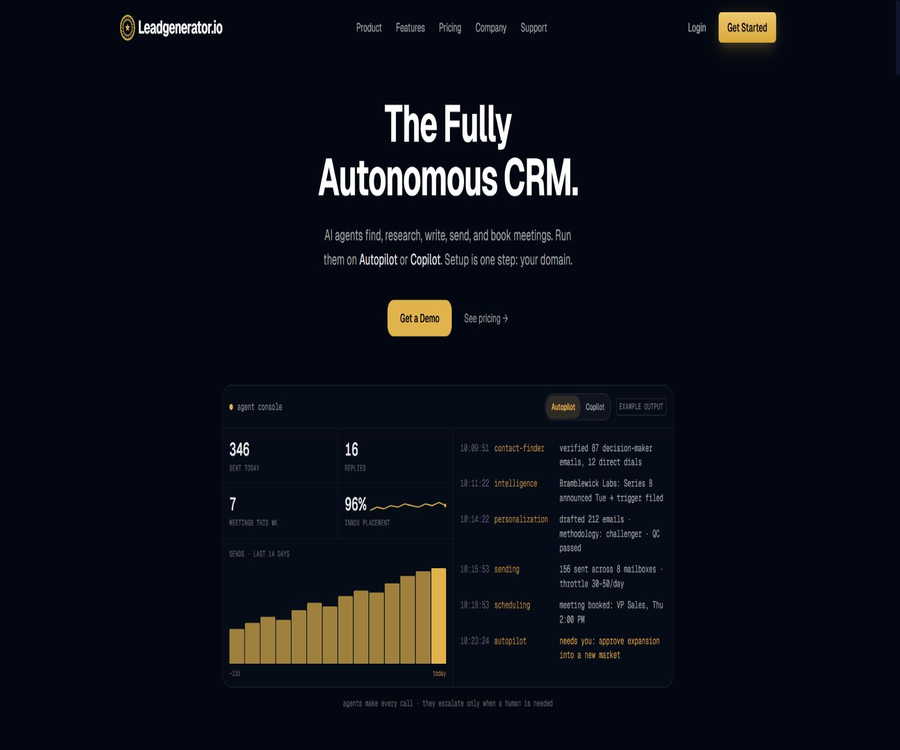
What is Leadgenerator.io?
Leadgenerator.io is an AI-powered sales lead generation and autonomous CRM platform operated by Destiny 360 Inc. It integrates a database of potential customers, company and contact information, email personalization, outreach sequences, sending infrastructure, a unified inbox, dialing functions, and the sales pipeline into a single system.
The current role of this product goes beyond that of a simple lead generator; its goal is to enable AI agents to maintain the CRM database and push potential customers to respond or schedule meetings. Sales staff are responsible for handling actual conversations, assessing customer suitability, and closing deals, rather than having to search for leads, enter data, and send messages manually on a daily basis.
Current product positioning
Leadgenerator.io refers to its product as Agentic CRM, a type of CRM in which multiple specialized AI agents work together in the background. Users can choose Autopilot to allow the agents to carry out tasks continuously, or they can use Copilot to assign specific tasks to the agents while retaining more manual control.
| Product format | Main function | Degree of human involvement |
|---|---|---|
| Traditional CRM | Save contacts, opportunities, and events | The sales team is responsible for continuous data entry and progression. |
| Ordinary outreach tools | Batch sending of emails and management of sequences | Lists, data, and CRM usually come from other systems. |
| Leadgenerator.io Copilot | The agent carries out the designated tasks for acquiring customers and reaching them. | Users define tasks and check the results. |
| Leadgenerator.io Autopilot | The agent continuously searches for, enriches, reaches out to, and updates the pipeline. | The team focuses on handling responses, meetings, and exceptions. |
Main functions
- Continuously search for target companies based on the ideal customer profile.
- Search for decision-makers by position, function, experience, and department.
- Verify the work email, phone number, and company details.
- Train corporate and product information using websites, PDFs, and manual materials.
- Generate a separate, personalized email for each contact.
- Create multi-step delivery sequences and send them according to the recipients’ time zones.
- It provides independent options for domain names, email addresses, as well as functions for pre-warming and rotation.
- Handle incoming inquiries, responses, calls, and meeting bookings.
- Automatically update CRM records, stages, signals, and priorities.
- Track the performance of emails, accounts, contacts, and teams through reports.
AI agent workforce
The platform makes use of different agents, each responsible for tasks such as finding companies and contacts, enriching data, personalizing emails, performing quality checks, sending messages, handling responses, and arranging meetings. The agents share the CRM context, which allows the data obtained in one step to be used directly in subsequent outreach and sales processes.
| Agent or link | Main tasks | Typical output |
|---|---|---|
| Company Finder | Filter target companies using ICP. | List of accounts that have been added to CRM or the candidate pool |
| Contact Finder | Find and verify the decision-makers | Position, email, phone number, and profile |
| Enrichment | Complete company and contact information. | Scale, industry, recruitment, trends, and AI summary |
| Personalization | Write an email to each potential customer. | Independent copy tailored to roles, companies, and pain points |
| Quality Control | Check for matching, names, and grammar. | Mails pending dispatch, either approved, revised, or blocked |
| Sending | Send in rotation by sequence and email address | Delivery status, opened, clicked, and replied |
| Reply Handling | Identify intentions and route them accordingly | Positive response, rejection, follow-up, or manual intervention |
| Scheduling | Discuss the timing and arrange a meeting. | Meeting minutes and the updated CRM stages |
Ideal customer profile and AI training
The team can import a company website, PDF files, or product documentation, or enter the mission statement, unique features, value proposition, and use cases manually. After that, it is possible to specify the industry, size, location, and technology stack of the target company, as well as the position, responsibilities, experience level, and department of the target contact person.
- Create separate companies and product documentation for different product lines.
- Create different ICPs for multiple markets or events.
- Specify a default ICP for continuous use by the automatic proxy.
- Control the tone, citation points, and pain points through custom prompts.
- Link corporate knowledge to specific product lines.
- Adjust the matching and copywriting strategies continuously based on the actual responses.
Company and contact data
The platform allows for searching for companies by industry, company size, region, and technology stack; it also enables the identification of decision-makers within those companies based on their functions, positions, and experience. Contact information can include verified email addresses, phone numbers, work history, social media details, and AI-generated summaries.
A large volume of data does not guarantee that all records are always accurate; positions, employment relationships, and contact details can change. Before reaching out to a large number of people, it is necessary to check key fields carefully, and establish procedures for dealing with errors, those who have left their jobs, and contacts who do not wish to receive marketing messages.
Upload Pool candidate pool
The Upload Pool is used for temporarily storing companies and contacts; teams can upload CSV files or add domain names manually, and then decide which records should be processed by the agents. No usage quota is consumed during this temporary storage phase – actual consumption begins only when the agents start verifying, completing, or personalizing the data.
| Candidate pool operations | Uses | Limits and risks |
|---|---|---|
| CSV upload | Import an existing list of companies or contacts | First, check the legitimate channels, fields, and duplicate records. |
| Add domain name or page | Start by looking for contacts using the company’s identifier. | Whether a quota is consumed depends on the subsequent processing. |
| Zero-amount temporary storage | First organize the target account, then decide on how to proceed. | Temporary storage does not mean that the data has been verified. |
| Flow into CRM | Hand over the verification records to the agent to ensure continuous progress. | Access to a rich variety of options, personalized content, and messaging quotas |
| Blocking list | Exclude customers, partners, competitors, and subscribers | It must be implemented continuously on an organizational scale. |
Personalized emails and outreach sequences
AI can generate a complete sequence of communication steps based on natural language descriptions, and craft different emails for each contact. The content of these emails takes into account the position of the recipient, updates from the company, industry-related issues, and the benefits of the products; after that, a quality check is performed to ensure that the contacts are appropriate, the names are correct, and the grammar is proper.
- Configure the duration of the sequence, the date of sending, and the working hours.
- Delivery is scheduled according to the recipient’s time zone.
- A typical sequence can include three to five follow-up emails.
- Manually modify personalized content for high-value accounts.
- Set the content that must be mentioned and the content that must not be mentioned.
- Run different sequences in sequence to conduct A/B comparisons.
- Pause further sending when a response or risk is detected.
Email delivery infrastructure
Leadgenerator.io includes features such as separate domain names, email addresses, DNS settings, preprocessing, rotation, throttling, and delivery monitoring as part of its offering. This helps to avoid using the business owner’s own domain name for sending cold emails, but it still does not eliminate complaints related to spam, a decline in reputation, or compliance risks.
| Infrastructure capacity | Current configuration | Correct understanding |
|---|---|---|
| Send domain names independently | Each account is usually configured with 3 to 5. | Used to isolate risks associated with the main brand’s domain names. |
| Business email address | Up to 10 per sending identity | The actual quantity is influenced by the package, role, and capacity. |
| Authentication | Configure SPF, DKIM, and DMARC. | A correct configuration does not necessarily mean that the message will end up in the inbox. |
| Automatic preheating | It usually takes 2 to 4 weeks. | The volume of data sent should not be increased suddenly before the preheating process is complete. |
| Email rotation | Distribute sending across multiple domain names and email addresses | It cannot be used to avoid cancellation or platform policies. |
| Delivery monitoring | Check the inbox location, spam rating, and sending status. | It is necessary to pause operations and make repairs promptly in response to abnormalities. |
Sending rhythm and cooling period
The common recommendation provided by the platform is to send 30 to 50 emails per day per email address, with the number of emails sent increasing gradually for new addresses. Contacts can return to the candidate status after a period of 60 to 90 days, but any further contact must still comply with rules regarding unsubscribe requests, objections, legitimate interests, and local marketing regulations.
- Do not treat the recommended limit as a fixed value that applies to all domain names and ensures their security.
- First, establish a low-level baseline, and then make adjustments gradually based on return emails and complaints.
- Stop sending messages immediately in the case of hard bounces and invalid addresses.
- Unsubscribes, clear rejections, and privacy objections are permanently added to the suppression list.
- Do not automatically override the other party’s refusal just because the cooling-off period has ended.
- Use global pause during abnormal activities to retain the current configuration.
Autonomous CRM and pipeline management
Companies, contacts, emails, replies, phone calls, and meetings are all stored in the same CRM record; agents update the sales stage and priority based on the activities. Quarterly updates refresh the information, remove outdated contacts, and reactivate records that meet certain criteria.
| CRM capabilities | Automatic processing of content | What does the sales team need to do? |
|---|---|---|
| Account records | Complete company information, news, job listings, and ratings | Verify the accuracy of key strategic accounts. |
| Contact records | Verify contact information and work experience | Handling errors, resignations, and privacy requests |
| Pipeline stage | Based on reach, responses, and meeting updates | Review high-value opportunities and unusual changes |
| Intention signal | Integrate access, replies, clicks, and company updates | Determine true purchasing intent and priorities |
| Task management | Generate expiration date, priority, and allocation. | Actions that require human relationships and negotiation must be completed. |
| Data refresh | Quarterly re-crawling and enrichment | Establish rules for retention, deletion, and lawful use. |
Unified inbox and reply handling
Sent and received messages from multiple business email accounts are consolidated in a single inbox, where they are automatically linked to company and contact records. The team can reply directly, mark messages for follow-up, view the full history of communications, and take over the conversation when AI detects a positive attitude on the part of the recipient.
- View all unread and replied emails from all sending identities in one place.
- Associate each reply with the correct account and contact.
- Identify positive, rejection, referral, and automated responses.
- Create follow-ups for content that requires manual judgment.
- Pause the automatic sequence after manual takeover.
- View delivery, opening, clicks, and subsequent steps.
Incoming leads and meeting bookings
The platform also deals with the inquiries that come in via the website; it is able to identify the companies visiting the site, assign a score based on ICP criteria, complete the relevant information, and assign those inquiries to the appropriate sales staff. Positive responses to emails enable automatic scheduling of meetings, allowing the sales team to get involved directly in conversations with customers who show high interest.
| Inbound stage | Automated actions | Manually controlled points |
|---|---|---|
| Access identification | Match company visits with CRM accounts | Do not consider anonymous signals as proof of an individual’s intentions. |
| Form entry | Enrich, rate, and update records | Check the scope of consent and the content of the form. |
| Clue routing | Allocate by region, account, or responsible person | Maintain routing rules and employee availability status |
| Reply classification | Identify interests, rejections, and issues | For complex or sensitive replies, please contact a human agent. |
| Meeting arrangements | Schedule a time for consultation and create an appointment. | Confirm time zone, attendees, and qualifications |
Dialing and call history
Sales staff can use dialing and automated dialing functions within the CRM system; the system sorts the calls based on their intent score and records the outcomes of those calls along with any relevant notes. Outbound calls are subject to restrictions related to number permissions, recording approvals, blocklists, and regional laws regarding telemarketing, and these aspects need to be managed separately.
Reports and analyses
The reports cover email performance, active accounts, active contacts, sequence steps, individuals, teams, and the entire organization. The data can be exported in CSV format for further analysis, archiving, or integration with management reports.
- View changes over time in terms of deliveries, opens, clicks, and replies.
- Compare the conversion and loss across different sequence steps.
- Identify active accounts and personal contacts.
- View outreach and meeting results by team member.
- Distinguish between the individual view and the overall company view.
- Export CSV for external analysis and auditing.
Teams and permissions
The platform supports login via Google, password, or team invitation, as well as user roles such as standard users and administrators. It includes features like dashboards, tasks, priorities, responsible persons, and deadlines; the enterprise version offers a dedicated customer success manager and more comprehensive implementation support.
| Management skills | Premium | Enterprise |
|---|---|---|
| Initial number of users | 1 user | 5 users |
| Role permissions | Standards and administrators | Includes and is suitable for larger teams |
| AI capacity | Standard quota and agent operation | Custom quotas, doubled AI capacity, and priority handling |
| Ticket and email support | Includes | Includes |
| Zoom support | Not included | Includes |
| Introductory training | Does not include formal training | Includes introduction, training, and continuous optimization |
| Dedicated Customer Success Manager | Not included | Includes |
| Done-For-You settings | Not included | Includes |
Implementation and launch process
Before the first shipment, it is necessary to complete tasks such as domain name purchase, DNS setup, email account creation, preliminary preparation, provision of corporate and product information, ICP registration, as well as the establishment of suppression lists and delivery sequences. The platform can handle some of the basic settings automatically, but the team is still required to approve the brand, target audience, legality, and quality of the relevant elements.
- Define the target market, products, sales cycle, and success metrics.
- Import company website, PDFs, value propositions, and product materials.
- Define the ICP for the target company and the target contact person.
- Provides lists of existing customers, partners, competitors, and those on the unsubscribe suppression list.
- Configure separate domains for sending, email addresses, and DNS authentication.
- Complete 2 to 4 weeks of preheating and establish a health baseline for transmission.
- Upload the candidate accounts to the Upload Pool or have them discovered by an agent.
- Generate sequences, prompts, and personalized quality rules.
- Start with small-scale manual review, and gradually introduce Autopilot.
- Continuously monitor bounce rates, complaints, responses, meetings, and sales quality.
Autopilot and Copilot
| Pattern | Degree of autonomy of agents | Suitable scenarios | Main risks |
|---|---|---|---|
| Copilot | Only execute user-defined tasks and scopes. | First deployment, high-value accounts, and markets with strict compliance requirements | It requires more manual operation, but is easier to calibrate. |
| Autopilot | Continuously carry out discovery, enrichment, writing, and sending. | Markets with mature rules, stable data, and high repeatability | Errors can spread rapidly, so strict thresholds are necessary. |
| Blend mode | Automatic processing for regular accounts, manual handling for high-value or unusual accounts. | Most growing B2B teams | Clear hierarchical structure and takeover rules are required. |
Prices and packages
The price information was verified on August 23, 2026; the actual amounts, taxes, exchange rates, and discounts may vary, and the final figures will be those displayed on the settlement page.
Leadgenerator.io does not currently disclose any fixed monthly or annual fees, nor any fees based on the number of seats; for both the Premium and Enterprise plans, it is necessary to contact sales. Both plans include a full-featured Agentic CRM, with the differences mainly lying in the initial number of users, data limits and agent capacity, priority support, training, and dedicated services.
| Package or version | Price | Billing cycle | Core benefits or quota | Suitable for users |
|---|---|---|---|---|
| Premium | Custom quote | Contractual agreement | Starting from 1 user: full CRM, agent functionality, unified inbox, email infrastructure, reporting, and ticketing support. | Growth-oriented sales teams and first-time users |
| Enterprise | Custom quote | Contractual agreement | Starting from 5 users: custom quota, double AI capacity, priority handling, training, dedicated manager, and setup assistance. | High-capacity teams and sales agencies |
| Additional users or capacity | Custom quote | Expand according to the contract | Increase the number of users, expand credit limits, offer personalization options, and enhance the capacity for agent operations. | Customers who have reached the current capacity limit |
| Done-For-You | The Enterprise version is included or available at a quoted price. | Implementation and ongoing services | Configure ICP, lists, proxies, and outreach sequences | Teams that lack resources for GTM project implementation |
Quotas and agent operation
The package includes quotas for enhancing data content, personalization, and the operation of AI agents; however, the public page does not specify a fixed amount or the cost associated with each operation. The enterprise version allows users to set their own quotas and agent capacities, and it offers higher AI processing capabilities.
- When inquiring about prices, determine the cost per unit for each type of operation.
- Distinguish between company search, contact discovery, verification, and personalized consumption.
- Determine whether to deduct credits for failed confirmations, repeated queries, or queries that yield no results.
- Understand the definition, units, and concurrency limits of agent operation.
- Check whether the unused quota has been carried over and the unit price for excess usage.
- Include domain names, email addresses, phone numbers, and third-party fees in the total cost.
Compliance and the boundaries of spam emails
The product offers features such as a blocklist, sending throttling, global pause, and data exit requests; however, these functions cannot automatically verify that each cold email is legitimate. Companies must determine whether to send emails based on the location of the contacts, the method used to obtain the data, the content of the marketing messages, the legal basis for such actions, and industry regulations.
| Risk aspects | Platform control | The company remains responsible. |
|---|---|---|
| Contact data | Verify, enrich, and cancel requests | Verify the legitimacy of data sources and processing methods |
| Email content | AI personalization and quality inspection | Avoid falsehood, discrimination, impersonation, and misrepresentation. |
| Transmission frequency | Throttling, preheating, and mailbox rotation | No harassment, no evasion of rejections or supplier policies |
| Unsubscribe and objections | Organizational-level suppression list | Handle applicable requests promptly and implement them permanently. |
| Outbound phone calls | Dialing, queue, and call history | Comply with the rules regarding numbers, recording, time periods, and call rejection. |
| Monitoring | Open, click, and access tracking | Obtain consent based on the region and provide transparent explanations. |
Privacy and data withdrawal
The platform may handle names, work email addresses, phone numbers, companies, IP addresses, geographical locations, account details, billing information, and support-related data; it also allows eligible individuals to submit requests to have their business contact information removed. Once such a request is made, the relevant data will be deleted from the service, with the email address possibly remaining only for the purpose of continuing to suppress unwanted communications.
- The customer should specify in the privacy statement how sales data will be processed.
- The contact person can request to withdraw, object to the processing, or exercise regional rights.
- Account deletion and exiting the lead database are separate processes.
- Before uploading the list, check whether it contains personal or sensitive data.
- Cross-border processing may involve different storage locations such as the United States.
- The contract should specify data retention, deletion, subcontractors, and security responsibilities.
Terms and content responsibility
Users must ensure that the company information, contact lists, PDF files, email contents, and other data they upload are subject to legitimate use rights, and they are responsible for their accuracy and appropriateness. The terms of service prohibit improper behaviors such as spam; therefore, the automatic sending capabilities of the product cannot be used to ignore these usage restrictions.
Supported platforms
| Platform or method | Support status | Precautions |
|---|---|---|
| Web applications | Primary mode of use | CRM, agents, inboxes, tasks, and reports are all available in the browser. |
| Mobile browser | Some pages are accessible. | The promised complete mobile experience has not been verified. |
| Native iOS apps | Not verified. | Do not mark it as an official iPhone app. |
| Native Android apps | Not verified. | Do not mark it as an official Android app. |
| Google Workspace | Supports OAuth and application passwords | Involves email permissions and administrator settings |
| CSV import and export | Support | Suitable for list migration, auditing, and external analysis |
API, GitHub, and open-source status
No API, developer SDK, or verified official GitHub repository that is available to the public on Leadgenerator.io has been identified. The platform is a closed-source commercial SaaS product, and its internal proxy, CRM, and sending interfaces cannot be considered as being accessible to external users.
| Project | Status | Label correctly |
|---|---|---|
| The Leadgenerator.io platform | Closed-source commercial products | Whether it is open source is marked as no. |
| Public API | Not disclosed | The enterprise’s integration capabilities need to be confirmed through demonstrations and contracts. |
| Official SDK | Not disclosed | There is no verifiable development package. |
| Official GitHub | Not verified. | Do not associate clue generation repositories with similar names. |
| CSV | Supports importing and exporting. | File exchange is not equivalent to real-time APIs. |
Which teams are suitable?
- A B2B team that aims to integrate customer acquisition, CRM, and email infrastructure.
- Sales organizations that need to continuously update the lists of target companies and decision-makers.
- Teams that wish to reduce manual data entry and repetitive outreach tasks.
- At the same time, manage growing teams for inbound, outbound, responses, and meetings.
- Organizations that require multiple sending identities and unified delivery monitoring.
- A sales agency that manages customer acquisition projects for multiple clients.
- Teams willing to invest several weeks in preparing the email system and optimizing the processes.
Product advantages
- AI agents share context with CRM records, reducing synchronization between tools.
- It covers the entire process, from ICP and lists to responses and scheduling meetings.
- Built-in functions for monitoring the sending domain names, email addresses, preprocessing processes, rotation mechanisms, and delivery status.
- Company and contact information can be updated regularly.
- Autopilot and Copilot allow for adjusting the level of automation.
- Centralized management of the unified inbox, dialing, tasks, and reports.
- The enterprise version offers training, a dedicated manager, and configuration services.
Restrictions and Precautions
- There is no fixed public price; a demonstration and a sales quote are required before making a purchase.
- There are no unified and public figures available for the quota, agency operations, and excess costs.
- Email warming up usually takes 2 to 4 weeks, so large-scale sending cannot be carried out immediately.
- There may be errors in the contact information and AI personalization.
- Cold emails and phone calls pose legal, privacy, and brand-related risks.
- Built-in email address rotation cannot be used to circumvent unsubscribe or anti-spam rules.
- There are no public APIs, SDKs, mobile applications, or official open-source projects.
- The actual outcome depends on ICP, product appeal, list quality, and sales follow-up.
Pre-purchase checklist
- Identify the market areas, sales strategies, and applicable marketing regulations.
- Prepare lists for customers, partners, competitors, as well as those who have requested to unsubscribe and those who were rejected.
- A complete record of the process from adding to the list to scheduling a meeting is required.
- Verify the users, quotas, and AI capacity for Premium and Enterprise plans.
- Verify whether there are additional charges for domain names, email addresses, phone numbers, data, and services.
- Understand the contract duration, renewal, minimum commitment, and data export after termination.
- Evaluate the email preheating time and the main domain isolation approach.
- Test accuracy, response quality, and delivery using small-scale real data.
- The contract specifies the procedures for security, retention, deletion, and privacy requests.
- Set rules for manual approval, global suspension, and exception handling.
Frequently Asked Questions
Is Leadgenerator.io just a outreach tool?
No, it integrates autonomous CRM systems, lead data, personalization features, email infrastructure, a unified inbox, dialing capabilities, tasks, and reports. Outreach is just one element of the complete sales pipeline.
How much does Leadgenerator.io cost?
Both Premium and Enterprise offer customized pricing; there is no fixed monthly fee available publicly. Premium starts with 1 user, while Enterprise starts with 5 users, and includes additional benefits such as increased capacity, priority support, training, a dedicated manager, and setup assistance.
Can emails be sent completely automatically?
It is possible to use Autopilot for continuous operation, or switch to Copilot to have tasks defined by the user. Companies should still implement quality checks, sending thresholds, blocklists, and manual intervention; they cannot rely on AI to handle legal and brand-related responsibilities.
Does it include email infrastructure?
It includes separate domains for sending emails, business email addresses, DNS authentication, automatic preheating, rotation, as well as monitoring of delivery processes. The exact numbers, capacities, and total costs need to be confirmed in the quote.
Can the contact person request to withdraw?
A request to withdraw can be submitted using the business contact details; the platform will add the corresponding account to a block list and remove its relevant information. Customers are also required to handle email unsubscribe requests, objections, and requests related to regional privacy rights in a timely manner.
Does Leadgenerator.io offer an open source version or an API?
No public APIs, SDKs, or official open-source core components have been identified. It is a closed-source Web SaaS; integration requirements must be confirmed through corporate demonstrations and contracts.
Summary
Leadgenerator.io is suitable for B2B teams that wish to have AI handle the maintenance of their sales pipeline, as well as for those who want to integrate CRM systems, data management tools, email infrastructure, and meeting scheduling functions into a single system. Its value lies not only in generating lists of potential customers, but also in enabling multiple agents to carry out tasks from the initial contact stage all the way to the point where human sales staff take over.
Before deployment, it is essential to assess the legitimacy of the data, the readiness of the email addresses, the accuracy of the contact information, the reliability of the delivery process, as well as the available quota and the total cost associated with the contract. The most prudent approach is to start with small batches using Copilot, and to verify the quality of the responses and meetings before expanding the use of Autopilot.
Tools similar to Leadgenerator.io





 Guigong Network Security Registration No. 45132202000164