






A one-sentence summary
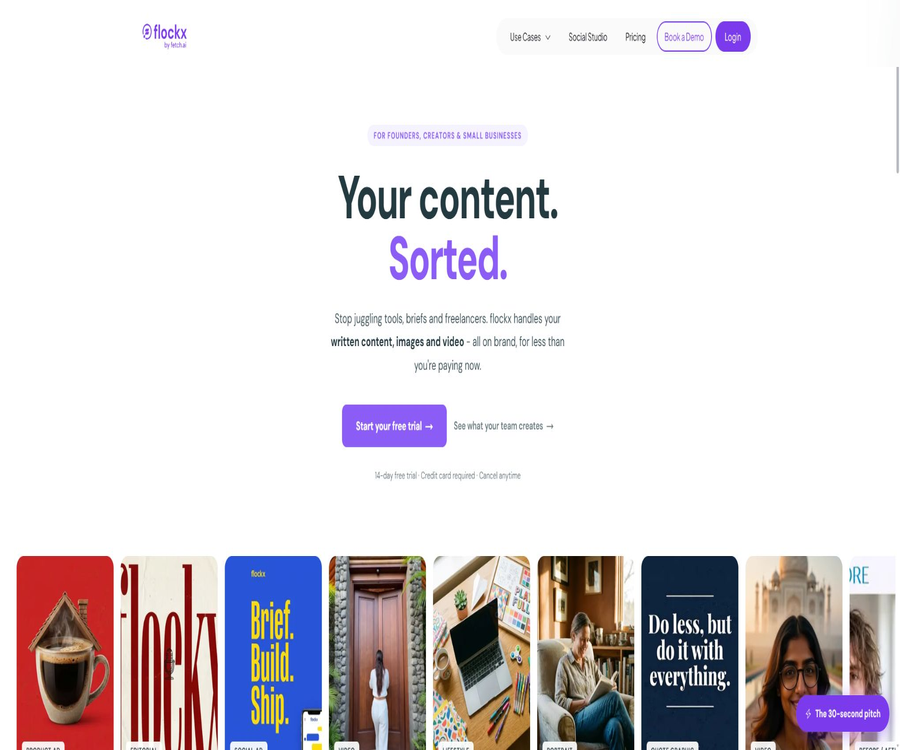
Flockx combines copywriting, brand images, short videos, social media scheduling, and email management into a collaborative AI team that helps creators, small businesses, and streamlined marketing teams to continuously produce and review content.
Tool Introduction
Flockx is operated by Flockx Inc., and its official website describes it as an integrated content workspace designed for creators and small teams. Users can assign tasks in a manner similar to chatting with colleagues, after which various AI tools handle tasks such as writing, visual creation, social media posting, and administrative tasks.
The product is undergoing a significant transformation: the current official website emphasizes Social Studio, brand content, and Smart Inbox, while the help documents and mobile app still focus heavily on configurable AI Agents, knowledge graphs, and multi-agent collaboration. Before making a choice, it is necessary to verify whether both sets of functionalities are available depending on the specific account being used.
Differences between the current product and the older version
| Data or entry point | Current main positioning | Verifiable capabilities | Check before use |
|---|---|---|---|
| Official website and price page | Six-person AI content team | Copywriting, images, videos, social media scheduling, and brand guidelines | Current main business focus |
| Social Studio | Creation and publication of social media content | Posts, images, Reels, calendar, approval, and publishing | Current key features |
| Smart Inbox | Gmail Smart Sorting | Categorization, priority, drafting replies, and archiving | Beta version; the results need to be reviewed. |
| Help documentation | Code-free AI Agent platform | Personality, knowledge graphs, collaboration, channel deployment, and interfaces | May contain older versions or parallel capabilities |
| iOS and Android apps | Create and manage AI Agents | Knowledge, chatting, collaboration, and partial integration | The store description may be outdated compared to the website version. |
| API and MCP | Organization, agents, media, and social automation | Programmatic reading, generation, scheduling, and publishing | Operate in accordance with account permissions and plan restrictions. |
Such differences in the documentation do not necessarily mean that certain functions will be discontinued, but it cannot be assumed that every old feature mentioned in the documents is included in all new subscriptions. In particular, features related to mobile devices, channel integration, and credit limits should be verified one by one during the trial period.
Main functions
AI-generated copy and brand expression
The writing member Clara can create blogs, briefings, social media posts, and other written content based on the brand’s information. Users still need to verify the facts, proper nouns, tone, and business commitments.
Brand image generation
The platform can create social media images that take into account the brand’s colors and content requirements, thereby reducing the stylistic inconsistencies that arise from using generic image assets. The costs associated with each image displayed on the official website, as well as the monthly production volume, are estimates for marketing purposes; the actual expenses depend on the points available in the subscription package and the parameters used for image creation.
AI videos and Reels
Flockx supports creating videos from text, converting images into videos, generating avatar videos based on speech, and recombining existing photos and clips to create vertical Reels. Before publishing a video, it is necessary to check the characters, text, brand logos, music, and the platform’s safety guidelines.
Social Studio
Social Studio brings together topic selection, copywriting, images, Reels, approval processes, calendars, and publishing in a single interface. The current page clearly shows Instagram, LinkedIn, and X, while Facebook and TikTok are mentioned in the functional areas.
- The same theme can be rewritten into copy for different platforms, thereby reducing the need to create content repeatedly.
- The images and text can make use of the brand’s voice, colors, and existing content.
- The calendar shows the draft status, scheduling, and publication status, and allows for suspension or rescheduling.
- Users can modify and approve the draft before it goes live; the platform emphasizes that nothing will be published without approval.
- Existing photos and clips can be remade into vertical videos suitable for Instagram, TikTok, and Shorts.
- Automatic replies to private messages and comments on Instagram are included as part of the package benefits; the actual rules and approval processes need to be checked in the account settings.
Smart Inbox Beta
Smart Inbox, powered by the AI administrative assistant Eva, connects to Gmail to read new emails, assigns priorities to them according to predefined rules, prepares draft responses, and archives emails of low importance. It does not send responses without the user’s approval.
- Sort emails according to custom rules such as contracts, customers, teams, and briefings.
- Prepare draft responses for important emails, and place those items that require manual decision-making in the review queue.
- Mark important emails with stars or labels, and archive those of lower priority.
- Continue to view the organization results on the existing Gmail interface; there is no need to migrate your emails.
- The current feature is in the Beta stage; sorting, archiving, and drafting results all require manual verification.
Brand toolkit
Users can provide the brand’s voice, visual style, and business background to the AI team for reuse, thereby avoiding the need to repeat these details with each task. The brand toolkit cannot guarantee that trademarks, advertising statements, and all corporate compliance requirements are accurate.
Scheduled tasks and workflows
The package page lists the daily or weekly scheduled tasks, over 20 pre-defined tasks, and more than 100 tool connections. The official source does not list all of these connectors and quotas in a detailed price table; therefore, the exact scope of support should be determined by checking the integration catalog after logging in.
Code-free AI Agent
The documentation allows users to set the name, description, personality, location, and knowledge graph of agents, as well as enable multiple agents to work together. The creation process is quick, but high-quality results still depend on the knowledge materials, behavior rules, and testing.
Multi-channel deployment
The agent documentation supports website widgets, Discord, Telegram, n8n, Make, ASI, and Agentverse; it also indicates that features such as WhatsApp, SMS, Zapier, and ChatGPT Actions are in different stages of availability. On the deployment page, WhatsApp is listed as a corporate feature, and account verification is required before using it.
The workflow from brand materials to social media posts
- Register for Flockx and create an organization, providing the brand name, website, target audience, tone of voice, and visual preferences.
- Connect to the social accounts that are set to go into operation, granting only the minimum permissions required to complete the tasks.
- Enter a topic, event, or existing content, and ask the AI team to create platform-specific copy, images, or Reels.
- Check facts, people, trademarks, discounts, calls to action, music, and platform specifications.
- Approve the draft in Social Studio, set the publication time, and confirm the time zone and target account.
- After publishing, check the status and any errors; for content that performs poorly, adjust the brand rules and generate it again.
Social Studio usage guide
- During the trial period, connect to a low-risk brand account and import a website or existing content as context.
- Create a weekly theme first; do not generate content for an entire month right from the start, in order to test the brand’s voice.
- Have the platform create posts, images, and a vertical Reel separately, and then compare the versions from different channels.
- Edit the text, images, and videos one by one to ensure there are no error messages or materials that cannot be used.
- Add the approved draft to the calendar, and suspend automatic publishing until both the time zone and account are confirmed to be correct.
- Complete one actual scheduling task first, then increase the number of tasks, and record the points consumed by each task.
Smart Inbox usage guide
- Use a dedicated test email address or an email for less sensitive tasks to connect to Gmail, in order to first check the scope of authorization.
- Set priority rules for contracts, customers, invoices, teams, and marketing emails.
- After starting Eva, check the first batch of classifications; do not allow a large number of automatic archivings right away.
- Review each draft response individually, paying special attention to the recipient, attachments, commitments, amounts, and deadlines.
- Follow the rules for correcting misclassifications and regularly check the archived emails to avoid missing important matters.
- Revoke Google’s authorization when it is no longer in use, and delete the relevant data from Flockx as needed.
Create and deploy AI Agents
- Log in to the web dashboard, select the option to create an agent, and fill in the role, name, description, style, and location.
- Configure personalization and knowledge graphs, and upload only those data that have permission to be processed and have had their sensitive information removed.
- Test the responses using common questions, edge cases, and error messages to refine the knowledge and behavioral rules.
- In the settings, enable the desired functions such as web search, calendar, Discord, or Telegram.
- Choose website widgets, messaging channels, n8n, Make, or other available deployment methods.
- Before going live, test permissions, identities, references, failure handling, and manual transfer, while periodically checking conversations.
API and MCP connection process
- Create separate organizations for the development, testing, and production environments, and verify subscription details, points, and API permissions.
- When connecting via a direct interface, an independent API Key is created, which is used together with authentication headers to access resources such as agents, channels, collaboration tools, knowledge bases, media content, and reports.
- When using MCP, OAuth authorization is carried out through a browser, with the specific organization that is to be operated on being selected explicitly.
- First, perform read-only operations to verify that the agents, media libraries, and social accounts all belong to the correct organization.
- Add budgeting, approval processes, and idempotent control for generating images, videos, social drafts, and publishing actions.
- Rotate keys, review authorization scopes, and monitor failed tasks to prevent the repeated creation or accidental sending of content.
Which users are it suitable for
- Independent creators: Integrate blogs, newsletters, photos, videos, and social media scheduling into the same process.
- Small business owners: Maintain steady social updates while retaining the right to approve posts before they are published.
- Streamline the marketing team: Use brand toolkits to unify messaging across multiple people and channels.
- Local businesses: Create content for the food and beverage, hotel, real estate, promotional, and new product launch sectors.
- Small agencies: They manage multiple brand calendars, but it is necessary to strictly separate the organizations and accounts involved.
- Development and automation team: Connects internal workflows through APIs, MCP, n8n, or Make.
- Knowledge-based service teams: Create intelligent agents for answering questions or communicating with customers, equipped with personality traits and knowledge graphs.
Typical use cases
- Weekly social media content: Create posts, images, and schedules for multiple platforms based on an event brief.
- Reuse of existing materials: Reassemble photos and videos to create vertical Reels.
- Brand content creation: Standardize blogs, newsletters, social media posts, and visual style.
- Morning email organization: Prioritize displaying contracts and client emails, and prepare replies that need to be reviewed.
- Website agent: Integrated tested knowledge-based agents into websites to answer common questions.
- Cross-tool automation: Triggering content and media tasks using n8n, Make, APIs, or MCP.
- Agent collaboration: Enables different roles to share tasks and knowledge, while retaining human approval for key outputs.
Product advantages
- Bring text, images, videos, schedules, and certain interactive management functions together in one dashboard.
- Brand voice and visual guidelines can be reused across tasks, reducing the need for repeated explanations.
- Social Studio allows for the approval of drafts, as well as their suspension and rescheduling – making it suitable for operational processes that require oversight.
- Smart Inbox works within the existing Gmail and does not send replies automatically.
- It offers a chat interface for ordinary users, as well as APIs, MCP, and automation integration.
- MCP can manage organizations, agents, media, and social drafts, and it uses scope-based permissions to control read and write access.
- The public price is lower than the cost of typical full-time positions, making it suitable for testing team processes on a trial basis first.
Usage Restrictions and Important Notes
- The current terms explicitly prohibit individuals located outside the United States from using the service, which is in conflict with the global website and the localized pricing pages; users who are not in the United States should not subscribe without prior written confirmation.
- The main products on the official website, the help documents, and the mobile app belong to different product categories; it cannot be assumed that all old functions of the agents are included in the current content package.
- The price cards claim that all plans refer to the same product, but the frequently asked questions state that monthly points and advanced features vary, and the official website does not specify the exact amounts.
- The cost per point, the amount allocated per package, and the rules for carrying over points can change; unused points may expire or not be carried over.
- Smart Inbox is still in the beta stage; misclassification, incorrect archiving, and inappropriate draft responses can result in business losses.
- AI-generated copy, images, and videos may be inaccurate, incomplete, or biased, and cannot be used as professional advice.
- Social scheduling, immediate publishing, and media generation result in actual external actions or consumption of quotas, and confirmation is required.
- The license provided in the terms for website materials allows only temporary, personal use for non-commercial purposes; this is in conflict with the purpose of content marketing aimed at businesses, and any commercial use of the generated content requires written approval.
- The terms also include provisions related to community activities and older products such as cryptocurrency wallets, indicating that the legal text covers multiple stages of these products.
- The minimum age for use is 16 years; the privacy policy has relatively lenient provisions regarding minors, but the strict restrictions set out in it must still be complied with.
- The range of channels listed on the Social Studio page varies from time to time; it is necessary to check the specific publishing capabilities before connecting an account.
- The entity responsible for releasing the mobile application is different from the entity that operates the current website; therefore, when making purchases, companies should verify the contract, invoices, and identify who has control over the data.
Prices and packages
As of August 22, 2026, the Social Studio page displays prices in US dollars, while the general pricing page shows the amount in the local currency based on the region from which the page is accessed. The figures shown in this table are the US dollar prices listed on the relevant functionality pages; the actual currency used, any taxes, and the final payment amount will be as indicated on the purchase page.
| Package | Converted monthly price | Actual deduction cycle | Trial | Primary interests | Suitable for users |
|---|---|---|---|---|---|
| 1 month | $ | $ | 14 days | Six-person AI team, Social Studio, brand content, planned tasks, and integration | Short-term verification or flexible use |
| 3 months | $ | $ | 14 days | The page states that the products are identical, with a long-term discount of around 14%. | Quarterly usage has been confirmed. |
| 12 months | $ | $ | 14 days | The page states that the products are identical, with a long-term discount of around 31%. | Stable long-term operation |
| Smart Inbox | Starting at $1 per day | The page does not indicate whether a separate charge will be applied. | 14 days | Gmail categories, draft replies, and archiving – currently in beta version | Users with a high volume of emails |
A bank card is required for the trial period; no charges are incurred during the first 14 days, with fees starting from the 15th day, and the service can be canceled at any time. The package page does not disclose the specific monthly points for each plan, the maximum amount that can be earned, the number of team seats available, or the differences in advanced features; it is necessary to consult the support team before making a purchase.
Differences in localized prices and billing
| Page display | Monthly payment | Quarterly payment | Annual payment | How to understand it |
|---|---|---|---|---|
| Social Studio Dollar Page | $ | $ | $ | The price is displayed directly on the function page. |
| General price page – current visit | 2,599 Indian rupees per month | 6,599 Indian rupees/quarter | 21,599 Indian rupees per year | It may be dynamically localized based on the region visited. |
| Regional restrictions on the terms | Only users within the United States are allowed. | Only users within the United States are allowed. | Only users within the United States are allowed. | There is a conflict with the localized page; written confirmation is required first. |
Do not assume that the prices on the two pages are equivalent based on exchange rates, nor treat the discounts shown on those pages as permanent commitments. Taxes, currency, regional eligibility, points, and renewal fees should all be verified before making a payment.
Platform support and integration
| Platform or capability | Status | Primary uses | Precautions |
|---|---|---|---|
| Web version | Support | Content, brands, social calendar, agents, and organization management | Current main product entry point |
| iPhone | There is an official app. | Create and manage AI Agents, knowledge, and chat functions | The store description is outdated; the full details of Social Studio have not been confirmed. |
| Android | There is an official app. | Create and manage AI Agents | The store description is outdated; the functions need to be tested in practice. |
| Social Studio | Support | Instagram, LinkedIn, X, and other platforms mentioned on the page | The ability to publish content through various channels requires login for confirmation. |
| Gmail | Smart Inbox Beta | Categorization, drafting responses, and archiving | It will not be sent without approval. |
| Website widgets | The documents are listed as available. | Embed agents in websites | Knowledge and permissions need to be tested. |
| Discord and Telegram | The documents are listed as available. | Message channel deployment | A platform token and configuration are required. |
| The page specifications vary. | Corporate messaging channels | The document includes both upcoming releases and statements that companies can use. | |
| n8n and Make | The documents are listed as available. | Code-free workflows | Credentials and error handling are managed by the user. |
| REST API | Support | Agents, channels, collaboration, knowledge, media, and reports | API Key authentication |
| Remote MCP | Support | Organizations, agents, media, images, videos, and social operations | OAuth authorization with selection by organization |
| A2A | Document support | Agent interoperability | It relates to the developer’s capabilities. |
API and MCP capabilities
Flockx offers a REST API that utilizes API Key authentication; the documentation covers agents, channels, collaboration templates, markets, knowledge, interactions, media, documents, scraping, reporting, and WebSocket chat. It is not specified in the public price list whether these interfaces are included in the current package or what the rate limits are.
Remote MCP utilizes OAuth 2.1 browser authentication, eliminating the need to copy API keys. It allows for listing organizations and agents, managing media, creating images and videos, reading from social accounts and drafts, as well as approving, scheduling, or publishing social content.
| Development capability | Authentication method | Main operations | Risk control |
|---|---|---|---|
| REST API | API Key | Create and manage agents, knowledge, media, collaboration, and reporting. | Independent keys, rotation, and environmental isolation |
| WebSocket chat | Account and API permissions | Real-time intelligent agent dialogue | Connection loss, retry, and message deduplication |
| MCP read-only range | OAuth 2.1 | List organizations, agents, media, social profiles, and drafts | First, verify the organization and permissions. |
| MCP write range | OAuth 2.1 | Create agents, generate media, draft, schedule, and publish | Manual verification, budgeting, and idempotency |
| n8n and Make | Platform credentials | The business system triggers the agent workflow. | Minimum permissions and failure queue |
| Websites and messaging channels | Channel token or configuration | Provide agents for visitors or groups. | Content review and manual transfer |
GitHub and open source
Flockx has an official GitHub organization that has undergone domain verification, but the three repositories made publicly available are branches derived from other projects; they relate to uAgents, research agents, and the A2A Python SDK. These repositories do not serve as proof of the existence of Flockx’s web-based products, its content generation services, or its hosting of MCP open-source tools.
The public branch indicates an Apache 2.0 license, but this license applies only to the code in that repository. The core Flockx platform, model orchestration tools, Social Studio, Smart Inbox, as well as the server-side code do not have any official open-source releases; therefore they should be considered closed-source commercial services.
| object | Public status | License | Correct understanding |
|---|---|---|---|
| Flockx web pages and hosting services | Source code not made public | Commercial terms | The product itself is not open source. |
| uAgents branch | Public derived repository | Apache 2.0 | It comes from the Fetch.ai project; it is not the complete source code of Flockx. |
| gpt-researcher branch | Public derived repository | Apache 2.0 | From third-party research agent projects |
| A2A Python branch | Public derived repository | Apache 2.0 | It is the protocol SDK branch, not the Flockx SDK. |
| REST API | Public documents | Managed business interface | Open access does not equate to open source. |
| Remote MCP | Publicly available documentation | Hosting services | No server-side source code was found. |
Privacy and data processing
The data listed in the privacy policy includes device and log information, unique identifiers, settings, possible geographical locations, names, email addresses, and payment information. This data can be processed by suppliers responsible for hosting, storing, analyzing it, using it for advertising purposes, keeping records of errors, handling payments, and providing professional services.
An active selection mechanism is employed for the training of the base model: by default, dialogue or content is not used for training this model, and it is only utilized when the user explicitly enables such training. Disabling this training does not affect the service’s memory or personalization features, and the data covered by the enterprise data processing protocols is also not used for training the base model.
| Data type | Public saving rules | Usage suggestions |
|---|---|---|
| Dialogue and AI interaction | The account is active and necessary for memory and personalization; it will be deleted or anonymized later. | Do not submit unnecessary confidential and personal data. |
| Using and analyzing logs | 30 days | Enterprises should still identify the log fields and visitors. |
| Location events | The account is active and the location feature is required; it will be deleted or anonymized later. | Turn off location permissions when not needed. |
| Accounts and Information | During the account’s validity period, it is deleted or anonymized after closure. | Export necessary information before closing the account |
| Payments and transactions | Usually up to 6 years. | Retain invoices and understand the legal requirements for retention. |
| Basic model training | By default, participation is not enabled; users can activate it voluntarily. | Keep it closed or decide according to organizational policies. |
- Before connecting Gmail to social accounts, check the read, write, publish, and long-term token permissions.
- Agency agencies should use separate structures for different clients, in order to prevent the mixing of media assets and accounts across clients.
- Do not give passwords, bank cards, identification documents, health information, or confidential contracts to content intelligence agents.
- When dealing with data from the EU, the UK, or other regions, it is necessary to ensure that the mechanisms for processing and transferring such data across borders in the United States meet the organization’s requirements.
- When deleting an account or terminating third-party connections, check the authorizations in Google, social media platforms, and automation tools as well.
- The withdrawal of a selected training option has no retroactive effect on previously completed trainings; caution should be exercised before enabling it.
- Before using it, the enterprise must obtain written versions of the data processing agreement, the sub-processors’ details, as well as the mechanisms for event notification and data deletion.
- Audit records are retained for automated creation and release operations, including the personnel involved, the time taken, the organization responsible, as well as the draft and approval actions.
Basic information
| Project | Content |
|---|---|
| Tool name | Flockx |
| Operating entity | Flockx Inc. |
| Tool type | AI content team, social media management, intelligent inbox, and AI Agent platform |
| Current core products | Social Studio, brand content creation, and Smart Inbox |
| Main inputs | Brand information, topic selection, website content, images, videos, emails, and knowledge materials |
| Main output | Copywriting, images, videos, social media drafts, scheduling, email categorization, and reply drafts |
| Price pattern | 14-day trial period, with options for monthly, quarterly, or annual payment; some features are charged separately. |
| Is registration required? | It is necessary. |
| Minimum age | 16 years old |
| Regional restrictions | The current terms allow users only within the United States. |
| Chinese support | The official website does not explicitly guarantee a complete Chinese interface or high-quality output. |
| Web version | Support |
| Mobile version | iPhone and Android apps; the descriptions are based on the older version of AI Agents. |
| API | Provides REST API and WebSocket chatting. |
| MCP | Provides OAuth remote MCP |
| Official SDK | No Flockx-specific SDK was found. |
| Is the product open source? | Not open source; the official organization only provides derivative repositories for third-party projects. |
| Price verification date | August 22, 2026 |
Recommendation score
Recommendation score: 3.6 / 5. Flockx combines brand copy, images, videos, social media scheduling, email management, and API connections into one platform; its approval mechanisms, MCP capabilities, and automation features are particularly attractive to small teams.
The deductions are mainly due to inconsistencies in the structure of the pages resulting from product transformations, lack of transparency regarding the amount of points available, the fact that Smart Inbox is still in the testing phase, as well as explicit restrictions on users outside the United States and contradictions in the provisions related to commercial licensing. A long-term subscription is only appropriate after written confirmation of regional eligibility, content rights, and package details.
Frequently Asked Questions
What is Flockx used for?
It is an AI-powered content and automation platform that can generate copy, brand images, and videos; it also allows for the review, scheduling, and publication of social media content within Social Studio. In addition, it offers Gmail organization tools, configurable agents, APIs, and MCP.
Is Flockx free?
It is not a permanently free product. The public plan offers a 14-day full trial period; a bank card is required, and charges are applied automatically based on the selected subscription cycle once the trial is over.
How much is Flockx?
The public pricing for Social Studio is $29 per month, $74.97 per quarter, and $239.88 per year. The price is displayed in different currencies depending on the region from which the page is accessed; Smart Inbox has a separate rate of $1 per day starting after the trial period.
Do all packages have the same features?
The package cards claim that the products are identical and that the longer the commitment period, the lower the monthly price; however, common questions on the pricing page indicate that there are differences in terms of monthly points and advanced features. The specific amounts are not indicated on the public pages, so it is necessary to confirm them before making a purchase.
Is a credit card required?
It is necessary. The page states that no charges are applied during the 14-day trial period; fees start to apply from the 15th day, and cancellation is possible before renewal.
Will Social Studio post content without permission?
The product page indicates that drafts require user approval, and users can also pause or reschedule them. The interfaces and MCP still enable publishing actions; therefore, confirmation steps must be included in the automated processes.
Does Smart Inbox send emails automatically?
No. Eva can categorize, tag, archive, and prepare draft responses, but user approval is required before sending them.
Is Smart Inbox stable?
It is currently in beta version; the page clearly states that the functionality may change and that the results need to be reviewed. It is advisable to start using it with emails of low sensitivity, and to check regularly for any misclassifications.
Which social platforms does Flockx support?
Social Studio primarily lists Instagram, LinkedIn, and X; Facebook and TikTok are also mentioned in other sections. The capabilities related to posting, creating Reels, sending private messages, and leaving comments on each platform should be checked within the respective accounts.
Does Flockx provide an API?
Available. The REST API covers resources such as agents, channels, collaboration tools, knowledge bases, media, documents, scraping functions, reporting capabilities, and real-time chat; an API Key is required to use it.
Does Flockx offer MCP?
It offers a remote MCP; OAuth authentication is carried out through a browser, and it enables management of organizations, agents, media, images, videos, and social drafts, as well as scheduling or publishing.
Is Flockx open source?
The core products are not open source. The three public repositories in the official GitHub organization are derivative versions of other open-source projects, and cannot be considered as the source code for the Flockx platform.
Can the generated content be used for commercial purposes?
The current terms do not explicitly grant the right to use the generated content for commercial purposes, and the licensing terms for the website materials restrict commercial use. Commercial users should obtain written confirmation regarding ownership of the output, rights to the materials, and the scope of commercial use before subscribing.
Will user-generated content be used for training?
Training of the base model is disabled by default; it is only utilized for conversations or content processing when the user explicitly chooses to do so. The data covered by the enterprise data processing protocols is not used for training the base model.
Can Chinese users use Flockx?
The current terms explicitly prohibit individuals located outside the United States from using the service; therefore, users in China should not register or make payments directly. It is necessary to first obtain a written confirmation from Flockx stating that one meets the requirements for use in that region.
Does the mobile version support the full Social Studio?
It is not possible to rely solely on the store pages for confirmation. The iOS and Android apps mainly focus on creating and managing AI Agents; it is necessary to conduct actual tests to determine whether Social Studio and Smart Inbox are fully functional.
Summary
Flockx is suitable for small teams that wish to handle brand copywriting, visual elements, short videos, and social media scheduling through a single system; it also provides developers with REST APIs, real-time chat, and remote MCP. Its approval process is more appropriate for actual operations than fully automatic publishing.
However, the product is currently in a phase where both content platforms and the older version of the agent platform coexist; the available quotas, mobile capabilities, and certain integration features are not uniform. The existing restrictions in the United States and issues related to commercial licensing are particularly crucial, and written confirmation must be obtained before subscribing.
Tools similar to Flockx





 Guigong Network Security Registration No. 45132202000164