






A one-sentence summary
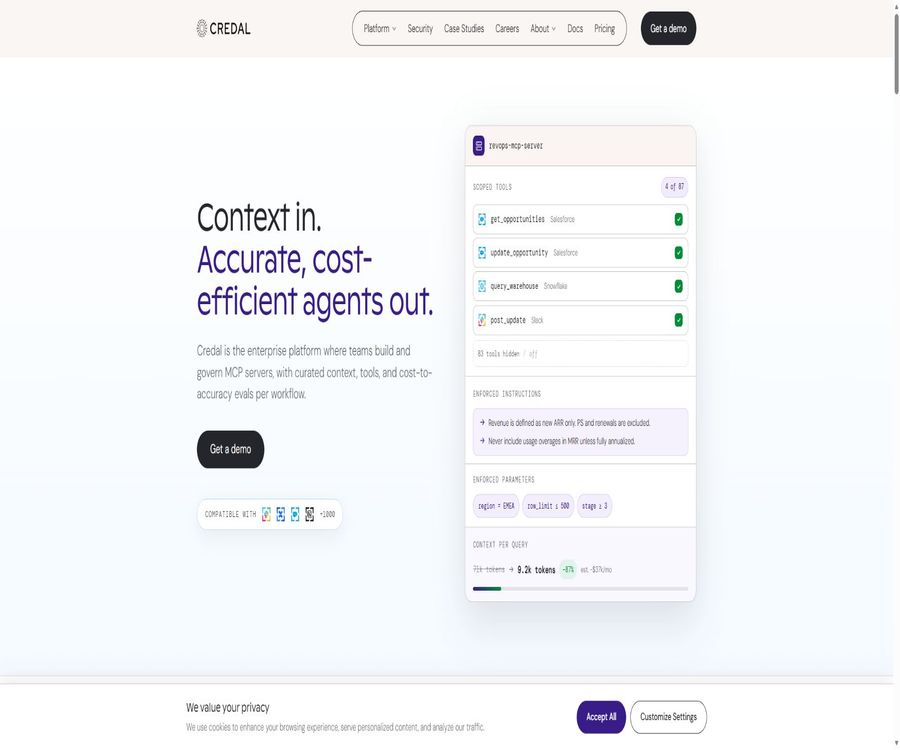
Credal is an AI agent and MCP governance platform designed for enterprises; it uses unified permissions, data connections, auditing, and security controls to make an organization’s internal knowledge and business tools available to AI agents that can carry out tasks.
Tool Introduction
The Credal service supports teams in the AI platform area, as well as IT, security, and business departments. Users can create custom agents, select different models, connect internal data with various tools, and then deploy these agents on the Credal interface, Slack, or their own applications.
Its focus is not on individual conversations, but rather on enabling multiple agents and MCP servers to operate within defined identities, data permissions, and audit boundaries. The platform also offers knowledge retrieval, business operations, a management console, and development interfaces.
Main functions
Construction of enterprise AI agents
The builder can assign a name to the agent, provide descriptions of its purpose, define its model, set creative parameters, give background instructions, and supply example questions and answers; they can also connect data sources and various operations. Agents can be used for customer service, contract review, internal Q&A, IT support, and cross-system workflows.
- Select models from providers such as OpenAI, Anthropic, Google, Cerebras, etc., based on the task at hand.
- Define roles, objectives, output formats, and business boundaries that must not be crossed, using custom prompts.
- Add document collections, indexed data, real-time operations, or MCP servers as proxy capabilities.
- The proxy is continuously improved through user feedback, testing, and logs, rather than being left to run as-is after a single configuration.
Knowledge base and enterprise context
Document Collections enables the organization of files, web pages, and connector content into a searchable knowledge base. When providing answers, agents can retrieve relevant snippets and trace the results back to specific documents or source systems.
- Indexed data is suitable for fast semantic retrieval after overnight synchronization.
- Manual document upload is suitable for temporary materials and small-scale projects.
- Web scraping can recursively process pages on a site as well as the documents linked to them.
- Deep Summarize is used for aggregating information from multiple documents, while Smart Filters enable precise filtering based on metadata.
- Document permissions can be set by administrators so that they are visible to the entire organization or only to specific users.
Actions and business operations
Actions enable agents to not only retrieve data but also to query databases in real time, create tickets, modify records, or invoke enterprise systems. For high-impact actions such as sending emails, making payments, or updating business data, it is necessary to implement permission controls, parameter validation, and manual confirmation.
MCP server governance
The platform allows for the deployment of MCP servers that are managed centrally by an organization; it also enables connection to third-party MCP services, as well as the creation of custom servers based on enterprise data. Administrators can view in one place which agents are invoking which systems and tools.
Slack and app release
Agents can be posted to public or private Slack channels, and it is possible to set them to respond only to mentions, relevant messages, all messages, or content that meets certain filtering criteria. When multiple agents are in the same channel, the system selects the appropriate responder based on the description of each agent.
Centralized management and auditing
Administrators can manage proxies, tools, models, and data connections in a centralized manner, as well as monitor the AI usage by users and applications. The platform offers audit logs and SIEM export capabilities, which facilitate security investigations, compliance checks, and cost tracking.
Connectors and data types
| Connection method | Characteristics of the job | Suitable for tasks | Main points to note |
|---|---|---|---|
| Indexed data | Perform regular synchronization and create semantic indexes. | Knowledge Q&A and document search | Pay attention to the synchronization frequency and the permissions of the original system. |
| Actions | Real-time reading or writing to business systems | Query databases, create work orders, and modify records | High-risk actions should require manual confirmation. |
| MCP server | Provide the agent with a set of governed tools. | Cross-application calls and unified tool deployment | Review third-party servers and parameter permissions |
| Document Collections | Organize files, web pages, and metadata | Departmental knowledge base and cross-document aggregation | The scope of deletion, sharing, and crawling needs to be clearly defined. |
| Manual upload | Add temporary files from the interface | Project data and one-time analysis | Sensitive files must comply with corporate policies. |
The typical channels listed by the officials include Slack, Confluence, Google Drive, Microsoft SharePoint, OneDrive, Box, Salesforce, Zendesk, and databases. The available connectors, write actions, and synchronization capabilities depend on the configuration set by the enterprise.
Standard workflow
- First, define the problems the agent is meant to solve, the types of data it can process, and the actions that it cannot carry out automatically.
- The administrator connects the identity system, data sources, and business tools, and checks the access permissions of the original system.
- Create a proxy by entering a clear name, description, background instructions, and the desired output format.
- Select the appropriate model, and then add index data, document collections, Actions, or MCP tools.
- Use real but anonymized tasks to test retrieval, citation, refusal, and operational boundaries.
- Configure role permissions, channel ranges, manual verification, auditing, and cost control.
- Publish to the organization interface, Slack, or your own application, and continuously monitor feedback and logs.
Create the first knowledge agent
- Go to the Agents section and create a new agent; the name and description should clearly indicate the target audience of the service and the scope of its tasks.
- Choose the model and response style, starting with robust settings such as Precise or Balanced.
- The instructions should specify the background, the format of the answers, the requirements for evidence, and what to do in case insufficient information is available.
- Create a Document Collection and add authorized documents, web pages, or enterprise data sources.
- Connect the collection to the proxy, and adjust the number of retrieval segments as well as the relevance threshold.
- Prepare a set of test cases including those with known answers, those without answers, unauthorized requests, and prompt injection attacks.
- After confirming that the citations, permissions, and rejections are as expected, release it to a limited group of users.
Tutorial for publishing to Slack
- First, the administrator establishes the Slack connection and defines the list of channels that are allowed to publish messages via proxies.
- In the agent’s Publish settings, enable Slack Channels and select the target channel.
- Choose to respond only when mentioned, to relevant messages, or based on filtering criteria.
- For private channels, it is first necessary to add the Credal integration to that channel.
- Verify the routing in scenarios involving regular queries, sensitive queries, and multiple proxies working simultaneously.
- After going live, check for incorrect responses, excessive triggers, permission issues, and operation logs.
Which users are it suitable for
- Enterprise AI Platform Team: Responsible for the unified setup, deployment, and management of agents and MCP servers across various departments.
- IT and security teams: Integrate identity, permissions, auditing, and acceptable use policies into AI workflows.
- Customer service and operations teams: Answer questions based on internal information, and record the responses in the tickets or business system.
- Legal and Compliance Team: Creates contracts, policies, and security questionnaires to assist agents, while also keeping records and conducting audits.
- Sales and Customer Success Team: Retrieves CRM data, documents, and communication records to assist in preparing account information and determining subsequent actions.
- Development team: Integrates governed agents into its own products via APIs, SDKs, and MCP.
Typical use cases
- Employees ask questions about benefits, policies, or IT processes on Slack, and agents provide well-founded answers based on the approved information.
- Salespeople use natural language to query Salesforce records, with agents generating and executing controlled queries.
- The security team is responsible for maintaining a variety of tools that can be accessed via proxies, as well as for tracking every access to models and data.
- The customer service agent searches the knowledge base, checks the account status, and creates or updates tickets after manual verification.
- The R&D team integrated the company’s agents into internal applications, while continuing to use OAuth for authentication and user permissions.
Product advantages
- It covers proxies, data context, Actions, and MCP governance at the same time, thereby reducing redundant development efforts across different departments.
- Inherit the permissions of the source system, and manage role controls separately from data access boundaries.
- It supports multiple model providers, self-hosted Azure OpenAI deployments, as well as self-hosted open-source models.
- It provides interactive logs, channel tracking, SIEM exports, and centralized cost visibility.
- It can be used in Credal and Slack, as well as embedded in enterprise applications via APIs.
Usage restrictions and precautions
- The platform uses a corporate sales model; the public page does not offer any individual packages or fixed prices that can be purchased directly.
- The effectiveness depends heavily on data quality, prompts, permissions, and testing; connecting more systems does not guarantee that the results will be reliable.
- Actions can alter real business data; sending messages, making payments, deleting or modifying records require manual approval.
- The content of the index may be outdated compared to that of the source system; for tasks that reflect the latest status, real-time operations or re-verification should be used.
- API v1 is still in the Beta phase and under continuous development; its interfaces, behaviors, and available endpoints may change.
- API v0 is an older version; it only supports synchronous text-based interactions and single-agent static keys, and it is not suitable for creating complex integrations.
- Different model providers affect capabilities, costs, latency, and data pathways; enterprises should confirm the specific configurations as specified in the contract.
- AI outputs may miss context or misinterpret intentions; human oversight is necessary for high-risk operations.
Prices and packages
As of August 2026, Credal’s official website only provides customized quotes for Enterprise versions; it does not list fixed monthly fees, a free version, or standard trial prices. Most customers start with a pilot project on a limited time basis for specific use cases, and then determine the terms of the contract based on the size of the team, the amount of data, and the level of usage.
| Billing components | Measurement method | Corresponding content | It should be confirmed at the time of purchase. |
|---|---|---|---|
| Builder seats | Builder Seat | The persons who create proxies, MCP servers, and security rules | Number of roles and scope of permissions |
| User seats | User seat | Members who can query and use the published proxies at various entrances | Definitions for internal and external users |
| Data indexing | Data index size | Enterprise data that is connected, indexed, and continuously synchronized | Capacity, synchronization frequency, and deletion mechanism |
| Usage-based tokens | Model Token Usage | The computational costs incurred by the agent when invoking different models | Model unit price, price increases, and budget control |
| Enterprise | Custom quote | Includes SSO, SAML, SCIM, audit logs, and dedicated support. | Contract duration, pilot programs, service levels, and excess fees |
The authorities state that companies can connect to their own Azure OpenAI services, self-hosted open-source models, or use the cutting-edge models managed by the platform. The final pricing, minimum subscription requirements, model costs, and conditions for trials are determined according to the sales proposal and contract.
Security, privacy, and data processing
- The official website lists the capabilities related to SOC 2 Type II, HIPAA, as well as GDPR and CCPA; the specific scope of application shall be determined through verification by the Trust Center and through contracts.
- It supports SAML single sign-on, SCIM synchronization, role-based permissions, inheritance of permissions from the source system, as well as auditing and SIEM export.
- The official policy on limited use states that customer synchronization data will not be used to train machine learning models, nor will customer data be sold.
- The platform states that it adopts a zero-data-retention approach with AI providers, and it is possible to use AWS Bedrock or Azure to minimize the amount of data that leaves the cloud environment.
- The privacy policy does not set a uniform fixed period for all data; instead, it determines such periods based on the purpose of the service, the duration of the relationship, and legal requirements.
- Cross-border data transfer, sub-processors, as well as the timelines for deleting and backing up business data should be further specified in the data processing agreement and within the trust framework.
APIs, SDKs, and open-source status
Credal offers an API for development, as well as official Python and TypeScript clients. API v1 uses OAuth 2.0 to enable asynchronous calls to proxies and their Actions; a response should be obtained promptly after making such calls, and temporary responses should not be used as long-term storage.
| Development capability | Current status | Authentication or technology | Scope of application |
|---|---|---|---|
| API v0 | Old version | Single-agent static API key | Synchronous, simple text input and output |
| API v1 | Beta | OAuth 2.0 and asynchronous polling | Complete proxy cycle, Actions, and user context |
| Python SDK | Official public repository | Python client | Server side and automated access |
| TypeScript SDK | Official public repository | JavaScript and TypeScript clients | Integration of Web and Node applications |
| Actions SDK | Public repository, MIT license | TypeScript | Develop operations that can be called by agents |
| Credal platform | Commercial closed-source services | Corporate contracts | Agents, governance, data, and management consoles |
The official GitHub repository provides the SDK, documentation, and some integration components; however, this does not mean that the Credal platform itself is open-source. Before using it, it is necessary to check the license, version, and maintenance status of each repository separately.
Supported platforms
| Platform or entry point | Support status | Primary uses | Notes |
|---|---|---|---|
| Web management and chat interface | Support | Building, managing, and using proxies | Main enterprise entrance |
| Slack | Support | Channel Q&A, routing, and automation | Administrator connection and channel authorization are required. |
| Own web or internal applications | Supported through API | Embedded proxy interaction | v1 is still Beta |
| MCP client | Support | Expose governed tools to other agents or applications | Connectors and permissions need to be configured. |
| Python | Official SDK | Backend integration | The warehouse version shall prevail. |
| JavaScript and TypeScript | Official SDK | Web and Node integration | The warehouse version shall prevail. |
| Independent personal mobile applications | No public explanation is available. | Not as the primary form of delivery | It can be used through the integrated entry point. |
Basic information
| Project | Content |
|---|---|
| Tool name | Credal |
| Tool type | Enterprise AI agents, MCP, and AI governance platforms |
| Core competencies | Proxy construction, knowledge retrieval, Actions, MCP, permissions and auditing |
| Price pattern | Custom quote for Enterprise |
| Free version | Not disclosed |
| pilot | Supports time-limited proof-of-concept or pilot projects. |
| Model | Supports multiple models, self-hosted Azure deployments, and self-managed models |
| Main entrance | Web, Slack, APIs, and MCP |
| API | Yes, there is the old version v0 and v1 Beta. |
| Official SDK | Python, TypeScript, and Actions SDK |
| Official GitHub | Yes |
| Is it open source? | The platform is not open-source; however, some SDKs and components are available publicly. |
Recommendation score
It receives a rating of 4.4 out of 5 points. Credal is suitable for large organizations that need to integrate multiple corporate agents, internal data, and executable tools into a unified framework for permissions, auditing, and security.
It is not suitable for individual users who merely wish to experience chat robots at a low cost. The insufficiently disclosed price, the complicated procurement process, and the fact that the v1 interface is still in beta version are factors that need to be taken into consideration when making an assessment.
Frequently Asked Questions
Is Credal free?
The official website does not disclose any permanent free plans or fixed free data limits. Companies can inquire about time-limited trial versions, while actual use will involve customized pricing.
What is Credal mainly used for?
It is used to create and manage AI agents that link corporate knowledge with business systems, as well as to provide unified control over models, permissions, MCP tools, auditing, and data access.
Which large models are supported?
The official documentation lists options such as OpenAI, Anthropic, Google, and Cerebras; it also supports deployment using Azure OpenAI as well as self-hosted open-source models. The specific options available depend on the configuration set by the enterprise.
Can it be used in Slack?
Yes. Agents can be posted to Slack channels, and the timing of their responses can be determined based on mentions, relevance, or filtering criteria; for private channels, an integration must first be added.
Is an API provided?
Available. Version v0 is the older version that uses static keys, a single agent, and synchronous text-based interactions; version v1 employs OAuth and asynchronous calls, and it supports Actions, though it is still marked as Beta at present.
Is Credal open source?
The core business platform is not open-source. The official GitHub repository provides Python, TypeScript, the Actions SDK, and documentation; it is necessary to follow the licensing terms of each respective repository.
Will customer data be used to train models?
The official policy on limited use specifies that customer data shall not be used to train machine learning models. Companies should still verify the selected model paths, data processing protocols, and the list of sub-processors.
Can real business operations be carried out?
Yes, Actions allow querying databases, creating tickets, or modifying records. For tasks involving payments, sending messages, deletion, and high-risk writes, minimum permissions and manual approval should be implemented.
What is the price?
The official party only provides customized quotes for Enterprise versions; the pricing is based on the number of builder seats, user seats, data indexes, and model tokens. The actual amount must be determined by contacting sales.
Is it suitable for individual users?
It is generally not suitable. Credal is intended for enterprises that require unified identity management, permissions, connectors, and compliance controls; for individual query needs, a lighter-weight AI assistant can be used.
Summary
Credal brings enterprise agents, knowledge contexts, real-time operations, and MCP tools under the same governance framework, making it suitable for organizations that wish to deploy AI on a large scale without compromising security and audit capabilities.
Before making a purchase, it is necessary to test through pilot projects the data access rights, the quality of answers, action security, model costs, and integration stability; moreover, the data pathways, deletion deadlines, service levels, and any additional fees must be specified in the contract.
Tools similar to Credal





 Guigong Network Security Registration No. 45132202000164