






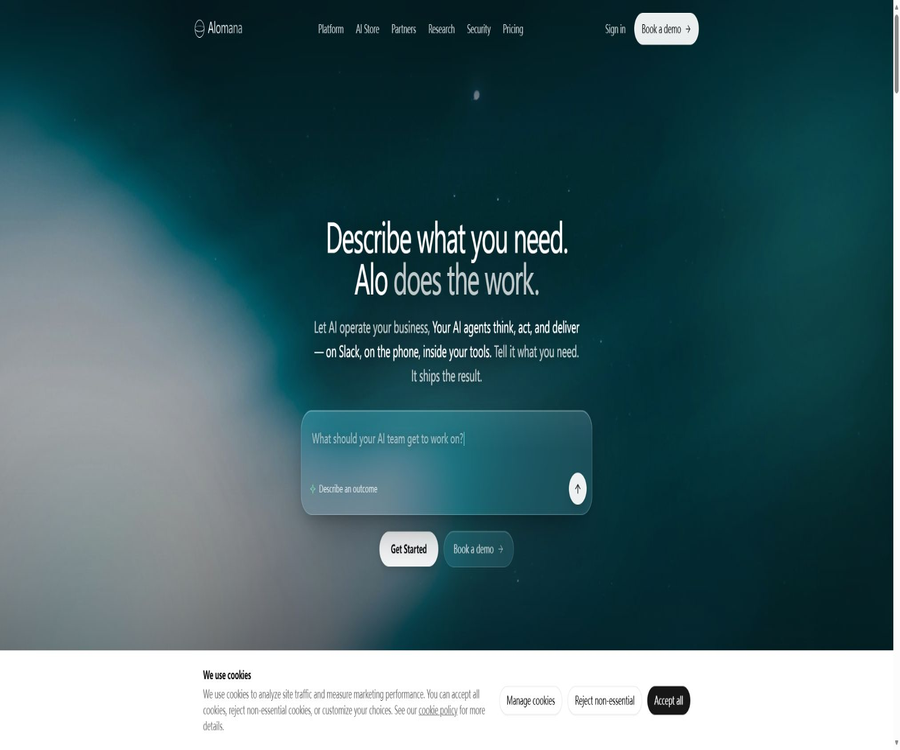
What is Alomana?
Alomana is an AI application and autonomous agent platform designed for enterprises, with the main assistant named Alo. Users can describe business outcomes in natural language; the platform then generates, verifies, and deploys AI Operators that can operate sustainably, rather than merely providing a single response to a chat query.
The platform brings together multi-model chat, Agent Builder, visual Flow Builder, AI Store, data connectivity, voice functionality, sandboxing, auditing, and enterprise security in a single workspace. It is designed to serve industries such as finance, engineering, manufacturing, compliance, procurement, and operations, where traceable automation is required.
Core product structure
| Components | Main function | Suitable for users |
|---|---|---|
| Alo | Understand tasks in natural language and generate execution plans. | All business users |
| Builder | Generate persistent agents and internal applications from goal descriptions. | Business leaders and product teams |
| Flow Builder | Visualize the orchestration of multiple steps, conditions, and system actions | Operations, finance, and automation staff |
| AI Store | Provides data, documents, voice, and industry operators | Teams that wish for rapid deployment |
| Sandbox | Isolate test code, Agents, and processes | Developers, governance officers, and approvers |
| Private Instance | Provide a single-tenant isolated environment in the customer’s cloud. | Large enterprises and regulated industries |
Main functions
- Create AI Agents using natural language.
- Generate an internal AI application for connecting to real-time data.
- Use Flow Builder to orchestrate end-to-end processes.
- Install pre-built Operators from the AI Store.
- Connects databases, data warehouses, CRM, and ERP.
- Read from and write to office and collaboration tools.
- Runs automatically based on plans or business events.
- Execute and test code securely in a sandbox.
- Record input, model, tools, output, and user.
- Deploy single-tenant private instances in the enterprise cloud.
Alo natural language construction
Users can describe the objectives, inputs, and success criteria in a manner similar to assigning tasks to colleagues; Alo will first create a plan and outline the steps for execution. Once approved, the system connects to the relevant data, runs the necessary tools, and generates results, thereby preventing any actions from being taken on the production system without prior confirmation.
Builder
Builder is used to transform a business requirement into an Operator or internal application that can operate sustainably. The resulting output can connect to databases, documents, and Agents, and be used over the long term in the team workspace, rather than merely generating an unmaintainable interface prototype.
- Describe the business problem that needs to be solved.
- Automatically generate Agent commands and tool combinations.
- Connect to actual business data.
- Generate an interactive interface for teams.
- Deployed as a persistent application in the workspace.
- Control access based on roles.
Flow Builder
Flow Builder is a code-free, visual workflow editor that enables the integration of model analysis, document processing, conditional branching, system data entry, and manual approval processes. It is suitable for use by finance, operations, or compliance professionals who truly understand these workflows in order to build such workflows.
- Drag and combine multiple AI elements with business steps.
- Create different execution branches based on conditions.
- Call databases, APIs, and third-party systems.
- Insert manual approval at key points.
- Set rules for abnormal escalation and retry.
- It runs in response to time-based or business event triggers.
- Save complete execution records for audit purposes.
AI Store
AI Store offers data analysis, document extraction, voice processing, and industry-specific operators that can be deployed directly. The Starter version allows for the use of 3 Store Agents, while Company and Enterprise versions provide an unlimited number of pre-built Agents.
Jade Data Analysis Agent
Jade is used to connect enterprise data, identify anomalies, generate predictive insights, and automate report creation. It is suitable for financial monitoring, fraud detection, investment reporting, and business analysis; however, the detection of anomalies and the generation of predictions still require business standards and human verification.
Lens Document Extraction Agent
Lens is used to extract fields, terms, and structured data from invoices, contracts, engineering documents, and other types of documents. For fields with a high risk level, the original text, confidence levels, and manual verification should be retained, in order to prevent OCR errors or misinterpretations by the models from being fed directly into the financial system.
Vox Voice Agent
Vox represents the platform’s voice operation capabilities, which can be used for answering calls, filtering leads, and collecting information. For voice-related functions, it is necessary to define the identity of the AI, obtain consent for recording calls, establish rules for transferring calls to human operators, specify the topics that can be discussed, and handle cases of incorrect recognition.
Multi-model support
Alomana offers options such as GPT, Claude, Gemini, DeepSeek, and open-source models within a unified interface, allowing users to switch between them depending on the task at hand. The names and versions of these models may change; therefore, companies should lock in and record the verified versions of each model that is used in their operations.
- Select the most suitable state-of-the-art model based on the task.
- Use open models to meet specific deployment requirements.
- Avoid tying all processes to a single supplier.
- Switch between cost, speed, and quality.
- Record the model that was actually used in each run.
Data and system connection
The platform connects operators to real-time enterprise data through connectors, rather than only processing statically uploaded files. Examples of such systems include databases, data warehouses, CRM systems, ERP systems, Microsoft 365, OneDrive, Outlook, Linear, Jira, Google Drive, Teams, and Slack.
Over 50 data connectors
Company plans to provide more than 50 data connectors; Enterprise also allows for the development of custom connectors and APIs. The capabilities of these different connectors in terms of reading, writing, incremental synchronization, and permission inheritance vary, so it is necessary to verify each one against the specific system before making a purchase.
Plans and triggers
The operator can run continuously based on fixed time intervals, data events, or other triggering conditions; for example, it can generate reports on a weekly basis, monitor transactions in real time, or handle invoices automatically once they are received. The team should establish settings for concurrency, repeated events, timeouts, and protection against shutdowns.
Plan and Act modes
The agent can first propose a plan and then carry out tool and system operations once the user gives approval. For high-impact actions such as payments, publishing, deletion, approval, and customer communication, plan review and manual confirmation must always be retained.
Code sandbox
Agents can write and run code within an isolated sandbox, which is used for data transformation, analysis, and application development. The sandbox reduces the impact on the production environment, but it is still necessary to impose restrictions on networking, dependencies, file access, execution time, and output data.
Complete audit trail
Alomana records the inputs used in each Operator run, the model calls made, the actions performed by the tools, the outputs generated, as well as information about the users involved; this enables compliance officers to reconstruct what the Agent has done. To ensure reliable governance, audit logs must be supplemented by features such as anti-tampering measures, retention periods, access controls, and alerting systems.
- Record the source of the trigger and the input data.
- Save the models and prompt rules used.
- List each tool invocation and its parameters.
- Track reads and writes to external systems.
- Save outputs, exceptions, and manual decisions.
- It supports tracing executions by user and Agent.
From sandbox to production
Company and Enterprise offer sandbox environments, allowing teams to test processes using real structures without affecting the production environment. Once validated, the official Operator can be released; old versions can be retained and shutdown switches can be used if necessary.
Financial and investment scenarios
- Generate investment portfolio reports automatically.
- Continuously monitor positions and constraints.
- Perform KYC and AML document checks.
- Check for discrepancies in transactions and payments.
- Screen for ESG and regulatory requirements.
- Extract obligations and risks from the contract.
- Identify abnormal transactions and fraud signals.
Engineering and industrial applications
- Extract structured requirements from the technical specifications.
- In accordance with ISO, EN, ASTM, and DIN standards.
- Read the P&ID and extract instrument data.
- Check the consistency between the line list and the design.
- Automatically generate NCRs and punch lists.
- Organize debugging, inspection, and delivery documents.
- Analyze RFQs and suppliers’ bid documents.
Procurement and financial automation
The operator can read supplier invoices, extract relevant fields, verify purchase information, and enter it into accounting or ERP systems. Companies should establish clear rules regarding duplicate invoices, amount tolerances, taxation, supplier master data, and payment approvals.
Life Sciences and Compliance
Alomana offers solutions for dealing with adverse events, as well as for handling regulatory materials and compliance documents. In cases related to drug safety or regulatory submissions, AI should serve as a tool for organizing and preliminary screening of the relevant information; the final decisions, however, must be made by qualified personnel.
Chemical and product compliance
The platform can read supplier statements, material lists, and component specifications to assist with REACH and RoHS screenings, and it rechecks products whenever the list of candidates is updated. However, the final decision must still be based on the latest regulations, original documentation proving compliance, and the review by compliance experts.
Which users are it suitable for
- Large and medium-sized enterprises that wish to move AI from pilot projects to actual production.
- Business teams that need to build agents without coding.
- Financial and compliance organizations that require traceability for each transaction.
- Companies that handle complex engineering and industrial documents.
- An operations team that needs to be connected to CRM, ERP, and databases.
- Customers who wish to use single-tenant instances in enterprise clouds.
- Platform teams that require cross-departmental AI Operator management.
Typical use cases
- Weekly operational and project briefings are generated automatically.
- Read information from the invoice and enter it into the accounting system.
- Continuously monitor transactions and flag fraudulent anomalies.
- Generate a compliant array for the supplier’s materials.
- Automatically draft sales quotes and conduct customer research.
- Convert videos or audio into step-by-step procedures.
- Cross-check the contract and technical standards.
- Develop internal AI applications that connect to real-time databases.
It’s not very suitable for which situations
- Only users of free personal chat bots are needed.
- Processes that only require fixed, stable steps and for which traditional RPA is sufficient.
- Vague automation requirements without clear criteria for success.
- Enterprises that are unable to grant permissions or manage access to external systems.
- Developers who hope for a fully open-source core platform.
- Organizations that cannot arrange for manual approval of high-risk actions.
- Small teams that cannot afford the costs associated with enterprise integration and verification.
Tutorial for creating the first Agent
- Select a repetitive business process whose outcomes can be verified.
- Express the input, action, and success criteria in one sentence.
- Describe the work in Alo and view the generated plan.
- Connect only the data and tools required to complete the task.
- Test in the sandbox using real, anonymized samples.
- Check normal, abnormal, and unauthorized paths.
- Set rules for manual approval and escalation.
- Monitoring results and audit logs after deployment.
Flow Builder tutorial
- Break down business processes into inputs, decisions, and actions.
- Add the corresponding nodes in the visual editor.
- Define the data format and error branches for each node.
- Connect to databases, APIs, or office systems.
- Add an approval step for write operations.
- Run edge cases in a sandbox.
- Changes are managed by version after release.
AI Store Deployment Tutorial
- Filter existing Operators by industry or function.
- To view it, you need access to the relevant data and tools.
- Install a small number of Agents in the trial workspace.
- Use masked samples to test the output.
- Adjust rules, fields, and exception escalation.
- It is made available to the team only after verification in a sandbox.
- Regularly check for version changes in the Store Agent.
Enterprise launch tutorial
- Determine whether a shared instance or a single-tenant instance is needed.
- Complete the design of data, models, connectors, and permissions.
- Integrate with SSO and establish role permissions.
- Create quality and security test sets for the Agent.
- Define policies for logging, retention, alerts, and shutdown.
- It is first launched in one department and within a controlled process.
- Measure time, quality, risk, and financial value.
- Expand to more departments once the threshold is reached.
Safety and privacy
Alomana emphasizes compliance with ISO 27001 and GDPR; Enterprise allows for the operation of dedicated, single-tenant instances in customers’ clouds. The platform states that prompts, documents, and outputs are not used to train models for customers or suppliers, and the contract still needs to specify data flows, sub-processors, and deletion rules.
Single-tenant private instance
Enterprise provides separate computing and storage resources within the customer’s cloud; instances are not shared with other customers, and it supports SSO, SAML, role-based control, as well as custom connectors. Single-tenant architecture reduces the risk of isolation, but the customer remains responsible for managing the cloud account, keys, network settings, and user permissions.
Difference from RPA
RPA typically processes structured interfaces following fixed steps, and it is prone to failure when the input data changes; Alomana Agent, on the other hand, can understand the context, plan the necessary actions, and handle unstructured files as well as exceptions. This agent is more adaptable, but it also requires more testing, safeguards, and auditing.
| Comparison items | Alomana Agent | Traditional RPA |
|---|---|---|
| Execution method | Reasoning and tool invocation based on goals | Execute according to the preset script. |
| Data type | It can handle documents, text, and complex contexts. | More suitable for structured fields |
| Exception handling | It can be analyzed and upgraded according to rules. | It usually relies on pre-written branches. |
| Predictability | It is necessary to assess model uncertainty. | Relatively certain under fixed conditions |
| Key governance aspects | Models, prompts, tools, and permissions | Scripts, interfaces, and running accounts |
Price packages
| Package | Price | Agents and processes | Integration and Security |
|---|---|---|---|
| Starter | 7-day free trial | 3 Store Agents, 100 Flow executions per month | 5 data connectors, community support |
| Company | Starting at $50 per user per month | It allows Store Agents and Flow to operate without any restrictions, and provides a sandbox environment. | Slack, over 50 connectors, API, Webhooks, and auditing |
| Enterprise | Custom quote | No restrictions on agents, and custom development is available. | Single tenant, SSO, custom connectors, SLA, and dedicated support |
Starter trial
The starter version offers a 7-day free trial without the need for a credit card; it provides access to cutting-edge and open models, 3 AI Store Agents, 5 data connectors, and up to 100 Flow executions. After the trial period ends, an upgrade to the Company version is required to continue using the service.
Company plans
For each user of Company, the cost starts at $50 per month; unlimited use of AI Store Agents and Flow is allowed, along with features such as a sandbox environment, team sharing, Slack integration, APIs, Webhooks, over 50 different connectors, as well as audit capabilities and role-based permissions. The specific usage limits for the models must be confirmed prior to billing.
Enterprise plan
Enterprise offers pricing based on the organization’s size; it includes single-tenant private instances in the customer’s cloud, SSO, SAML, custom connectors, APIs, a dedicated success manager, white-glove implementation, SLA support, and the development of custom agents.
It needs to be confirmed before purchasing.
- The starting price of the Company includes the models and token quota.
- How is billing handled for each user and service account?
- There are no restrictions regarding fair use or concurrency limits for Flow.
- The read/write operations and synchronization frequency supported by the connector.
- Charges for voice, documents, storage, and code execution.
- Cloud costs and operational responsibilities for single-tenant deployments.
- Charging boundaries for the implementation, customization of Agents, and support.
- Ways to export, terminate, and delete data.
APIs and developer capabilities
Company and Enterprise offer API access and Webhooks; enterprises can also develop custom connectors. The official website does not provide a complete reference for public APIs, so details such as the scope of the interfaces, usage rates, authentication methods, sandboxing options, and error handling need to be confirmed through the account management process or sales channels.
GitHub and the open-source status
No GitHub organization has been found that publicly exposes Alomana’s core platform, the Agent runtime, or the source code of Flow Builder. The platform is able to utilize open-source models, but the complete enterprise AI operating system is a closed-source commercial software.
Product advantages
- Bring multiple models, Agents, applications, voice, and data together on one platform.
- Business users can create automations using natural language or visual workflows.
- It provides data, documents, and voice Operators that can be deployed directly.
- A complete record of the model, tools, and results is generated each time it is run.
- Supports sandbox testing and manual approval processes.
- Connects over 50 types of enterprise data with office systems.
- Enterprise provides cloud single-tenant instances for customers.
- Starter allows for a full 7-day trial without the need for a credit card.
Usage restrictions
- Starter is only a 7-day trial, not a permanently free version.
- The specific usage of the Company’s models is not fully disclosed in the table.
- Autonomous agents increase the risks associated with external system permissions.
- Putting a complex process into operation still requires several weeks of integration and testing.
- The client success metrics do not guarantee that other organizations will achieve the same results.
- In a single-tenant deployment, the customer still has to take responsibility for cloud governance.
- The transparency of the public API documentation is limited.
- The core platform is not open-source software.
Basic information
| Project | Content |
|---|---|
| Tool name | Alomana |
| Core Assistant | Alo |
| Tool type | Enterprise AI operating systems and autonomous Agent platforms |
| Key capabilities | Builder, Flow Builder, AI Store, voice and data connections |
| Primary users | Finance, engineering, manufacturing, compliance, procurement, and operations teams |
| Deployment method | Shared cloud and enterprise single-tenant private instances |
| Price pattern | 7-day trial, user-based subscription, and enterprise pricing |
| Whether API is provided | Company and Enterprise support |
| Is it open source? | No |
Recommendation score
The comprehensive recommendation score is 4.6 out of 5 points. Alomana is suitable for companies that want their business units to create auditable production agents; however, before granting the system write permissions, thorough sandbox testing, manual approval, and security measures must be implemented.
Frequently Asked Questions
What does Alomana do mainly?
It converts natural language requests into a sustainably operational enterprise AI Operator, and connects business data with systems to carry out tasks.
Is programming required to use Alomana?
It is not necessary; business users can create agents and workflows using Alo and the no-code Flow Builder.
Which large models are supported?
It supports a variety of options including GPT, Claude, Gemini, DeepSeek, and open-source models.
Can it be connected to ERP and databases?
Yes, Company offers more than 50 types of connectors, and Enterprise also allows for the creation of custom connectors as well as APIs.
Is Alomana free?
A 7-day free trial is available, without the need for a credit card; however, after the trial period ends, it is necessary to upgrade to a paid plan.
How much is Alomana?
For Company plans, the cost is $50 per user per month; Enterprise plans have customized pricing based on deployment, number of users, and scope of services.
Will the data be used to train models?
Officially, it is stated that customer prompts, documents, and outputs are not used for training models; moreover, Enterprise versions allow the use of single-tenant instances.
Can each execution of the Agent be audited?
Yes, the platform keeps track of inputs, model calls, tool actions, outputs, and users.
Is Alomana open source?
It is not open source; the use of an open model does not mean that the entire platform and the Agent’s runtime code are available under an open source license.
Tools similar to Alomana





 Guigong Network Security Registration No. 45132202000164