






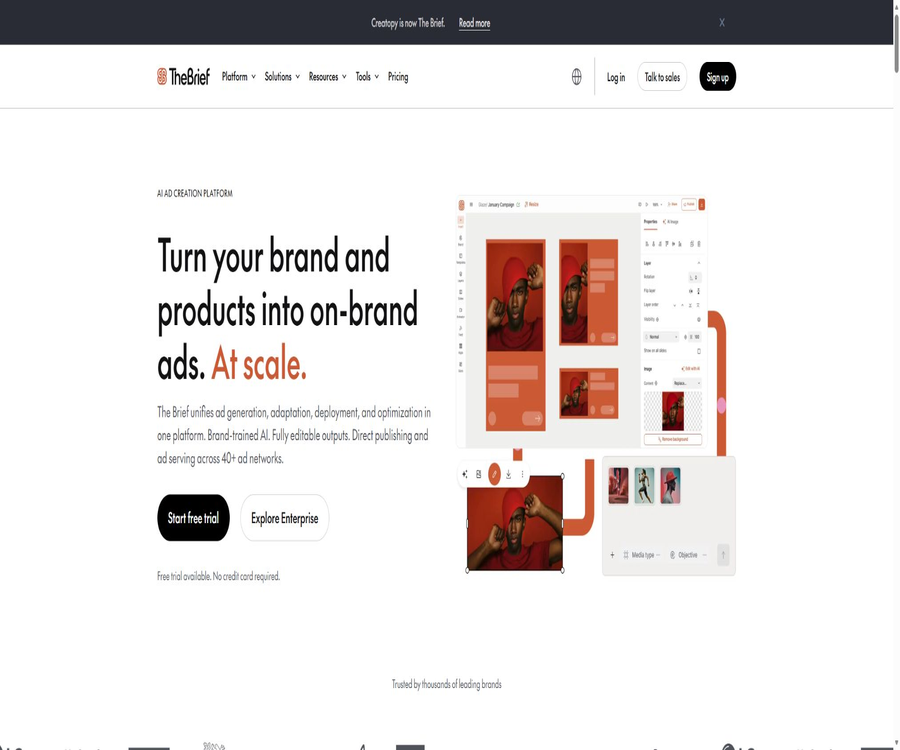
What is The Brief?
The Brief is the upgraded AI-based advertising creation and marketing platform from Creatopy; it covers tasks such as finding inspiration, generating content, adapting materials in bulk, publishing ads, and analyzing their performance. It offers an editable Ad Studio, as well as AI Agents for brand training and capabilities for generating images and videos using multiple models.
Explanation for the name change of Creatopy
The official website now states clearly that Creatopy has been renamed The Brief; the original creative design capabilities have been integrated into the new approach focused on the entire advertising lifecycle. Old tutorials, interfaces, and third-party evaluations may still use the name Creatopy, but it is necessary to refer to the current pages of The Brief when using them.
A one-sentence summary
The Brief allows brand information, products, and marketing objectives to be transformed into editable ads in various sizes, while also enabling collaboration, publishing, ad hosting, and optimization analysis.
Core functions
- Study the ads that competing brands are running.
- Generate branded ad designs using prompts.
- Create images, videos, copywriting, and product photography.
- Fine-tune static and dynamic assets in Ad Studio.
- Adapt the main design intelligently to various channel sizes.
- Use data sources to generate product and region variants in bulk.
- Publish directly to certain advertising platforms or output advertising tags.
- Analyze ad performance and generate optimization suggestions.
Discover: Research on competitors
- Check the ads run by competing brands on major platforms.
- Collect creative ideas, copywriting, and visual elements by brand.
- Create a mood board in an infinite Canvas.
- Use AI to summarize hooks, calls to action, and creative strategies.
- Transform the research findings into action plans.
- Pro, Ultra, and Team can track 10, 15, and 20 brands respectively.
- The enterprise version allows for more flexible tracking of quantities.
Ad Studio ad editor
Ad Studio is The Brief’s advanced design workspace, allowing users to start working with templates, blank canvases, or PSD and Figma files. Each element can still be edited, making it suitable for design teams to make further adjustments to the AI-generated drafts.
- Over 5,000 design and video templates are available.
- Edit text, shapes, images, videos, and audio.
- Create layered animations using a timeline.
- Use Magic Animator to create animations quickly.
- Import PSD and Figma designs to continue working on them.
- Set masks, filters, cropping, and blending modes.
- Create HTML5 content, videos, and static ads.
Canvas Creative Canvas
- Organize inspiration and mood boards on an infinite canvas.
- Save competitor ads and visual references.
- Explore potential directions for activities together with colleagues.
- Use AI to create images or videos suitable for presentations.
- Save the selected materials to the brand kit.
- The team solution supports real-time collaborative editing.
Create Agent
Create Agent generates static, animated, or video ads based on prompts, brand context, and channel requirements, and it is also able to produce variations in size and language. It is suitable for quick drafts, but ultimate brand, legal, and platform compliance still requires manual verification.
- Read the brand colors, fonts, and saved assets.
- Create advertising copy based on the campaign objectives.
- Create static, animated, and video candidates.
- Prepare the dimensions according to the main advertising channels.
- Expand the same concept into multiple versions.
- It can still be entered into the editor for modification after it has been generated.
AI image generation
- Generate ad visuals based on the textual instructions.
- Create style or content variations from existing images.
- Create or replace product backgrounds.
- Remove the background and unwanted objects.
- Expand the image to fit the new proportions.
- Improve low-quality images.
- Edit specific content using prompts.
Product photography
Product photography tools allow new scenes and backgrounds to be created from the uploaded product images, thereby reducing the reliance on actual photos during the conceptualization stage. When it comes to the product’s shape, color, packaging text, and regulatory labels, each element must be checked individually.
- Generate different scenarios from product images.
- Quick test for seasonal and lifestyle visuals.
- Create candidate materials for e-commerce and social media advertising.
- Save the results for reuse in the brand kit.
- Continue to add text and labels in the editor.
- It cannot replace manual verification, which is responsible for ensuring the authenticity of the products.
AI video generation
The Brief supports the creation of videos from text as well as from images, and can be used in Chat or Ad Studio. The documentation indicates that it is possible to set the resolution, aspect ratio, mode, number of variations, and whether audio should be included; videos of around 8 seconds in length can be generated.
- Generate short videos from text descriptions.
- Create dynamic effects from static product images.
- Use hint enhancers to supplement the description of the image.
- Generate and replace videos directly within the editor.
- Download or save the results to the brand kit.
- High-capacity usage is subject to the fair use rules of the plan.
AI ad copywriting
- Generate a title, body text, and call to action.
- Multiple tone options are provided.
- The way of expression is constrained by the brand’s guidelines.
- Translation and localization in over 30 languages.
- Modify the text in a set of ads at the same time.
- It is still necessary to check the price, effectiveness, comparisons, and legal statements.
AI intelligent scaling
AI Resize allows a main design to be adapted to different platform and ad space sizes, thereby reducing the need for repeated formatting. The system reorganizes the elements, but extreme aspect ratios, long text passages, and complex animations may still require manual adjustments.
- It covers square, vertical, horizontal, and IAB ad slots.
- Generate multiple size variants at the same time.
- Retain the brand elements and main hierarchy.
- Support handling special ad slots with custom dimensions.
- The custom canvas range is from 20 to 4,000 pixels.
- Check the safety area and text readability for each dimension before exporting.
Batch ads and Feed
Ad Feed Builder allows CSV files or fields from data sources to be linked to design layers, so that each row of product data generates a separate ad variant. It is suitable for e-commerce catalogs, physical stores, local pricing, and large-scale A/B testing.
- Upload a CSV containing product information.
- Attach images, titles, prices, and call-to-action buttons.
- Use row selectors to preview different variants.
- Batch generation is carried out by combining multiple sizes.
- Download results individually or in batches.
- Enterprise supports larger Feeds and a higher synchronization frequency.
- Before putting dynamic data online, missing values and format should be verified.
Real-time data and dynamic advertising
- Link price, inventory, or promotional information to the assets.
- Use a countdown and real-time status to improve efficiency.
- Generate personalized versions based on regional or product data.
- Avoid manually modifying large numbers of ad files.
- Enterprise solutions support more frequent data synchronization.
- Incorrect data can be rapidly spread to all advertising slots.
Brand kit
- Save brand colors, fonts, logos, and common assets.
- Create reusable brand templates.
- Manage assets separately for different customers or product lines.
- Pro offers 5 brand kits.
- Ultra and Team offer 20 brand kits.
- Enterprise can be configured according to the contract.
- Teams and enterprises can strengthen template locking and permission control.
Team collaboration
- Edit together in real time on Canvas.
- Gather feedback through comments and by sharing links publicly.
- Use version history to restore the old design.
- Manage 2 to 10 team seats by role and permissions.
- Share fonts, templates, and brand systems.
- The enterprise version includes custom roles, user groups, and approval processes.
- Agents can choose customized packages for multiple brands.
Publishing and ad hosting
Ultra, Team, and Enterprise support ad hosting for more than 25 advertising networks, and ads can be published on Meta and Google Ads. Certain features such as platform-specific options, dynamic catalogs, CM360, DV360, and Veeva capabilities are available only in the higher-tier plans.
- After downloading, upload it manually to the advertising platform.
- Publish materials directly on some platforms.
- Generate the files required for HTML5 and programmatic advertising.
- Use the platform’s CDN to host dynamic ads.
- Track the display and performance of managed ads.
- It still needs to pass the approval of various advertising platforms before it can be published.
Optimization and reporting
- Aggregate campaign data from advertising platforms.
- Analyze creative ideas and performance in campaigns.
- Generate reports that can be downloaded or shared.
- Use AI to interpret metrics and provide action recommendations.
- Ultra and higher plans support automatic A/B testing.
- Enterprise supports automatic reporting via email and Slack.
- Optimization suggestions do not guarantee conversion or advertising returns.
Export format
- Static images include JPG, PNG, and WEBP.
- Animations and videos include GIF, HTML5, and MP4.
- The document can be exported as PDF.
- It supports specific ad formats such as AMP.
- Certain printing and CMYK capabilities are limited by the package.
- Before exporting, check the platform’s specifications regarding file size and duration.
APIs and Integration
The Brief provides public API documentation that enables management of projects, folders, designs, and template-based exports; it also offers application integration through Ad Studio. The old Creatopy interface is now in a compatibility transition phase, and new projects should use The Brief’s current endpoints.
- The Enterprise package includes APIs as part of its standard features.
- The editor can be embedded in your own applications.
- Zapier can trigger the generation of templated creative content.
- Integration with Google Drive, Dropbox, Shopify, and others is supported.
- Companies can connect to DAM services such as Bynder and Frontify.
- The old interface may still work, but it has been marked as deprecated.
- Production integration should complete migration, authentication, and throttling tests.
Which users are it suitable for
- Designers and freelancers who need to create ads frequently.
- A brand marketing team that manages multiple channels simultaneously.
- E-commerce companies that create a large number of product variants.
- Companies that need multilingual and multi-market localization.
- Agencies that produce advertisements for multiple clients.
- Marketing teams that require HTML5 and dynamic advertising capabilities.
- Companies that wish to distribute media materials in bulk via API or DAM.
Typical use cases
- Generate the first round of advertising concepts from the event brief.
- Expand a main visual to over 50 different sizes.
- Create bulk price and image variants for product catalogs.
- Translate the advertisement and adapt it for various regions.
- Create social, display, and video ads.
- Publish directly to the advertising platform and view reports.
- Create a mood board and creative strategies for competitor ads.
- Use brand templates to control cross-team outputs.
It’s not very suitable for which situations
- It is only necessary to generate a free image occasionally.
- Complete film and video post-production as well as long-video editing are required.
- Organizations that require all generation models to be deployed locally.
- Developers who wish to obtain the complete source code for an open-source advertising platform.
- High-risk industries that lack brand assets or review processes.
- Individuals who only work with text-based search ads and do not need visual materials.
- Users who can only obtain a low public price by paying annually are not acceptable.
Price packages
As of August 2026, all public prices are displayed in US dollars; the prices for the Pro, Ultra, and Team plans are given on an annual basis. All subscription plans offer a 7-day trial period without the need for a credit card, while the Enterprise plan is priced based on usage volume and according to the terms of the contract.
| Package | Public price | Seats | Main positioning |
|---|---|---|---|
| Pro | $ | 1 person | Personal professional design |
| Ultra | $ | 1 person | High-capacity creation, publishing, and optimization |
| Team | $ | 2 to 10 people | Team collaboration and brand control |
| Enterprise | Contact sales for volume-based pricing. | Flexible | Mass production, APIs, and governance |
Comparison of package features
| Functions | Pro | Ultra | Team | Enterprise |
|---|---|---|---|---|
| Brand kit | 5 | 20 | 20 | Customization |
| Storage | 250GB | 1TB | 1TB | Starting from 1TB |
| Advertising hosting and display | Not included | 100,000 per month | 100,000 per month | Customization |
| Team collaboration | Single | Single | Real-time collaboration | Advanced governance |
| AI translation | Not included | Includes | Includes | Includes |
| Automatic A/B testing | Not included | Includes | Includes | Includes |
| API | Not included | Not included | Not included | Includes |
| SSO and SCIM | Not included | Not included | Not included | Includes |
AI and export usage rules
The pricing page states that AI generation and export do not involve any visible credit counting; regular use is included in the plan, but it is still subject to fair use policies and the capacity limits of the package. When usage is high, the platform will contact the user before those limits are reached, rather than guaranteeing unlimited computing power.
- Pro is suitable for regular personal use.
- Ultra offers greater capacity for high-frequency individuals.
- The capacity of a Team increases as the number of seats rises.
- Enterprise specifies the usage scale in the contract.
- The export formats are included in each plan.
- Abnormal automation or large-scale generation may trigger restrictions.
How to choose a package
- Individual regular design can start with Pro.
- Ultra is available as an option for ad hosting, publishing, and A/B testing.
- For two or more people who need to work together in real time, Team is a better choice.
- For more than 10 seats, or if API or SSO is required, please request a quote for Enterprise.
- The agent should also inquire about the Agency Package.
- Calculate the requirements based on brand kits, storage capacity, and display volume.
- First, complete a 7-day trial with actual activities.
Free trial
All versions – Pro, Ultra, and Team – offer a 7-day trial period, and no credit card is required for registration. The features available after the trial ends, as well as the process for purchasing additional services, will be determined by the real-time instructions displayed in the account.
Subscriptions and refunds
- Public low price with annual payment settlement.
- The subscription downgrade will take effect in the next billing cycle.
- Fees that have already been paid are, in principle, non-refundable.
- Unused periods generally do not entitle you to a refund or credit.
- In areas where the law requires refunds, the applicable regulations shall be followed.
- If the platform terminates the service without fault, the terms provide for a proportional refund.
- Before purchasing, check the renewal date and the cancellation option.
Tutorial on creating ads quickly
- Create a brand kit and upload the logo, colors, and fonts.
- Select a template, a blank canvas, or enter an activity prompt.
- Generate multiple sets of candidate images, videos, and text captions.
- Modify the layout and legal information in Ad Studio.
- Use AI Resize to create the desired channel dimensions.
- Check the text, buttons, and safety areas on a per-size basis.
- Export or publish to the target advertising platform.
Tutorial on advertising bulk products
- Create a CSV containing the product ID, title, price, and image.
- Create a main ad template with placeholder layers.
- Upload the Feed and bind the fields to the corresponding layers.
- Check for missing values, long titles, and image proportions.
- Preview multiple rows of data and various ad sizes.
- Generate checks in batches and sample them for inspection.
- It will be released after confirming the price and inventory update mechanism.
AI video tutorials
- Select video generation in Chat or Ad Studio.
- Enter the description of the scene, shot, subject, and style.
- Upload product images as needed for visual reference.
- Set the resolution, scale, mode, and number of variants.
- Decide whether audio needs to be generated for the video.
- Generate a 8-second clip and verify the authenticity of the product.
- Save to the brand kit or export after continuing to edit.
Advertising compliance and brand risks
- AI may generate incorrect product appearances and packaging text.
- Evidence is required for prices, discounts, efficacy, and comparison claims.
- Brand templates cannot replace legal and platform audits.
- Multilingual translation may change the constraints and tone.
- Similarities and copyright disputes may arise from the outputs of third-party models.
- Errors in dynamic data can affect a large number of advertisements that are being displayed.
- The publisher is ultimately responsible for the accuracy and compliance of the ads.
Safety and privacy
The official security page states that the company complies with major privacy regulations such as GDPR and CCPA; the enterprise solutions also list SSO, SAML, SCIM, and compliance audit support. A contract and security review must be carried out before handling unreleased products, customer data, or regulated materials.
Product advantages
- It covers the entire process of ad discovery, creation, publishing, and optimization.
- The results generated by AI can be further modified in a professional editor.
- It supports static, animated, video, and HTML5 content.
- Smart scaling reduces the need for repeated formatting in different sizes.
- Feed and real-time data are suitable for large-scale ad production.
- Brand kits and team permissions help ensure consistency.
- Visible point counting is not used for public packages.
- Provides APIs, an embedded editor, and various enterprise integrations.
Product restrictions
- The public monthly price requires annual payment.
- All packages are still subject to fair use and capacity limits.
- API, SSO, and advanced governance are available only in Enterprise.
- Team allows up to 10 users; more users require an enterprise solution.
- AI-generated content may deviate from the facts regarding products and brands.
- Automatic scaling and translation still need to be checked version by version.
- Payments generally do not allow for refunds.
- Dynamic ad deployment increases data and quality risks.
- The platform is not an open-source project.
GitHub and the open-source status
During this verification, no complete source code repository for the platform that has been officially verified using The Brief’s domain name was found. The Brief provides public APIs and development documentation, but its platforms for creating commercial ads, AI Agents, and Ad Studio are closed-source SaaS solutions.
Basic information
| Project | Content |
|---|---|
| Tool name | The Brief |
| Original brand | Creatopy |
| Company | The Brief, Inc. |
| Tool type | AI advertising creation and marketing platform |
| Trial | 7 days, no credit card required |
| Minimum public price | The annual fee is equivalent to $29 per month. |
| API | Available, primarily aimed at enterprises. |
| Export | Images, animations, videos, HTML5, and PDF |
| Open-source status | Not open source |
Recommendation score
Recommendation score: 4.6 / 5. The Brief is suitable for brands, agencies, and e-commerce teams that need to create a large number of advertisements in various sizes, in different languages, and in dynamic formats on a frequent basis.
Individuals should focus on comparing the annual cost with the actual fair usage capacity, while businesses need to examine the API options, advertising hosting services, data synchronization features, governance policies, and refund terms.
Frequently Asked Questions
What is the relationship between The Brief and Creatopy?
Creatopy has been renamed The Brief; its existing design capabilities remain intact and have been expanded to cover the entire lifecycle of advertising campaigns.
Is The Brief free?
There is no publicly available long-term free plan; Pro, Ultra, and Team offer a 7-day trial without the need for a credit card.
What is the lowest price?
The Pro plan costs $29 per month when paid annually, for a total of $348 for the whole year.
Are credits needed to generate content with AI?
The current pricing page does not take into account visible points, but AI functionality and data export are still subject to the limits set by the plan’s capacity and the rules of fair usage.
Can video ads be created?
Yes, it is possible to create short videos from text or images, and these videos can be further edited in Ad Studio.
Is batch advertising supported?
Supported: Variants can be created in bulk via Feed, multiple sizes, and data binding.
Are APIs provided?
Public API documentation is provided, but the current package comparisons mainly list the APIs under Enterprise.
Can I get a refund?
The terms stipulate that payments made are non-refundable, unless required by law or in cases where the platform terminates its services without any fault of its own.
Is The Brief open source?
It is not open-source; the availability of public APIs does not mean that the source code of Ad Studio or the AI platform is made available.
Similar to AI-powered ad generation – tools like The Brief AI.





 Guigong Network Security Registration No. 45132202000164