






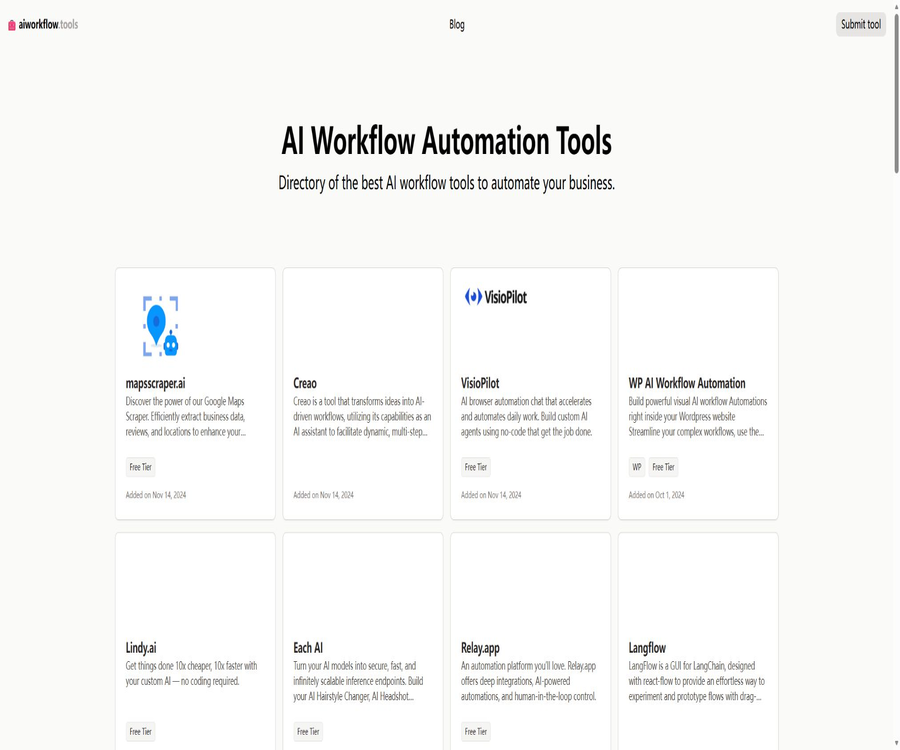
What are AI Workflow Tools?
AI Workflow Tools is a vertical directory focused on AI workflow and business automation products. It aggregates information such as the purpose of third-party tools, their main functions, as well as whether they offer a free version or are open source, thereby helping users to create a list of potential options.
The website itself is not responsible for running automated processes, nor is it a unified control panel for Zapier, n8n, or Make. After selecting a tool, users still need to go to the respective product’s website to check its features, prices, terms, and security capabilities.
A one-sentence summary
AI Workflow Tools helps businesses and individuals find the appropriate workflow platform more quickly by presenting various types of AI automation products in one place.
Core functions of the catalog
- It showcases AI workflows and automation tools in a centralized manner.
- Provide a brief description of the location and functions for each tool.
- Indicate whether certain products offer a free tier.
- Indicate whether certain products are open source.
- Organize product capabilities by individual detail pages.
- Publish an article on workflow automation.
- Accept new tools submitted by developers.
- It provides a way to discover and make preliminary comparisons of similar products.
It is not an automated execution platform.
- It is not possible to connect directly to the user’s application account.
- It is not possible to create executable processes within a directory.
- There is no unified management for third-party AI Agents.
- It does not replace the official consoles for each product.
- Third-party subscriptions and refunds are not handled in a unified manner.
- It is not responsible for the output of the included tools.
- Directory entries do not equate to official certification.
List of tool types
- No-code and low-code workflow automation.
- AI Agents and natural language automation.
- Enterprise integration platforms and iPaaS.
- RPA and business process automation.
- A platform for data integration, cleaning, and processing.
- AI application and prompt workflow builder.
- Tools for browser automation and web page manipulation.
- An open-source and self-hostable automation engine.
- Specific industries and WordPress automation products.
Representative products included
The home page currently lists products such as Zapier, Make, n8n, Activepieces, Workato, Tray.io, UiPath, Taskade, Gumloop, Langflow, Relay.app, and Lindy. The range of products shown in the catalog as well as their order may change.
| Category | Examples in the catalog | Primary uses |
|---|---|---|
| General application automation | Zapier, Make, IFTTT | Connect to the application and execute triggers and actions. |
| Open source or self-hosted | n8n, Activepieces, Langflow | Self-control over the deployment or expansion of workflows |
| Enterprise integration | Workato, Tray.io | Cross-system integration, governance, and scalable automation |
| RPA and processes | UiPath, ProcessMaker, Pipefy | Desktop automation and business process management |
| AI workflow | Gumloop, Wordware, Stack AI | Composite models, data, and application logic |
| AI assistant | Lindy, Taskade, SmythOS | Create Agents and automate team collaboration |
Tool details page
- Display the product name and a one-sentence description.
- Summarize the core functions and applicable processes.
- List the possible integration options and technical features.
- Display the free tier or open-source label.
- Provides a link to access the product’s official website.
- The depth of the content and the update time vary depending on the entry.
Free tier label
Some directory entries carry a Free Tier label, indicating that the product offers a free version or a free trial at the time it was included in the directory. This label does not guarantee that the free quota, functional limitations, and registration requirements will remain unchanged.
Open source tag
The catalog will mark some products as Open Source, such as Activepieces on the home page. The scope of openness may apply only to the core code or to the community version; before using them in commercial purposes, it is necessary to check the license of the relevant repository, as well as the enterprise features and hosting costs.
Blogs and content on product selection
- Introduces the concept of AI workflow automation.
- Organize representative automated products.
- Discuss the natural language design workflow.
- It explains the approaches to automating different business processes.
- Provides references on security and implementation topics.
- The product information in the article may be from an earlier version.
Tool submission process
Developers and product teams can recommend their AI workflow tools by submitting a form. The website will review them, but the public page does not specify any timeline for making a decision, any guarantees regarding ranking, or complete criteria for evaluation.
- Prepare the accurate product name and official website.
- Explain the workflow problems that the tool solves.
- List the actual functions and target users.
- Indicate whether it is free, paid, or open source.
- Avoid submitting exaggerated and unverifiable data.
- Update the catalog information proactively after product changes.
How to use directories
- First, identify the business processes and outcomes that need to be automated.
- The approach to be adopted – no-code, low-code, or open-source – is determined based on the team’s technical capabilities.
- Browse the directory and identify three to five potential tools.
- Record the integration, deployment, pricing, and permission requirements for each candidate.
- Visit the product’s official website to check the current documentation and prices.
- Use masked samples to set up a small validation process.
- Compare stability, maintenance costs, and anomaly handling capabilities.
- Official procurement will take place only after completing the security and contract reviews.
Tutorial on creating a selection checklist
- List the trigger conditions, input data, and expected output.
- List the applications and accounts that must be connected.
- Estimate the number of runs per month and the peak concurrency.
- Indicate whether manual approval or rollback is required.
- Determine the requirements for cloud, self-hosted, and data region.
- Compare functionality, cost, lock-in risk, and support separately.
- Set pass or fail criteria for key requirements.
Tutorial for verifying candidate tools
- Create a trial project from a low-risk process.
- Only the minimum permissions required for testing are granted.
- Test normal, repeated, missing, and incorrect inputs.
- Monitor throttling, retries, logs, and alerts.
- Calculate the total cost of accounting models, tasks, and third-party interfaces.
- Export process and data validation migration capabilities.
- It is approved by personnel from business, technology, and security teams.
Which users are it suitable for
- Individual users who are learning about AI automation products for the first time.
- Operations staff who help companies find process tools.
- Compare small and medium-sized enterprises using no-code platforms.
- Developers seeking open-source, self-hosted solutions.
- A team that studies AI Agents and workflow ecosystems.
- Developers who need to submit new automated products.
- Person responsible for compiling the research and procurement list for writing tools.
Typical use cases
- Look for automated tools that can connect CRM and email.
- Compare Zapier, Make, and open-source alternatives.
- Look for process builders that support AI Agents.
- Look for automation engines that can be deployed privately.
- Learn about RPA, iPaaS, and business process platforms.
- Discover specific industries or WordPress automation tools.
- Prepare a list of candidates for the internal selection meeting.
It’s not very suitable for which situations
- Users who wish to run automation directly on the website.
- Purchases that require real-time, comprehensive, and unified price comparisons.
- Companies that request a directory as an alternative to official security audits.
- A critical business area that requires assurance of product stability.
- A team that is ready to enter into a long-term contract based on just a brief introduction.
- Developers who need detailed API examples and troubleshooting guidance.
- Users who wish to manage all third-party tools through a single account.
How to compare workflow tools
| Comparison dimensions | Issues that need to be verified |
|---|---|
| Integration | Does it natively support key applications, Webhooks, and custom interfaces? |
| Construction method | Are no-code, low-code, code, or natural language suitable for teams? |
| AI capabilities | Which models, knowledge bases, Agents, and manual review options are supported? |
| Operation restrictions | Tasks, steps, concurrency, timeout, and file size limits |
| Safety | Are the permissions, logging, encryption, authentication, and data location requirements met? |
| Deployment | Available only in the cloud, or it can be self-hosted or used in dedicated enterprise environments |
| Price | Billing by task, step, user, computing power, or model usage |
| Maintenance | Are retry on failure, version management, testing, and alerts all in place? |
How to choose a no-code tool
- Give priority to checking whether critical applications have stable connectors.
- Verify the capabilities for branching, looping, and data transformation.
- Test whether non-technical personnel can carry out maintenance independently.
- Check whether the task billing increases rapidly as more steps are completed.
- After a failure to confirm, it is possible to identify the specific step.
- Evaluate the export and migration options.
How to choose open-source tools
- Check whether the license permits the intended commercial use.
- View repository commits, releases, and security responses.
- Estimate the costs of servers, databases, and backups.
- Confirm the functional boundaries between the community version and the enterprise version.
- Test upgrade, migration, and high-availability solutions.
- Establish isolation between credentials and execution nodes.
How to choose an AI Agent tool
- Check whether it is possible to restrict the tools that the Agent can use.
- Ensure that the prompt words, model, and sources of knowledge are traceable.
- Set up manual approval for writing and external messages.
- Tests indicate risks related to injection attacks and malicious documents.
- Limit the duration of a single run, as well as tokens and costs.
- Keep a record of each decision and tool invocation.
How to choose an RPA tool
- Confirm that the target desktop and browser environments are supported.
- Assess the maintenance work after changes to the interface.
- Check for credential isolation and unattended operation.
- Test resolution, pop-ups, and error recovery.
- Clarify robot licensing and concurrent billing.
- Prioritize using APIs for systems that are stable and capable of maintaining a connection.
Price of the catalog itself
As of this verification, AI Workflow Tools is available for visitors to use free of charge; there are no publicly listed membership plans, subscription prices, or paid premium features. Nor are any fixed fees for submission are indicated on the tool’s submission page.
| Services | Current directory pricing | Precautions |
|---|---|---|
| Browse the list of tools | Free | There is no need to confuse directory access fees with costs associated with third-party products. |
| Read the details page | Free | The content may not reflect the product’s current real-time information. |
| Read blogs | Free | The date of publication of an article affects its reference value. |
| Submission tool | Unpublicized fixed costs | No clear commitment has been given regarding whether inclusion and processing will take place. |
| Use the included tools. | Determined by each product. | It is necessary to go to the corresponding official website to complete the payment. |
The price of the included tools
The tools listed in the catalog operate under different billing models, including a free tier, billing by task, by user, based on the amount of model usage, per process execution, and enterprise quote requests. Catalog tags are only intended for preliminary screening; any purchasing decision should be verified by checking the official price page for the respective product.
Validity of catalog information
- On the home page, it can be seen that the majority of entries were added in 2024.
- The product name, positioning, and features may have changed.
- The free tier may see its scope reduced, discontinued, or subject to additional restrictions.
- Open-source project licenses and maintenance status may change.
- The number of integrations and the supported models can change rapidly.
- A table of contents summary should not serve as a contract or proof of security.
Verification of information accuracy
- First, check the product name and positioning shown in the entry.
- Then check the product’s official website to confirm that it is still in operation.
- Check the current help documentation and update logs.
- Check the price page, terms, and privacy policy.
- For open-source products, check the official repository and license.
- For important data, seek independent or verifiable evidence.
- Report any errors to the directory or the product provider.
Automated security considerations
- Do not grant production account permissions just because it is included in the directory.
- First, confirm the product main body and the login domain name.
- Use the minimum permissions for OAuth authorization.
- Sensitive credentials are managed using enterprise key management.
- Approval is required for sending messages and performing deletion actions.
- Regularly clean up connections that are no longer in use.
- View the product’s event response and data deletion rules.
Risks associated with automated implementation
- Incorrect process definitions can amplify problems on a large scale.
- Changes to third-party interfaces can disrupt operations.
- AI outputs may be incorrect or have inconsistent formatting.
- Loops and retries can result in unexpected charges.
- Excessive account permissions increase data risks.
- The lack of a person in charge will result in long-term maintenance gaps.
- The table of contents cannot assume these implementation responsibilities on behalf of the user.
Advantages of the table of contents
- Focused on AI workflows and automation in specialized fields.
- It enables quick understanding of various product types.
- It includes both commercial and open-source tools.
- Some entries offer a free tier and open-source tips.
- The separate details page facilitates the creation of a candidate list.
- Developers are allowed to submit new products.
- It is possible to view public content without registering.
Directory restrictions
- It is not a product that can be run directly as a process.
- Directory entries do not constitute official approval or recommendation.
- Some of the information was added at an earlier time.
- There is a lack of unified, real-time price comparison.
- There are no publicly available complete criteria for inclusion and ranking.
- The free and open-source tags need to be verified again.
- There is no unified display for security certifications and data regions.
- It cannot replace actual trial use and procurement review.
APIs and developer capabilities
No public APIs, data export interfaces, Webhooks, or SDKs are available for developers through AI Workflow Tools. The submission feature on the website is intended for recommending directory entries, and it is not an interface for automated execution.
GitHub and the open-source status
No official GitHub repository that can be verified by this website was found, so the directory itself should be considered non-open source. The open-source status of projects such as n8n, Activepieces, or Langflow, which are included in this directory, is independent of the status of the directory itself.
Basic information
| Project | Content |
|---|---|
| Website name | AI Workflow Tools |
| Website type | Catalog of AI workflows and automation tools |
| Primary use | Discovery, preliminary screening, and comparison of candidate tools |
| Whether to execute automation | No |
| View prices | Free |
| Tool submission | Support |
| Public API | No findings were detected. |
| Official GitHub | No findings were detected. |
| Open-source status | The directory itself is not open source. |
Recommendation score
Recommendation score: 3.8 / 5. AI Workflow Tools are useful for quickly getting to know the ecosystem of AI workflow products and creating an initial list of potential options, but they cannot replace official documentation, up-to-date prices, actual trials, or security assessments.
Frequently Asked Questions
Can AI Workflow Tools run automations directly?
No, it is a directory of third-party tools, not a workflow execution platform.
Is the website free?
Currently, the public catalogs and articles can be viewed for free; there is no membership package available for visitors.
What tools are available in the catalog?
This includes Zapier, Make, n8n, Activepieces, Workato, UiPath, Gumloop, as well as various AI agent platforms.
Is the Free Tier tag reliable?
It can only be used for preliminary screening; the free usage quota and related restrictions must be verified on the official website of the respective product.
What does the Open Source tag represent?
It indicates that the directory marks the product as open source at the time of inclusion, but the specific license and the extent of openness need to be checked in the official repository.
Can I submit my own tools?
It is possible to get recommended through the submission page, but the website does not provide any guarantees regarding the time it will take for the content to be included or the ranking it will achieve.
Is the directory information up to date?
It cannot be assumed that it is real-time; the dates of addition for many entries on the homepage are from 2024, and differences may arise as the products change.
Is a unified price comparison available?
No, the prices of third-party products need to be checked on their respective official websites.
Are APIs provided?
No public directory API or SDK was found.
Is the website open source?
No verifiable official source code repository was found; therefore, the directory itself is considered to be non-open source.
Tools similar to AI Workflow Automation Tools





 Guigong Network Security Registration No. 45132202000164