






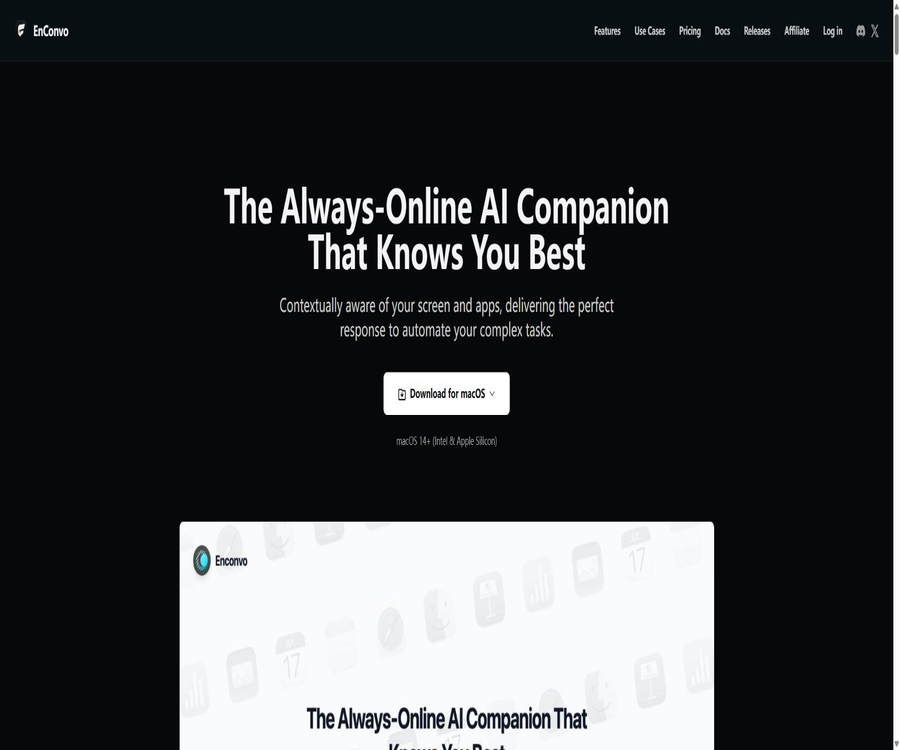
What is EnConvo?
EnConvo is a native macOS AI agent launcher that can detect the currently active application, selected text, Finder files, web pages, and screen content. Users can invoke AI functions through the SmartBar, PopBar, sidebar, or shortcut keys, without the need to switch windows frequently.
It integrates a knowledge base, workflows, voice transcription, real-time subtitles, web search, image generation, as well as over 100 different extensions. The core applications are not open source, but the official extension repository is available, which is suitable for users who wish to customize their Mac workflows.
Core functions
- SmartBar: Unified search for AI conversations, apps, tools, and past sessions.
- PopBar: An AI operation bar appears after selecting text.
- App Sidebar: A smart sidebar that remains accessible alongside the current app.
- Companion Orb: Displays the entry point and task status at all times.
- Agent Mode: Completes complex tasks by leveraging memory, context, tools, and knowledge.
- Knowledge Base: Create local or cloud-based knowledge bases from files and websites.
- Workflow: Combines tools, models, and steps to create reusable automation.
- Extension System: Install and invoke over 100 plugins.
SmartBar and quick access
SmartBar functions like a system-level command center, allowing users to quickly open dialogs, tools, or applications. Users can use symbols to select commands rapidly, access relevant context, or return to previous sessions.
- Enter @ to invoke a specific tool or command.
- Enter # to add the current context and so on.
- Enter > Browse recent AI sessions.
- Open it above any application using a shortcut key.
- Fix common workflows as quick access points.
PopBar and writing tools
- Correct spelling, grammar, and punctuation.
- Translate, rewrite, expand, or compress the selected text.
- Generate replies, summaries, and versions in different tones.
- Explain code, error messages, or professional text.
- Customize the operations displayed in the PopBar.
- Replace, copy, or pass the processing results on to the workflow.
Context awareness
EnConvo can use the selected text, the currently active application, browser pages, Finder files, and screen content as context. This reduces the need to copy and paste, but it also means that users need to carefully manage their screen controls, file access, and accessibility settings.
- Summarize the selected content in the current application.
- Ask questions related to the current page of the browser.
- Read the selected file and pass it to the document Q&A system.
- Enable visual models to understand real-time screen or camera footage.
- Select a more appropriate tool automatically based on the current task.
Agent pattern
- Leverage memory to understand user preferences and past tasks.
- Plan multi-step tasks before execution.
- Call EnConvo tools, plugins, and workflows.
- Search the personal knowledge base to obtain additional background information.
- Perform actions in conjunction with the screen and application context.
- Supports MCP servers, custom skills, and browser automation.
Knowledge base and document Q&A
A knowledge base can be created from files in formats such as PDF, DOC, XLS, PPT, TXT, JSON, Markdown, and EPUB; according to the official documentation, there is no limit on the size of these files. To import content across the entire website, it is usually necessary to have a sitemap provided by the website.
- Import various office documents and e-books.
- Create a knowledge base from a website with a site map.
- Relevant segments are found through vector retrieval.
- Invoke knowledge in agents and workflows.
- Install pre-built knowledge bases from the extended store.
- The Paid license supports an unlimited number of knowledge bases.
Workflow automation
- Combine the model, prompts, tools, and existing workflows in sequence.
- Start the same process from SmartBar, PopBar, or shortcut keys.
- Create text processing, research, translation, and document processing workflows.
- It operates automatically by combining scheduled tasks with instant messaging bots.
- Complete cross-application tasks through browser automation and computer operations.
- Import or export configurations to facilitate migration and backup.
Voice input and real-time subtitles
EnConvo offers global voice input, the ability to speak while holding a button down, AI processing of transcribed audio, and system audio subtitles. For voice services, options include providers such as Microsoft, AssemblyAI, Deepgram, Groq, or the local Whisper service.
- Use voice transcription in any input field.
- Use AI to automatically add punctuation and correct spoken language.
- Generate real-time subtitles for meetings, videos, or system audio.
- Translate identified subtitles into other languages at the same time.
- Use local models to reduce audio uploads.
- Pass the transcription results on to the summarization workflow.
Web search and in-depth research
- It can be connected to search services such as Google, Bing, Tavily, SerpAPI, You Search, and Exa.
- Pass the search results to the preferred large model for processing.
- Conduct in-depth research through the Spotlight-style entry point.
- Continue to ask questions and summarize regarding the current webpage.
- Some search services require users to configure their own keys or quotas.
Local model and privacy mode
Users can run local models using tools such as Ollama, LM Studio, and MLX, thereby keeping certain tasks related to conversations and document processing on the device. Whether it remains completely offline depends on whether the workflow makes use of cloud models, search functions, translation services, or other online tools.
| Operation mode | Data path | Costs | Suitable situations |
|---|---|---|---|
| Local model | Mainly on Mac computers. | Bear the costs of hardware and electricity bills yourself. | Sensitive data and offline tasks |
| Built-in API key | Send to the selected model provider | Pay the provider directly | Flexible models and proprietary accounts are required. |
| EnConvo Cloud | Use official hosted models and services | Monthly points package | I don’t want to manage multiple keys. |
| Hybrid workflow | Process each node separately. | Combined costs of on-premises and cloud solutions | Balancing privacy and cutting-edge models |
How to get started
- Ensure that the Mac is running macOS 14 or a later version.
- Install EnConvo and grant it the minimum permissions required to complete the tasks.
- Choose a local model, an embedded key, or Cloud credits.
- Configure SmartBar shortcut keys and test a regular conversation once.
- Select the text and set up the common PopBar writing operations.
- Create a small knowledge base and verify the cited content.
- Combine a simple workflow and run it initially in a manually triggered manner.
- Re-enable scheduled tasks, robots, or computer operations after stabilization.
Steps to create a workflow
- Define clearly the input, expected output, and completion criteria.
- Select a model whose processing quality is in line with the cost.
- Add to the knowledge base, current page, or file context.
- Add translation, summary, search, or tool nodes in sequence.
- Set stop conditions for failures, empty results, and sensitive operations.
- Use non-sensitive samples to test the results of each step.
- After saving, bind it to SmartBar, PopBar, or a shortcut key.
- Regularly check for model changes, permissions, and third-party fees.
Which users are it suitable for
- Knowledge workers who need to frequently utilize AI in multiple Mac applications.
- Users who value shortcuts, the efficiency of selecting text, and system-level interactions.
- Users who wish to switch flexibly between local models and cloud models.
- Teams that need document Q&A, research, and writing workflows.
- Users who wish to improve accessibility through voice transcription and real-time subtitles.
- Developers who need MCP, plugins, and automation capabilities.
Typical use cases
- Rewrite and translate the selected text in emails or chats.
- Ask questions and get answers regarding PDFs, tables, and presentations in Finder.
- Search for information on the current webpage, summarize it, and create research materials.
- Use local models to process internal documents that are not suitable for uploading.
- Provide real-time transcription, translation, and summarization of meeting audio.
- Process text, images, or files in batches using workflows.
- Developing tools and business applications are connected through MCP and computer operations.
Product advantages
- A native macOS application; its integration with the system is deeper than that of ordinary web-based chat applications.
- SmartBar, PopBar, the sidebar, and shortcut keys provide various ways to access things.
- It supports three modes: local models, built-in keys, and the official cloud service.
- Knowledge bases, workflows, Agents, and plugins can be combined.
- The voice transcription, real-time subtitles, and translation functions are quite comprehensive.
- More than 100 extensions can be invoked in various applications.
- Buyout licenses and Cloud subscriptions can be used in combination, offering flexible options.
Usage restrictions
- It is only available for macOS 14 and later; versions for Windows or Linux are not provided.
- The free tier allows only a limited number of calls per day, and the number of knowledge bases and workflows is also restricted.
- The purchase of a license does not include permanent, free access to third-party models.
- Standard includes updates only for one year; to obtain a newer version, renewal is required.
- The speed and quality of local models depend on Mac memory, the chip used, and the size of the model.
- Screens, cameras, accessibility features, and file permissions pose a high risk to privacy.
- When a workflow invokes multiple cloud services, the data paths and costs become more complex.
- The official website’s instructions for refunds mention both 14 days and 30 days as time frames.
Price of a perpetual license
| Package | One-time price | Equipment | Cloud Rewards | Update |
|---|---|---|---|---|
| Free | Free | 1 Mac | 5,000 welcome points | Basic functions |
| Standard | 49 dollars | 1 Mac | 50,000 points | 1 year of free updates |
| Premium | 99 dollars | 3 Macs | 150,000 points | Lifetime free updates |
| 5 seats on Teams | 139 dollars | 5 Macs | 250,000 points | Lifetime free updates |
| Additional seats in Teams | 20 dollars per person | Maximum expansion per account | 50,000 points per seat | With team permission |
AI systems that use their own API keys or local models are not subject to any limits on the number of EnConvo calls, but the model providers may still charge fees. A perpetual license covers the application functions, device authorization, and update rights; it does not mean that all cloud-based models are included in such a license.
Cloud subscription price
| Package | Monthly payment | Annual payment | Monthly points | Equipment and Features |
|---|---|---|---|---|
| Plus | 10 dollars | 96 dollars | 500,000 | 5 Macs; all Cloud-based models and services |
| Pro | 50 dollars | 480 dollars | 2,500,000 | 5 Macs; DeepSeek and MiniMax M3 are available at half price |
| Max | 100 dollars | 960 dollars | 5,000,000 | 5 Macs; DeepSeek and MiniMax M3 on a quarter-score basis |
An annual payment entitles you to a 20% discount. Cloud credits can be used for services such as messaging, image and voice generation, and transcription; the specific consumption rate for each model is determined according to the real-time Cloud pricing table.
How to choose between licensing and subscription
| Demand | Recommended method | Reason |
|---|---|---|
| Use only local models | After trying Free, choose Standard or Premium. | There is no need to continuously purchase Cloud credits. |
| There are already multiple model keys. | Buy-out license | Unified entry point while retaining custom billing |
| I don’t want to configure a key. | Plus, Pro, or Max | Monthly points apply to official model services. |
| Requires regular updates and support for multiple devices | Premium | 3 devices with lifetime updates |
| Shared by small teams | Teams | Starting from 5 seats, with the option to add more seats. |
| Private deployment or 500 seats or more | Contact the company’s sales team | Custom security and delivery are required. |
Refunds and student discounts
The package card on the home page states that a permanent license is provided with a 30-day refund guarantee, while the FAQ mentions a 14-day refund without any reason required; the official terms also refer to a 14-day trial period. It is necessary to save the payment page before making the payment and to confirm the applicable deadline with support.
- Subscriptions can be canceled at any time, usually upon the end of the current cycle.
- Students can contact the authorities to request a 30% discount.
- Buyout and Cloud subscriptions can be used simultaneously.
- After the annual update for Standard expires, the usage rights for the old version and the policies applicable to the new version must be confirmed separately.
- For team and private deployments, the terms of the contract apply.
Privacy and permissions
- Only enable the auxiliary functions and screen permissions that are truly necessary for the current feature.
- Check whether sensitive information is present before using the screen or camera context.
- Local model tasks avoid invoking online searches and cloud tools.
- When using your own key, also read the data policy of the corresponding model manufacturer.
- Tracks the destination of data for external services within the workflow.
- Enable manual confirmation and task boundaries before initiating computer operations.
GitHub and the open-source status
The core macOS application of EnConvo is not open-source software; the official GitHub repository provides access mainly to extensions and adaptations for various model providers. Users can contribute to, review, or modify these extensions, but this does not mean that it is possible to build and deploy the complete application on one’s own.
| Project | Status | Explanation |
|---|---|---|
| EnConvo core application | Closed source | Distributed through official licenses |
| Official extensions | Open source | Focused in the Enconvo GitHub organization |
| LLM Providers | Public warehouse | Used to connect to different model providers |
| Writing and practical plugins | Public warehouse | It is possible to view submissions and contributions. |
| Local model | Third-party ecosystem | Run via Ollama, LM Studio, or MLX |
Basic information
| field | Content |
|---|---|
| Tool name | EnConvo |
| Tool type | macOS AI Agent Launcher and Workflow Tools |
| System requirements | macOS 14 and later |
| Processor | Intel and Apple Silicon |
| Price pattern | Free, one-time purchase, Cloud subscription, team licenses |
| Minimum buyout price | 49 dollars |
| Minimum Cloud subscription | $ |
| Local model | Support |
| Is it open source? | Core application: no; expanded source code |
| Windows and Linux | Not supported |
Recommendation score
4.6 / 5. EnConvo is suitable for users who want to integrate AI deeply into their daily tasks on the Mac, offering a wide range of options regarding interfaces, models, and automation features. Its drawbacks include broad permission requirements, support only for macOS, and inconsistencies in the information provided on the refund page.
Frequently Asked Questions
Which systems does EnConvo support?
It is only supported on macOS 14 and later, and is compatible with both Intel and Apple Silicon Macs.
Is EnConvo free?
There is a free tier, which usually allows 10 uses per day and provides a knowledge base as well as a workflow.
What is the difference between Standard and Premium?
The Standard version costs $49 and includes 1 device along with updates for one year; the Premium version costs $99 and provides 3 devices along with lifetime updates.
How much is Cloud Plus?
Plus costs $10 per month or $96 per year; it includes 500,000 points per month and supports 5 Macs.
Is it necessary to provide my own API key?
No. It is possible to use local models, built-in keys, or purchase a Cloud package in order to make use of the official hosted services.
Can it be used entirely offline?
By using a local model and avoiding searches, cloud translation, and online plugins, the main processing can take place on the device itself.
Does it support Q&A for documentation?
It supports a variety of office documents, texts, and e-books; it is also possible to create knowledge bases from websites that include site maps.
How long is the refund period?
The homepage indicates 30 days, while the FAQ and certain terms specify 14 days; prior to payment, confirmation should be obtained from the settlement page and an official written response.
Is EnConvo open source?
The core application is not open source, but the official GitHub page provides repositories for extensions and integration with model providers.
Is support available for team and private deployments?
Perpetual licenses for Teams are available; for 500 seats or more, or in cases of private deployment, it is necessary to contact the official team to obtain a customized solution.
Tools similar to enconvo_ai





 Guigong Network Security Registration No. 45132202000164