






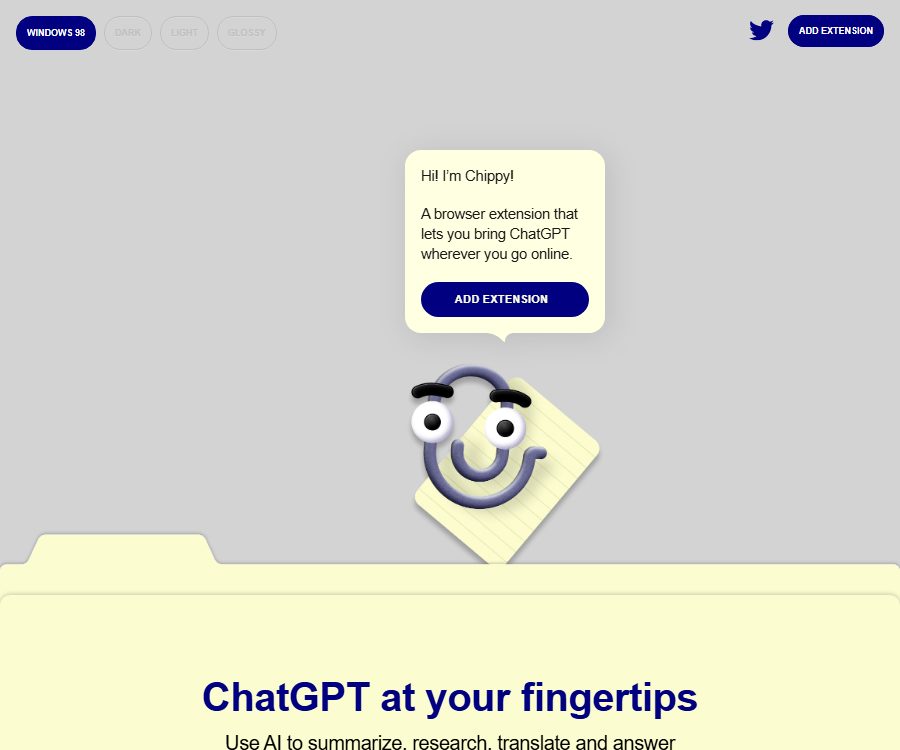
Chippy - AI ChatGPT Chrome extension
Chippy – an AI ChatGPT Chrome extension that makes it possible to use AI plugins more efficiently and simply in conjunction with Skills.
Tags:Plugins and SkillsWhat is Chippy?
Chippy is a browser AI assistant designed and developed by Fictive Kin; it is listed in the Chrome Web Store under the name Chippy: AI Writer with GPT. It integrates the conversation interface directly into the current webpage, allowing users to avoid switching back and forth between the content being viewed and a separate chat page.
The product is primarily used for tasks such as reading, writing, and interpreting web content; it is not an independent search engine nor a complete office suite. Extensions submit user queries, selected text, or page content to the model for processing, which then returns a textual response.
Current operation and version status
| Project | Status verified | Usage meaning |
|---|---|---|
| Developer | Fictive Kin | Responsible for product strategy, design, and front-end and back-end development. |
| Product format | Chrome extensions | Call it from within the web page after installation. |
| Store version | 0.1.35 | The public page shows that it was last updated in October 2023. |
| Interface language | English | Chinese content can be translated or handled through Q&A, but interface localization is not available yet. |
| Account requirements | No Chippy account is required for basic use. | When more calls are needed, it may be necessary to configure your own model key. |
| Maintain activity level | Not confirmed yet | The ability to install it does not mean that the model interface will remain compatible over time. |
The store page still shows the available installation links, but the version has not been updated in many years. Since the interfaces related to generative AI, model names, and browser permissions can change, users should rely on actual installation tests to determine whether the tool can be used.
Main functions
Processing of questions and answers as well as selected texts on web pages
- Open Chippy on any web page, enter your question directly, and let the assistant generate explanations, suggestions, or drafts.
- Select the paragraph first before asking a question; this reduces the need for copying and pasting and limits the task to the text that is of interest to the user.
- It is suitable for explaining terms, rephrasing sentences, extracting key points, and asking follow-up questions about the text, but the answers still need to be checked against the original text.
Search on current page
- Focused Search allows narrowing the search range to the current page, so as to find relevant information within the content of that page.
- This model is suitable for long articles, product documentation, and tutorials; it should not be interpreted as a real-time search of the entire Internet.
- When a page is too long, the viewer may need to filter or compress the content, which can result in the loss of details and context.
Summary, Translation, and Explanation
- Users can ask for a summary of articles, an explanation of complex paragraphs, or have selected text translated into other languages.
- Summaries are suitable for quick previews, while translations are meant to serve as a first draft; legal, medical, contractual, and technical terms should be reviewed by qualified professionals.
- The store only labels the extended interface in English, without providing a complete list of input and output languages.
Email and writing assistance
- You can open the extension near the email box or the text editing area to request a reply, adjust the tone, or continue writing.
- Suggestion prompts and related follow-up questions can help users start with blank input and gradually refine their output.
- The expansion generates text suggestions; it does not determine for the user whether the recipients, facts, commitments, or attachments are correct.
Programming content assistance
- The store instructions outline uses such as error correction, code explanation, syntax guidance, and practical suggestions.
- Users can select code or error messages on a webpage and ask questions, thereby receiving guidance on how to resolve the issues as well as examples.
- The generated code may contain obsolete interfaces, security flaws, or licensing issues; it must be tested in an isolated environment and subjected to manual review.
Input and output
| Input method | Enter content | Main output | Suitable for tasks |
|---|---|---|---|
| Ask directly. | Natural language commands | Answers, suggestions, or drafts | Quick consultation and writing |
| Select text | A piece of text on a webpage | Summary, rewriting, translation, or explanation | Precisely handle local content |
| Current page | Expand the content of pages that can be read. | Answers within the page range | Long-text search and reading assistance |
| Code and errors | Code snippets, error messages, or documentation | Explanations, repair suggestions, or examples | Development and debugging |
The output is primarily in text form; no official documentation indicates support for batch uploading of files, image generation, audio transcription, or export of structured data. Due to login restrictions, dynamic pages, browser settings, or page permissions, some content may not be available for full retrieval.
Installation and Basic Usage
- In the Chrome Web Store, verify the extension’s name, developer, and ID, then select Add to browser.
- Check the permissions for the extension request, and allow it to read page content only on websites where it is truly necessary.
- After installation, select the interface theme; on the web page, use Control plus J or Command plus J to open Chippy.
- Enter the task directly, or select the text first and then request a summary, translation, rewriting, or explanation.
- Enable page search when it is necessary to focus on the current page, and use follow-up questions to narrow down the range of possible answers.
- If the base quota is insufficient, check the available options through the upgrade option in the settings; before configuring a personal API key, it is necessary to understand the separate billing rules for model accounts.
- Before sending an email, using code, or citing facts, verify each part of the response against the original page, business documentation, and test results.
Free quota and fees
| Method | Public price | Billing cycle | Core benefits or quota | Suitable for users |
|---|---|---|---|---|
| Chippy base quota | Free | Recover on a daily basis | The official website states that 20 queries to GPT-3.5 can be made per day. | Lightweight web Q&A |
| Provide your own OpenAI API key. | Charged through the model service account. | In accordance with the rules of that account | The official website states that it can be used for more queries or with GPT-4. | Users who require a higher dosage |
| In-app purchases in Chippy | Not yet made public | Not yet made public | The store indicates that in-app purchases are available, but it does not show the amounts or the benefits associated with them. | Users who wish to upgrade within the expansion |
The free quota and model names are taken from the product’s public page; however, both this page and the extended version are updated fairly frequently, so it cannot be guaranteed that older models are still available for use. The actual number of uses allowed, the models available, regional restrictions, and the payment amount should be based on the extended settings and the actual billing page.
No verifiable information could be found regarding Chippy’s current refund policies, auto-renewal terms, or corporate pricing. The costs associated with models generated using personal API keys are borne by the respective service account; these costs cannot be mixed up with Chippy’s free credits or in-app purchases.
Precautions for using your own API keys
- The official website states that users can provide their own OpenAI API keys in order to perform more queries or access specific models.
- Using an own key is part of the client configuration; it does not mean that Chippy makes its product APIs, SDKs, or batch invocation interfaces available to developers.
- Before configuration, it is necessary to set manageable usage budgets and alerts for the key, and to regularly check the call records in the model account.
- Do not expose keys in web form fields, conversation content, screenshots, emails, or shared devices.
- If a key leak is suspected, the key should be revoked from the model account and a new one created immediately, rather than simply deleting it through the browser interface.
- The model names, permissions, and interface compatibility may change; when errors occur with older versions of the extensions, sensitive information should not be submitted repeatedly.
Browser and platform support
| Platform | Status | Explanation |
|---|---|---|
| Google Chrome | Already supported | Provide official store extensions |
| Chromium-based browsers | The official website states that it provides support. | Whether it can be installed depends on the policies of each browser’s store and regarding extensions. |
| Firefox | Not confirmed yet | No official extension page was found. |
| Safari | Not confirmed yet | No official extension page was found. |
| iOS and Android | Not confirmed yet | The official native application page could not be found. |
Privacy and data processing
The product page states that conversations and API keys are stored locally in the browser and can be deleted by the user at any time, and it claims that browsing history is not tracked. However, the store’s privacy policy indicates that the extension processes personal identification information as well as website content.
- The privacy policy states that it may collect the email addresses submitted by users, as well as the standard server logs generated during access to the service.
- Third-party service providers include those that offer services for browser distribution, business metrics, error monitoring, and payment processing; each provider handles data in accordance with its own policies.
- The information can be used to provide support, measure usage, conduct research, improve functions, notify about updates, and for marketing purposes.
- Data may be shared with service providers, or it may be disclosed when required by law, to protect the services, or in the event of a business transfer.
- Users can request access to, correction of, or deletion of their submitted personal information, but the policy does not specify a fixed retention period.
- The service is intended for residents of the United States; information may be collected, stored, processed, and transmitted in the United States or in other countries and regions.
- The service requires users to be at least 13 years old; those under 13 are not allowed to submit personal information.
\"Local storage\" does not mean that all processing takes place solely on the local device, as generating responses requires sending the relevant inputs to models or service infrastructure. Before handling customer data, unpublished code, personal information, and content subject to confidentiality rules, it is necessary to first review the organization’s policies and the terms related to third-party data.
Suggestions for safe use
- Web page reading permissions are granted only when necessary for a task, and access is restricted by requiring a click on an extension first.
- Do not allow extensions to access password pages, financial backends, medical records, customer lists, or development pages that contain keys.
- After using it on a shared computer, it is necessary to delete conversations, local storage, and personal API keys, as well as lock the browser profile.
- Before deployment, enterprises should review the extended versions, list of permissions, data flows, model providers, and procedures for revoking access upon departure.
- Since the public version is outdated, it is necessary to first use a non-sensitive test page to verify that installation, shortcut keys, page loading, and model invocation are functioning properly.
API, SDK, and open-source status
- No product APIs, SDKs, or integration documentation provided by Chippy for developers have been found.
- No official source code repository or open-source license that corresponds to the identity of this product was found.
- The extension allows for the entry of API keys for third-party models; it does not mean that Chippy itself is open-source, nor does it grant the right to modify, redistribute, or use it in commercial applications.
- The commercial terms for the product and the details regarding the licensing of the generated content have not been made public yet; companies should consult the developers before using it.
Suitable for users and scenarios
- Researchers and readers: Locate paragraphs in long pages, summarize key points, and pose follow-up questions.
- Content and operations staff: Create draft responses, revisions, and translations based on the selected text.
- Educate users: Explain terms and the structure of materials, but do not submit the generated content as original work.
- Developer: Explain documentation, error messages, and code snippets, then verify suggestions through testing.
- It is not suitable for teams that require active maintenance commitments, a comprehensive enterprise console, native mobile applications, or public development interfaces.
Advantages and limitations
| Aspect | Actual judgment |
|---|---|
| Operation path | Quick access from within the webpage: select the text and ask questions directly, eliminating the need to copy and paste. |
| Page context | The current page can be focused on, but long pages and dynamic content may be truncated. |
| Basic usage | The official website specifies a free daily quota, but the performance of the old model and its current availability need to be tested in practice. |
| Key control | It supports the use of custom model keys, while assigning the associated costs and responsibility for key security to the user. |
| Privacy | It claims that conversations and keys are stored locally, but it still involves page content and third-party processing. |
| Maintenance status | It can still be installed in stores; the public version was updated earlier, and its long-term compatibility is uncertain. |
| Platform | Primarily Chrome and Chromium browsers; other platforms have not been confirmed. |
| Development capability | There are no public APIs, SDKs, or open-source licenses available. |
Summary
The value of Chippy lies in its ability to integrate functions such as question answering based on selected text, page searching, summarization, translation, and writing tools directly into the current webpage; it is suitable for users who wish to reduce the need to switch between tabs and copy-paste content. Its capabilities are well-defined, but it cannot replace professional search tools, fact-checking services, code review processes, or enterprise data management solutions.
Before installation, it is important to check the date of the latest update, as well as the permissions and privacy settings. After installation, test the model and its capabilities using non-sensitive data. Users who need to use their own API keys should also set a budget, secure those keys, and verify whether older extensions are compatible with the current model account.
Tools similar to Chippy – the AI ChatGPT Chrome extension




 Guigong Network Security Registration No. 45132202000164