






Cursor Search
Cursor Search: makes it easier and more efficient for AI plugins to work with Skills.
Tags:Plugins and SkillsWhat is Cursor Search?
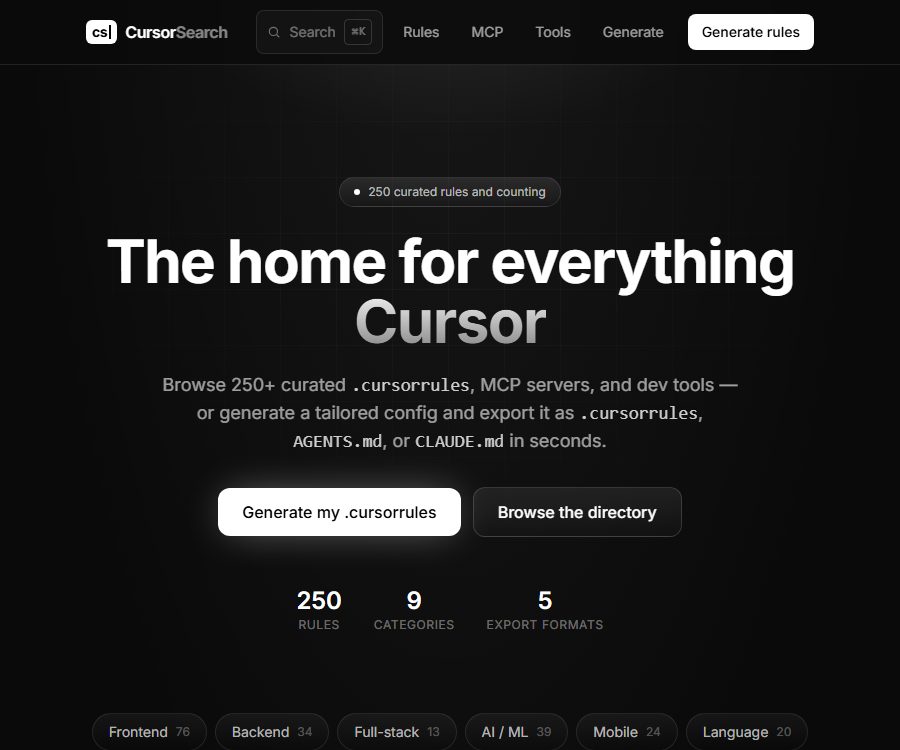
Cursor Search is an independent development resource site created by Sai Chandan Kadarla; it currently focuses on compiling information related to Cursor rules, MCP servers, and various development tools.
It also offers a registration-free AI configuration generator that can convert project descriptions or package.json files into rule files suitable for various coding agents to read.
Current products and historical expansions
| Version | Current status | Key capabilities | Suitable for users |
|---|---|---|---|
| Web page directory | Current main products | Browse rules, MCP servers, and development tools | Cursor and other users of coding agents |
| AI Rule Generator | The website is available. | Generate and export project instructions based on the technology stack. | Drafting of new project configurations and team guidelines |
| Chrome extensions | It can still be installed in stores; the latest update is from October 2024. | Use shortcut keys to invoke AI-powered search and Q&A on the current webpage. | Quick search while browsing documents |
Cursor Search has no connection with Anysphere, the developer of the Cursor editor, and the contents of this directory do not represent official approval or recommendation by Cursor.
Main functions
Cursor rules directory
- The website currently contains over 250 rules, covering front-end, back-end, full-stack, AI and machine learning, mobile development, programming languages, DevOps, game development, and other topics.
- Users can find the rules corresponding to a specific technology stack by category or keyword, and can read the complete instructions and relevant rules on the details page.
- Rules are used to inform the coding agent about the project structure, coding practices, dependency selection, testing requirements, and prohibited behaviors.
- The quality of community rules varies, as does the frequency of their updates; before copying them, it is necessary to compare them item by item with the project version, team guidelines, and the actual code.
AI Configuration Generator
- Users can describe the project’s language, framework, database, deployment environment, and engineering requirements, or paste a package.json file to allow the system to identify the technology stack.
- AI generates a preliminary draft of the project rules based on the input provided; no registration is required, nor is it necessary to choose from any pre-existing templates in the catalog.
- The results can be copied or exported in configuration formats for intelligent agents such as .cursorrules, AGENTS.md, CLAUDE.md, etc.
- The generation page clearly positions the resulting output as a starting point; users should review the commands, versioning, and security requirements before submitting to the code repository.
MCP server directory
- The current directory lists 14 MCP servers, along with copyable startup commands and the location of the Cursor configuration.
- The categories include file systems, web scraping, Git, memory, time management, browser automation, document retrieval, databases, search functions, payment systems, and productivity tools.
- Projects that require access tokens are identified by environment variables, such as search, database, scraping, payment, and knowledge management services.
- The installation commands come from various MCP projects; before running them, it is still necessary to verify the package name, repository, permissions, license, and the latest documentation.
Recommended list of development tools
- The tools page lists editors, backends, hosting services, product management tools, and interface generation services that are suitable for use with Cursor.
- The currently visible entries include Cursor, Supabase, Vercel, Linear, v0, and Context7 MCP.
- These are all third-party products; their prices, privacy policies, terms of service, and availability are determined by their respective operators.
Chrome web search extension
- The extension enables users to invoke the AI using shortcut keys while browsing the current page, thereby reducing the need to switch between the web page and a separate chat window.
- It processes queries, the current page address, and the page content whenever the user uses the search function, in order to generate relevant responses.
- The current version of the app is 0.1.0; it has an English interface and in-app purchases, with the most recent update taken place on October 1, 2024.
- The additional features operate differently from the current rule structure; before installation, it is necessary to verify whether the capabilities of the older version are still sufficient to meet the requirements.
Input and output
| Functions | Main inputs | Output | Typical uses |
|---|---|---|---|
| Rule browsing | Technology stack, categories, or keywords | Project-level development instructions | Standardize code style and project constraints |
| AI generator | Project description or package.json | Configuration files that can be copied or exported | Quickly establish agent rules |
| MCP directory | Capability categories and operating environment | Installation commands, configuration snippets, and key prompts | Add external tools for Cursor |
| Chrome extensions | Query, current page address, and content | Answers related to the page context | Immediate queries while reading |
Tutorial for using the web page generator
- First, sort out the project’s language, framework, version, directory structure, database, testing tools, and deployment method.
- Open the generator and enter a descriptive text for the structured project; it is also possible to paste a package.json file, but the tokens, private addresses, and other secrets must be removed first.
- After generating the configuration, check whether the correct version has been identified, and remove any rules that conflict with the existing code and team processes.
- Select the target format and place the file in the location specified by the corresponding encoding agent and project requirements.
- Have the agent complete a small task to observe whether it adheres to the directory structure, testing, security, and submission guidelines.
- The rules are modified based on actual deviations, incorporated into code reviews, and continuously maintained as dependencies are upgraded.
MCP configuration process
- Select File, Git, Document, Browser, Database, or another MCP server as needed.
- Open the project details and check the official repository, runtime, package name, license, and the most recent maintenance activities.
- Before copying the configuration, reduce the directories and tools that are allowed to be accessed to only those necessary for the task.
- When a token is required, it should be stored using environment variables or secure credentials; the keys must not be included in rule files or uploaded to repositories.
- Add the configuration to the global or project-level MCP file; after restarting the client, test only one operation with low risk.
- Only after confirming that the logs, permissions, and outputs are functioning properly should features such as file writing, command execution, database operations, or payment processing be enabled.
Suitable for users and scenarios
- Cursor user: Quickly find project rules that match the language, framework, and tasks.
- Users of coding agents such as Claude Code and Codex: convert the same set of project requirements into appropriate instruction files.
- Team leader: Formulates common rules for code style, architecture, testing, and security requirements.
- MCP for beginners: Compare common servers and get started with installation and configuration.
- Web page research users: Use an older version of Chrome extensions to initiate context queries on the current page.
Price and business model
| Package or version | Price | Billing cycle | Core benefits or quota | Suitable for users |
|---|---|---|---|---|
| Web page directory | Free | No subscription required | Browse rules, MCP, and tool catalogs; no registration required | Development of resource retrieval capabilities |
| AI generator | Free | No subscription required | Enter the project description or package.json and export the rules; there is no specified limit on the number of items that can be generated on the public page. | Draft of the rules created |
| Chrome extensions | Offers in-app purchases | Not yet made public | The store does not list specific products, prices, usage limits, or refund policies. | Web context search |
| Developer sponsorship | Contact the operator | In accordance with the cooperation agreement | A tool for displaying content on pages intended for Cursor users | Promoters of development tools |
The website does not disclose any information regarding paid memberships, corporate packages, or a points system. If a Chrome extension shows purchase options, those options should be based on the actual pricing details after installation.
GitHub, Licensing, and Open Source Status
- The Context7 repository specified in the database belongs to Upstash; it is an external project included in the Cursor Search MCP directory, and not a code repository of this site.
- The rules for the website are compiled by the community, including the awesome-cursorrules collection under the MIT license.
- The page for a single rule does not always indicate the original author, repository, and license; therefore, the entire directory cannot be assumed to be under the MIT license.
- No official code repository for Cursor Search, developer APIs, SDKs, or open-source licensing for the product have been found yet.
- If a commercial project wishes to publish new rules, it should first determine the author of each specific item, as well as the licensing and attribution requirements.
Privacy and security
- The privacy policy primarily describes Chrome extensions, which may collect account information, user preferences, search queries, and usage frequency.
- When a user performs an active search, the extension processes the address and content of the current page; however, it is stated that it does not collect a complete browsing history beyond the context of that immediate search.
- Queries and their results are processed in real time and not stored permanently; preference settings are saved locally and can be synchronized via a Chrome account when enabled.
- The policy does not specify the exact models used by the web-based AI generator, the service providers responsible for processing, the retention period for logs, or whether these data are used for model training.
- Before pasting the package.json file into the generator, private package addresses, internal project names, script parameters, tokens, and environment information should be removed.
- The MCP configuration can grant permissions for files, the network, browsers, databases, or payments; the security boundaries depend on the third-party server chosen.
Capacity boundaries
- The “Recommended” items in the catalog do not necessarily have undergone a thorough security audit; the rules and installation commands may still be outdated, incorrect, or unsuitable for the current version.
- Rules can only influence the behavior of agents; they cannot guarantee that the generated code is correct, secure, maintainable, or passes tests.
- Automatically generated configurations may overly restrict development, or they might fail to take into account the project’s implicit standards and compliance requirements.
- Third-party MCP servers introduce additional dependencies, credentials, and data processing entities, which should be independently reviewed before being enabled.
- Chrome extensions are updated relatively early and do not have public ratings; therefore, it is not possible to determine their level of maintenance activity solely based on whether they are available in the store.
Frequently Asked Questions
Is Cursor Search an official product of Cursor?
No, it is an independent community resource site that is not affiliated with Anysphere or Cursor. The rules, MCPs, and tools available in the directory are not subject to official approval by Cursor.
Is the rule generator requires registration or payment?
The current web page generator is free to use and does not require registration; you can enter a project description or a package.json file. There is no specified limit on the number of times a page can be generated.
What rule formats can be exported?
Currently, formats such as .cursorrules, AGENTS.md, and CLAUDE.md are explicitly supported; users should choose the file that matches their editor or coding agent.
Is the Context7 repository in the database the source code for Cursor Search?
No, Context7 is an external MCP project maintained by Upstash; it is simply an entry in the Cursor Search directory.
Is the Chrome extension still being maintained?
The extension is still available in stores, but the last update date shown is October 1, 2024; the current frequency of maintenance as well as any future plans are not yet public.
Can directory rules be used directly in commercial projects?
It is not possible to make a general judgment; some collections of communities use the MIT license, but the author and license for each individual rule are not always clear. It is necessary to check each item separately before redistributing or using them commercially.
Tools similar to Cursor Search




 Guigong Network Security Registration No. 45132202000164