






GPTKey
GPTKey, an intelligent tool focused on plugins and skills.
Tags:Plugins and SkillsA one-sentence summary
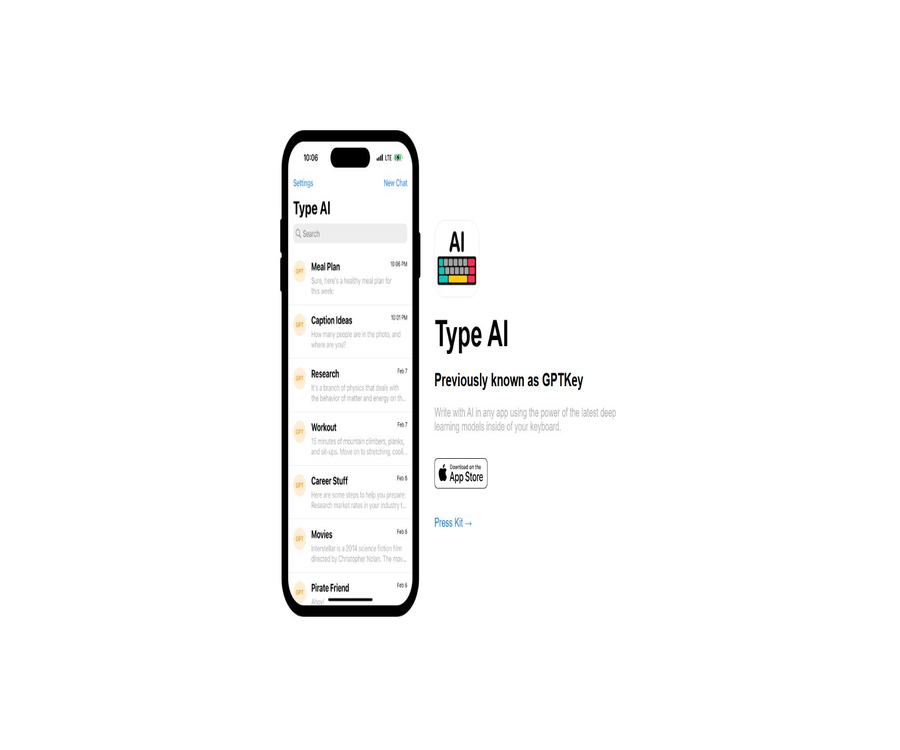
GPTKey was an iOS AI keyboard and writing assistant that was later renamed Type AI; it allowed users to select prompts in the keyboard area of any app in order to generate text. However, the original App Store page listed on the official website is no longer functional.
Current status
As of August 23, 2026, the Type AI official website and Press Kit are still accessible, with the note \"Previously known as GPTKey\" displayed. The only App Store installation button on the website points to the original application identifier, but that page currently shows that it cannot be found.
This means that the product overview page remains online, but the original iOS app cannot be installed through the designated entry on the official website. The listing should no longer be marked as available for normal download, nor should the TypeAI app with the same name developed by another developer on the App Store be considered to be the original GPTKey.
| Verification items | Original GPTKey or Type AI | Current status | Table of Contents Conclusions |
|---|---|---|---|
| Brand relationship | It was renamed Type AI after GPTKey. | The official website clearly provides explanatory notes. | Belong to the same historical product |
| Official website | Product Introduction and Press Kit | Still online | Only the historical functions can be understood. |
| Official installation link | Points to the original iOS app identifier | The page shown in the App Store does not exist. | It is not possible to install through the original entry point at the moment. |
| Platform | iPhone and custom keyboard extensions | The installation package is not available. | It cannot be promoted as currently available. |
| Developer | Gavin King | The Press Kit still has records. | Different from the current developers of apps with the same name |
| Price | Initial hints are free; additional hints or unlimited use are available through in-app purchases. | The current price cannot be verified. | The prices of other apps with the same name cannot be cited. |
| Privacy and Terms | The official website does not provide the complete current version of the page. | It is not possible to verify the current policy. | Not suitable for processing sensitive input. |
Introduction to historical products
Type AI is an iOS app and a custom keyboard extension designed to bring AI-powered text generation to messages, emails, social platforms, notes, and other input scenarios. Users no longer need to copy and paste content frequently between chatbots and the applications they use.
The official Press Kit describes it as an AI writing tool that uses similar technology to ChatGPT, but it does not reveal the specific name of the model, its version, or the company that provides it. It cannot be said that this tool was developed by OpenAI itself.
Main functions of history
System-level custom keyboard
Once a user activates the Type AI keyboard extension, they can use prompts in iOS apps that support third-party keyboards. The generated results appear directly in the input area, making it suitable for instant writing.
Prompt generation
After a user selects a writing prompt, the AI generates a corresponding response. Historical records include various types of content such as tweets, titles, emails, text messages, notes, and articles.
Main applied writing
In addition to keyboard extensions, the main application can also create new prompts and generate responses. Users can view the history and copy the results to other applications.
Use across applications
The core value of this product is to enable AI to be integrated into any application that supports switchable keyboards. Its actual usability, however, is still influenced by iOS’s permissions for third-party keyboards, the network connection, and the compatibility of the target application.
Ad-free in-app purchase option
According to the Press Kit, each user receives initial free prompts; thereafter, they can purchase more prompts or unlock an unlimited supply of them. The team describes in-app purchases as a way to cover the costs associated with the models and their maintenance, while ensuring a ad-free experience.
Historical workflow
| Stage | User operations | Applied behavior | Risk points |
|---|---|---|---|
| Installation | Download the original app from the App Store | Add main application and keyboard extension | The current official page is no longer functional. |
| Enable keyboard | Add Type AI in iOS Settings | Allow the system to switch to a third-party keyboard. | It is necessary to check the full access permissions. |
| Select prompt words | Open the AI keyboard in the target application. | Display preset or custom Prompts | The prompt may contain the input context. |
| Generate | Click on the writing task you need. | Send the request to the cloud AI. | The content may leave the device. |
| Insert | Confirm the generated result | Write to the current text box | Manual inspection is required. |
| History record | View in the main application | Save and display past answers | The retention period is not disclosed. |
| Purchase limit | Buy Prompt for unlimited use | Paid through in-app purchases in the App Store | The current product cannot be verified. |
Historical usage tutorials
Original installation and setup process
- Check the original application name, icon, identifier, and developer on the Type AI official website.
- Open the app page through the App Store link provided on the official website.
- Confirm that the developer is Gavin King, as listed in the original Press Kit, before installing.
- Launch the main application and read the instructions for keyboard extension settings.
- Add the Type AI third-party keyboard in iOS Settings.
- Check whether Allow Full Access is required, and understand the impact on the data.
- Switch to the Type AI keyboard in the non-sensitive text field.
- Select a prompt to generate and examine a short text.
- Expand use only after confirming that privacy and quality meet the requirements.
The above describes the historical process; it is not a tutorial that can be downloaded at present. The original App Store page is no longer available, and new users cannot install the application through the official website at this time.
Secure handling of existing older versions of applications
- Open the iPhone Settings to check whether the Type AI main app and keyboard are still installed.
- Record the application version, developer, and last update time.
- Check whether the keyboard still has full access rights.
- Do not enter passwords, card numbers, verification codes, or work secrets on an old keyboard.
- Export or delete the historical content that still needs to be retained.
- Confirm that no further charges are incurred for subscriptions and in-app purchases.
- If the application has not been updated for a long time, disable the keyboard extension first.
- Uninstall the app when it is no longer needed and remove the keyboard permissions.
Which historical users are suitable?
- Social media users: Quickly draft tweets, headlines, and comments.
- Business communication users: Generate drafts for emails and text messages.
- Students and writers: Conceiving notes, articles, and essays.
- Mobile workers: Reduce the switching between AI applications and target applications.
- Non-native writers: Use AI to improve expression and tone.
- Prompt enthusiasts: Create and reuse writing prompts within the main application.
These are the original target user groups for GPTKey or Type AI. As the official installation links are no longer functional, they should not be recommended as options for new users.
Historical use cases
- Generate concise business replies in the email app.
- Draft titles, posts, and comments in social apps.
- Rewrite a phrase in a messaging app.
- Expand outlines and ideas in a note-taking app.
- Create custom writing prompts in the main application.
- View past answers and copy them to other apps.
Historical advantages
- The AI functions are integrated directly into the keyboard, reducing the need to switch between applications.
- It can be used in the text fields of various iOS apps.
- It also offers keyboard expansion and a standalone main application.
- Covers tasks related to social media, emails, messages, notes, and articles.
- The initial prompt is free, allowing you to test it out first.
- The historical pattern emphasizes ad-free use.
Usage restrictions and current risks
- The original App Store page specified on the official website can no longer be found.
- There are no official announcements explaining the removal, migration, refunds, or handling of data.
- The content on the official website is outdated, and it does not prove that the cloud-based AI services are still operational.
- Third-party keyboards may handle user input and generate requests.
- Full access rights expand the range of data that the keyboard can handle.
- The model options, prompt quotas, prices, and rules for saving historical data have not been made publicly available.
- AI-generated text may contain factual errors, inappropriate tone, or privacy breaches.
- The current TypeAI app in the App Store is operated by another developer.
- The apps with the same name in the Android Store also do not have any confirmed connection to the original product.
- The TypeAI open-source framework that was found belongs to another project.
Price and In-app Purchases
The original Press Kit stated that each user receives a certain number of free prompts initially, with the option to purchase more prompts or unlock an unlimited supply of them. It did not specify the exact number, unit price, renewal cycle, regional taxes, or refund policies.
Since the original application page is no longer available, it is not possible to verify any currently valid in-app purchases. The weekly, annual, and lifetime subscription prices shown by other applications with the same name belong to different developers, and therefore cannot be used as prices for this product.
| Historical projects | Public price | Billing method | Current status | Conclusion |
|---|---|---|---|---|
| Initial Prompt | Free | Gift for new users | The quantity cannot be verified. | For historical purposes only |
| Additional Prompt | Not announced | One-time in-app purchase or quota | Not available for purchase | Do not speculate on prices. |
| Infinity Prompt | Not announced | Unlock within the app | Not available for purchase | The cycle and rights are unclear. |
| Advertising | History refers to it as ad-free. | Costs supported by in-app purchases | The current status cannot be verified. | No action as current commitment |
| Current package | None | The original application is no longer available. | Stop verification | Do not cite the price of an app with the same name. |
Identification using the same-name TypeAI application
On the current US App Store, another app named TypeAI: AI Keyboard & Writer can be found; however, its app ID, developer, and official support website are different from those of the original Type AI. Similar functions do not imply any inheritance of the brand or a transfer of the product.
| Distinguishing features | Original GPTKey or Type AI | Current TypeAI application with the same name | Conclusion |
|---|---|---|---|
| Designated number on the official website | 1659285044 | 6448661220 | They are not records from the same application. |
| Historical developers | Gavin King | DEEP FLOW SOFTWARE SERVICES | The development entities are different. |
| Official website | Old Type AI website | Another developer support system | There are no official migration instructions. |
| Installation status | The original page could not be found. | Another application is still on sale. | The latter cannot be used to replace the former. |
| Price | Historical prices are not available. | Another app has its own in-app purchases. | Prices must not be written incorrectly. |
| Privacy Policy | The current details on the original site are insufficient. | Another developer policy | Data rules are completely separated. |
Check the steps before downloading
- Confirm the exact name of the target application from the directory records or the official website.
- Check the App Store application ID, rather than just looking at the display name.
- Compare developers, sellers, the official website, and the entities related to privacy policies.
- Check whether the version history is continuous with the original product’s timeline.
- Check whether the in-app purchases belong to the same developer.
- In the absence of an official migration announcement, do not consider apps with the same name to be updated versions.
- Avoid installing old IPA files or configuration files from third-party download sites.
Privacy and keyboard security
Custom keyboards are considered components with high sensitivity, as they can handle users’ input in various applications. AI generation also typically involves sending prompts or text to cloud-based models.
The original website did not provide sufficient information regarding current privacy practices, data storage, training processes, data deletion, and details about third-party processors. Even if users are still able to access the older version of the application, they should not enter their account credentials, payment information, verification codes, health data, or personal details.
| Risk scenarios | Possible data involved | Main risks | Safe practices |
|---|---|---|---|
| Ordinary writing | Drafts and prompts | Cloud processing and storage are unclear. | Use non-sensitive content. |
| Contact person and business information | Confidential information leakage | Only generate generic templates. | |
| Message | Private conversation | Third-party processing | Desensitize first, then generate. |
| Password and verification code | Account credentials | Account stolen | Return to the system keyboard |
| Bank cards and payments | Financial information | Fraud and data leakage | The use of AI keyboard input is prohibited. |
| Full access | Broader keyboard communication capabilities | The data range has expanded. | Turn it off only when necessary. |
| History record | Answers generated in the past | Long-term retention is unknown. | Delete regularly |
Alternative tool options
New users who need an AI keyboard should choose products that are still maintained in the official app stores, whose developers are identifiable, whose privacy policies are complete, and that are regularly updated. Do not download unverified old versions in order to install the original GPTKey.
- Check the current version, recent updates, and system compatibility requirements.
- Read the instructions on full keyboard access and cloud processing.
- Confirm whether the input is to be used for training, how long it should be saved, and how to delete it.
- Check the free quota, trial options, auto-renewal settings, and refund policies.
- First, test the generation quality in non-sensitive applications.
- Keep the system’s native keyboard for passwords and payments.
- Organizational devices should use keyboards approved by the administrator.
APIs, GitHub, and open source status
The original GPTKey or Type AI did not provide any public developer APIs, SDKs, or keyboard extension interfaces; nor was there any official GitHub repository confirmed by the official website. It is an iOS application intended for end-users.
The TypeAI-dev project on GitHub is an AI engineering framework for TypeScript; it has no confirmed connection to GPTKey, which was developed by Gavin King. This repository or its license cannot be considered part of the open-source version of the original application.
| Project | Historical status | Current conclusion |
|---|---|---|
| iOS main app | Was provided once | The official website link is no longer valid. |
| Custom keyboard extension | Was provided once | New users cannot install it officially. |
| Public API | Not provided | No development interfaces available. |
| Official SDK | Not provided | No software development kit available. |
| Official GitHub | Not found | Do not associate with frameworks of the same name |
| Core source code | Not disclosed | Open source cannot be marked. |
| Self-hosting | Not provided | Dependence on the original application and cloud services |
Supported platforms
| Platform | Historical support | Current status | Explanation |
|---|---|---|---|
| iPhone | Support | The original application page is no longer functional. | History requires iOS 16 or higher. |
| iOS custom keyboard | Support | It is not possible to install it anew. | It could be used across different applications. |
| iPad | The official website does not specify this. | Unverifiable | Do not assume compatibility. |
| macOS | Not provided | Not provided | It’s not a desktop keyboard. |
| Android | Not provided | Not provided | The Android app with the same name belongs to another product. |
| Web writing | Not provided | The official website only provides an introduction. | It’s not a web editor. |
| APIs and SDKs | Not provided | None | Cannot be integrated systemically |
Basic information
| Project | Content |
|---|---|
| Original name | GPTKey |
| Subsequent name | Type AI |
| Historical developers | Gavin King |
| Tool type | iOS AI keyboard and writing apps |
| Historical platforms | iPhone and custom keyboard extensions |
| Historical system requirements | iOS 16 or higher |
| Historical price patterns | Initial free prompts and in-app purchases |
| Current official website | The introduction page is still online. |
| Current installation status | The App Store page specified on the official website cannot be found. |
| Official migration | Not found |
| Public API | Not provided |
| Official GitHub | Not found |
| Is it open source? | No or not publicly available |
| Verification date | August 23, 2026 |
Recommendation score
Current recommendation score: 1.0 / 5. GPTKey’s approach of integrating AI-powered writing into the iOS keyboard was quite useful, as it helped reduce the need to copy and paste content between different apps.
However, the original app specified on the official website can no longer be found in the App Store, and its current price, privacy policies, and service status cannot be verified. This entry is suitable for keeping as historical information, but it is not appropriate for recommending it for download.
Frequently Asked Questions
What is the relationship between GPTKey and Type AI?
Type AI is the later name for GPTKey; the official website states explicitly that it was previously known as GPTKey. Both represent the same product from that historical period.
Can GPTKey still be downloaded?
It cannot be downloaded through the official App Store link provided on the website. On August 23, 2026, it was verified that this page could not be found.
Why is the official website still online?
The official website still contains product descriptions and a Press Kit, but the presence of static pages does not mean that the app store, model services, in-app purchases, and customer support are still operational.
Is the TypeAI app with the same name in the App Store the original product?
They are not records of the same application. The ID and developer of the current application with the same name differ from those of the original GPTKey, and there is no official announcement regarding migration.
What could GPTKey do originally?
It can function as a custom iOS keyboard, enabling the generation of tweets, emails, text messages, notes, articles and other types of text in other apps based on prompts. The main app also provides functions for creating prompts and keeping a history of them.
Is GPTKey free?
Historically, initial free prompts were provided; thereafter, it was possible to purchase more or unlock unlimited use. The specific prices and quotas are not available at the moment.
Is it compatible with Android?
The original official documentation only mentioned iOS apps and keyboard extensions. The app with the same name on Google Play is not connected to the original GPTKey.
Is it necessary to enable full access?
AI keyboards usually require an internet connection to process generation requests, and full access may be requested. Given the insufficient privacy protections offered by the current version of this product, it is not recommended to grant additional sensitive permissions.
Can the old version still be used?
It might still be possible to open it, but there is no guarantee as to whether the cloud-based models and in-app purchases will be available. It is advisable to first disable sensitive permissions, check the subscription status, and avoid entering important data.
Are APIs provided?
There are no public APIs or SDKs. It is a keyboard application for end users, not a development platform.
Is GPTKey open source?
No official code repository or license was found. The TypeAI framework on GitHub with the same name belongs to a different project.
Summary
GPTKey or Type AI was a lightweight tool that integrated AI-powered writing capabilities into the iPhone keyboard, making it suitable for quickly drafting content for social media posts, emails, text messages, and notes. Its approach to product design still holds value as a reference.
The most important fact at the moment is that the original App Store page is no longer functional, and apps with the same name were not developed by the same person. Download recommendations should be removed from the catalog; historical data, the status of apps as being unavailable, and alerts related to keyboard privacy should still be retained.
Tools similar to GPTKey



 Guigong Network Security Registration No. 45132202000164