






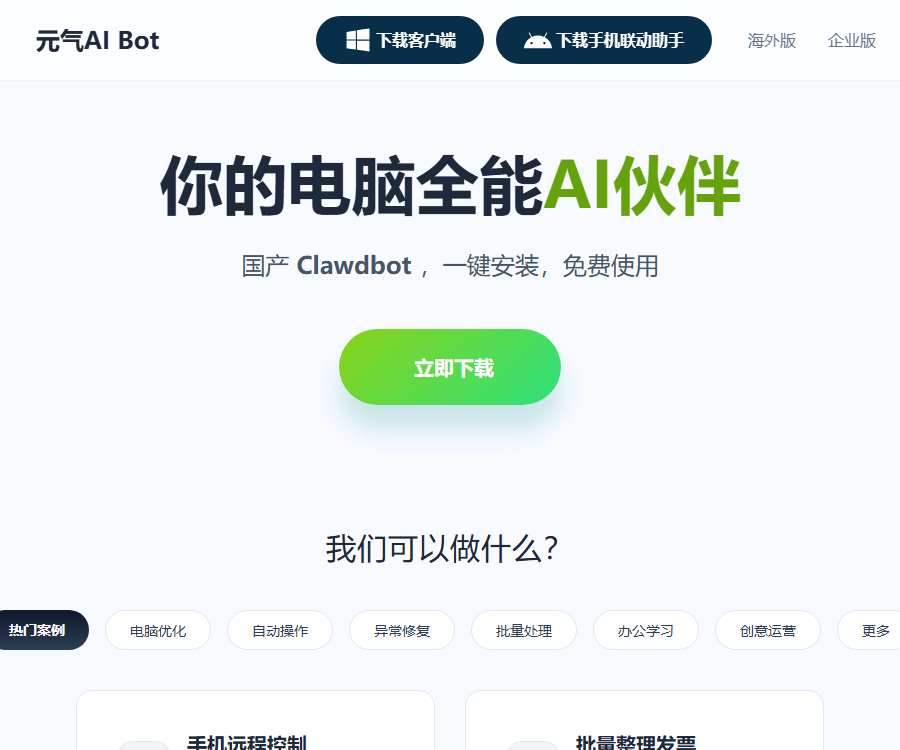
Yuani AI Bot
It meets users’ needs in various scenarios such as companionship in daily life, computer repair, and office work/study.
Tags:AI learning websitesWhat is Yuanqi AI Bot?
Yuani AI Bot is a desktop AI assistant that can understand commands and operate a computer.
It was developed by Beijing Lingbao Intelligent Technology Co., Ltd.; the official website refers to it as a domestic version of Clawdbot.
Product format
| Form | Uses | Explanation |
|---|---|---|
| Windows client | Execute desktop and system tasks | Main functional carrier |
| Mobile Phone Integration Assistant | Send commands remotely and view results | It is necessary to link it to one’s own device. |
| Chrome extensions | Assist with browser operations | It cannot run independently without the desktop client. |
| Cloud Bot | Use pre-installed AI tools on mobile devices | It’s not a complete virtual computer. |
| Enterprise Edition | Designed for organizational deployment and use | Functions and prices need to be confirmed separately. |
| Overseas version | For overseas users | Separated from the entry point for the domestic version |
Main functions
- Plan and execute computer operations through natural language.
- Use a smartphone to remotely control the connected computer.
- Organize invoices in batches and conduct statistics in Excel.
- Convert Word files to PDF in bulk.
- Convert image formats in bulk and rename files.
- Organize the desktop and remove system junk.
- Uninstall the software and deal with any remaining components.
- Fix sound, network, printing, and environmental issues.
- Send files to apps such as WeChat.
- Monitor hotspots and generate Markdown daily reports.
- Maintain the comment section and carry out operational tasks.
- Set up scheduled tasks to execute commands automatically.
How does AI-assisted operation work?
The user agreement states that the product is capable of interpreting intentions, understanding interfaces, and automatically planning and carrying out operational procedures.
- Users describe the target in natural language.
- The system identifies the current interface and related applications.
- AI breaks down the goal into a set of steps to be carried out.
- The client performs keyboard, mouse, or system operations within the authorized scope.
- Users can observe the operation interface and process.
- Use the stop button to interrupt the task when necessary.
- After completion, verify the files, accounts, and business results.
AI execution is an extension of the user’s actions; the user remains responsible for orders, conversations, and file modifications.
Computer optimization and error correction
| Task | Possible operations | Check before use |
|---|---|---|
| Clean up Drive C | Identify caches, temporary files, and logs | First, check the deletion list and create a backup. |
| Computer acceleration | Analyze processes, startup items, and resource usage | Do not terminate business-critical processes. |
| Software uninstallation | Delete the program and any remaining components. | Verify software, data, and licenses |
| Sound restoration | Check the driver and output configuration. | Record the configuration before modification |
| Network repair | Check network parameters and connections. | Retain the enterprise network configuration. |
| Printer repair | Check services, queues, and drivers. | Avoid interfering with shared printing tasks. |
The official agreement explicitly recommends backing up important data before cleaning, repairing, and organizing files.
Batch file processing
The Yuanqi AI Bot can convert repetitive file operations into natural language tasks.
- Generate a preview list before renaming in bulk.
- Keep a copy of the original file when converting it.
- After the invoices are compiled, a random check is carried out on the amounts and taxes involved.
- When converting images, it is necessary to verify the size, transparency, and color.
- After converting Word to PDF, check the page layout, fonts, and charts.
- Check the recipient and attachments before sending a file.
Office and study
The privacy policy lists functions such as Q&A, translation, AI-powered PPT creation, AI writing, and intelligent summarization.
| Functions | Enter | Output or purpose |
|---|---|---|
| Knowledge quiz | Text, images, files, or voice | Answers and history record |
| Translate | Select text | Translation and secondary editing |
| AI PPT | Text, images, and document materials | Content of the presentation |
| AI writing | Theme and editing requirements | Articles or office documents |
| Understanding and summarizing | Audio and video, documents, or real-time recordings | Abstract and meeting minutes |
Errors may occur in the generated content; official documents, data, and citations still require manual review.
Remote control via smartphone
Mobile connectivity allows users to send tasks to their connected Windows computers and view real-time information on the desktop.
- Log in with the same account on both the computer and mobile devices.
- Only devices that you own or for which you have authorization can be bound.
- Configure supported mobile devices or third-party tools according to the guidelines.
- Set separate security permissions for third-party app credentials.
- First, use a read-only task to test the connection and notifications.
- Confirmation is retained for tasks involving deletion, sending, payment, and publishing.
- Unbind the device immediately upon its loss and contact support.
Remote commands may be parsed by the server; passwords, keys, or any unnecessary sensitive information should not be sent.
Chrome browser extensions
The official extension is the browser-based core of the Yuanqi AI desktop client, and it cannot operate independently.
- Open a specified webpage or online video according to AI instructions.
- Assist clients in obtaining download resources in the browser.
- Synchronize tasks between the desktop client and the browser.
- Before installation, check the page for extension requests and the download permissions.
- Actions such as logging in, making payments, and publishing should be confirmed by the user.
Cloud Bot
Cloud Bots provide a cloud-based environment equipped with specific AI tools, available for users who do not have computer terminals.
- Send tasks to the cloud environment through a dialog box.
- The results of the task will be sent back to the mobile device.
- It does not provide a full remote desktop experience.
- Users cannot access the underlying system settings.
- It is necessary to back up the results in a timely manner before the service expires or stops.
- It must not be used for attacks, mining, spam, or illegal proxy activities.
Scheduled tasks
Users can set the task name, execution time, and AI instructions, which are then scheduled by the client at the specified time.
The privacy policy states that the content and results of scheduled tasks are stored and processed locally, but external services may still have their own data pathways.
- Test it once first before enabling periodic execution.
- Set clear file and account ranges for the task.
- Avoid performing deletions, payments, or mass communications without human oversight.
- Retain operation logs and failure notifications.
- Discontinue the task in a timely manner when it is no longer needed.
Guide to Using Yuanqi AI Bot
- Download the Windows client from official sources.
- Complete the installation and read the permissions and privacy notices.
- Log in using your phone number or a supported third-party account.
- Start with low-risk tasks such as opening the application and retrieving information.
- Prepare a test folder and backups for file operations.
- Observe the operational steps of AI planning.
- Stop immediately if the target, file, or account is found to be incorrect.
- Expand to batch tasks after confirming the results.
- Bind your own device when remote operation is required.
- Regularly update the client and review permissions.
Principles for safe use
- Create a backup before performing deletion, overwriting, or cleanup operations.
- Payments, order placement, messaging, and content posting must be confirmed.
- Do not allow AI to access unrelated accounts and folders.
- Corporate computers require written authorization from the administrator first.
- Do not submit state secrets, trade secrets, or important data.
- Before executing the script, check the source and impact of each line.
- After use, check the operation log and the actual results.
- Remote control credentials must not be sent publicly through chat.
Data processing method
Different functions involve different approaches to data processing; it cannot be simply assumed that all data remains local.
| Functions | The approach outlined in the official instructions | Precautions |
|---|---|---|
| Knowledge quiz | Enter the encrypted data for upload to a third-party cloud service for processing. | Avoid sensitive files |
| Translate | Result returned after the text is uploaded to the server | Do not translate confidential text. |
| AI-assisted operation | Temporary local processing of screenshots and screen content | Clean up temporary data after completion. |
| PowerShell script | Scripts and logs are executed locally. | Malicious scripts can still harm devices. |
| Scheduled tasks | The task details are stored locally for scheduling purposes. | External operations are also subject to the platform’s rules. |
| Remote control via smartphone | Commands and records are encrypted before being transmitted over the server. | Protect App ID and Secret |
| Cloud Bot | Device and interaction information are used for cloud connectivity. | Back up before the service stops. |
Third-party models and services
The privacy policy lists model services such as DouBao, Kimi, and Tongyi Qianwen, as well as the login and payment components.
- Model providers may handle conversations, images, and operation commands.
- Different models may have varying data policies and storage methods.
- Logging in requires a phone number or WeChat nickname and profile picture.
- Purchasing value-added services will handle order and transaction status.
- Before using it, enterprises should conduct assessments of the supplier and data compliance.
Price and version
The following shows the pricing status as of August 31, 2026, which can be verified on the official website and in the user agreement.
| Version or service | Public price status | Explanation |
|---|---|---|
| Basic client | The official website claims that it can be used for free. | The specific scope of what is free is determined by the client. |
| Pricing feature | It exists. | Some features require payment. |
| Member Services | It exists. | May include automatic renewal. |
| Cloud Bot | It may be charged based on the service provided. | Service may be suspended upon expiration or due to unpaid fees. |
| Enterprise Edition | Fixed price not disclosed | Based on the enterprise’s requirements and as confirmed in the contract |
| Overseas version | Separate entrance | Prices and benefits are verified separately. |
The official website does not disclose the price of the regular subscription plans; the final price, as well as the rules regarding automatic renewal and refunds, are specified on the purchase page and in the agreement.
Notes on automatic renewal
- Check whether automatic renewal is enabled by default before making the purchase.
- View the renewal cycle, deduction date, and price.
- Cancel it according to the rules before its expiration if it is no longer needed.
- Cancellation affects only subsequent periods; the rights and interests for the current period remain in effect until expiration.
- Handle any remaining memberships and virtual benefits before canceling the account.
Platform automation limitations
When automatically operating third-party websites and accounts, users must also comply with the rules of those platforms.
- The platform may restrict automatic posting, scraping, or bulk interactions.
- Improper use may result in limited functionality or account suspension.
- It is forbidden to manipulate traffic numbers, send spam messages, or engage in fake interactions.
- There should be clear rules for deleting comments, as well as manual review.
- Live interactions cannot create misleading levels of popularity.
- Before enabling commercial automation, check the account and content permissions.
AI content identification
The user agreement requires that content published to the outside world be reviewed and clearly marked as being generated by artificial intelligence.
- The AI identifier that has been added to the product must not be removed or obscured.
- For false information, watermarks or statements are also required.
- Facts, data, and professional advice should be traced back to their original sources.
- The generated content must not pretend to be originally created by a human.
- When using materials belonging to others, obtain proper authorization first.
API and open-source status
| Project | Current status | Explanation |
|---|---|---|
| Public developer API | No findings yet. | No public interface documentation was found. |
| Official SDK | No findings yet. | Browser extensions are not SDKs. |
| Complete product source code | Not open source | The user agreement prohibits reverse engineering. |
| Enterprise integration | Consultation is required. | Subject to the enterprise version plan and contract. |
Usage restrictions
- AI may misinterpret intentions and carry out incorrect actions.
- System cleanup and file organization carry a risk of data loss.
- Browser extensions cannot be used independently of the desktop client.
- Third-party platforms may block automated actions.
- Cloud Bot is not equivalent to a full virtual computer.
- The free scope, membership options, and features may change with different versions.
Frequently Asked Questions
Can the Yuanqi AI Bot be used for free?
The official website claims that the client can be used for free, but the terms of service specify the existence of paid features and membership options; the exact details are as indicated in the client itself.
Can the Yuanqi AI Bot operate a computer automatically?
Yes, it can understand the interface and plan the operations, but users should monitor the process and verify the high-risk steps.
Does the Yuanqi AI Bot support remote control via smartphone?
Supported; the phone and computer must use the same account, and it is only possible to control devices that belong to one’s own self or those for which authorization has been granted.
Can the Yuanqi AI browser extension be used on its own?
No, the official extensions serve as the core components that work alongside the desktop client, and they need to be used together with the client.
Is it safe to use the computer’s cleanup functions?
There is a risk of accidental deletion and data loss; official guidelines recommend backing up important data before cleaning, repairing, or organizing it.
Is all the processing for Yuanqi AI Bot done locally?
No, some of the data related to operations and scheduled tasks is processed locally, while knowledge-based queries and remote commands involve the cloud.
Is Yuanqi AI Bot open-source software?
No, there is no official open-source repository for the complete product at the moment, and the user agreement explicitly prohibits reverse engineering.
Tools similar to Yuanqi AI Bot

 Guigong Network Security Registration No. 45132202000164