






Free AI Study Tool & Study Guide Maker
Free AI Study Tool & Study Guide Maker – makes AI-driven learning more efficient and simpler
Tags:AI learning websitesWhat is Penseum?
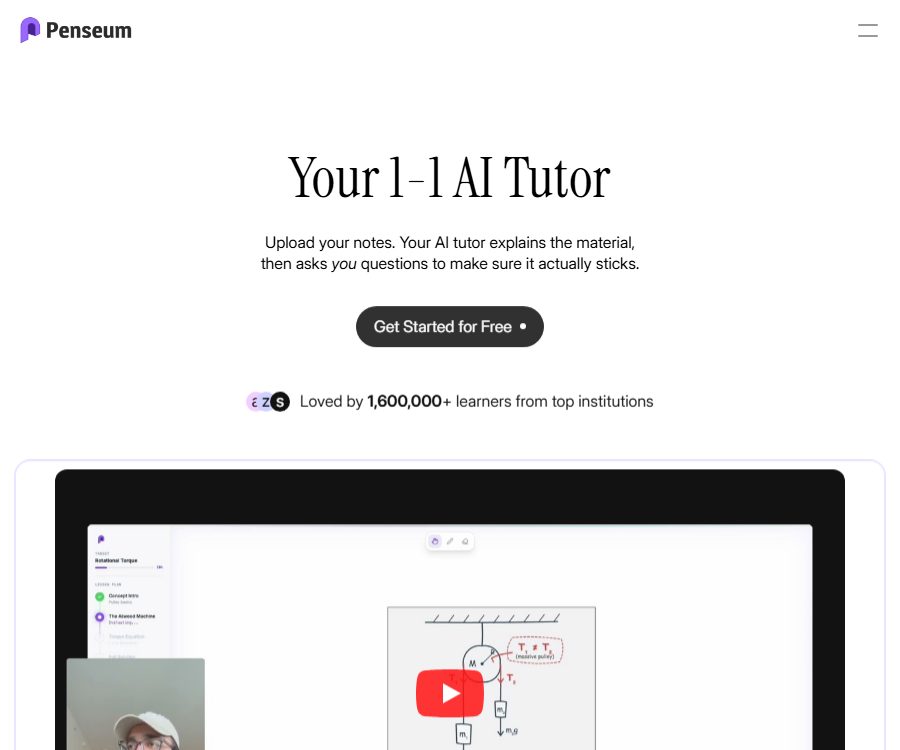
Penseum is an AI learning platform developed by Penseum Inc.; its core functionality is evolving from a tool for converting materials into a real-time, one-on-one AI tutor. Students can upload course materials, present questions, or write directly on a canvas, and the system will observe these actions and provide explanations accordingly.
The platform still offers review tools such as study guides, flashcards, and quizzes. It is useful for helping with understanding and practice, but it should not replace textbooks, teacher feedback, or official grading.
Main functions
Data to Study Guide
After the user uploads materials such as PDFs, class notes, and slides, the system extracts the key topics and organizes them into learning content. The resulting material can be used as a review outline, but it is necessary to verify each item against the original files.
Automatic flashcards
Penseum can identify terms, concepts, and their corresponding explanations from the material, and generate quiz cards for memorization. Students can practice on the areas in which they are weak repeatedly, without having to enter all the cards manually.
Quizzes and practice questions
The platform generates questions based on the content uploaded, which are used for practice exercises and pre-exam self-assessments. These questions may go beyond the scope of the provided material or have imprecise wording, so they cannot be used as part of an official exam question bank.
Real-time voice narration
The AI tutor explains concepts and problem-solving processes step by step via voice, and allows students to ask follow-up questions. It is suitable for immediate tutoring in mathematics, science, and other tasks that involve multiple steps.
Interactive visual canvas
Students can write down their answers on the canvas, show the steps they follow, or work with diagrams, while instructors can add explanations in the same space. The visual approach makes it easier to identify each step of the reasoning process compared to plain text chatting.
Real-time error detection
When students try to answer, the system monitors the process, identifies the specific locations of errors, and then explains how to make the corrections. Users should first complete the key steps on their own, rather than simply copying the final answers.
Multilingual learning
The current page claims to support more than 20 languages, including English, French, German, Hindi, Portuguese, Russian, Turkish, and Mandarin. The generated language usually matches the original text, but technical terms still require manual correction.
Mobile learning
The website is designed for use on mobile devices, and official apps are also available for iPhone and iPad. Compatibility with Apple Silicon Macs and Vision devices depends on the system requirements listed in the store.
Input and learning outcomes
| Enter | Content that can be generated | Suitable for tasks | Key points for review |
|---|---|---|---|
| PDF and course materials | Study guides, flashcards, quizzes | Chapter review | Charts, formulas, and page numbers |
| Class notes | Topic outline and Q&A | Identify and address gaps. | Is the note itself complete? |
| Set of topics or questions | Step-by-step explanations and exercises | Task comprehension | Conditions, units, and conclusions |
| Writing on canvas | Real-time error correction and visualization | Mathematics and reasoning problems | Check whether the recognition is accurate. |
| Verbal or written follow-up questions | Voice explanation | Concept clarification | Is there any fiction? |
Complete usage process
- Register an account and create a personal learning workspace.
- Choose to upload materials, enter questions, or open the interactive whiteboard.
- Only submit documents for which you have permission to use, and that do not contain any irrelevant personal information.
- Let the system generate guides, flashcards, or quizzes, first by verifying the key facts.
- Explain to the AI tutor the concepts or specific steps that you do not understand.
- Listen to the audio explanation and ask that complex processes be broken down into smaller steps.
- Write the answers separately on the canvas and watch the real-time error correction suggestions.
- Practice the mistakes again, rather than just memorizing the system’s answers.
- Verify the final conclusion using textbooks, lecture notes, and the teacher’s requirements.
- Export or organize your key review list before the exam.
Prices and memberships
The current homepage and the information on recent products indicate that the basic functions can be used for free, while the Premium version costs 29.99 dollars. The page does not specify a fixed billing cycle, the number of uses allowed, the file size limits, or the maximum amount of support that can be provided in real time; it is necessary to check the account billing page before making a purchase.
| Package or version | Price | Billing cycle | Core benefits or quota | Suitable for users |
|---|---|---|---|---|
| Free | Free | Continuous use | Functions for converting basic data and learning; the specific limits depend on the account. | First experience and light review |
| Premium | 29.99 US dollars | The settlement page shall prevail. | Real-time one-on-one voice tutoring, interactive canvas, error correction, and additional usage privileges | Students who require ongoing guidance |
Some of the older product listings still show prices of 9.99 or 14.99 dollars; these figures are inconsistent with those on the current homepage and therefore cannot be considered as the current pricing. Taxes, currency, regional prices, and renewal periods may also vary.
Suitable for users and scenarios
- University students: Organize lecture notes and class notes into materials for review before exams.
- Middle school and preparatory school students: Step-by-step guidance to understanding math and science problems.
- Multilingual learners: Convert materials in their native language into practice resources in the same language.
- Users preparing for exams: Identify their weak areas through flashcards, quizzes, and repeated error correction.
- Mobile learners: View materials and ask questions on smartphones and tablets.
- Teachers and parents: Use the generated content as material for discussion, rather than as a basis for automatic grading.
Advantages
- Data organization, active recall, and real-time tutoring form a continuous learning pathway.
- Voice and canvas are suitable for explaining formulas, graphs, and multi-step problems.
- The system will wait for the student to make an attempt, and then correct errors related to specific steps.
- It supports a variety of course files and over 20 languages.
- Websites and iOS devices cover common mobile learning scenarios.
Capacity limits and risks
- AI may misinterpret scanned documents, formulas, charts, and handwritten text.
- The generated questions and answers may be outside the scope of the course or contain factual errors.
- Real-time error correction relies on canvas recognition, and it is not possible to ensure that every step of the writing can be understood.
- A platform cannot replace teachers, experimental verification, and examination rules.
- The current free and paid quotas are not fully disclosed.
- Different official articles contain conflicting historical prices.
- Android native apps have not been confirmed.
Platform support
| Platform | Current status | Explanation |
|---|---|---|
| Web page | Already provided | It can be accessed via desktop and mobile browsers. |
| iPhone | Already provided | iOS 15.1 or later is required. |
| iPad | Already provided | iPadOS 15.1 or higher is required. |
| Apple Silicon Mac | Compatibility | The store lists macOS 12.0 along with M1 or newer chips. |
| Android | Not confirmed yet | Mobile web versions can be used; the official native app has not been verified. |
API and open-source status
It was not confirmed that Penseum provides a public developer API, an official SDK, browser extensions, or a self-hosted version. Data synchronization between web applications and mobile apps cannot be considered equivalent to external APIs.
The official release of the product’s source code or license has not been confirmed either; therefore, it cannot be deemed that Penseum is open-source. Creating flashcards or quizzes does not grant users the right to copy the platform’s software itself.
Privacy and data security
The product page states that learning materials and personal information are stored securely and are accessible only by the user; however, the App Store reveals the name, email address, and data related to interactions with the product, which can be linked to an individual’s identity. The terms of service do not provide sufficient information regarding the retention period of files, the purposes for model training, the sub-processors involved, the deadline for deletion, or the locations where the data is stored.
- Do not upload exam questions, other people’s assignments, student rosters, or medical records.
- Before submitting the course materials, check the usage rules for teachers, schools, and publications.
- Remove the name, student ID, and other unnecessary identifiers from the header.
- Before implementation in schools, complete guidelines on data processing and the protection of minors must be obtained.
- If there is an issue with the account, change the password promptly and contact support.
Copyright, Commercial Use, and Refunds
The terms grant users a personal, non-commercial, and non-transferable license to access the application. Other rights regarding course materials, textbook pages, and any content that is generated remain subject to the rules set by the school, teachers, publishers, and applicable laws.
Paid memberships are automatically renewed, and users can cancel this renewal in their account settings. Under the current policy, refunds are not provided as a rule, but in cases of accidental purchase or technical issues, it is possible to contact support to request an exception; if a refund is approved, it will be issued back to the original payment method.
Frequently Asked Questions
Can Penseum be used for free?
The free basic tier can be used, but the exact number of uploads, generations, and consultations available is not fully disclosed. It is advisable to check the account alerts before using it at high volumes.
How much is Premium?
The current homepage indicates a price of $29.99, but the billing cycle and regional taxes are subject to those specified on the settlement page. The prices mentioned in earlier articles may no longer be valid.
What learning materials can be uploaded?
The current page lists PDFs, handouts, slides, question sets, and other learning materials. The quality of the scan affects the recognition of formulas and charts.
How does an AI tutor correct mistakes?
After students write down the steps on the canvas, the system attempts to identify any incorrect locations and provides explanations via voice and visuals. The key conclusions should still be verified against the course standards.
Is Chinese supported?
The page lists Mandarin among more than 20 supported languages. Complex terms and texts in mixed languages require manual correction.
Are there apps for iPhone and iPad?
Yes, the official app is available for iPhone and iPad. There is no confirmation yet regarding a native Android app; you can use the mobile website as a temporary solution.
Does Penseum have an API?
No public APIs or SDKs have been confirmed yet. The features available to regular users cannot be considered as interfaces that can be integrated automatically.
Can I request a refund?
The standard policy is no refunds; in cases of mistaken purchase or technical issues, you can contact support to request an exception. Approval depends on the specific circumstances.
Are the learning materials necessarily accurate?
Not necessarily. The platform also recommends that users review the content they generate, especially formulas, citations, and information related to medicine and law.
Summary
Penseum is suitable for combining course materials, practice exercises, and live explanations; its voice tutors and interactive canvas are the key features that set it apart from other options. The free version can be used to determine whether it suits one’s own learning style.
Before subscribing, it is necessary to confirm the real-time quota and duration; while using it, one should answer questions independently, check the textbooks, and protect the privacy of learning materials.
Tools similar to the Free AI Study Tool & Study Guide Maker

 Guigong Network Security Registration No. 45132202000164