






Edubrain
Edubrain: makes it more efficient and simpler for AI to learn and work.
Tags:AI learning websitesWhat is Edubrain?
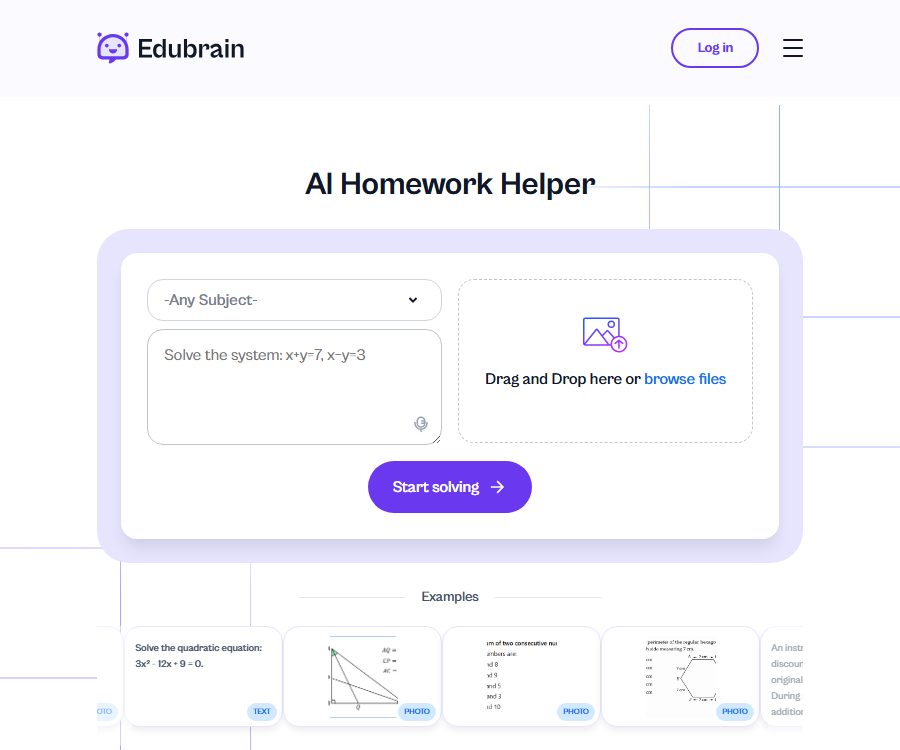
Edubrain is an AI-based learning and homework assistance platform available online, operated by PIXELLA RISE LTD in Cyprus. It brings together tools for multi-disciplinary Q&A, research, note-taking, flashcards, quizzes, presentations, and charts in one single learning workspace.
The platform offers both AI tools that are generated automatically, and services such as guidance from human experts, STEM support, writing assistance, editing help, and presentation services. The pricing, delivery methods, and refund policies for these two types of services differ; it is necessary to determine the type of service before making a purchase.
Main learning tools
| Tools | Main inputs | Main output | Suitable scenarios |
|---|---|---|---|
| Generation of homework answers | Text questions, images, or files | Answer and step-by-step explanation | Understanding the problem-solving process and reviewing after class |
| AI Tutor | Disciplines, knowledge points, and follow-up questions | Personalized explanations and practice suggestions | Fill in the gaps in weak concepts |
| Research assistant | Topics, issues, and reference documents | Structured research draft and evidence clues | Start with selecting the topic, outlining it, and conducting literature research. |
| Note-taking tool | Lectures, course materials, or long texts | Structured notes and key summaries | Class organization and review before exams |
| Flashcards and quizzes | Notes, PDFs, or course content | Memory cards, multiple-choice questions, true/false questions, and short-answer questions | Active recall and self-testing |
| Generated by PowerPoint | Topics, materials, and presentation requirements | Draft presentation | Class presentations and report preparation |
| Charts and mind maps | Data, processes, topics, or files | Flowcharts, timelines, mind maps, etc. | Visual concepts and project plans |
| AI detection and rewriting | Text to be checked or revised | Detection results and naturalized text | Editing, self-review, and improvement of expression |
Homework solution and multidisciplinary tutoring
Users can enter questions directly or upload screenshots of problems or learning materials, so that Edubrain can provide answers and explain the steps to solve them. The platform covers subjects such as mathematics, statistics, physics, chemistry, biology, computer science, economics, history, social sciences, and language learning.
- Mathematical tools can handle algebraic, geometric, calculus, and statistical problems, and display the calculation steps.
- Scientific tools can explain formulas, concepts, and issues related to experiments.
- The code assistant can help analyze programming assignments, syntax, and problem-solving approaches.
- The humanities can be used to organize events, arguments, concepts, and writing structures.
- Continuous questioning helps identify the steps that are not understood, rather than simply copying the final answer.
- Due to differences in textbook versions, course symbols, and teacher requirements, the results need to be compared with classroom methods.
AI-generated content may be incorrect, incomplete, or similar to what other users receive. Numbers, facts, quotes, code, and experimental results should all be verified independently.
Research assistant
Research assistants generate short drafts in an academic style, along with structural guidelines and source suggestions, based on the topic and the level of study. Users can choose from various levels such as middle school, high school, university, graduate studies, doctoral studies, or educator, so that the depth of the explanations can be adjusted to better suit the task at hand.
- Specify the research topic, core questions, disciplinary scope, and intended length.
- Select the learning level and specify any requirements regarding courses, methods, or region.
- Enter a question with at least 5 characters, or upload a supported reference file.
- Run the research assistant to obtain a structured draft, key points, and directions for gathering information.
- Open each paper one by one and check the title, author, year, conclusions, and citation information.
- Remove the unverifiable information and include what has been genuinely read as part of one’s own arguments.
- Rewrite, cite, and list references as required by the course; do not submit machine-generated drafts directly.
The limitations specified on the current research tools page are a maximum of 10,000 characters for the text, 32 MB for each file, and only one file can be uploaded at a time. The allowed file types include TXT, PDF, DOC, PNG, JPEG, and JPG; other tools may have different limitations.
Notes, flashcards, and quizzes
A note generator can organize long texts into sections and key points that are easy to review, while a flashcard tool converts definitions, formulas, and concepts into question-and-answer cards. A quiz generator can create multiple-choice questions, true/false questions, and short open-ended questions from notes, documents, or PDF files.
- First, use a note-taking tool to remove duplicate content while retaining the course terminology.
- Create flashcards based on the organized key points; they are suitable for spaced repetition and active recall.
- Adjust the difficulty, number of questions, and question types of the tests to simulate different stages of review.
- Generate similar exercises from the incorrect questions to check whether the method has been truly understood.
- Quizzes can be created based on the materials provided by the user, thereby reducing the inclusion of facts from unrelated web pages.
- Any automated answer must be checked against the original lecture notes and the teacher’s answers.
The test page states that the relevant data on the server will be deleted once the session is completed, but the overall privacy policy does not specify a uniform deadline for deleting files across all tools. In cases involving student records, unpublished research, or copyrighted material, it is necessary to first determine the data handling rules specific to each tool.
Charts, mind maps, and presentations
The chart generator supports various formats such as flowcharts, mind maps, pie charts, radar charts, sequence diagrams, and timelines. Users can describe the relationships they wish to display using text, voice, or files, and then download, share, or further adjust the resulting charts.
- Flowcharts are suitable for illustrating experiments, algorithms, and business steps.
- Mind maps can organize course chapters, papers, or project objectives into hierarchical levels.
- A timeline is suitable for historical events, research progress, and project milestones.
- Pie charts and radar charts require clear and comparable data.
- The PowerPoint tool allows themes and content to be organized into a presentation structure and page drafts.
- The numbers, labels, arrows, and causal relationships in the generated chart must be checked manually.
The chart page currently allows a maximum of 10,000 characters in the input text; the specific requirements for files are indicated on the tool’s interface. Visual outputs can improve the efficiency of organization, but they do not guarantee that the design standards, accessibility features, or disciplinary symbols are entirely accurate.
AI detection, rewriting, and Humanizer
Edubrain offers text tools such as AI detection, paraphrasing, and Humanizer, which are used to analyze expressions and make the text sound more natural. The results provided by AI detection are merely probabilistic suggestions; they cannot prove with certainty whether a piece of text was written by a human or by a machine.
- First, keep track of your own opinions, evidence, citations, and the writing process.
- After rewriting, check whether the original meaning, terminology, and citations have changed.
- Do not use Humanizer to conceal cheating, ghostwriting, or the use of AI without disclosure.
- Teachers, schools, and publishers may have different AI usage policies.
- No tool can guarantee that text will evade detection or be accepted by the course.
Complete usage process
- Determine whether the goal is to learn concepts, work on exercises, organize notes, create quizzes, or prepare a presentation.
- Check the specific rules for AI, collaboration, citation, and external tutoring in the course.
- Select the appropriate tool, enter the question, and provide any necessary context or materials.
- It is required to show the steps, the basis for them, and any uncertainties, rather than merely requesting the conclusions.
- Cross-check the output with textbooks, lecture notes, calculators, or reliable sources.
- Continue to ask questions about the incorrect steps, and reproduce the method using new problems independently.
- Rewrite it in your own words, adding authentic citations and personal analysis.
- Download or share the final learning materials, and avoid making public links that contain sensitive personal or course information.
Free version, AI-Plus, and human assistance
| Package or version | Price | Billing cycle | Core benefits or quota | Suitable for users |
|---|---|---|---|---|
| Free | $ | No payment is required. | AI tools with advertising can be used to download and share results; specific tools may have their own limitations. | Daily practice and functional experience |
| AI-Plus | 3.99 dollars | Automatic weekly renewal | Ad removal, advanced reasoning, access to AI tools, and discounts for human experts | Users who engage in frequent learning and require stronger reasoning skills |
| Expert Help | Starting at $3.99 | By service or order | Manually created demonstrations, homework assistance, STEM, writing, editing and proofreading | Tasks that require manual feedback |
The free pricing page uses the phrase “unlimited use,” and it states that any restrictions will be indicated in the application in advance; some tool pages also mention that a certain number of simple answers are available without limit, along with a limited number of free advanced answers. The actual restrictions may vary depending on the tool, account, data usage, and functional updates.
Subscription, renewal, and refunds
AI-Plus is a automatically-renewing service charged on a weekly basis; the fee is incurred at the time of purchase and on each renewal date, until cancellation. The pricing page states that an email reminder will be sent two days before renewal, and cancellation must be requested in accordance with the policies specified for subscriptions.
| Project | Applicable rules | Important reminder |
|---|---|---|
| AI-Plus renewal | Automatic weekly renewal | It is based on the amount on the payment page, taxes and fees, as well as the renewal date. |
| AI-Plus cancelled | It can be requested at any time. | The confirmation must be completed and saved before the next renewal. |
| AI-Plus refund | The subscription policy states that refunds are generally not provided. | Misclassification, obvious errors, or statutory rights may be reviewed separately. |
| Expert order appeal | Processed according to delivery status and time windows such as 72 hours. | The rules are different from those applicable to refunds for AI subscriptions. |
| Expert order results | Reviewed by the quality team | It may be refunded to the account balance or to the original payment method. |
The pricing FAQ states that incorrect charges or obvious issues will be dealt with on a priority basis, while the official subscription policy specifies that subscription fees are non-refundable. In case of disputes, it is necessary to provide the order number, date, and payment records, and the matter will be resolved in accordance with the consumer protection laws applicable in the relevant region.
Academic integrity and usage boundaries
Edubrain positions AI tools as aids for learning; students should still be the ones who create their assignments and abide by the course rules. The outputs provided by the platform’s human experts are granted only a limited license for personal and educational use, and they cannot be resold, shared, or presented as one’s own original work.
- Allowing the use of AI does not mean allowing the submission of complete answers generated by AI.
- The paper should retain original data, reading notes, citations, and version records.
- Do not bypass invigilators or course restrictions in exams, quizzes, and closed-book assignments.
- For calculation problems, one must be able to explain each step independently, rather than simply arriving at the correct numerical answer.
- Artificial expert content can also only serve as learning material and a reference for ideas.
- The platform does not guarantee that the generated content is accurate, up-to-date, complete, or unique to each user.
Regional restrictions
The terms of service specify several areas where use is prohibited, including England and Wales, the Republic of Ireland, the Commonwealth of Australia, and New Zealand. Users located in these areas should not register, place orders, or make payments.
Regional restrictions may change as laws and platform policies evolve; the fact that a page is accessible does not necessarily mean it can be used legally in that area. Schools, employers, and professional organizations may also have more stringent rules of their own.
Platform, API, and open-source status
| Project | Current status | Explanation |
|---|---|---|
| Web version | Confirmed | The main tools, accounts, subscriptions, and expert services are all available on the website. |
| Native mobile apps | Not confirmed yet | No official iOS or Android page with verifiable details was found. |
| Desktop client | Not confirmed yet | No official Windows or macOS applications were found. |
| Browser extensions | Not confirmed yet | No official extensions store page was found. |
| Public APIs and SDKs | Not yet made public | No developer documentation, keys, or official SDK found. |
| GitHub and product source code | Not yet made public | No official code repository or open-source license was found. |
Public web pages allow results to be shared and downloaded, but this does not mean that development interfaces are provided. Third-party plugins, projects with the same name, or unofficial clients cannot be considered part of the Edubrain product.
Privacy and data considerations
According to the privacy policy, the platform may collect names, email addresses, and communication details that users provide voluntarily; it also collects technical data such as IP addresses, host names, Cookie identifiers, session duration, browser type, operating system, and language. The website furthermore uses third-party tools for analysis, advertising, and behavior monitoring.
- Third-party tools include Google Analytics, Google Ads, Facebook products, and Hotjar, among others.
- Data may be transferred outside the European Economic Area, where it is protected under applicable mechanisms.
- Personal information is retained in accordance with legal requirements or business needs, and there is no fixed uniform deadline for its disclosure.
- Users can request access, correction, deletion, objection, restriction, and data portability.
- The platform claims it will not sell personal data, but may share it with affiliated parties, service providers, or as required by law.
- Before uploading a file, names, student IDs, grades, unpublished research, and third-party personal information should be removed.
The terms grant the user broad, global, permanent, irrevocable, transferable, and sublicensable rights to use the content, including the right to store it, display it, modify it, and promote it for various purposes. Do not upload teaching materials, papers, customer documents, or any other sensitive content for which you do not have the necessary rights to provide.
Suitable for users and typical use cases
- Middle school and college students: Understanding the steps involved in solving problems, identifying the key points of the course content, and preparing for exams.
- Graduate students: Develop research questions, an outline, and a preliminary framework for the data.
- Teachers and tutors: Create practice questions, flashcards, and classroom charts from materials.
- Language learners: Understand concepts through example sentences, explanations, and question-and-answer exercises.
- Users who need visual organization: create mind maps, flowcharts, and timelines.
- Students who require manual feedback: purchase writing, STEM, or presentation tutoring separately.
Advantages and main limitations
Main advantages
- It covers the entire learning pathway, from Q&A to notes, quizzes, flashcards, charts, and presentations.
- The free version provides AI tools for use, downloading, and sharing, with a low entry cost.
- It supports input of text, voice, images, and various file types.
- It provides access to research and tutoring resources tailored to different levels of learning.
- Manual expert services can be sought when needed.
Main limitations
- AI-Plus is charged on a weekly basis with automatic renewal; the long-term costs need to be calculated separately.
- The free “unlimited use” option may still be subject to restrictions related to specific tools and advanced responses.
- Subscription fees are generally non-refundable, while manual orders have more complex refund conditions.
- The scope of permission for user-generated content is broad; it is not suitable for uploading sensitive or unauthorized materials.
- There are clear geographical areas where use is prohibited, and one must also comply with the school’s policies regarding academic integrity.
- No native applications, APIs, SDKs, official GitHub versions, or open-source versions have been identified.
Frequently Asked Questions
Can Edubrain be used for free?
Yes, the free plan costs $0; it includes advertisements and allows the use of AI tools, as well as downloading and sharing content. However, certain tools may have restrictions on the number of advanced responses that can be provided, on file sizes, or on data usage.
How much is AI-Plus?
The current price is $3.99 per week, with automatic weekly renewal. It offers discounts for ad removal, advanced reasoning capabilities, and access to human experts.
How to cancel AI-Plus?
The subscription policy requires that cancellation requests be submitted through the designated contact channel. This must be done before the next renewal, and the email as well as the confirmation of cancellation should be kept.
Can the subscription fee be refunded?
The official subscription policy states that refunds are generally not provided; however, cases of incorrect charges, obvious errors, and consumer rights as stipulated by law may be reviewed separately. A different set of rules for filing complaints applies to orders handled by human experts.
What types of files can be uploaded?
The research assistant currently supports TXT, PDF, DOC, PNG, JPEG, and JPG formats; each file may not exceed 32 MB in size, and only one file can be processed at a time. Other tools may require different formats or size limits.
Will Edubrain provide verifiable information?
Research assistants claim to provide information on the title of the source material and its origin, but users still need to verify individually the author, the year, the conclusions, and whether the source is actually accessible. Automated citations cannot be trusted outright.
Is it cheating to use Edubrain?
It depends on the course rules and actual usage. Understanding steps and carrying out exercises is usually different from simply submitting pre-generated answers; students should consult their teachers and keep track of their own research and writing process.
Can the generated content be used commercially or resold?
The outputs produced by artificial experts are licensed only for personal and educational use; they cannot be resold or presented as original works created by those experts. The commercial rights related to AI-generated content also lack clear, universal authorization.
Does Edubrain have an API or an open-source version?
No public API, SDK, official GitHub repository, or open-source license has been found; it is currently confirmed to be a closed-source web service.
Which areas are not available for use?
The terms specify that England and Wales, the Republic of Ireland, the Commonwealth of Australia, and New Zealand are areas where use is prohibited; local users should not register for or purchase the service.
Tools similar to Edubrain

 Guigong Network Security Registration No. 45132202000164