






Daydrm
Daydrm, an intelligent tool focused on AI learning.
Tags:AI learning websitesA one-sentence summary
Daydrm is an AI generator designed for advertising and brand creativity tasks; it can produce strategic directions, creative concepts, brand video plans, names, shot lists, and dialogues based on a brief, and it can also be integrated with Daydrm Studio for video production led by human experts.
Tool Introduction
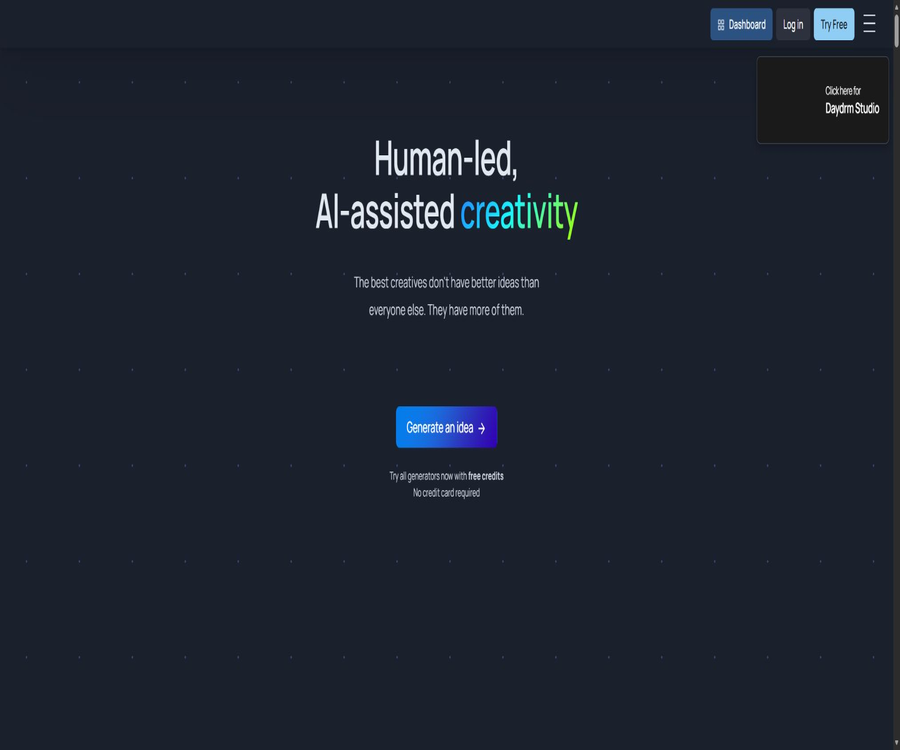
Daydrm positions itself as a platform for human-led, AI-assisted creativity, with AI responsible for expanding the range of creative ideas and humans taking charge of making judgments and selections. It is not a general-purpose chat tool; rather, it features several specialized generators designed for use in advertising strategies, concept development, and pre-production of films and videos.
Daydrm.ai is a self-service creative software, while Daydrm Studio offers video production and post-production services guided by human expertise and powered by AI. Both share creative methods and team expertise, but free credits and production budgets are part of different pricing systems for each product.
Product composition
| Products | Primary users | Main inputs | Main output |
|---|---|---|---|
| Daydrm.ai | Strategists, copywriters, and creatives | Brand or project overview | Policies, concepts, names, and script materials |
| Ari Creative Partner | Teams that need interactive brainstorming | Natural language dialogue | Creative directions that can be modified continuously |
| Brand Film Generator | Brands and film/TV creativity | Brand mission and creative requirements | Multiple video concepts, scripts, and keyframes |
| Surreal Film Generator | Experimental ad creators | Products and the surreal direction | Concept of surreal commercial videos |
| Daydrm Studio | Brands, agencies, and production teams | Prepare a formal brief | Videos, social media clips, and edited films |
| AI post-production tools | Production and post-production teams | Existing video materials | 4K zoom, replacement, extension, and dimming |
Main functions
Strategic Brief Generator
The strategic brief generator compiles various elements such as the brand, target audience, issues, and objectives into a brief that can be used by the creative team. The output should be reviewed by strategy professionals to verify the facts, insights, and brand positioning; it cannot be regarded as a final research conclusion.
Creative Idea Generator
The creative concept generator produces various marketing strategies based on the advertising brief, covering options such as YouTube videos, experiential events, in-store promotions, digital interactions, Instagram content, and ad headlines.
Brand Film Generator
The brand video generator is able to produce multiple video concepts at once, which can then be converted into scripts and keyframe images. The homepage emphasizes the need for generating a large number of options before filtering them; in practice, one should not stick only to the first result that appears.
Surreal Film Generator
The surreal video generator is designed for more absurd, unexpected, or visually striking commercial concepts. It is useful for exploring the boundaries of creativity, but the final outcome still needs to be in line with the brand’s identity, the platform’s policies, and the production budget.
Ari Creative Partners
Through the chat interface, Ari works together with users to develop and refine ideas, experiencing a process similar to continuous discussions with a creative partner. Such conversations can help facilitate rapid iteration, but they cannot replace internal team reviews or customer approval.
Revise Idea iteration
Users can use Revise Idea to modify the existing direction, adjusting the product’s role, target audience, scenario, tone, or medium. It is necessary to record the objectives of each change in order to avoid losing the core aspects of the strategy as a result of repeated modifications.
Naming Generator
A name generator is used to come up with names for new brands, products, or projects. Before a candidate name is finalized, it is necessary to conduct checks regarding trademarks, domain names, linguistic implications, and existing competing brands.
ShotList Generator
The shot list generator creates a list of the shots needed to compose a scene or film based on the ideas for it, which is useful for directors and producers to use in the initial planning stage. The camera equipment, location, actors, special effects, and safety requirements still need to be determined by the production team.
Line-O-Rama dialogue generation
Dialogue tools with specific styles can generate candidate lines for character scenes. Commercial works should not directly imitate living creators or copy protected characters; instead, they need to be developed into original expressions.
Brand video and production services
Daydrm Studio covers concepts, scripts, storyboards, visual development, filming or generative scenes, editing, VFX, and color grading. It is a custom production service, rather than a self-service tool that can automatically generate a finished video simply by entering a sentence.
AI-assisted video post-production
The capabilities made available by Studio include 4K upscaling, object placement and replacement, background replacement, performance transfer, shot extension, and scene re-illuminating. Each of these processes is subject to manual post-processing and review.
Fully refined final version
The team treats the model’s initial output as an unfinished negative, and subsequently carries out tasks such as noise reduction, artifact removal, adjustment of grain, color grading, stabilization or simulation of a handheld camera effect, sound design, and audio post-processing.
Creative workflow
- Identify the brand, products, target audience, business goals, and the facts that must not be violated.
- Use the Strategic Brief Generator to create a one-page strategy brief for review.
- Use creative, brand video, or surreal video tools to explore various directions on a bulk basis.
- Filter candidates based on strategic relevance, originality, feasibility of production, and brand risks.
- Modify the most promising directions using Revise Idea or Ari.
- Convert the selected film concept into a script, keyframes, and a shot list.
- Check trademark, copyright, personality, warranty, and advertising regulations.
- Create it yourself or submit a formal brief and budget to Daydrm Studio.
Usage tutorial
Write effective advertising briefs
- State in one sentence what the product is and what action you expect the target audience to take.
- Describe the actual situation of the target audience, rather than simply using broad age categories.
- Provide information that can demonstrate the product’s benefits, limitations, and required elements.
- List the brand tone, media, duration, region, and budget limits.
- List competitive solutions and common clichés that the tool should avoid.
- After generation, policy officers remove unverified insights and exaggerated claims.
Use the brand video generator to find directions.
- Generate multiple sets of video concepts from the same briefing, without considering the first set as the final answer.
- Identify the core conflicts, product roles, and key points to remember for each direction.
- Retain candidates with significant differences, and remove duplicate ideas that only differ in context.
- Modify the tone, medium, and visual rules separately, and observe whether the direction becomes clearer.
- Generate scripts and keyframes for the selected concepts, and check the continuity of the shots.
- Let creativity, strategy, production, and legal affairs work together to decide whether to proceed with production.
Submit the production brief to Daydrm Studio.
- Prepare the final concept, target length, platform specifications, delivery version, and launch date.
- List the products, brand assets, actors, music, and copyright materials that must be used.
- It indicates the budget range; the currently announced target is between 1,000 and 50,000 dollars.
- Confirm that the project involves two rounds of revisions, and define the method for providing feedback in each round.
- Approve the Treatment, script, storyboard, and visual direction before filming or production begins.
- During acceptance, check the 4K files, audio, subtitles, colors, and versions for different platforms.
Managing AI video modifications
- The first round focuses on addressing issues related to narrative, structure, brand, and key visual elements.
- The second round deals with rhythm, text, color, sound, and delivery details.
- In each round, a responsible person consolidates the feedback to avoid conflicts among them.
- Distinguish between modifications within the original brief and the addition of new scenarios, actors, or versions.
- Calculate the additional costs and their impact on the delivery date before going beyond two rounds.
- After final approval, lock the template and then create variants with different sizes and durations.
Which users are it suitable for
- Advertising strategist: Organize the product information into usable creative briefs.
- Creative Director: Quickly explore a large number of options and conduct manual screening.
- Copywriter: Creates ad concepts, headlines, names, and draft dialogues.
- Brand team: Identifies strategies for videos, social media campaigns, and offline activities.
- Director and Producer: Expand the concept into a script, keyframes, and a Shot List.
- Agency: Increase the number of options before submitting a proposal and retain human judgment.
- Enterprises that require a complete package: they entrust a studio to handle production, VFX, color grading, and delivery.
Typical use cases
| Scene | Recommended tools | Main output | Manual inspection |
|---|---|---|---|
| New product ads | Brief plus Creative Idea | Communication strategies and concepts | Product facts and differences |
| Brand video | Brand Film Generator | Concepts, scripts, and keyframes | Budget and feasibility of filming |
| Social activities | Creative Idea Generator | UGC or interactive route | Platform policies and moderation |
| Brand naming | Naming Generator | Candidate name | Trademarks, domain names, and languages |
| The director in the early stages | ShotList Generator | List of lenses | Equipment, time, and safety |
| Officially finished footage | Daydrm Studio | Production and post-delivery | Contracts, versions, and copyrights |
| Upcycling of old materials | AI post-processing capabilities | Replace, extend, dim, or 4K | The characters agree with the authenticity of the visuals. |
Prices and free quota at Daydrm.ai
As of August 22, 2026, the homepage of Daydrm.ai offers a free trial with points; it is clearly stated that no credit card is required. However, the amount of points available, the amount of points used per generation, the subscription price, or the cost for corporate accounts are not disclosed.
| Plan | Price | Billing cycle | Public equity | Suitable for users |
|---|---|---|---|---|
| Free points trial | Free | One-time or per account; not specified. | All generators can be tried out without the need for a credit card. | First experience |
| Software subscription plan | Not disclosed | Not disclosed | More points or benefits are not disclosed. | Teams that require continuous use |
| Use of enterprise software | Contact the team | In accordance with the contract | Privacy and business requirements can be discussed. | Agencies and brands |
Free points do not mean permanent free access or unlimited generation of content. After registration, one should first check the account balance, the pricing rules, the validity period of the points, and the ways to cancel them, before deciding whether to upload a genuine customer brief.
Quotation from Daydrm Studio for production
Daydrm Studio provides quotes based on the budget allocated for each project; it is not a software subscription service. The target budget range specified is between 1000 and 50,000 dollars, and each project includes collaboration, production, post-processing, and two rounds of revisions.
| Project creation | Target budget | Includes modifications | Additional modifications | Suitable for users |
|---|---|---|---|---|
| Daydrm Studio project | 1,000 to 50,000 dollars | 2 rounds | For each additional round, 10% of the budget for collection is added. | Brand videos, social media clips, and experimental short films |
| Example of a $5,000 project | 5000 dollars | 2 rounds | $ | Small and medium-scale production |
| Example of a $10,000 project | 10,000 dollars | 2 rounds | $ | More comprehensive brand projects |
| Example of a $25,000 project | $ | 2 rounds | $ | High-standard production |
In addition to the budget for production, it is also necessary to determine whether taxes, travel expenses, actors’ fees, music rights, materials, media versions, exclusive licensing fees, insurance, and emergency delivery costs are additional charges. The 10% increase applied to the new round merely reflects adjustments to the rates; it does not mean that all new elements included in the production are covered by this increase.
Comparison of software and production services
| Comparison items | Daydrm.ai | Daydrm Studio |
|---|---|---|
| Product type | Self-service AI creative software | Human-led AI-native creation services |
| Core phase | Strategies, divergence, and initial creativity stages | The entire process of creativity, production, and post-production |
| User operations | Fill in the Brief by yourself and generate it. | Submit projects to the team and work together. |
| Current price | Free points; the paid price is not disclosed. | Target budget ranging from $1,000 to $50,000 |
| Modification method | Revise Idea with self-iteration | 2 rounds are included; an additional 10% for each extra round. |
| Main delivery | Text concepts, script materials, and keyframes | Complete the video and various production files. |
| Suitable for scale | Individuals and creative teams | Brands, agencies, and official production |
Product advantages
- It is specifically designed for advertising strategies and creative formats, rather than being generic chat templates.
- Multiple generators handle Brief, concepts, videos, naming, and shot lists separately.
- Ari and Revise Idea support continuous iteration in the existing direction.
- It emphasizes that, after a large number of variations are generated, human selection is carried out, which is in line with the actual process of evaluating creative ideas.
- Users retain ownership of the input and output; the platform does not claim ownership of the ideas generated.
- It is publicly committed that user Briefs will not be used for model training or service improvement.
- When a formal finished product is needed, it is possible to integrate the production and post-production services provided by the same team.
Usage restrictions and precautions
- AI-generated output serves as a starting point for creativity, but it cannot replace consumer research and brand strategy.
- The amount of free points, their usage, validity period, and the price of paid software versions are not disclosed.
- Different generators use their own datasets, and thus the output format and capabilities may vary.
- Massive generation leads to repetitive, generalized, or brand-inconsistent ideas.
- Keyframes and video models may contain errors related to people, products, text, and physical elements.
- Brand names, dialogue, style, and characters require trademark and copyright verification.
- For Studio, if more than two rounds of revisions are required, a fee of 10% of the project budget will be charged for each round.
- When using external models and materials, it is also necessary to verify their respective commercial licenses.
- Famous directors, film and television characters, or brand styles cannot be copied directly without authorization.
Input, Output, and Delivery
| Tools or stages | Enter | Output | Main format or status |
|---|---|---|---|
| Strategic Brief | Brand, audience, goals, and product facts | Structured Strategy Briefing | Web page text |
| Creative Idea | Advertising Brief | Multimedia creative concepts | Web page text |
| Brand Film | Brand and video tasks | Concepts, scripts, and keyframes | Text and images |
| Naming | Brand or product requirements | Name candidates | Text list |
| ShotList | Scene and Narrative | List of lenses | Structured text |
| Studio production | Approved Briefs and Assets | Complete the video | The contract specifies the master version and the variants. |
| 4K Upscaling | Videos already available | High-resolution master template | The official website shows 4K downloads. |
Privacy, data, and ownership
The Daydrm FAQ states clearly that only authenticated and authorized users can view their own outputs; the platform does not share them with anyone else. Users own their inputs and outputs, and Daydrm does not claim ownership over the ideas generated.
The official website also states that the model does not learn from the information provided by users, and the input text is not used for any purpose related to improving services or training the model. Companies should still verify, through formal contracts, the retention period, the sub-processors involved, as well as the procedures for storing and deleting data.
- Remove unpublished financial information, customer personal data, and access credentials before uploading the Brief.
- Team members use separate accounts and do not share login passwords.
- Confirm that the customer’s contract permits the use of AI to process brand and creative materials.
- Retain the input, output, modified, approved, and final adopted versions.
- Separate terms of use apply to the images and videos generated by third-party models.
- After the project is completed, apply to delete any unnecessary briefs, materials, and generated files.
- Sign the confidentiality, data processing, and material licensing annexes prior to formal production.
Copyright, trademarks, and advertising compliance
- Just because a user has the right to produce something does not mean that all such outputs automatically qualify for copyright registration.
- Candidate names must undergo searches for trademarks, company names, domain names, and languages.
- Protected advertisements, characters, lines of dialogue, music, and visual assets cannot be copied directly.
- The transfer of live performances and the modification of portraits require the consent of the actors or rights holders.
- There must be evidence to support claims regarding the product’s efficacy, comparisons, prices, and social responsibility.
- User-generated activities require platform rules, privacy protections, and content review mechanisms.
- Preserving the process of human selection and modification helps to demonstrate original contributions.
Supported platforms
| Platform | Support status | Primary uses | Notes |
|---|---|---|---|
| Web page version | Support | Use generators and Ari. | Main software entry point |
| Desktop browser | Support | Brief, generate, and modify | No desktop app was found. |
| Mobile browser | Accessible | Easy to view and use | Complex creative ideas are better suited for desktop use. |
| iOS and Android Apps | No findings were detected. | No native client. | Do not confuse Daydreams with the same name. |
| Daydrm Studio | Remote project services | Creativity, production, and post-production | Eastern Time Zone of New York |
| APIs and SDKs | No public interfaces were found. | Unverifiable automated access | It is necessary to contact the team. |
API, GitHub, and open-source status
Daydrm.ai does not provide any public APIs, SDKs, developer documentation, or solutions for bulk integration. Daydrm Studio mentions that its team uses TypeScript, Node, React, and Svelte to develop software, but this is merely information regarding the technical stack used; it does not mean that the source code is available for public use.
No official GitHub repositories or open-source licenses for Daydrm.ai or Daydrm Studio were found. The open-source real-time video project named Daydream belongs to another company, and it cannot be considered part of the Daydrm code.
Basic information
| field | Content |
|---|---|
| Tool name | Daydrm |
| Service brand | Daydrm.ai and Daydrm Studio |
| Tool type | Advertising creative development and AI-assisted video production |
| Primary users | Strategists, creatives, directors, brands, and agencies |
| Core output | Brief, concept, name, script, keyframes, and video |
| Software price | Free trial with points; the paid price is not disclosed. |
| Studio price | The project budget ranges from $10 million to $50 million. |
| Main platforms | Web and remote production services |
| Input training | The official website states that it is not intended for use in training or to improve services. |
| Output ownership | The official website states that it belongs to the users. |
| API | No findings were detected. |
| SDK | No findings were detected. |
| Official GitHub | No findings were detected. |
| Is it open source? | No |
Recommendation score
The recommendation score is 4.3 out of 5. Daydrm provides useful generators for advertising creative work, focusing on batch generation, manual selection, and ongoing adjustments, rather than promising to deliver the final result in just one step.
The main shortcomings are the lack of transparency regarding software points and subscription prices, as well as the absence of an API. Studio offers comprehensive capabilities for production and post-production, but its services are intended for projects costing over a thousand dollars, and strict control is required over the scope of modifications.
Frequently Asked Questions
Is Daydrm free?
New users can obtain free credits to try out all the generators, without the need for a credit card. The website does not disclose the amount of credits available or the rules regarding long-term free access.
What is the difference between Daydrm and Daydrm Studio?
Daydrm.ai is a self-service creative software, while Studio offers creative, production, and post-production services provided by a team of professionals. Their prices and methods of delivery are completely different.
How much is Daydrm Studio?
The budget for creating a public goal ranges from $10,000 to $50,000, and two rounds of revisions are included in this amount. An additional fee of 10% of the production budget is charged for each extra round of revision.
Can a complete brand video be created?
The software can create video concepts, scripts, and keyframes; once the video is fully developed, it can be produced by oneself or by commissioning a studio. The concept generator should not be regarded as a guarantee that the video will be completed automatically.
Who has the ability to generate ideas?
The website’s FAQ states that users have the right to input and output data, and Daydrm does not claim ownership over any ideas generated. Third-party rights and local copyright regulations still need to be verified separately.
Will Brief be used for training?
The official website clearly states that this will not happen; the entered text is not used for model training or to improve services. Companies should specify in the contract details regarding data retention and any sub-processors.
Is Chinese supported?
The official website is primarily in English; there is no Chinese interface nor any information related to Chinese-language advertisements. It is possible to use a Chinese brief, but it is necessary to first test the tone, cultural aspects, and ways of expressing advertisements in that language.
Are APIs provided?
No public APIs, SDKs, or developer consoles were found. If custom software is needed or corporate access is required, it is necessary to contact the team for confirmation.
Is Daydrm open source?
It is not open source; no official source code repository or license has been found. Do not confuse it with the Daydream real-time video open-source project, which has a similar name.
Summary
Daydrm is suitable for teams that need to quickly develop ideas across various aspects such as advertising briefs, creative concepts, brand videos, naming, and camera framing, and it allows the chosen directions to be integrated into Studio’s professional production and post-production processes.
The most effective approach is to use AI to expand the range of options, after which strategy, creativity, production, and legal considerations are used to select the best ones. Before using such tools, it is necessary to check the cost associated with software credits as well as the budget allocated for Studio projects, while also managing issues related to privacy, copyright, and the extent of modifications that can be made.
Tools similar to Daydrm

 Guigong Network Security Registration No. 45132202000164