






Paperguide
An AI research workstation that covers tasks such as identifying papers, reading them, taking notes, citing sources, and conducting systematic reviews.
Tags:AI learning websitesWhat is Paperguide?
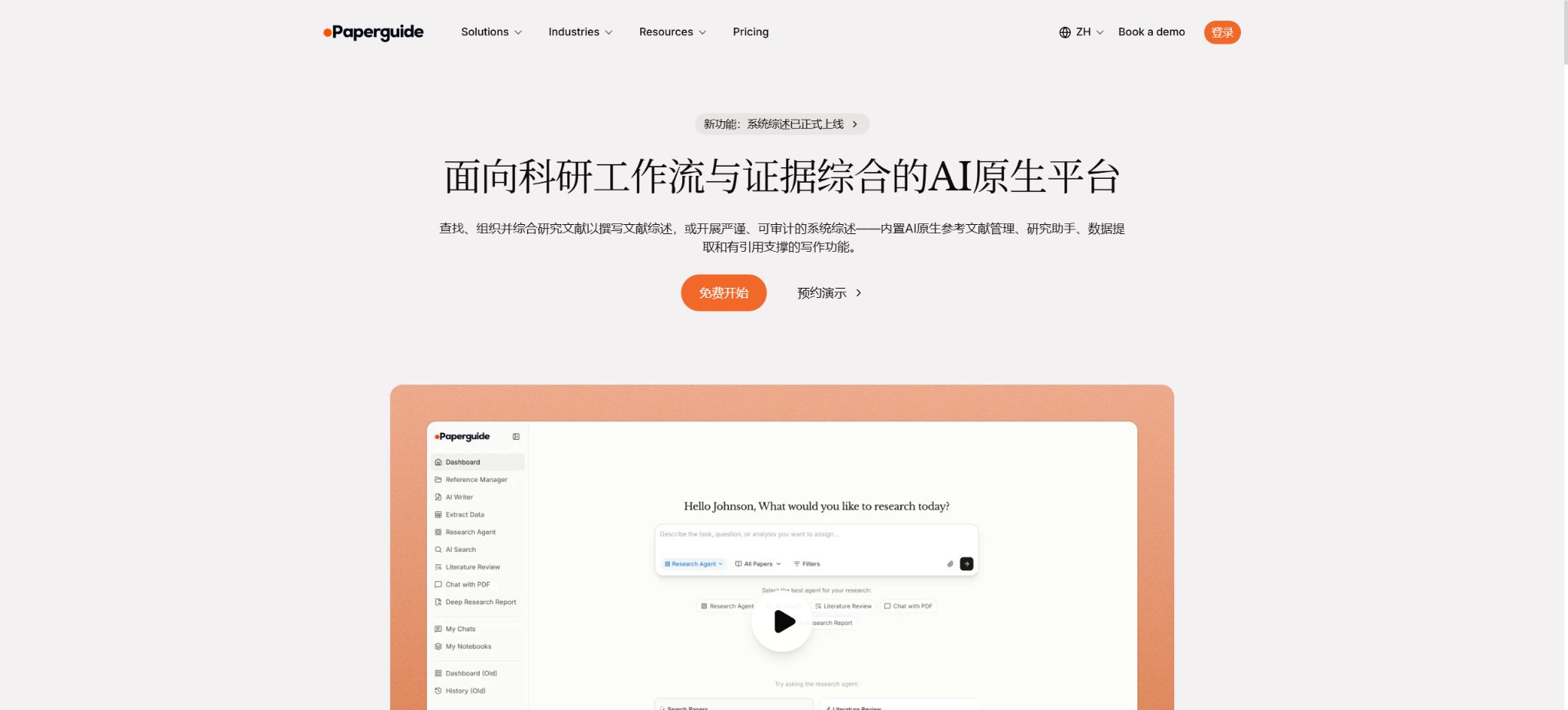
Paperguide is a one-stop AI research platform designed for students, teachers, researchers, and development teams. It brings together functions such as paper discovery, full-text reading, literature management, data extraction, systematic reviews, and academic writing in a single workspace. Users can search among over 200 million academic papers, or they can import their own PDFs and references; thereafter, the Research Agent can analyze and organize this information to produce results with citations.
As of this verification, the main functions of Paperguide include AI Search, Research Agent, Literature Review, Deep Research Report, Chat with PDF, Systematic Review, Extract Data, and Reference Manager.
AI Writer, Team Workspaces, Search API, and MCP.
It is a cloud-exclusive product; its core applications do not come with an open-source version that can be deployed locally.
Core functions
1. AI Search paper search
AI Search allows searches to be performed using research questions, topics, paper titles, or natural language descriptions. By default, it searches through more than 200 million papers from sources such as PubMed, arXiv, OpenAlex, and Semantic Scholar; it is also possible to limit the search to PubMed, arXiv, or one’s own Reference Manager.
The result is not merely a list of links; it is an answer containing citations derived from highly relevant papers, along with up to 20 key reference materials.
The free version provides 20 AI Search queries per month, while the Plus plan and higher offer unlimited queries. AI Search searches only within academic materials; it does not search ordinary web pages, blogs, or the open internet.
To obtain industry news, regulatory announcements, or company information, one should use the appropriate databases or official sources instead.
2. Research Agent and literature review
The Research Agent can conduct multiple searches around a specific question, compare different research methods and conclusions, and identify areas where there is consistency, conflict, or gaps in the evidence. It is capable of working with 200 million papers, as well as analyzing only the materials available in the user’s workspace.
Chat with PDF and Literature Review now share the same Agent architecture as Research Agent; users can proceed with further inquiries after searching, read papers, and compile reviews.
The Literature Review Agent can first determine the relevant protocols and then generate thematic overviews and citations for up to 50 papers. The Deep Research Report is suitable for tasks where it is necessary to monitor and control more search steps.
Overviews generated by AI remain draft versions of research; it is essential to conduct a manual review to check the research design, the quality of the evidence, the presence of duplicate studies, and the accuracy of the citations.
3. Chat with PDF
After uploading a PDF, users can ask for information on methods, examples, results, limitations, or the location of certain phrases. The system provides a built-in reader and page-level referencing, enabling in-depth reading of individual documents as well as comparison across multiple papers.
When encountering questions such as “Where was it said?”, the relevant original text location is provided for easy verification.
Scans, complex tables, formulas, supplementary attachments, and low-quality OCR can affect the accuracy of the interpretation. For key data such as effect sizes, confidence intervals, doses, safety events, and statistical significance, it is necessary to check the original document; one should not rely solely on the responses provided in chats.
4. Structured Extraction of Data
Extract Data consolidates multiple papers into a workbook. After the user defines the fields, the AI can extract in bulk information such as the sample size, research design, interventions, outcomes, effects, and limitations, while also linking the results to their sources.
The free version can process up to 10 documents per session, with 5 columns per table; the Plus version and higher allow up to 100 documents per session and 50 columns per table. The Pro, Max, and Enterprise versions also support the extraction of images and tables.
Fields should be described as specific instructions, rather than using only general labels such as “result” or “method”. It is best to define separately the endpoint, time points, units, and rules for handling missing values, with researchers sampling or reviewing each item individually.
5. PRISMA systematic review
Paperguide offers a comprehensive six-stage systematic review process: Protocol, Papers, screening of titles and abstracts, full-text screening, data extraction, and Report. The AI is responsible for drafting inclusion and exclusion criteria as well as the fields to be extracted from the studies, carrying out searches and screenings, providing evidence for each criterion, and generating a methodological record along with a PRISMA flowchart.
Each stage must be verified by designated personnel before moving on to the next one.
During the title and abstract phase, values of Include, Exclude, or Maybe can be assigned; in the full-text phase it is necessary to read the PDF and make a decision as to whether to include or exclude it. Papers without a PDF will be marked as not available, and this will be taken into account in the PRISMA eligibility assessment.
Audit records are kept for all AI decisions, manual interventions, protocol snapshots, and member actions; it is possible to trace any given paper from its origin to the final result.
Plus allows for a maximum of 1,000 articles in a single systematic review, Pro allows up to 5,000 articles, Max allows 10,000 articles, and Enterprise allows 20,000 articles; Max and Enterprise offer PRISMA-compliant two-stage screening.
The system allows for the export of BibTeX, RIS, and CSV files at various stages; the extracted tables can be further analyzed, and the final reports can be exported in PDF and DOCX formats.
Being auditable does not mean that the research meets the criteria for publication automatically. Researchers still need to pre-register their study plans, develop queries for multiple databases, deal with gray literature, assess the risks of bias and the certainty of the evidence, and manually verify each key stage.
The authorities also explicitly referred to the final report as a draft to be further refined, rather than a completed paper.
6. Reference Manager
The reference manager supports folders, tags, notes, and collaboration; it allows for imports from Zotero, Mendeley, or DOI, and it can also save search results and PDF files. Papers stored in this repository can be directly used by agents, extraction tools, and AI writers, thereby reducing the need to repeatedly export data between search, chat, and writing applications.
The free version provides 500MB of storage space, while the paid plans offer unlimited storage for references; however, the policies of reasonable use and copyright restrictions must still be followed. Paperguide should not be the only source for backups – important projects should have their content exported in BibTeX, RIS, CSV, and PDF format on a regular basis.
7. AI Writer and automatic citation
AI Writer can generate drafts based on research questions or a custom outline; it can also rewrite, expand, condense, refine selected text, and check its grammar. It is able to cite documents from the workspace or papers available on the platform, and it allows switching between more than 1000 different citation styles, while automatically managing the in-text citations and the reference list.
The content generated belongs to the user, but the rules regarding academic attribution, disclosure of AI use, and plagiarism checking are determined by the university, the journal, and the funding agencies. The references must be checked individually for author, title, year, DOI, and the actual relationship of support; one should not skip this verification just because the system claims that no citation is being created.
8. Team Organization and Workspaces
The team structure that will be in place by 2026 includes an Organization, individual spaces, private spaces within the organization, and shared Workspaces. Teams can share libraries of documents, collaborate on documents, extract data together, and conduct systematic reviews; access is controlled through roles such as Owner, Admin, Member, as well as workspace permissions.
Organizations and collaboration workspaces can be created with two or more seats, and administrators can monitor usage and manage these seats.
9. Chrome extensions and institutional collections
Chrome extensions allow users to save information from journals, papers, or ordinary web pages into Reference Manager, select folders, and pose questions to AI. The pricing page also lists “accessing institutional library papers through browser extensions” as one of the features of each option.
Whether the full text can be obtained still depends on the subscription of the user’s organization, the proxy settings, and the publisher’s permissions.
10. Search API and MCP
The Search API offers both semantic and keyword-based searches; it provides information such as the author, DOI, abstract, BibTeX format, PDF links, and citation data. It also allows for filtering by year, discipline, journal quality, and whether the content is openly available. Free access is granted 10 times per month, or 5 times per minute.
Plus: 100 times per month, 15 times per minute; Pro: 500 times per month, 30 times per minute.
The pricing page shows 1,500 requests per month for Max.
Enterprise offers pay-as-you-go pricing; the official documentation states that the cost is $0.01 per request, with a maximum of 50 requests per transaction.
MCP enables external AI assistants to search for papers and view their details; the AI Credits allocated for shared accounts are as follows: 10 Credits per search, 2 Credits for viewing the details of a paper, and no charges are incurred in case of failed attempts. Developers should store the API Key on the server side, rather than including it in web pages or mobile applications.
How are AI Credits calculated?
Systematic Reviews, in-depth research, data extraction, conversations with Research Agents, text generation and editing by Writers, as well as MCP all consume AI Credits. The amount of credits available is updated on a monthly basis at each billing date, and the actual consumption depends on the number of sources cited, the length of the content, the number of fields, and the complexity of the task.
According to the official estimates, 12,500 Credits with Plus are sufficient for carrying out 15 to 17 literature reviews per month, or for extracting 10 fields from 300 to 400 papers; 50,000 Credits with Pro allow for 60 to 70 reviews, or the extraction of data from 1,200 to 1,600 papers of similar size.
The above are examples only and not guarantees; for formal projects, an estimation should first be made using a small sample.
Prices and plans
The following are the annual pricing in US dollars displayed on the official website during this verification; the cost is calculated per seat. The monthly subscription options, taxes, and the currency used in billing are specified on the settlement page.
| Package or version | Prices, quotas, and core benefits |
|---|---|
| Free | Free of charge: 1,000 AI Credits per month, 20 AI searches, 500MB of storage for documents, the ability to extract 10 items and 5 columns per query, 10 searches via the Search API; it also includes PDF Q&A, an AI Writer tool, report generation functions, import capabilities for Zotero/Mendeley, and over 1,000 different citation styles. |
| Plus | The annual fee amounts to $17 per seat per month, for a total of $204 per year; this includes 12,500 Credits per month, 1,000 systematic reviews, unlimited use of AI Search and document storage, 100 extractions per session with 50 columns each, and 100 API calls. |
| Pro | The annual fee is $39 per seat per month, amounting to $468 for the whole year; this includes 50,000 credits per month, 5,000 systematic reviews, extraction of images and tables, and 500 API calls. |
| Max | The annual cost per seat is $119 per month, amounting to $1,428 for the whole year; this includes 150,000 credits per month, 10,000 systematic reviews, double-blind review process, team management, and 1,500 API calls. |
| Enterprise | Quotation request; customizable Credits, up to 20,000 systematic reviews, dual review process, team and security capabilities, as well as customizable API quotas. |
Third-party websites may still display older subscription plans such as Starter, Advanced, 12 dollars, or 24 dollars; these do not correspond to the Free, Plus, Pro, Max structure offered on the official website. The pricing on the official website and the final amount to be paid should be taken as the standard when making purchases.
Data, Privacy, and Ownership
The official terms state that users retain ownership of the files, messages, and materials they upload; Paperguide is granted only a limited license to process, store, and display such content in order to provide its services. It does not sell user data, nor is it used to train public or general AI models.
The summaries, analyses, and outputs generated by AI belong to the user.
This does not mean that unauthorized publications, patient data, or trade secrets can be uploaded. Institutional users should still verify the location where the data is stored, the sub-processors involved, procedures for deletion and backup, security certifications, and the terms of the contracts, and they must comply with the database licensing requirements.
GitHub and the open-source status
During this verification, no official GitHub open-source repository was found that is explicitly linked on the official website and can represent the complete Paperguide product. The core web applications, paper indexing tools, Agent, Writer, and system reviews are all cloud-based services; there is no officially hosted community version of these tools.
Projects with the same name on GitHub, crawlers, or third-party integrations cannot be considered official source code.
Paperguide usage guide
Complete a basic task.
- Clarify the coding tasks to be completed in Paperguide, the scope of the repository, and the acceptance criteria.
- Connect to or import the test project, and first back up the current branch;
- First, use AI Search to generate a search plan for papers, and then verify the modified files.
- Make minor adjustments using Research Agent and a literature review;
- Run tests, static checks, and builds; unverified code is not accepted directly.
- Manually check permissions, keys, dependencies, and handle exceptions before merging;
Create reusable professional workflows
- Select a low-risk, real-world project as a template;
- Fix the order of using AI Search for paper searching, Research Agent and literature review, and Chat with PDF;
- Record the environment, model, prompts, and failure conditions;
- Set up manual approval for write, deploy, and delete actions;
- Compare speed, cost, test pass rate, and the amount of rework;
- Expand to a team or production environment only after stability has been verified;
Which users is it suitable for?
- Students and researchers who need to move from searching to writing citations;
- The team responsible for conducting literature reviews, scoping reviews, and PRISMA-based systematic reviews;
- Medical or social science researchers who extract papers, samples, and results in bulk;
- Users who wish to integrate Zotero and Mendeley data into AI-driven analysis;
- Laboratories and institutions that need to share literature databases, work together on writing documents, and keep audit records;
- Developers who create paper search workflows using APIs or MCP.
Restrictions and Precautions
- 200 million papers represent the size of the aggregated corpus, but not all of them have full texts;
- Chinese journals, dissertations, paid databases, and gray literature may not provide sufficient coverage.
- A formal review must supplement the disciplinary database and save reproducible search queries;
- AI may misinterpret PDFs, confuse the subjects being studied, overlook negative words, or produce overly generalizations;
- In systematic reviews, AI-driven decisions must be verified by humans, and data extraction should be based on the original sources.
- When presenting content related to medicine, policy, and research, it is also necessary to conduct assessments of bias risk, statistics, and the level of evidence.
- AICredits, the number of systematic reviews, and API requests are different types of limitations – one should not rely solely on the option of “unlimited searching”.
- Large-scale projects are also affected by PDF acquisition and processing times, team quotas, and reasonable usage policies.
Frequently Asked Questions
Is Paperguide free?
There is a free version that provides 1,000 Credits per month, 20 AI searches, 500MB of storage space, and 10 API calls; it allows users to take advantage of functions for PDF Q&A, writing, report creation, and document management.
Is Chinese supported?
Mandarin is supported as the language for AI-generated text; Writer, PDF Q&A, Literature Review, AI Search, and Extract Data can output in Chinese. The availability of Chinese literature still depends on the sources used for indexing.
Can a systematic review be done?
Yes, it covers protocols, paper collection, screening of abstracts and full texts, extraction, reporting, and PRISMA diagrams; it also retains records of manual verification and audits. The free version does not include a full systematic review, while this feature is available in the Plus version and higher.
Is it compatible with Zotero and Mendeley?
Import is supported, and a literature database can also be created using DOIs, browser extensions, and search results.
Are API and MCP provided?
Available. The Search API allocates monthly requests and quotas based on plans;
MCP uses the same AI Credits pool: 10 Credits for searching and 2 Credits for viewing details.
Is Paperguide open source?
It is not open source; no official complete source code or self-hosted version has been found. The product is accessed through web interfaces, extensions, APIs, and MCP.
Tools similar to Paperguide

 Guigong Network Security Registration No. 45132202000164