






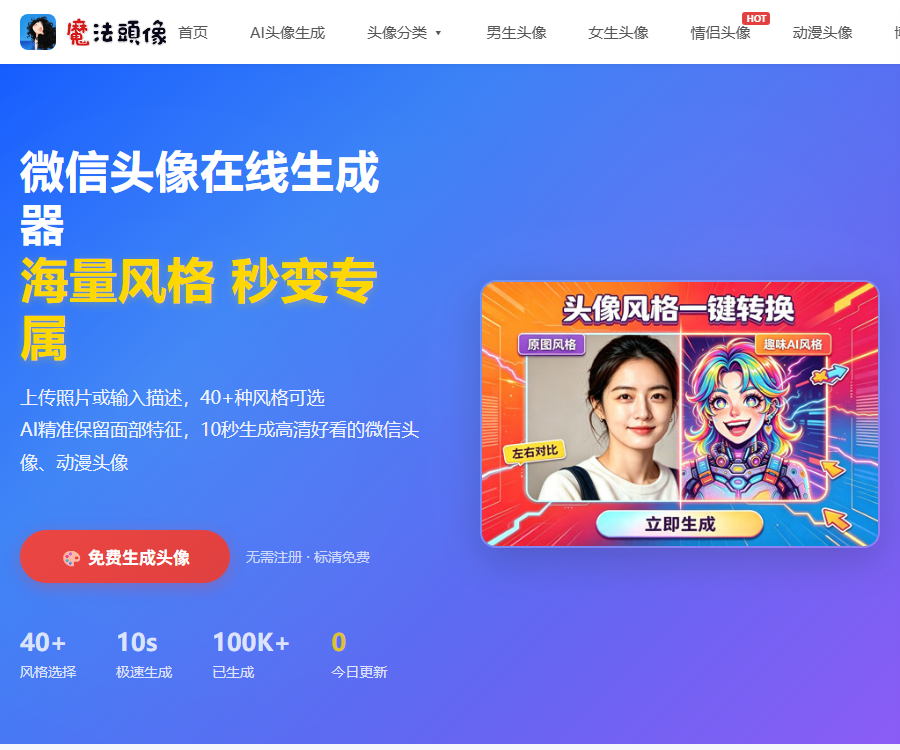
Magic avatar
AI can generate various styles of WeChat avatars with just one click.
Tags:Common AI image toolsWhat is a magic avatar?
Magic Avatar is an online AI tool designed for creating social media avatars; it allows for the generation of personalized avatars from photos or text.
It also provides the ability to view header images, making it suitable for use on WeChat, QQ, Douyin, REDnote, Weibo, as well as in professional accounts.
Main functions
- Upload a photo to create an AI-style avatar.
- Enter text to describe and create a profile picture.
- More than 40 avatar styles are available.
- Generate SD or HD versions.
- Browse and download free header images.
- After logging in, save the generated results.
- Supported on mobile phones, tablets, and computer browsers.
Convert photos into AI avatars
After uploading a clear portrait, the user can choose a system style to allow the AI to redraw the face, clothing, background, and the overall quality of the image.
| Pattern | Suitable for the requirements | Key points of use |
|---|---|---|
| Convert photo to profile picture | Retain one’s main characteristics | Upload a clear front-facing photo. |
| Text generation | Create fictional characters or thematic figures. | Specify the characters, style, and background. |
| System style | Achieve stable results quickly | Directly select a preset template. |
| Custom style | Create more personalized avatars | Define the composition and visual direction. |
Supported avatar styles
The official website currently features over 40 different styles, covering anime, painting, photography, professional work, and creative hobbies.
- 2D, Japanese anime, and anime line drawings.
- 3D cartoons, cute chibi styles, and Ghibli-inspired designs.
- Oil painting, watercolor, sketching, and traditional Chinese ink painting.
- Cyberpunk, pop art, and minimalist lines.
- Pixel, clay, and emoji style.
- Japanese-style freshness, vintage film style, and black-and-white portraits.
- Business formal wear and professional headshots.
- Couple, boys, girls, and social profile pictures.
Requirements for photo upload
| Project | Requirements from the official website | Suggestions |
|---|---|---|
| File format | JPEG, PNG, JPG, BMP, WEBP | Give priority to JPG or PNG. |
| File size | No more than 10MB | Avoid excessive compression. |
| Minimum resolution | Not less than 256×256 | It is recommended to use 512×512 or higher. |
| Highest resolution | Not more than 5760×3240 | There is no need to upload extremely large original images. |
| Aspect ratio | The ratio of the longer side to the shorter side should not exceed 2:1. | Square or nearly square is more appropriate. |
| Face status | Clear and unobstructed | Avoid exaggerated gestures and expressions. |
How to increase the similarity of profile pictures
- Choose a front-facing photo with even lighting.
- Ensure that the face occupies the main part of the frame.
- Avoid having masks, sunglasses, or hair cover the facial features.
- Do not use group photos or low-resolution screenshots.
- First, choose a style that is similar to the atmosphere of the original photo.
- After generation, compare the results of different batches.
- If the result is not satisfactory, replace the photo or try a different style.
AI avatars are created by redrawing the image, rather than by simply applying filters; therefore, it is not possible to ensure that they will always look exactly like the original person.
Tips for creating avatar images from text
Text mode is suitable for creating fictional characters, brand characters, or social profiles that do not rely on real photos.
- First, write down the character’s age, gender, and personality.
- Add hairstyles, clothing, and expressions.
- Indicate the anime, oil painting, or photography style.
- Specify a close-up portrait or a half-body composition.
- Explain the background color and the direction of the light.
- Avoid stacking style terms that conflict with each other.
- Optimize the results gradually through minor modifications.
What use cases are suitable?
| Scene | Recommended style | Precautions |
|---|---|---|
| WeChat and QQ | Cartoony, fresh, hand-drawn | It should also be clear under the thumbnail. |
| Douyin and REDnote | Trends, film, cyberpunk | Maintain visual consistency across accounts |
| Work-related accounts | Business formal wear, black and white portraits | Do not create fake professional identities. |
| Game account | 2D, pixels, clay | Avoid using restricted character images. |
| Couple profile pictures | Japanese style, vintage, cartoon | Obtain consent before uploading someone else’s photos. |
| Brand role | Text generation, custom styles | Check similarity risks before commercial use |
Tutorial for using magic avatars
- Open the generation page and select the creation mode.
- Select the desired effect from the system styles.
- Upload clear photos that meet the specifications.
- Enter a complete description when using text mode.
- Check the upload preview and the main subject of the person.
- Click to start generation and wait for it to be processed.
- Compare the generated results and replace a batch as needed.
- Select a satisfactory image to open it in preview.
- Download the standard definition version or choose the high definition version.
- Check for portrait and intellectual property risks before commercial use.
Prices and free rules
The official website indicates that the core functions are available for free, but the generation page explains that different rules apply to the standard and high-definition versions.
| Version or entitlements | Current price | Explanation |
|---|---|---|
| Generation of standard-definition profile pictures | Free | It is possible to generate and download without logging in. |
| High-definition profile picture | Uses a small amount of points. | The specific volume fraction is based on the page. |
| New user quota | Registration gift | The number of free items is determined by the account page. |
| Head pixel material download | Free resources can be downloaded for free. | Judgment is made based on the specific identifier of the material. |
| Points package | Not yet made public | Subject to the real-time purchase or settlement page. |
| Commercial use | The platform does not charge any additional fees for licensing. | It is still necessary to assess the risks of infringement on your own. |
The official website does not disclose fixed amounts for points packages, and it is not appropriate to estimate prices based on articles from third parties.
Is registration required to log in?
Basic generation and download in standard definition require no registration; users can directly select a style and upload a photo.
- A new user quota is available after registration.
- After logging in, you can use avatars for bookmarking.
- Account features may save generated records.
- If you forget your password, it can be reset using the security question.
- Whether high-definition download requires login is subject to the real-time page.
Generation speed and result management
The official website states that the photo generation process takes approximately 5 to 10 seconds, while text generation takes about 5 seconds; the actual time required depends on network conditions and service load.
- If the results are not satisfactory, another set can be used.
- The page provides a option to clear the history of operations.
- If the image turns black, you can refresh it or change the style.
- On mobile devices, images can be saved as indicated by the on-screen prompts.
- Important results should be downloaded to local storage promptly.
Can the generated avatar be used for commercial purposes?
The copyright statement permits users to use, modify, distribute, and use their own AI-generated avatars for commercial purposes, without the platform charging any additional fees for authorization.
This does not mean that there is no risk of third-party rights issues with the content; users still need to ensure that the photos they upload and the accompanying text are legal.
- Only upload your own photos or photos that have been authorized.
- Do not create accounts by using someone else’s portrait without permission.
- Avoid imitating protected characters and brand identifiers.
- Check whether the results of the pre-commercialization inspection are similar to those of existing works.
- Retain the original input and generation time records.
- High-risk business projects should be subject to legal review.
Privacy and photo processing
The website’s privacy policy states that the original photos are used solely for creating profile pictures, and they are deleted automatically once processing is complete; they are not stored as data for facial recognition.
The platform may still process account information, generate profile pictures, prompts, device information, IP addresses, and access logs.
| Data | Processing instructions | User suggestions |
|---|---|---|
| Original photo | Automatically cleaned up after generation | Remove irrelevant people before uploading. |
| Generate a profile picture | A generation record may be created. | Remove unnecessary content in a timely manner. |
| Prompt | Used for generation and service operation | Do not enter sensitive information. |
| Phone number | Used for registration and logging in | Basic use does not require registration. |
| Devices and logs | Used for statistics and security protection | Use after reading the privacy settings. |
Third-party models and data
The magic avatar indicates that its generation engine is based on third-party models such as Tongyi Waneng; the rules of these third-party services can affect the process of generation and data processing.
- Do not upload ID cards or photos of identification documents.
- Avoid uploading sensitive photos of minors.
- Do not include contact information in the prompt.
- Obtain consent before generating family member avatars.
- You can request the deletion of account data when it is no longer in use.
Supported platforms
| Platform | Support status | Explanation |
|---|---|---|
| Windows and macOS | Support | Access via a modern browser |
| Android phones and tablets | Support | Use a mobile browser |
| iPhone and iPad | Support | Use a mobile browser |
| Independent desktop client | No findings yet. | Currently, web services are the main focus. |
| Native mobile apps | Not confirmed yet | Be aware that apps with the same name are not necessarily official. |
API and open-source status
To date, no official public API, developer documentation, or verified official GitHub repository for Magic Avatars has been found.
| Project | Open status | Explanation |
|---|---|---|
| Magic Avatar Website | Not open source | It is provided as an online hosting service. |
| Public API | Not yet made public | It is not possible to confirm the programmatically generated interface. |
| Official SDK | Not yet made public | The developer’s installation package was not found. |
| Official GitHub | Not confirmed yet | Projects with the same name cannot be considered official. |
| Underlying model | Use third-party models | It does not mean that the entire platform is open source. |
Product advantages
- It can be used online without the need to install any software.
- Standard-definition profile pictures can be generated and downloaded for free.
- It also supports creating content with photos and text.
- The styles cover social, anime, and workplace themes.
- The upload format and specifications are clearly specified.
- The official website provides the rules for photo editing.
- The generated content is allowed for personal and commercial use.
Usage restrictions
- The high-definition version may require points.
- The specific price of the points has not been made public yet.
- AI redrawing cannot guarantee an exact likeness to the original person.
- The generation speed is affected by the network and load.
- A commercial license does not mean there is no risk of infringement.
- The platform itself has not confirmed whether it is open source or provides an API.
- For mobile apps with the same name, it is necessary to verify the identity of the developer.
Frequently Asked Questions
What can magic avatars mainly do?
It allows users to upload photos or enter text to create AI avatars, and offers over 40 different styles including anime, cartoons, paintings, photography, business themes, and couple themes.
Are magic avatars free?
Standard-definition profile pictures can be generated and downloaded for free, while high-definition versions require a small amount of credits; the exact number of credits and package prices are indicated on the live page.
Is it necessary to register in order to use magic avatars?
Basic generation and download in standard definition require no registration; after registering, new users can obtain a quota as well as access to account features such as favorites.
Which image formats are supported by magic avatars?
JPEG, PNG, JPG, BMP, and WEBP are supported; files should not exceed 10 MB. It is recommended to upload clear, front-facing photos with no obstructions.
Can the generated AI avatar be used for commercial purposes?
The official website allows users to use, modify, distribute, and use their generated avatars for commercial purposes, but they still need to ensure that the materials uploaded are legal and to check for any risks of infringement.
Will the photos be saved after they are uploaded?
The official website states that the original photos are automatically deleted once they have been generated, but profile pictures, prompt texts, account information, and access logs may still be handled in accordance with the privacy policy.
Does Magic Avatar provide APIs or open-source code?
To date, no official public API, SDK, or verifiable GitHub repository has been found; the website itself should be considered a closed-source online service.
Tools similar to magic avatars




 Guigong Network Security Registration No. 45132202000164