






ImgTo3D-AI: Convert images to 3D format
Convert 2D images into high-quality 3D models with one click; supports export in various formats.
Tags:Common AI image toolsWhat is ImgTo3D?
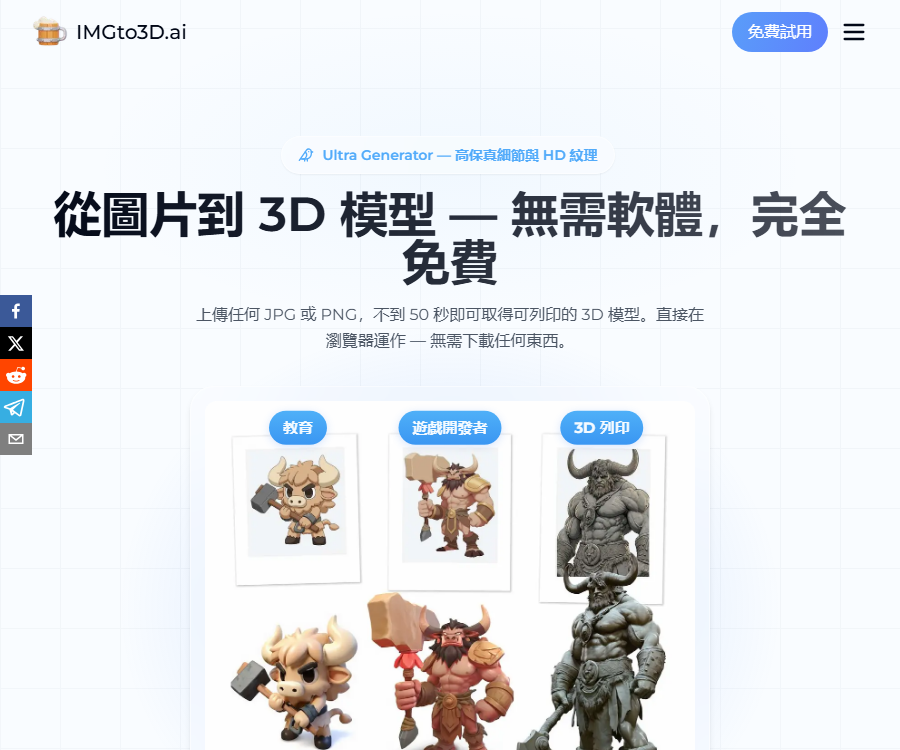
ImgTo3D is an online AI 3D model generator under the AI3DGen brand; it can convert photos, illustrations, or sketches into downloadable 3D meshes.
It carries out uploading, preprocessing, generation, previewing, and exporting in the browser, without requiring users to install Blender or any game engine first.
What type of images is it suitable for?
- Images that are clear, have even lighting, a complete subject, and contain only one object are the most likely to yield usable results.
- A front-facing perspective and a simple background help the model determine contours, proportions, and spatial relationships.
- Currently, input in JPG, PNG, and WebP formats is explicitly supported.
- Complex scenes, occlusions, strong shadows, reflections, transparent materials, and multiple overlapping objects can easily lead to incorrect geometry.
- It is not possible to see the back side of an object in a single image; the system can only estimate the hidden structures, so it cannot be considered a precise scan.
Main functions
Free conversion of Lite images to 3D
- The free generator requires no registration or credit card; you can upload images and quickly obtain a basic 3D mesh.
- The free tier uses the Lite model, and the generation time is usually under 50 seconds; however, during peak periods there is a waiting queue and a daily limit that has not been specified.
- The result only supports texture-free OBJ files with a low number of faces, and is primarily used for personal testing and internal business prototypes.
- The free model does not include permission to distribute, sell to third parties, or integrate into commercial products.
Turbo fast generator
- Turbo is designed for rapid iteration and simple objects, costing 20 points per use.
- The typical generation time is around 30 to 60 seconds, while for individual functional pages the range is also 20 to 60 seconds.
- The paid version analyzes images to generate textures, which may make it slower than the free version that does not create textures.
- It is suitable for large-scale prototyping and placeholder assets in games, but it is still necessary to check the back, bottom, thin layers, and topology.
Pro Quality Generator
- Pro costs 38 points per use, and is positioned as a daily asset generator that offers a balance between quality and speed.
- It will handle geometry and textures with greater precision, and attempt to identify the light sources in the input image in order to reduce the amount of highlights that are baked into the textures.
- The typical time mentioned in the help center is around 100 to 200 seconds, while dedicated pages may indicate a time range of 120 to 180 seconds.
- Suitable for drafts of props, product concepts, and game assets; formal production still requires refinement in 3D software.
Ultra High-Detail Generator
- Ultra is designed for highly detailed objects such as characters, creatures, armor, and complex props; the processing time is typically around 3 minutes.
- It uses more computing power to refine geometry, structure, and textures, making it an excellent starting point for high quality.
- The price page states 60 points per use, while the help center indicates 80 points; the information provided in these two sources does not match.
- Before submitting a task, check the generate button and the alerts regarding charges to the account; it is not possible to estimate the budget based on lower figures.
3D style converter
- Flat illustrations and sketches lack perspective, lighting, and depth cues, which causes them to appear as blocky shapes when generated directly.
- The 3D style converter first transforms the 2D plan into a rendered image with realistic shadows and perspective.
- This step costs 15 points each time it is used, and the processed image is then sent to the main generator.
- Pre-processing will change the original appearance; users should check whether there are any deviations in structure, color, and brand details.
Background removal
- Backgrounds, the ground, and object shadows may be misinterpreted as part of the model, resulting in large bases or chaotic grids.
- The background removal tool costs 1 point per use, and it is used to separate the main subject from the scene.
- Even if the original image has a white background, it is still advisable to check for contact shadows, reflections, and residual edges.
- The required floor, projection, and display stand need to be added separately using 3D software after downloading.
Number of faces and advanced parameters
- Face Count controls the density of the target polygon; lower values are suitable for real-time games, while higher values preserve more surface details.
- The adjustable range displayed on the Turbo page is from 5K to 40K faces; the actual range for other generators should be as indicated in the editor.
- Octree Resolution affects the level of detail captured during reconstruction; too low a value may result in loss of structure.
- The Number of Chunks determines the granularity of chunk-based processing, while Steps affects the iteration process; increasing these parameters does not necessarily lead to better results.
Input, processing, and output
| Stage | Enter | Processing | Output |
|---|---|---|---|
| Image upload | JPG, PNG, or WebP | Identify clues related to the subject, outline, depth, and material. | Generate task |
| Background removal | Images with a background or shadows | Separate the foreground subject | Reference image with transparent background |
| 3D-style preprocessing | Sketch or flat illustration | Add perspective, lighting, and depth. | Reference images more suitable for reconstruction |
| Geometric generation | Reference diagrams and face count settings | Predict visible and hidden surfaces | 3D mesh |
| Texture generation | Payment model and original image | Create colors and PBR materials | Textured model |
| Export | The model after previewing | In package format | OBJ, GLB, or STL |
Output format and usage direction
| Format | Available packages | Primary uses | Precautions |
|---|---|---|---|
| OBJ | Free and paid | Universal mesh switching, modeling, and sculpting | The free version does not include textures, while the paid version may come with separate texture files. |
| GLB | Starter and Advanced | Websites, AR, VR, and real-time previews | Models, materials, and textures can be packaged in a single file. |
| STL | Starter and Advanced | 3D printing and geometric exchange | It usually does not contain color textures; it is necessary to check its sealing quality and thickness before printing. |
The compatible software listed on the page includes Blender, Maya, 3ds Max, Unity, and Unreal Engine; however, the ability to import the format does not mean that bones, collision objects, topology, and materials need no further processing.
Complete usage tutorial
- Choose a picture of a single object that is clear, has even lighting, a complete subject, and a simple background.
- Remove irrelevant elements, and use the background removal tool to clean up the ground, shadows, and other clutter.
- If the input is a flat sketch or illustration, use the 3D style converter first to add perspective and depth cues.
- Choose from Free Lite, Turbo, Pro, or Ultra based on speed, quality, and complexity.
- Set the target number of faces; for the first generation, the default parameters for Octree, Chunks, and Steps are used.
- After it is generated, rotate the model to check the front, back, bottom, thin layers, holes, symmetry, and material seams.
- When the results are not satisfactory, prioritize improving the input, background removal, and perspective, before considering increasing integral consumption or the number of faces.
- Choose OBJ, GLB, or STL for export and save it immediately to your project directory.
- Fix the topology, normals, scale, UVs, textures, collision volumes, and print thickness in Blender or other tools.
How to choose a generator
| Generator | Integration | Speed | Features | Suitable for tasks |
|---|---|---|---|---|
| Lite | Free, with a daily limit. | It is usually less than 50 seconds. | Low polygon count, no texture, just OBJ | Concept validation and personal testing |
| Turbo | 20 points | About 30 to 60 seconds | Emphasize speed and generate textures. | Fast iteration and simple assets |
| Pro | 38 points | About 100 to 200 seconds | Balance between quality and speed, improvement in light recognition | Daily games and product assets |
| Ultra | Price page: 60, Help center: 80 | About 180 seconds | Complex structures and high detail | Characters, creatures, and complex props |
Current price plan
| Package or version | Price | Billing cycle | Core benefits or quota | Suitable for users |
|---|---|---|---|---|
| Free | $ | Free to use | No account required; long queues during peak hours; a limited number of uses per day, though the exact figure is not specified; only texture-free OBJ files are available; Lite version of the model; not suitable for commercial use. | Personal trials and internal prototypes |
| Starter monthly plan | 13.9 dollars | On a monthly basis | 800 points per month; approximately 40 Turbo generations; no daily limit; Turbo, Pro, Ultra; OBJ, GLB, STL, and textures | Low-frequency professional asset production |
| Starter annual plan | 7 dollars per month, converted accordingly | Settled on an annual basis | 800 points per month; the benefits are the same as those for the Starter monthly plan; points are still issued on a monthly basis. | Individual creators who are used consistently over the long term |
| Advanced Monthly Plan | 27.9 dollars | On a monthly basis | 2,000 points per month; approximately 100 Turbo generations; no daily limits; all paid generators and formats available | High-frequency modeling and professional projects |
| Advanced annual plan | 14 dollars per month, converted accordingly | Settled on an annual basis | 2,000 points per month; the benefits are the same as those of the Advanced monthly plan; points are still issued on a monthly basis. | Users who continuously create 3D assets |
The annual payment discount varies dynamically; the page only displays the average monthly price. The currency, taxes, total annual cost, and any discounts are subject to the details on the final settlement page.
Integration rules and conflicts
- Turbo earns 20 points per use, Pro earns 38 points per use, 3D style conversion earns 15 points per use, and background removal earns 1 point per use.
- On the current price page, Ultra is shown to have 60 points, but the help center indicates 80 points; it is the button for creating an account that determines the actual amount charged.
- Points for both monthly and annual payments are issued on a monthly basis, and unused points expire at the start of the next monthly cycle.
- Extra point packs can only be purchased by users with the Starter or Advanced subscription to the campaign.
- Subscription points are used first, followed by the point packages; however, any additional points also expire during the next monthly renewal.
Cancellation and refund policies
- Users can cancel their subscription on the account page; the cancellation takes effect at the end of the current billing cycle, and they can continue to use the remaining services during that time.
- Upgrades or downgrades can be requested at any time, and the changes will take effect in the next billing cycle.
- In principle, the platform does not issue refunds; exceptions are considered on a case-by-case basis.
- The refund request must be submitted within 5 days of the initial purchase, and the original image, the Pro and Ultra version results or screenshots, as well as the order details and a detailed explanation must be provided.
- Points that have been used cannot be refunded; a refund is only granted for the portion of points that remain unused. Requests for refunds may be denied if more than about 80% of the points have been used.
- The team typically takes 3 to 5 business days to review the request; once approved, the payment is returned to the original method, and it may take another 2 to 3 business days for the funds to arrive.
- Technical failures of the confirmed platform may result in the restoration of points, but this does not automatically constitute a reason for a cash refund.
Copyright and commercial use
- Users retain the right to upload images and must ensure that they have the necessary permissions to transform, copy, and use them.
- Free models are intended only for personal use or internal business prototypes; they cannot be redistributed, resold, or integrated into commercial products.
- The current Starter and Advanced subscription plans include a commercial use license as well as the rights to the generation models, as stated by the platform.
- Whether AI-generated works can be granted copyright depends on the jurisdiction and the level of human effort invested in their creation; the statements made by platforms cannot replace legal judgments.
- The generated content may resemble third-party characters, trademarks, product designs, or artistic works; a rights check is still required before it is published.
- The underlying models, algorithms, websites, and software of the platform are owned by ImgTo3D or its licensors, and are not transferred along with the model download.
Conflicts between privacy, retention period, and policies
- The service may collect technical information such as the support email address, IP address, and browser type, for the purposes of creation, maintenance, improvement, and security.
- The privacy policy states that the uploaded images and the generation models are used solely for processing, and they are deleted immediately after generation is completed.
- The Turbo page also states that the generated model can be accessed via a shared link for 1 hour, which indicates that at least some of the results are retained for a short period of time.
- The terms also state that the uploaded images and generated models must be deleted within 30 days after the account is closed, which is not exactly the same as the requirement to delete them immediately.
- The price page indicates that the file is accessible only to the user and shall not be shared without permission, but the privacy policy allows trusted service providers to process the data for operational purposes.
- Confidential designs, customer-original artwork, and unreleased characters should be assessed on the conservative assumption that they will be stored for a short period of time and processed by the service provider.
- The platform states that it will not use the uploaded images for training or marketing purposes, but it is still necessary to avoid uploading faces, brands, and confidential designs without proper authorization.
Result quality and post-processing
- Single-view reconstruction does not allow visualization of the back, bottom, and internal structures; AI must infer the missing geometry.
- The high accuracy rate claimed on the website is part of the product’s marketing description; it does not mean that the same results will be obtained for every image.
- Reflective metals, glass, hair, thin threads, holes, limbs that overlap each other, and asymmetrical structures tend to lead to failure.
- Textures can bake shadows, highlights, text, or background residues into the material.
- When using it in games, it is necessary to check the number of faces, UVs, normals, LOD, collision volumes, and skeletons.
- When using for 3D printing, it is necessary to check the closed meshes, non-manifold edges, wall thickness, dimensions, overhangs, and supports.
Platform, API, and open-source status
| Project | Current confirmed status | Explanation |
|---|---|---|
| Web application | Already provided | Free generation is available without logging in; paid features require an account. |
| Desktop application | Not confirmed yet | The main workflow is carried out in the browser. |
| iOS and Android | The official native app has not been confirmed yet. | No official store page was found. |
| Browser extensions | Not yet made public | No official expansion has been confirmed. |
| Public APIs and SDKs | Not yet made public | The development documentation, keys, limits, or prices have not been confirmed. |
| Official GitHub | Not confirmed yet | The core product warehouse could not be verified. |
| Open-source license | Not yet made public | It is not possible to conclude that the model or platform code is open source. |
Which users are it suitable for
- Designers who need to quickly turn a product concept diagram into a 3D draft.
- Independent game developers who need props, scene placeholders, and prototype assets.
- 3D artists who want to create a mesh that can be further sculpted, starting from a sketch.
- Content creators who create web pages, AR or VR previews and need GLB files.
- Those who prepare 3D-printed prototypes and also check and fix the meshes.
Scenarios that are not suitable for direct use
- CAD designs that require millimeter-level precision, engineering tolerances, and manufacturing certification.
- It is required to automatically generate production-grade characters that can be directly linked to animations without any need for further processing.
- Only tasks involving complex groupings, strong occlusion, or an inability to obtain clear images of individual objects.
- Once the free tier has been created, it is ready to be sold to customers, delivered to them, or incorporated into commercial games.
- Enterprise processes that require local deployment, public APIs, SDKs, or auditable open-source models.
Frequently Asked Questions
Is ImgTo3D free?
There is a free Lite generator that requires no registration or credit card, but it experiences delays during peak times, has undisclosed daily limits, and only allows the export of texture-free OBJ files.
Which image formats is ImgTo3D capable of handling?
Currently, JPG, PNG, and WebP are explicitly supported; clear front-view images of a single object with a simple background make it easier to obtain usable models.
What 3D formats can be exported?
The free version can only export OBJ files, while the Starter and Advanced versions allow the export of OBJ, GLB, and STL files with textures.
What are the differences between Turbo, Pro, and Ultra?
Turbo places emphasis on speed, Pro balances quality and time, while Ultra is designed for complex, highly detailed objects; the amount of points consumed by each of them varies.
Should Ultra deduct 60 or 80 points?
The official price page and the help center currently show 60 and 80 points respectively; the value indicated by the \"Generate Account\" button must be taken as the accurate figure before submitting a task.
Can free models be used for commercial purposes?
It cannot be used for commercial purposes; the free version is intended only for personal use or for developing internal business prototypes. Reproducing, selling it, or integrating it into customer products requires a paid license.
Are subscription points carried over?
No, both monthly and annual subscriptions result in point updates on a monthly basis; any unused subscription points as well as the balance of additional point packages will become invalid during the next update.
Can a refund be obtained if generation fails?
In the event of a technical failure, points are usually used to make up for it; cash refunds are granted only within 5 days after purchase, following special procedures, and complete evidence is required – points that have already been used cannot be refunded.
Will the uploaded image be deleted immediately?
The policies provide for three options: immediate deletion, keeping the share link valid for 1 hour, or deletion within 30 days after termination; sensitive materials should be handled in such a way that they can be stored for a short period of time.
Does ImgTo3D have an API or open-source code?
At present, there are no confirmed public APIs, SDKs, official core repositories, or open-source licenses; the main method of use is a web editor.
How to add a FAQ Schema
This page presents the FAQs using a “Frequently Asked Questions” header, subheadings for each question, and answer paragraphs that follow; website templates can use this to generate structured FAQPage data.
Structured data must be exactly consistent with the visible questions and answers on the page, and it should be generated uniformly using the publishing template; script tags or hidden questions and answers must not be included in the main text.
A tool similar to ImgTo3D-AI for converting images into 3D format




 Guigong Network Security Registration No. 45132202000164