






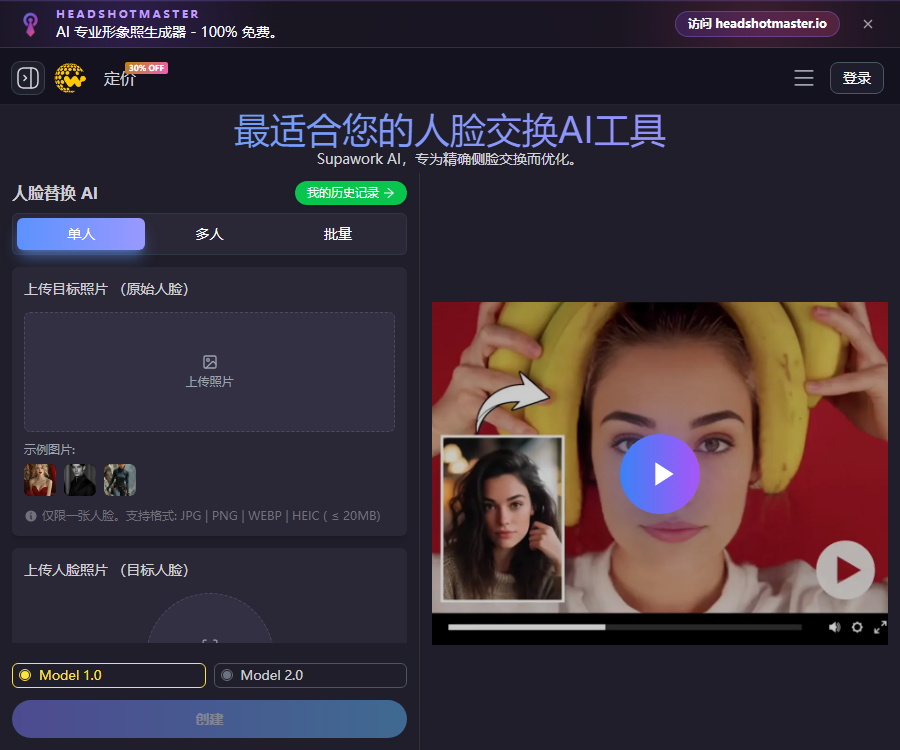
Supawork-AI face swapping
A free online tool for face replacement that can be used without registration. It features a simple and user-friendly interface: users simply need to upload a photo or video to carry out the face replacement quickly.
Tags:Common AI image toolsWhat is Supawork AI face swapping?
Supawork AI face replacement is a tool that enables the processing of images, GIFs, and videos for face replacement directly in the browser.
It is part of the Supawork integrated AI workspace, and it offers features such as avatar creation, video effects, and image processing capabilities.
Main functions
- Replace faces in single photos and videos.
- Identify multiple faces in the same video.
- Process videos with longer durations and larger files.
- Tracking is performed on the side profile, lighting, and expressions.
- Choose between Model 1.0 and Model 2.0.
- Supports GIFs and common short video materials for social media.
- Save historical tasks and download the results.
- Integrate enterprise image and video processes via API.
Three video modes
| Pattern | Uses | Limits of the current page |
|---|---|---|
| Single | Replace a main character in the video. | Normal generation is limited to a maximum of 20 seconds per time. |
| Multiple people | Processing multiple faces in the same frame | It is necessary to verify each target face one by one. |
| for a long time | Processing longer videos and larger files | Paid users can use it for up to 1 hour. |
The duration, file size, and amount of gold coins required vary depending on the entry point; the information displayed in the upload box should be followed at all times.
Upload format and size
| Materials | Supported formats | Public restrictions |
|---|---|---|
| Regular videos | MP4, MOV, AVI, WEBM | Up to 300MB |
| Target photo | JPG, PNG, WEBP, HEIC | Up to 20MB |
| Long-duration videos | Common video formats supported by the page | Up to 1024MB |
| GIF | GIFs and convertible animation assets | Follow the instructions on the tool page. |
Cropping out irrelevant segments before uploading can reduce processing time and the amount of coins used.
Models and effects
The face-swapping interface currently offers Model 1.0 and Model 2.0, allowing users to conduct tests with different materials.
- A face with a frontal view, clear features, and even lighting yields a more stable appearance.
- Side-face optimization helps with handling camera movements as the head turns.
- The system will attempt to match skin tone, lighting, and facial details.
- Fast movements, obstruction, and intense expressions can lead to drift.
- For long videos, consistency should first be tested using short segments.
- Different models may require different amounts of gold coins.
Free users and paid users
Some features can be used without creating an account; registration unlocks access to historical records and additional options.
| Project | Free trial | Pay to use |
|---|---|---|
| Account | Some features do not require registration. | It is necessary to log in to manage coins and tasks. |
| Video duration | The FAQ states that a maximum of 60 seconds can be tried. | The long-duration mode can last up to 1 hour. |
| Normal generation | The interface can be used for up to 20 seconds at a time. | It depends on the mode and gold coins. |
| Advanced options | Restricted | More modes can be unlocked. |
| Gold coins | There may be a trial quota available. | Purchase permanent gold coins as needed |
“Free” does not mean unlimited use in all modes; the actual number of times it can be used as well as the queueing rules will vary.
Supawork AI Face Swap Tutorial
- Confirm that legal authorization has been obtained for the use of videos, photos, and portraits.
- Choose between single-person, multi-person, or long-duration face swapping mode.
- Upload an original video with a clear face visible.
- Upload a clear photo of the target’s face with no obstructions.
- In a group video, select the individual characters that need to be replaced one by one.
- Select the model version based on the preview and budget.
- First, trim clips under 20 seconds to test the effect.
- Check the estimated gold cost before submitting long tasks.
- Check the edges of the face, skin tone, expressions, and the continuity of movements.
- Download the results promptly and delete unnecessary cloud records.
- Indicate that AI face replacement has been used at the time of publication, to prevent misleading the audience.
Prices and gold coin packages
The following are the pay-as-you-go USD plans as displayed on the official website on August 30, 2026.
| Package | Price | Cost per gold coin | Validity period |
|---|---|---|---|
| 400 gold coins | 9.99 dollars | About 0.0249 dollars | Valid forever |
| 800 gold coins | 14.99 dollars | Approximately 0.0187 dollars | Valid forever |
| 3000 gold coins | Special price: $37.99 | Approximately 0.0126 dollars | Valid forever |
| 8000 gold coins | Special price: $89.99 | Approximately 0.0112 dollars | Valid forever |
The original price of the activity, taxes, and the final amount to be paid shall be as indicated on the real-time settlement page.
Explanation of the billing method
The price page marks the current four subscription plans as pay-as-you-go, and the coins purchased are valid permanently.
- Different tools consume gold coins based on their computational resource usage.
- Video length and the model affect the cost.
- For long-duration videos, the total amount of gold coins should be estimated first.
- The instructions for unsubscribing in the FAQ are part of the general terms.
- The four price tiers currently available are mainly based on pay-as-you-go gold coin packs.
- If a recurring subscription is associated with the account, the renewal date must be confirmed separately.
Refunds and invoices
Officials state that the gold coins used in this transaction can be refunded once the abnormal generation is verified.
- If the result is not satisfactory, you can contact the support team.
- A proportional refund can be requested for the remaining gold coins.
- Approval and the specific amount are determined by the authorities.
- Stripe handles the payments, and the platform claims that it does not store any card information.
- Users can contact customer service to request an invoice.
- Saving the order details, task numbers, and screenshots of any errors helps with processing.
Commercial use
The pricing FAQ states that users have full rights to use the images and videos generated by the tool.
This does not cover the rights to input videos, portraits of people, music, brands, and other third-party materials.
- Obtain explicit permission before using real people’s faces.
- It is forbidden to fake endorsements from celebrities, companies, or government agencies.
- The products and reviews included in marketing content must be genuine.
- Music, video clips, and templates must have legitimate copyright.
- When publishing synthetic content, clearly indicate that AI has been used for processing it.
- Retain authorization, generation, and manual review records.
Other tools from Supawork AI
- Professional AI avatar and studio photos.
- Removal of images, videos, and GIF objects.
- Video effects, kiss and hug templates.
- Background removal and replacement.
- Tools for creating images and videos.
- Content creation and daily productivity workspace.
Supawork API
The official API is intended for developers and enterprises, and credits are consumed based on the number of calls made.
- API for face replacement in images and videos.
- Face detection API.
- API for removing backgrounds from images and videos.
- Watermark and object removal APIs.
- Companies can contact sales to request 5,000 test points.
- Concurrency, SLAs, and official prices need to be confirmed separately.
API Integration Tutorial
- Explain the business scenarios and estimated usage volume to the sales team.
- Apply for test points and developer access rights.
- Obtain API documentation and server-side keys.
- Only processed facial data that has been authorized are used.
- Use a small number of test tasks to verify quality and failure handling.
- Set limits for upload size, format, and duration verification.
- Supports task status querying, retrying, and timeout handling.
- Record the gold coins, task numbers, and authorization credentials.
- Conduct privacy and deepfake risk assessments prior to going live.
- Monitor for abuse, abnormal calls, and budget consumption.
Privacy and file security
The official website states that the uploaded content is processed securely, and it will not be made public unless the user chooses to share it.
- Do not upload identification documents or private images.
- Do not include sensitive personal information in the file name.
- Corporate materials must first undergo data classification and approval.
- Account history needs to be cleaned up regularly.
- Confirm the access scope before sharing the link.
- The manufacturer states that it cannot replace the user’s own security assessment.
Portraits and Deepfake Security
Highly realistic face swapping can be mistaken for real events or the actions of real people; it is necessary to prevent misguidance before such content is published.
- Unwanted pornography and humiliating face swaps are prohibited.
- It is prohibited to impersonate others for the purpose of fraud or identity verification.
- The fabrication of news, evidence, or official statements is prohibited.
- It is not allowed to use unauthorized celebrity images in advertising campaigns.
- Material involving minors requires the lawful consent of a guardian.
- Any publicly available work should indicate that it was synthesized by AI.
- It should be avoided when the platform and legal requirements are stringent.
GitHub and open source
At present, no official and complete open-source repository that can be confirmed as belonging to Supawork AI has been found.
This product should be labeled as a closed-source cloud service; the availability of public APIs does not mean that the platform or the models are open source.
Usage restrictions
- Side profile optimization cannot guarantee accuracy from all angles.
- Obstruction, blurring, and strong light can reduce the quality of face tracking.
- In long videos, there may be changes in the identity of the people and in their skin color.
- The free time period, the amount of gold coins required, and the prices for events can change.
- A commercial license does not replace third-party portrait and copyright permissions.
- Illegal or unauthorized use may result in legal consequences.
Frequently Asked Questions
Can Supawork AI’s face-swapping feature be used for free?
Some features can be tried out, but there are limits on the free time period, the number of uses, and advanced modes.
Which video formats is Supawork compatible with?
Currently, MP4, MOV, AVI, and WEBM are supported; the maximum size for regular video files is 300 MB.
How long can free users process videos?
According to the FAQ, up to 60 seconds can be tried, but the standard generation interface allows a maximum of 20 seconds per attempt at the moment.
Do Supawork gold coins expire?
No, the official pricing page clearly states that all purchased gold coins are valid forever.
How much is the lowest package at Supawork?
The current lowest subscription tier is 400 gold coins, equivalent to $9.99; the price is as indicated on the payment page.
Can the generated face-swapped videos be used for commercial purposes?
The official website states that it can be used for commercial purposes, but one must have the legal rights to the materials, images of people, and music used.
Is Supawork AI open source?
It is not open-source; currently, no complete official source code for the platform or model weights are available.
Tools similar to Supawork-AI for face swapping




 Guigong Network Security Registration No. 45132202000164