






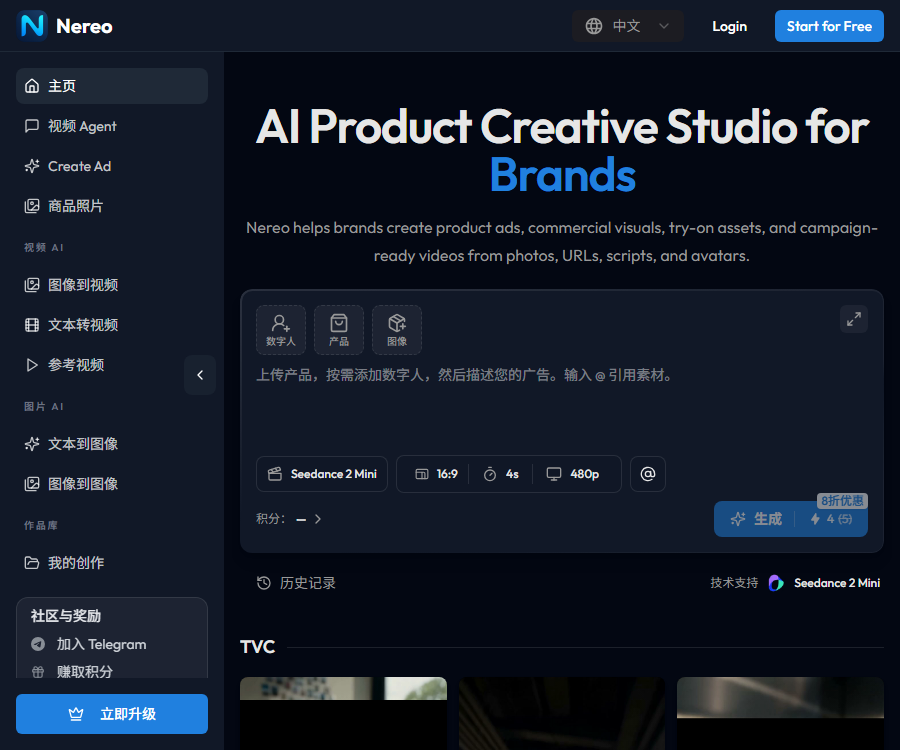
Nereo AI videos
\"Multi-model aggregation + free of charge with no barriers + simple operation,\" it fills the gap in the market where \"professional AI video tools are too expensive while basic tools offer poor performance,\" making it an affordable option for individual creators and small to medium-sized enterprises.
Tags:Common AI image toolsWhat is Nereo?
Nereo is an AI-powered product ideation platform designed for brands, e-commerce sellers, and marketing teams.
It can create advertising videos and commercial visuals based on product links, images, scripts, avatars, or marketing briefs.
Main functions
- Convert text prompts into short videos.
- Create lens movements and advertising scenes for product images.
- Generate video ads from product pages and marketing briefs.
- Create UGC-style recommendations, demonstrations, and promotional content.
- Generate product display images and virtual try-on images.
- Create version variations of proportions and copy for different platforms.
- Manage historical works and brand creative assets.
Product advertising workflow
Nereo emphasizes starting from marketing objectives, rather than simply creating a random image.
| Enter | Platform processing | Common outputs |
|---|---|---|
| Product link | Extract product information and key features | E-commerce short videos and redirect ads |
| Product images | Creating scenarios, shots, and product displays | Display videos and commercial visuals |
| Advertising script | Organize storyboarding, voiceover, and subtitles | Convert scripts into video ads |
| Event Briefing | Generate hooks, structures, copy, and call-to-actions | Multi-angle ad variants |
| Avatar orientation | Generate explanatory or recommendation-based content | UGC style and voice-over ads |
What types of content are suitable for creation?
- Short videos on TikTok, Reels, and YouTube Shorts.
- Facebook, Instagram, and Google ad materials.
- Shopify and independent website product videos.
- Ads for new product launches, time-limited discounts, and bundle promotions.
- Videos for SaaS product demonstrations and the homepage.
- UGC-style reviews, recommendations, and creator live broadcasts.
- Product display images, virtual try-ons, and commercial posters.
Supported AI models
The official website currently brings together various third-party video and image models in a single creation interface.
- Sora 2 and Veo 3.1.
- Kling 3.0 and Hailuo 2.3.
- Seedance 1.5, 2.0, and 2.5 series.
- Wan 2.5 and Wan 2.6.
- Seedream 4.5 and 5.0 series.
- Nano Banana, Nano Banana 2, and the Pro version.
The list of models, available regions, and points consumption may change; it is necessary to check the real-time interface before generation.
Video and image generation capabilities
| Ability | Uses | It needs to be verified. |
|---|---|---|
| Text-to-video | Generate shots from descriptions | Duration, ratio, model, and integration |
| Tusheng Video | Make static images appear to be in motion. | Consistency of the main elements and accuracy of the product |
| Reference student video | Control creativity based on reference materials. | Copyright and character licensing |
| Video effects | Apply actions or visual effects | Edge defects and image stability |
| Text-to-image generation | Create ad compositions and materials | Accuracy of text, packaging, and labels |
| Virtual try-on | Show the appearance of clothing or products. | Size, material, and risk of misrepresentation |
Advertising variants and platform adaptation
Users can test different hooks, scripts, tones, and call-to-actions for the same product.
- Use a 9:16 aspect ratio for vertical short videos.
- Prepare a 1:1 version for information flow ads.
- Prepare a 16:9 version for the website and YouTube.
- Distinguish between the cognition, transformation, redirection, and publication stages.
- Test from the perspectives of problem solving, product demonstration, and promotional offers respectively.
- Before going live, manually verify the subtitles, prices, promises, and brand information.
Nereo usage tutorial
- Register for the official account and receive free points for new users.
- Choose product advertising, video tools, or image tools.
- Upload images of products for which you have usage rights, or enter a product link.
- Add target users, platforms, selling points, and campaign objectives.
- Select the video aspect ratio, style, audio, or avatar orientation.
- Select an appropriate generation model based on the budget.
- Generate a low-cost draft first and check product consistency.
- Modify hooks, subtitles, voiceovers, scenes, and call-to-actions.
- Check the resolution, integration, and commercial license before exporting.
- Manually review prices, evaluations, efficacy, and compliance statements.
- Use a small budget to test click-through rates, conversion costs, and returns.
Price and package comparison
The following are the prices in US dollars as displayed on the official website’s pricing page on August 30, 2026.
| Package | Monthly payment | Annual payment | Monthly points | Output and Services |
|---|---|---|---|---|
| Mini | $ | $ | 200 | 1080p, for commercial use |
| Standard | $ | 360 dollars per year, which is equivalent to 30 dollars per month. | 1000 | 4K, fast queue, for commercial use |
| Plus | $ | $ | 3000 | 4K, fast queue, priority support |
The annual payment is charged in a single lump sum per year; taxes, exchange rates, and the settlement amount shall be as indicated on the payment page.
Reference for package output
The official website uses Veo3 videos and NanoBanana Pro images to illustrate examples of the production volume associated with points.
| Package | Example of Veo3 video size limit | Example of the maximum image size for NanoBanana Pro |
|---|---|---|
| Mini | Up to 25 8-second 1080p videos | Up to 100 pieces |
| Standard | Up to 125 8-second 1080p videos | Up to 500 pieces |
| Plus | Up to 375 8-second 1080p videos | Up to 1500 pieces |
The actual output depends on the selected model, resolution, and settings; the examples should not be regarded as fixed commitments.
Points and free trials
- New users receive 10 free points upon registration.
- In the official examples, a 1080p video recorded by Veo3 in 8 seconds consumes 8 points.
- An image example from NanoBanana Pro costs 2 points.
- Monthly subscription points are not carried over to the following month.
- The rules for upgrading, downgrading, and renewing should be confirmed again on the account page.
- The consumption per use may change after the model is upgraded.
Cancellation, Refunds & Renewal
According to the official price information, users can cancel their subscription at any time through their account settings.
After cancellation, it is usually usable until the end of the current billing cycle; the specifics are subject to the order and refund policies.
- Confirm the monthly or annual payment option before purchasing.
- An annual discount usually means paying the full yearly fee in one go.
- Unsubscribing does not automatically entitle you to a refund.
- Record the payment date, order amount, and renewal cycle.
- In the event of abnormal charges, contact official support promptly.
Commercial use and copyright
The official website states that all paid plans include the commercial rights to use the generated content.
A commercial usage license does not automatically resolve the issues related to the rights of the input materials, portraits of people, trademarks, and third-party models.
- Confirm the brand and photography copyright before uploading product images.
- Obtain proper authorization before using characters, voices, or avatars.
- It is forbidden to fabricate customer reviews or claim unverified benefits.
- The advertising prices and discounts must match those on the actual landing page.
- Medical, financial, and children’s content require additional compliance reviews.
- Save the generation records and manual review records.
GitHub and open source
Currently, no official open-source organization or complete source code repository that can be confirmed as belonging to Nereo products has been found.
Nereo should be labeled as a closed-source online service, and the third-party models listed on its pages do not indicate that the platform is open source.
Which users are it suitable for
- E-commerce sellers and Shopify merchants.
- DTC brand and product marketing team.
- Paid social media advertisers.
- Creative teams that need a large number of ad variations.
- SaaS entrepreneurs and product release teams.
- Creators who produce content in the UGC style.
Usage restrictions
- AI may change packaging, text, logos, and product structure.
- There may be flaws in the lip movements, hand gestures, and sequential actions of the characters.
- The generation speed is affected by the model and queue status.
- The 4K capability does not guarantee that each piece of content will have the same level of detail in its original form.
- New models, prices, and point consumption will change with product updates.
- The effectiveness of advertising depends on the product, creativity, target audience, and placement.
Frequently Asked Questions
Can Nereo be used for free?
New users can receive 10 free credits at present; ongoing creation usually requires the purchase of a subscription plan.
Which video generation methods does Nereo support?
It supports text-to-video, image-to-video, reference-video generation, product link ads, and script-to-video conversion.
How much does Nereo cost per month?
The monthly subscription fees for Mini, Standard, and Plus are 20, 50, and 99 dollars respectively.
Is there a discount on the annual Nereo subscription?
Yes, the current annual pricing on the official website is 144, 360, and 720 dollars, with a discount of about 40% indicated on the page.
Do unused points carry over?
No, according to the official guidelines, points do not carry over from one month to another; it is recommended to use them within the current billing cycle.
Can the generated video be used for commercial purposes?
The paid plan includes commercial usage rights, but it is still necessary to verify the copyright of the materials, as well as compliance with regulations regarding portraits and advertising.
Is Nereo an open-source tool?
No, there is currently no verifiable complete open-source code for the platform, nor any official open-source license.
Tools similar to Nereo AI video




 Guigong Network Security Registration No. 45132202000164