






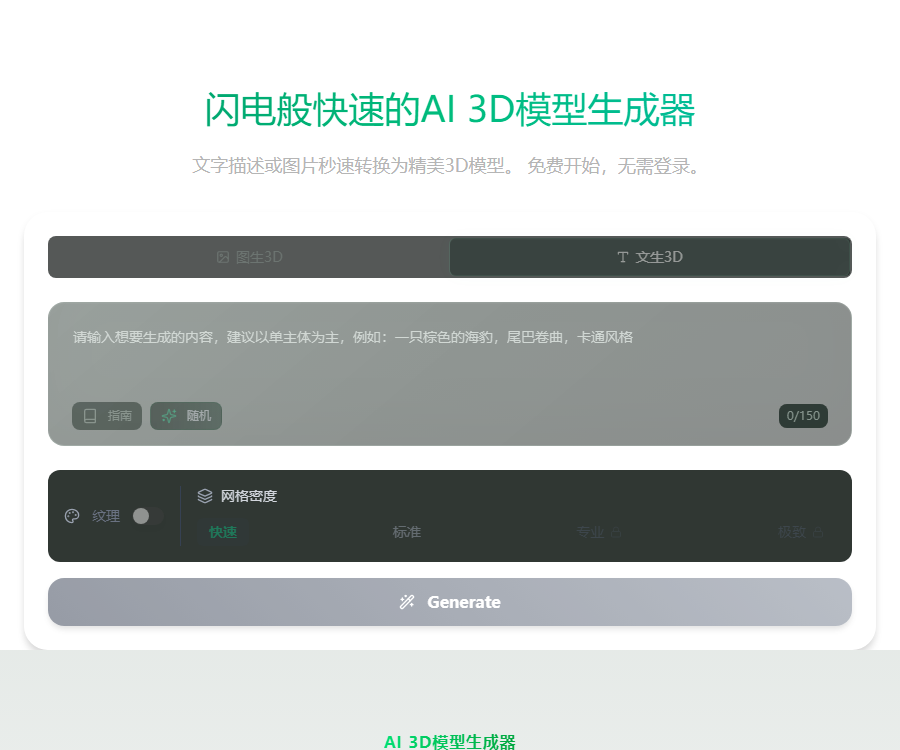
Fast3D model generator
AI-powered tool for rapid creation of 3D models
Tags:Common AI image toolsWhat is Fast3D?
Fast3D is an online AI tool that converts text or images into 3D models.
It is designed for use in areas such as gaming, 3D printing, AR/VR, product design, and concept validation.
Main functions
- Generate 3D models based on the textual description.
- Create 3D assets quickly from a single image.
- The paid plan supports converting multi-view images into 3D format.
- Different grid quality levels with varying degrees of precision are available.
- It can generate PBR textures and more comprehensive surface materials.
- Preview, manage, and download the generated assets online.
- It supports mainstream grid and 3D printing formats.
Three ways of generation
| Method | Input requirements | Suitable uses |
|---|---|---|
| Text-to-3D | Clearly describe objects, styles, and structures. | Concept sketches and creative exploration |
| Generate 3D from a single image | Clear images with a complete subject and a simple background | Quickly restore a single object |
| Multi-view 3D generation | Multiple consistent views of the same object | Improve the accuracy of the back and side structures |
Multi-view input is part of the paid service offerings; the available options depend on the generator and the current subscription plan.
Grid quality level
| Gear | Grid integration | Usage suggestions |
|---|---|---|
| Fast | 20 points | Used for drafts, composition, and low-cost experiments |
| Standard | 50 points | Balancing details, speed, and integration overhead |
| Professionalism | 100 points | Used for assets that require higher geometric quality. |
| Ultimate | 200 points | Used for high-detail models and subsequent refinement |
Free users can use the Quick and Standard tiers, while the Professional and Ultimate tiers are available only with paid subscriptions.
PBR texture generation
PBR textures are used to represent material properties such as color, roughness, and metallic texture, thereby making the model appear more realistic in its rendering.
- Suitable for game engines, product demonstrations, and real-time rendering.
- When PBR is enabled, the total score is 3 times the cost of the corresponding grid.
- Texture quality is affected by input clarity and object occlusion.
- Texture-free models are more suitable for first examining structure and contours.
- Before official use, check the UV, seams, and repeated textures.
Generation speed
The official FAQ states that a single task usually takes between 5 and 180 seconds; the actual time required depends on the quality and texture settings.
| Task type | Reference time | Factors affecting it |
|---|---|---|
| Simple texture-free model | About 5 to 30 seconds | Grid levels, queuing, and object complexity |
| High-poly PBR models | Up to about 3 minutes. | Texture, details, service load, and task settings |
After submitting the task, you can leave the creation page and go to the assets page to check the progress.
Supported export formats
| Format | Features | Common uses |
|---|---|---|
| GLB/GLTF | It can include grids, materials, and textures. | Websites, AR, real-time preview, and game engines |
| FBX | Common content creation exchange formats | Animation, DCC software, and game workflows |
| OBJ/MTL | Universal grids and basic materials | Modeling software and cross-tool exchange |
| STL | Focusing on surface geometry | 3D printing slicing and prototype creation |
The fact that the format can be downloaded does not mean that the model is ready for use in binding, animation, or printing; it still needs to be checked in professional software.
Fast3D usage guide
- Open the generator and select text, single-image, or multi-view mode.
- Prepare a clear description, or upload an image for which you have usage rights.
- Ensure that the main subject of the image is intact, the lighting is even, and the background is simple.
- Choose a fast or standard grid for the initial test.
- Decide whether to enable PBR textures and view the estimated score.
- Submit the task and wait on the assets page for it to be generated.
- Rotate the preview model to examine the structure of the front, back, and bottom sides.
- Adjust the prompt, upload an image, or set the quality level as needed.
- Select the format supported by the target software to download the model.
- Fix topology, UVs, scale, and materials in the modeling software.
- Used to perform checks for integrity and wall thickness before 3D printing.
Package price
As of August 30, 2026, the official pricing page offers free, Pro, Max, and a custom unlimited version.
| Package | Monthly payment | Annual equivalent | Integration and concurrency |
|---|---|---|---|
| Free version | $ | $ | 300 points per month, 1 concurrent task |
| Pro | 10 dollars per month | 7 dollars per month | 10,000 points per month, 2 concurrent tasks |
| Max | $ | 14 dollars per month | 30,000 points per month, 4 concurrent tasks |
| Max Unlimited | Contact sales | Contact sales | Infinite integrals and infinite concurrency |
The annual payment page shows a price of about 30% off; the actual total cost, taxes, and renewal terms are indicated on the settlement page.
Comparison of package features
| Equity | Free version | Pro | Max |
|---|---|---|---|
| Daily downloads | 2 times | No restrictions | No restrictions |
| Asset licensing | CC BY 4.0 | Private and owned by the customer | Private and owned by the customer |
| PBR texture | Not included | Support | Support |
| Multi-view image to 3D | Not included | Support | Support |
| Quality level | Fast, standard | Add professional tier | Add professional and ultimate tiers |
| Queue priority | Finite | Standard | Highest |
\"Unlimited\" may still be subject to fair use policies, system capacity, and account terms.
How to calculate the integral
The amount of points required is determined by the grid level and whether a PBR texture is generated; an estimated consumption value is displayed before submission.
| Gear | Only grid | Total consumption after enabling PBR |
|---|---|---|
| Fast | 20 points | 60 points |
| Standard | 50 points | 150 points |
| Professionalism | 100 points | 300 points |
| Ultimate | 200 points | 600 points |
Failed tasks, the validity period of points, and refund procedures are subject to the account records and the current terms of service.
Commercial use and asset licensing
The asset licenses for free and paid plans are different; it is necessary to determine the plan in which the assets were created before using them for commercial purposes.
- The assets in the free version are licensed under CC BY 4.0 as indicated on the official pricing page.
- Such a license usually requires appropriate attribution and a description of any changes.
- The paid plan indicates that the assets are private and belong to the customer.
- Assets generated for a fee can be used in commercial projects, but they are still subject to the terms of service.
- The trademarks, characters, and design rights present in the image will not disappear automatically.
- The team should keep records of the creation date, as well as of the licensing details for packages and materials.
APIs and automation
The official FAQ clearly states that the Fast3D API is not available at the moment; for now, only the web-based generation process is offered.
Teams with needs for commercial APIs can apply for early access, but the waitlist should not be considered an available interface.
GitHub and open source
To date, no official product source code, model weights, or deployment repositories for Fast3D.io have been made public.
Therefore, Fast3D should be classified as a closed-source online service; third-party repositories with similar names do not represent its official code.
Which users are it suitable for
- Game developers: Quickly create prototypes of items and scenes.
- 3D designer: Refines the concept assets after they have been created.
- E-commerce and brand teams: Create 3D render drafts of the products.
- AR/VR creators: Prepare the basic assets needed to work with real-time engines.
- 3D printing user: Convert the concept into a repairable STL draft.
- Educate users: Demonstrate the process of converting images or text into 3D models.
Quality inspection checklist
- Check the model for holes, floating surfaces, and self-intersections.
- Verify that the normal direction, topological density, and number of faces are reasonable.
- Check the structure of the back, bottom, and shaded areas.
- Check UV seams, texture stretching, and color variations.
- After importing the target software, verify the units, scales, and coordinate axes.
- The animation model requires re-topology, binding, and weight testing.
- When printing a model, it is necessary to check its closure, wall thickness, and support structures.
Usage restrictions
- A single image cannot provide complete information about the obscured areas.
- Complex mechanical structures and thin sheets are prone to geometric errors.
- It is difficult to replicate transparent, reflective, and hairy textures with accuracy.
- Generation models generally cannot be used directly for professional animation.
- High quality and PBR textures significantly increase the score consumption.
- The generation speed is affected by the complexity of the task and the queueing situation.
- AI results cannot replace engineering precision and production verification.
Frequently Asked Questions
Does Fast3D support text-to-3D generation?
Yes, users can enter descriptions of the object, style, and structure to create a 3D model.
Can a model be created using multiple images?
Yes, the Pro and higher tiers support multi-view 3D generation, which helps to improve the appearance of the sides and back.
How many points are available in the free version of Fast3D?
The free version offers 300 points per month, along with 1 concurrent task and 2 downloads per day.
How much is the paid version of Fast3D?
Pro costs $10 per month, while Max costs $20 per month; the equivalent annual rates are $7 and $14 per month respectively.
Can generative models be used for commercial purposes?
Assets generated from paid subscriptions can be used in commercial projects, but the terms of service and the rights related to those assets must still be respected.
Does Fast3D provide an API?
The API is not yet officially available; at present, only expressions of interest for early commercial access are accepted.
Is Fast3D an open-source tool?
No, at present no official publicly available product source code, model weights, or local deployment repositories have been found.
Tools similar to the Fast3D model generator




 Guigong Network Security Registration No. 45132202000164