






Ordinary people’s AI ID photos
With a focus on \"zero-cost core technology, AI-driven intelligence, and adaptation to various scenarios,\" it addresses users’ needs for \"low-cost production, rapid result delivery, and compliance with different standards.\" By integrating \"AI-powered facial recognition, intelligent background switching, and a standardized set of dimensions,\" it enables…
Tags:Common AI image toolsWhat is a normal-person AI ID photo?
凡人AI证件照 is a tool for creating online ID photos and replacing backgrounds, provided by 凡人AI工具箱.
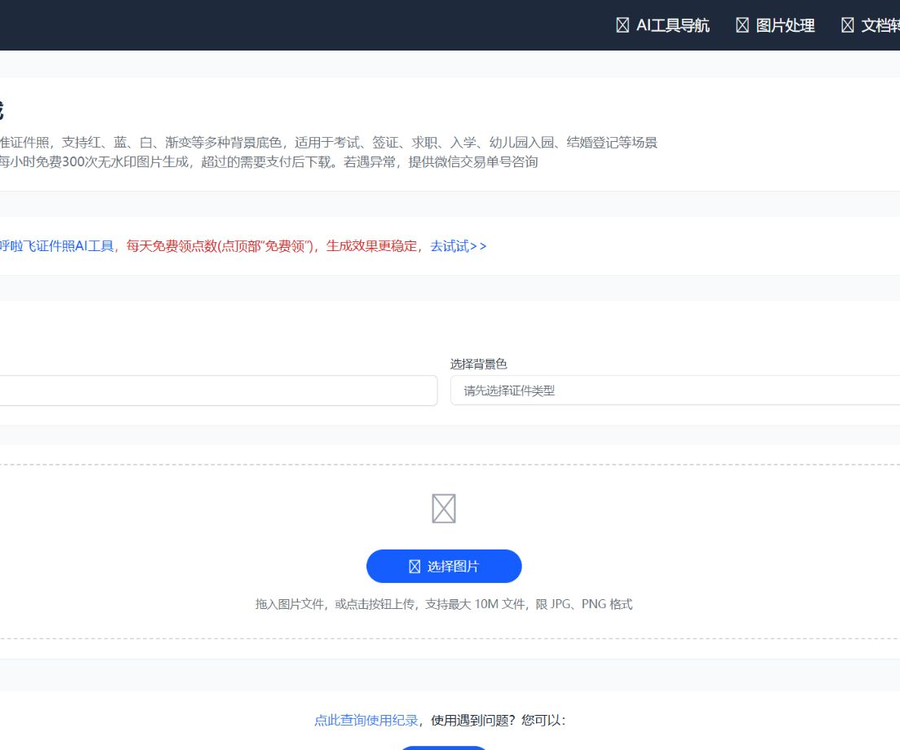
After the user uploads a frontal photo, the system identifies the face, adjusts the dimensions, and generates the final image with the specified background color.
Main functions
- Automatically recognizes facial features and shoulder contours.
- Perform hair-level background separation.
- Common sizes such as one inch and two inches can be generated.
- Switch between red, blue, white, and gradient backgrounds.
- Custom background colors are supported.
- Suitable for exams, job hunting, visa applications, and entry to institutions.
- Preview and download the processing results online.
- Tools for editing, sharpening, and masking related photos.
Requirements for ID photos
After selecting the specifications, the tool will generate the photo based on the corresponding width-to-height ratio and the position of the portrait.
| Specifications | Common sizes | Reference pixel | Common uses |
|---|---|---|---|
| One inch | 2.5×3.5 centimeters | 295×413 | Resume, social security card, and some exams |
| Two inches | 3.5×4.9 centimeters | 413×626 | Passport, visa, and educational qualification documents |
| U.S. visa | 5.1×5.1 centimeters | As required by the institution | Visa application |
| Custom specifications | In accordance with the system’s submission requirements | In accordance with the system’s submission requirements | Designed for specific organizations or platforms |
Different organizations may vary the dimensions, pixels, file size, and background requirements; it is necessary to check the latest guidelines before submitting.
Background color
- A white background is commonly used for visas, identification documents, and certain exams.
- Blue backgrounds are commonly used in resumes, work IDs, and identification photos.
- A red background is commonly used in certain registration and certification scenarios.
- Gradient backgrounds are more suitable for uses that are not strictly formal documents.
- To define a custom color, you need to enter or select the desired color.
- The required background color is subject to the regulations of the actual handling agency.
Requirements for uploading files
The current page supports JPG and PNG images, with a maximum size of 10 MB per file.
- Use the original photos to avoid multiple compressions.
- The face is clear with no motion blur.
- The person is looking straight at the camera.
- The hair should not cover the eyes and ears to a large extent.
- The background should form a clear contrast with the color of the clothing.
- Do not upload photos that have been heavily retouched.
Guide to using AI-generated photos for ID purposes
- Go to the 凡人AI证件照 tool page.
- Check the photo specifications for the target institution.
- Choose one inch, two inches, or specify the type of document.
- Choose a red, blue, white background or a custom one.
- Upload JPG or PNG photos not exceeding 10 MB.
- Wait for the system to complete the upload and face recognition.
- Preview the head proportions, shoulders, and hair edges.
- Switch the background color to check for any residual background.
- Check the free quota or the current download price.
- Download the watermark-free final version and save the original photo.
- Check the requirements for pixels, volume, format, and color.
- Keep both the original and the finished copy after formal submission.
Free quota and pricing
The system currently allows for the generation of 300 watermark-free images per hour; once this quota is exhausted, paid downloads are required.
| Project | Current rules | Precautions |
|---|---|---|
| Free generation without watermarks | The system performs 300 operations per hour. | The total capacity of the entire station, not 300 times per individual. |
| Excessive generation or downloading | Download after payment | The amount is displayed in real time within a pop-up window. |
| Member packages | Unpublished fixed packages | Do not use third-party old prices |
| Refund in case of processing failure | Application can be submitted within 7 days. | Submit through the website’s help page |
| Refund if the result is not satisfactory | Application can be submitted within 7 days. | Keep order details and screenshots of issues |
The above fee rules were verified on August 30, 2026; the free capacity and the amount that needs to be paid may change depending on the status of the server.
How to understand the free quota?
The statement on the page that reads “300 free requests per hour” refers to the overall availability of the system, not the quota assigned to an individual account.
- The free capacity may be used up more quickly during peak times.
- A payment prompt will be displayed on the page once the quota is used up.
- Free processing may be restored in the next period.
- Confirm the amount to be charged for this download before making the payment.
- Do not present the free usage quota as a permanent entitlement.
AI photo retouching
The passport photo page also provides an AI enhancement tool that can be used to improve appearance, ensure proper attire, adjust expressions, and enhance skin tone.
- Refinement is another functional entry point.
- Natural modifications cannot change identity characteristics.
- Visas and official documents may prohibit obvious beautification.
- After the outfit change, the collar, shoulders, and lighting effects need to be checked.
- Expression correction may produce unrealistic details.
Photography pose
- Keep your head upright and look straight at the camera.
- The shoulders should be relaxed naturally and at the same level on both sides.
- Keep your face centered; avoid turning your head to the side.
- Decide whether to expose the ears based on the requirements for identification documents.
- Maintain a natural expression and avoid exaggerated smiles.
- Keep your eyes naturally open; do not squint or stare.
Light and background
- Give priority to using even and gentle frontal lighting.
- Do not turn your back to the window, as this can cause your face to darken.
- Avoid heavy shadows caused by unilateral harsh lighting.
- The temporary background should be as clean as possible and have a single color.
- The color of the clothing contrasts with the background it is against.
- There should be no significant reflection on the lenses of glasses.
Can the ID photo be used as is?
Products generated by AI do not necessarily meet the approval criteria of examination, visa, or document processing systems.
- Check the width, height, and pixels of the nuclear image.
- Check the file format and maximum size.
- Check the space at the top of the head, chin, and shoulders.
- Verify that the background color value meets the requirements.
- Check whether glasses, makeup, and jewelry are allowed.
- Official documents must not alter the true features of a person’s face.
Face privacy
To create an identification photo, it is necessary to upload a clear image of the front face; the photo may contain recognizable facial features.
As of the time of verification, no complete and publicly available privacy policy nor a clear policy regarding the deletion timeline for documents was found.
- Only upload photos of yourself or of people who have given you permission.
- Do not upload both the ID number and address at the same time.
- Delete the downloaded and cached copies in the browser after use.
- Do not process ID photos on public computers.
- Children’s photos should be approved and managed by their guardians.
- For highly sensitive uses, local offline tools can be chosen.
Refunds and issue reporting
If the page generation fails or the result is not satisfactory, a refund can be requested within 7 days through the website’s help page.
- Save the WeChat transaction number or payment receipt.
- Failed to capture the error or abnormal result page.
- Record the usage time, specifications, and background color.
- Submit issues through the help or feedback section.
- Indicate whether you wish to have it processed again or to get a refund.
- Retain communication records until the issue is resolved.
Copyright and Compliance
- One must not use someone else’s photo to pretend to be them.
- It is forbidden to create fake documents or application materials.
- A job application photo should not lead to any significant misrepresentation of one’s identity.
- Permission is required for photos of children and customers.
- The results generated cannot replace official identity verification.
- When handling business matters on behalf of clients, it is necessary to protect their privacy.
API and open-source status
As of the time of verification, no official source code repository or public developer API for Fanren AI’s ID photos was found.
- The fact that an online tool is accessible does not mean it has an open API.
- The portrait segmentation model and the server-side code are not made public.
- Third-party GitHub projects with the same name are unrelated to this tool.
- The method for batch enterprise integration has not yet been officially confirmed.
Which users are it suitable for
- Students and candidates who are taking temporary photos for registration.
- Job seekers who need a resume photo.
- The staff member who changes the background color of the photos.
- Parents who take photos for enrollment.
- Individuals preparing visa or registration documents.
- Ordinary users who need to quickly try common specifications.
Product advantages
- No desktop software installation is required.
- Common document specifications are listed in a centralized area.
- Supports various backgrounds and custom colors.
- Automatically completes portrait segmentation and cropping.
- Watermark-free images can be downloaded during the free period.
- A limited-time refund option is available in case of failure or dissatisfaction.
Usage restrictions and precautions
- The free quota is the shared capacity of the system.
- The amount of overpayment is not fixed and made public.
- A single image cannot exceed 10 MB.
- It is confirmed that only JPG and PNG are supported.
- The edges and specifications of the portraits need to be checked manually.
- There is no publicly specified deletion schedule for documents.
- The official review result is determined by the handling agency.
Frequently Asked Questions
What can ordinary AI-generated ID photos be used for?
It can automatically identify faces, crop images to standard document sizes, and change the background to red, blue, white, or a custom color.
Are AI-generated ID photos free for ordinary people?
The system allows for 300 watermark-free downloads per hour; once the available capacity is exhausted, downloading further content requires payment based on the current price displayed on the page.
Is 300 times per hour the individual limit?
No, the page describes the free capacity that is shared across the system; users should not interpret it as 300 uses per hour per individual.
Which image formats and sizes are supported?
Currently, JPG and PNG are supported, with a maximum file size of 10 MB per upload.
Will the photo produced definitely pass the approval?
No guarantee is provided; users must verify the dimensions, pixels, background color, volume, and portrait requirements as specified by the handling agency.
Can a refund be issued if the processing fails?
If the page description is unsuccessful or does not meet expectations, an application can be submitted within 7 days; it is necessary to keep the transaction reference number and screenshots of the issues.
Is 凡人AI证件照 an open-source tool?
No official source code repository or developer API was found; the fact that a website is available online does not mean that the product is open source.
Tools similar to those used for creating AI-generated ID photos for ordinary people




 Guigong Network Security Registration No. 45132202000164