






Create Images
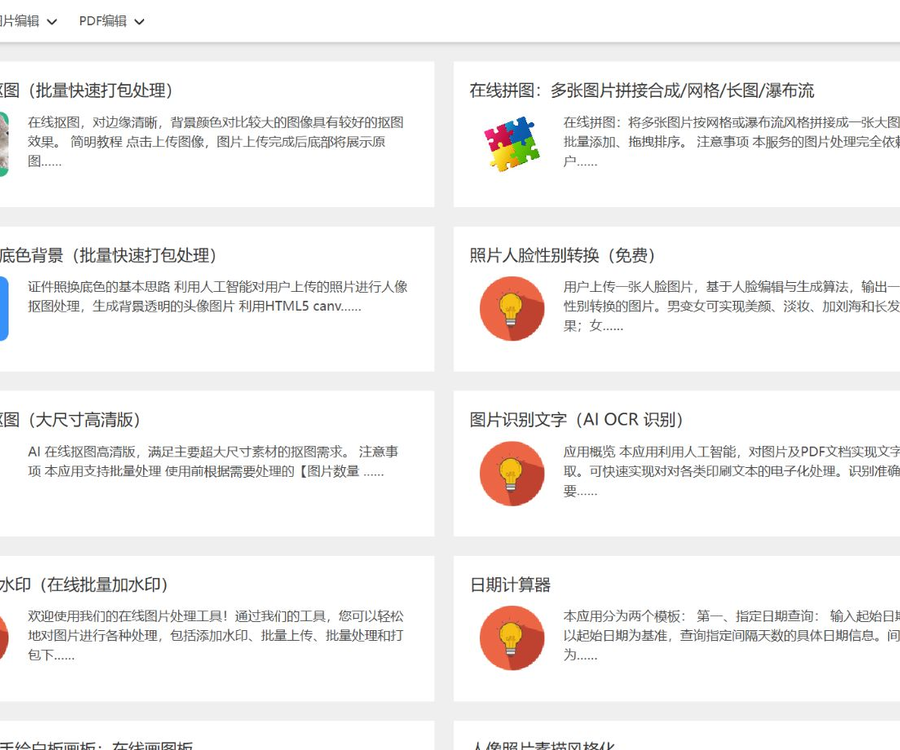
Chuangtu is a platform that offers a variety of AI-based online image processing tools, including AI-powered image masking, background color replacement for ID photos, gender identification from facial features in photos, and the conversion of portrait photos into sketch styles.
Tags:Common AI image toolsWhat is Chuantu?
Chuangtu is an online tool platform for processing images and documents, designed for individual users and light office tasks.
The platform offers both AI server-side tools and browser-based local tools; it is necessary to distinguish between these approaches before using them.
Main functions
- AI batch image extraction and high-definition image extraction.
- The background color of ID photos is automatically changed.
- Image and PDF text recognition.
- The image is enlarged by 4 times.
- Removal of image logos, watermarks, and subtitles.
- Automatic colorization of black-and-white photos.
- Pixel art and gender transformation of faces.
- Image cropping, compression, and format conversion.
- PDF merging and PDF to image conversion.
- Text-to-speech and QR code tools.
AI online image masking
AI image masking identifies the subject and creates an image with a transparent background; it supports batch uploading as well as packaged downloading.
- Universal masking is suitable for ordinary objects.
- Portrait masking is aimed at the edges of the body and hair.
- Product masking is suitable for e-commerce product images.
- The clothing and food options are optimized for specific body types.
- Misjudgment can still occur when the background color is similar to the main color.
Comparison between the standard version and the high-definition version
| Version | Maximum size | Maximum file size | Suitable scenarios |
|---|---|---|---|
| Regular image masking | 2000×2000 pixels | 9 MB | Web page images, profile pictures, and regular product images |
| High-definition image masking | 10,000×10,000 pixels | 40 MB | Posters, printed materials, and high-resolution assets |
Change the background color of ID photos
This tool first isolates the portrait, and then replaces the transparent background with a specified color.
- It is recommended to upload photos that are front-facing, clear, and have even lighting.
- The edges of the hair and any transparent accessories need to be checked carefully.
- Changing the background color of the same photo is charged only once.
- The photo specifications must still meet the requirements of the issuing authority.
- It is not allowed to use AI-generated results to forge identities or documents.
OCR text recognition
OCR can extract printed text from images and PDFs, making it suitable for entering data from invoices, scanned documents, and other materials.
- The clearer the original image, the more accurate the text recognition is usually.
- Tilt, reflections, and complex backgrounds can affect the results.
- Errors may occur in handwritten text and less common characters.
- Financial, contractual, and archival contents must be reviewed manually.
- The platform does not guarantee that the text recognition will be 100% accurate.
4x zoom for AI images
The zoom tool enlarges the image size by a factor of 4 in a proportional manner, but it does not guarantee that the original image’s blurriness will be corrected.
- JPEG, JPG, PNG, BMP, and WEBP are supported.
- The file size must not exceed 3 MB.
- The input size must be greater than 32×32 pixels.
- The input size must be less than 1920×1080 pixels.
- It is more suitable for materials that are originally clear but of small size.
Image restoration and stylization
- Coloring black-and-white photos involves guessing the colors of the original scene.
- Pixel art converts photos into a pictorial style.
- Gender transformation regenerates features such as hair and makeup.
- The unmasking tool will automatically fill in the erased areas.
- The details generated may not correspond to actual history or the original visuals.
Regular image and PDF tools
Some tools process files directly in the browser, without the need to send the data to AI models.
- Image cropping and canvas adjustment.
- Conversion and compression of PNG, JPG, and WEBP.
- Multiple-image grids, long images, and waterfall-style concatenation.
- Add text or image watermarks to multiple images at once.
- PDF merging and conversion to JPG, PNG.
- Conversion between images and Base64.
- QR code generation and parsing.
Tutorial for creating diagrams
- Go to the CreateArt homepage and select the desired tool.
- Read the page instructions, input restrictions, and pricing notes.
- Verify that the file does not contain any unnecessary private information.
- Upload a single image to test the processing effect.
- Select the image masking type, background color, or output parameters.
- Check the unit price and estimated charges before submitting.
- Start the task and wait for it to be processed.
- Enlarge to view details of edges, text, and colors.
- If unsatisfied, change the processing mode and try again.
- For batch tasks, use a small amount of material first to verify the process.
- Download individual images or package the results in a browser.
- Save the original file and delete the copies that are no longer needed.
Charging price
Chuangtu uses a combination of free tools and pay-per-use services; the cost of paid tasks is deducted from the account balance.
| Tool or version | Real-time reference price | Billing unit |
|---|---|---|
| Regular AI image masking | 0.01 yuan | Each one |
| High-definition AI image segmentation | 0.02 yuan | Each one |
| Change the background color of ID photos | 0.02 yuan | Each photo |
| 4x zoom for AI images | 0.05 yuan | Each one |
| Erasing of image logos or watermarks | 0.01 yuan | Each one |
| Colorizing black and white photos | 0.20 yuan | Each one |
| Human portrait in a stylized sketch style | 0.05 yuan | Each one |
| OCR text recognition | 0 yuan | The current page is free. |
| Image cropping and partial conversion | 0 yuan | The current page is free. |
The prices listed above were verified on August 30, 2026; the actual costs will be those indicated on the page before the task is submitted and as shown in the settlement result.
How to control processing costs
- First, test it using the free mode or individual assets.
- High-definition image masking is used only for tasks that require large-sized images.
- Confirm the unit price and the number of images before uploading in batches.
- Avoid repeated processing due to the wrong mode being selected.
- When the amount is large, register an account first and then top up.
- Save the successful results to avoid repeated calls.
Privacy and file handling
AI image segmentation, OCR, and cloud-based restoration usually require uploading files, while browser tools can process them locally.
- Remove unnecessary personal information from the ID photo before uploading it.
- Accounts, addresses, and signatures on contracts and invoices should be concealed.
- Permission to process customer images is required.
- Confidential information should not be provided to online identification services.
- Local processing tools should also use trusted devices and browsers.
- Before using it, enterprises should establish rules for storage, deletion, and confidentiality.
Precautions for downloading in a packaged format
Batch packaging is executed in the user’s browser, and its stability is affected by the device’s memory and the limitations of the browser.
- A large number of images can be divided into multiple smaller batches.
- Use a modern browser with an updated version.
- Do not close the page or clear the cache when packaging.
- Allocate sufficient memory when the file size is large.
- In the event that processing after deduction fails, the order and screenshots should be retained as feedback.
Are AI results reliable?
AI processing may miss fine hairs, accidentally delete areas with similar colors, or produce unrealistic colors and textures.
- Transparent and semi-transparent objects require magnification for inspection.
- The edges of the product should be previewed on both light and dark backgrounds separately.
- The OCR results need to be checked item by item against the original document.
- Coloring of historical photos is merely an estimation by the model.
- The enlarged version cannot replace the original image with its true high resolution.
Copyright and Compliance
- Only process images that you own or for which you have authorization.
- Removing watermarks must not be used to circumvent copyright markings.
- Face transformation requires the consent of the person whose portrait is being used.
- It is not allowed to create false documents using photo-editing tools.
- Check the materials, fonts, and permissions for characters before using them commercially.
- For important uses, keep the original image along with the processing records.
API and open-source status
As of the time of verification, no API documentation intended for developers or any official source code repository for Chuangtu was found.
- The fact that a web tool can be used online does not mean it is an open API.
- The use of third-party cloud services does not mean that the image creation platform is open source.
- The public page does not provide options for private deployment.
- Batch enterprise inquiries can be made through the official contact channels.
Which users are it suitable for
- Designers who need to quickly work with images featuring transparent backgrounds.
- E-commerce operations for mass production of product main images.
- Individual users who temporarily change the background color of their ID photos.
- Office staff responsible for organizing scanned documents.
- Users who repair or style family photos.
- Content creators who need lightweight image and PDF tools.
Product advantages
- The tool entries are grouped together, and the operation in Chinese is simple.
- Regular and high-definition mask removal support different sizes.
- Supports single, batch, and packaged downloads.
- Some routine processing is carried out locally in the browser.
- Pay-per-use is suitable for users who use it infrequently.
- The unit price is displayed directly on the task page.
Usage restrictions and precautions
- Different tools support various formats and sizes.
- AI results may contain edge or text errors.
- The per-use price and free status may change.
- Batch packaging depends on the performance of the browser and device.
- Sensitive files should not be uploaded to server-based tools.
- Public APIs and official open-source projects have not been confirmed yet.
Frequently Asked Questions
What tools does Chuantu mainly provide?
It offers AI image masking, background replacement for ID photos, OCR, image enlargement, photo coloring, as well as processing of images and PDF files.
Can Chuangtu be used for free?
Some tools are available for free at the moment; features such as AI image segmentation, image enlargement, and photo coloring are charged on a per-task basis.
What is the difference between regular image masking and high-definition image masking?
The standard version can have up to 2,000 pixels and a size of no more than 9 MB, while the high-definition version can have up to 10,000 pixels and a size of no more than 40 MB.
How much does it cost to use Chuangtu AI for image masking per image?
For verification, the cost for standard image masking is 0.01 yuan per image, while the cost for high-resolution image masking is 0.02 yuan per image; the price specified on the submission page applies.
Can AI image enlargement make blurry photos clearer?
There is no guarantee; it mainly enlarges the size, and the manufacturer clearly states that when the original image is blurry, its clarity will not improve significantly.
Will Chuangtu upload all images to the server?
No, some cropping and conversion tasks are handled locally in the browser, but AI and OCR tools usually require files to be uploaded.
Does Chartio provide APIs or open-source code?
As of the time of verification, no public API documentation or official source code repository was found; the presence of a web interface does not imply that the product is open-source.
Tools similar to Canva




 Guigong Network Security Registration No. 45132202000164