






135 AI typesetting
WeChat official account tools for AI-driven graphic layout and intelligent copy generation
Tags:Common AI image toolsWhat is 135 AI typesetting?
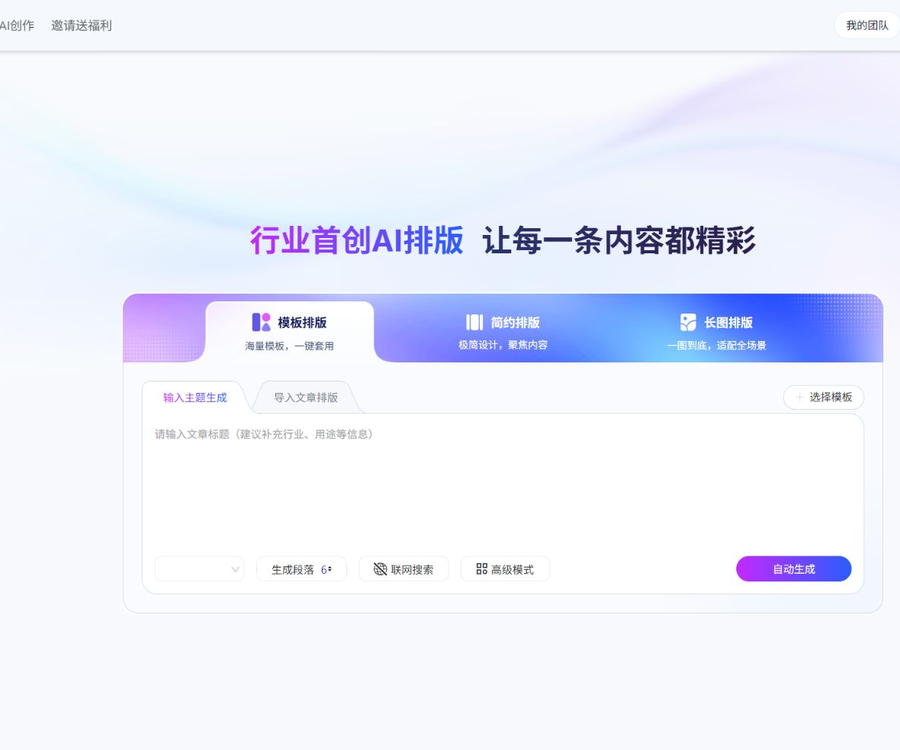
135 AI Layout is an intelligent tool for formatting text and images, designed for WeChat official accounts and other multimedia content; it is managed as part of the 135 Editor product suite.
It can generate articles from a topic, or it can import existing content and then automatically apply templates, hierarchies, color schemes, and images.
The differences between 135 AI Layout and 135 Editor
135 AI formatting, 135 Editor membership, and AI writing in 135 Editor are part of different products or benefit systems.
Buying a membership for the 135 editor does not automatically grant an AI layout membership, and the validity periods and usage limits of the two memberships are not interchangeable.
Three AI typesetting modes
Template formatting
Template formatting allows the articles generated from a theme or the imported documents to be fitted into a complete official account template.
Users can choose from alternative templates and then continue to modify the specific styles, colors, and formatting of the text.
Simplified layout
A clean layout emphasizes a clear and restrained visual style, making it suitable for notifications, informational articles, and formal content.
It also supports AI-generated content, as well as import from Word or links, and allows for the adjustment of templates and formatting after creation.
Long image formatting
Long-form layout analyzes the structure of the article and creates a single-image layout that is suitable for continuous reading.
After it is created, the text can be modified, but there are fewer options for adjusting the overall layout compared to the template mode.
Main functions
Generate articles on a topic
When there is no ready-made content available, users can enter a topic, and the AI will generate an outline and the complete text for the article.
The draft still requires manual verification of facts, data, citations, and brand representation.
Import of various types of content
The platform allows for pasting text, as well as importing content from Word, Markdown, and article links.
Smart import is more suitable for users who wish to keep the original text unchanged and avoid any alterations by AI.
Structure recognition and one-click formatting
AI can identify elements such as titles, text, lists, and citations, and then establish a clear hierarchy of the content.
After the analysis is completed, the system will match the template style, font, colors, and layout.
Outline and main text editing
Before generating the layout, it is possible to modify the outline, headings, text, and image options.
Even after formatting, the text and some styles can still be adjusted, avoiding the need to redo the entire document.
Template and style replacement
Users can replace the entire template with just one click, and they can also change individual titles, text content, or decorative elements.
Before using paid templates, it is necessary to verify the current membership level and the scope of commercial authorization.
Smart image matching and AI-driven image selection
Smart image matching uses the platform’s own image library, without consuming any AI credits.
AI image generation creates images based on the paragraphs of an article, with each image requiring 2 uses of the AI capacity.
Authorization synchronization for official accounts
After authorizing the official account, users can synchronize the completed articles directly to the official account’s backend.
Before synchronization, check the fonts, images, interactive elements, and sensitive words in the mobile preview.
Copy, long-image export, and PDF export
Once completed, the content can be copied in its entirety, or a long-format image or PDF can be generated for download.
The free version and the paid version differ in terms of watermarks, templates, and export options.
Cloud draft
Members can use cloud drafts to save the layout history, making it easy to continue editing or restore previous versions.
It is still recommended to keep both the original local version and a backup of the final published version for important articles.
Which users are it suitable for
- People who need to handle the creation of content for official accounts quickly.
- Organizations that regularly issue notices, provide explanations of policies, and share information about upcoming events.
- New media teams of companies that wish to standardize their brand templates.
- Authors who need to convert Word or Markdown content into the format suitable for official accounts.
- Creators who produce long-form images, knowledge cards, and content posters.
- Teams that require collaboration among multiple people and enterprise-level commercial licensing.
- Developers who wish to integrate formatting capabilities into content systems.
135 AI Typesetting Tutorial
- Log in to your AI typesetting account and select the typesetting mode.
- Enter the article topic, or import existing text and documents.
- It is recommended to use smart import when retaining the original text.
- Check the identified title, outline, and text hierarchy.
- Choose Smart Image Matching from the gallery, or AI image matching that requires a certain number of uses.
- Select a solution from the candidate templates that is suitable for the industry and brand.
- Adjust local styles, fonts, colors, and article spacing.
- Check the image copyright, facts, spelling errors, and sensitive words.
- Use your phone to preview and confirm the actual reading experience.
- Copy, export long images or PDFs, or sync to a public account.
- Keep the original draft, authorization proof, and the final version after publication.
135 AI typesetting membership price
As of August 30, 2026, the member section on the official website offers a free version, a personal member version, and an enterprise commercial version.
| Version | Reference price | Number of AI formatting attempts | Commercial use scope | Number of official accounts |
|---|---|---|---|---|
| Free membership | 0 yuan | It is subject to the information displayed in the account. | No commercial licensing protection available | 1 |
| Individual Membership Version | 8 yuan per month starting from | 200 times per month | Commercial use by individual entities | 2 |
| Enterprise Commercial Version | 66 yuan per month onwards | 800 times per month | Commercial use by corporate entities | 5 |
\"Starting from monthly\" refers to the price calculated on a periodic basis for such activities and purchases; the page also shows time-limited offers such as getting one more year free when purchasing for a year.
The actual total amount due, the duration of the activity, taxes and fees, as well as the renewal price, shall be based on the settlement page at the cashier.
Comparison of member quotas
| Equity | Free membership | Individual Membership Version | Enterprise Commercial Version |
|---|---|---|---|
| Sensitive word filtering | 3 times | 100 times | 1000 times |
| Upload image | 100 pieces/month | 300 pieces/month | 1000 pieces/month |
| Total image size | 150 pieces | 1000 pieces | 6,000 pieces |
| Word import | Not listed as a full entitlement. | Support | Support |
| Watermark-free long image | Not listed as a full entitlement. | Support | Support |
| Cloud draft | Not listed as a full entitlement. | Support | Support |
| Editing on mobile devices | Not listed | Not listed | Support |
| Dedicated customer service | Not listed | Not listed | One-on-one service |
The official website may adjust the number of events, capacity, and member benefits from time to time; it is therefore necessary to review the member page again before renewing the membership.
How are AI usage counts consumed?
- The number of AI layout attempts is used for the corresponding intelligent layout task.
- Generating one image with AI-powered image creation consumes 2 units of AI usage.
- Tuku’s intelligent image matching does not consume any AI credits.
- Once the quota is used up, you can wait for an update in the next calendar month.
- Users can also increase the number of purchases in their personal account.
- The number of AI formatting operations cannot be mixed with the number of AI writing operations in the 135 editor.
Commercial licensing and copyrights
The formatted content generated in the free version is intended only for learning or charitable purposes; it does not provide any commercial use rights for individuals or companies.
The individual membership is suitable for personal use in commercial purposes, while the corporate version is intended for corporate marketing and includes a license document that can be downloaded.
- Individual memberships are not suitable for corporate official accounts, corporate stores, or official promotions.
- Companies should use the enterprise commercial version and keep the orders as well as the authorization documents.
- Text, images, trademarks, and character materials uploaded by users must be obtained with proper authorization.
- When using AI to generate images, it is also necessary to check for risks related to people, trademarks, and similar works.
- Template authorization does not mean that all external materials used in the article have been authorized.
Notes on automatic renewal and refunds
The AI layout monthly subscription is available on a recurring monthly basis, and automatic renewal can be disabled through the original payment method.
Official guidelines recommend canceling the service in advance before the end of the billing cycle, to prevent charges from being deducted in the subsequent cycle.
- Canceling the renewal will not affect the current valid membership period.
- After the membership expires, drafts that contain member-exclusive content may no longer be editable.
- Online memberships are virtual products; once activated, they cannot be transferred or refunded in principle.
- The account is for personal use only; regular members are not allowed to share it among multiple people at the same time.
- Before making a purchase, it is necessary to verify the account details, membership type, duration, and the commercial entity involved.
Enterprise open platform and API integration
The 135 Editor Open Platform enables the integration of editing and formatting capabilities into enterprise content management systems, and it offers API services as well as consultation on privateization solutions.
To enable AI-based layout for users, it is necessary to apply to the authorities for an appkey and an AESkey; once encryption verification is completed, the functionality can be utilized through iframe or SDKs.
- Embedded solutions are suitable for using a full editor within existing systems.
- The standard API can be used to request formatting results and AI capabilities.
- Companies can consult about private deployment based on their data security requirements.
- There are no unified and publicly available quotes for connection costs, usage amounts, and service levels.
- Before development, obtain the latest interface documentation and testing environment.
Privacy and content security
Documents, links, images, and content from official accounts imported will be processed by the platform; materials for which no usage rights exist should not be uploaded.
- Delete information such as ID cards, phone numbers, customer lists, and internal accounts.
- For corporate secrets, the rules for data processing and storage must be established first.
- When authorizing a public account, only the permissions necessary for synchronization are granted.
- Regularly check the bound official accounts and login devices.
- Content generated by AI must be manually reviewed before it is published.
- Medical, legal, financial, and policy-related information should be verified against authoritative sources.
Product advantages
- There is a continuous process that encompasses the copy, structure, images, and formatting.
- Three modes – template, minimalist, and long image – cater to different types of content.
- Import from Word, Markdown, and links is supported.
- You can continue to adjust the outline, templates, and local styles.
- It supports preview on mobile devices, synchronization with official accounts, and various export options.
- The boundaries between personal and commercial licensing for enterprises are clear.
Usage restrictions and precautions
- The 135 Editor membership does not include the AI formatting membership.
- The free version does not come with any warranty for commercial use.
- Using AI-generated images consumes additional AI credits.
- There are limited options for adjusting the overall style in long-image mode.
- The discounted price of the offer is not equal to the total amount paid over all periods.
- Automated typesetting can still suffer from errors in hierarchy and image alignment.
- The effect of a post on the official account needs to be previewed again on a mobile device.
- Separate consultation is required for open platforms and private deployments.
Is 135 AI layout open source?
No verifiable official complete source code repository for 135 AI layout exists at the moment; therefore, the product cannot be labeled as open source.
Third-party integration scripts or compatible templates available on the internet do not represent the official product source code, nor do they indicate that the platform permits self-deployment.
Frequently Asked Questions
What is 135 AI layout mainly used for?
It can generate or import articles, and automatically handle the template, hierarchy, color scheme, images, and layout for official accounts.
Is 135 AI formatting free?
A free membership is available at no cost, but the free version has limited usage limits, storage capacity, and template options, and it does not provide any commercial use license.
Does the 135 Editor membership include AI formatting?
It is not included; the two are different membership products, and the number of times AI writing can be used cannot be combined with the number of times AI formatting can be used.
How much does it cost to become an AI typesetting member?
The current page shows that the individual version costs 8 yuan per month, while the enterprise version costs 66 yuan per month; the actual amount will depend on the purchase period and the payment process.
How many times will AI image generation be used?
Generating each AI image consumes 2 units of AI usage; using the platform’s image library for intelligent image matching does not consume any AI units.
Can the generated formatted content be used for commercial purposes?
The individual membership is suitable for personal use, while businesses should purchase the corporate version; the free version does not come with any commercial licensing protection.
Does 135 AI layout provide an API?
The open platform offers enterprise APIs, SDKs, and embedded integration options; however, prices, usage limits, and private deployment solutions require confirmation by the official team.
Tools similar to 135 AI for layout design




 Guigong Network Security Registration No. 45132202000164