






Ghibli AI Generator
Ghibli AI Generator – makes AI-based image processing more efficient and simpler.
Tags:Common AI image toolsWhat is Ghibli AI Generator?
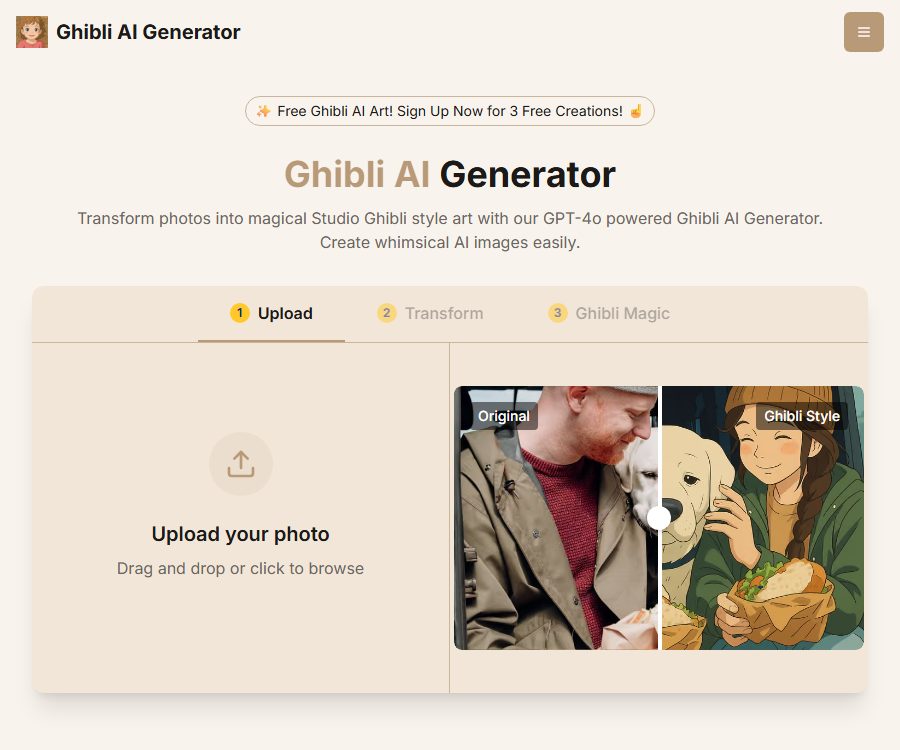
Ghibli AI Generator is an online tool that converts ordinary photos into illustrations in the style of Ghibli animations. After users upload images of people, pets, or scenes, the system generates new versions with soft lighting, a hand-drawn texture, and animated colors.
The website claims to use GPT-4o for its conversion processes and employs a point-based pricing system. It is an independent third-party AI service; it cannot be considered an official product of Studio Ghibli nor a tool that has received its brand authorization.
Main functions
Photo style conversion
- Photos of people, pets, travel scenes, and everyday situations can be converted into animated-style illustrations.
- The model will attempt to retain the subject, expression, and background structure, while redrawing the colors and lighting.
- In complex scenes, group photos, and images with significant occlusions, there may be deviations in the details.
High-resolution output
- Both the free and paid plans indicate support for high-resolution output.
- The generated images can be downloaded for use as profile pictures, wallpapers, and creative materials.
- The actual size, printing quality, and compression quality should be checked after downloading.
Create in three simple steps
- The user only needs to upload a photo, initiate the conversion, and wait for the result to be generated.
- The website does not require knowledge of prompt engineering or professional image editing skills.
- It is usually completed within a few minutes, but the speed is affected by the complexity of the scenario and the server load.
Points and watermark-free downloads
- Each image conversion consumes 1 point.
- New users receive 3 free points upon registration, which can be used to test the functionality.
- Free results come with watermarks, while the paid Starter and Pro plans offer watermark-free images.
Image processing and privacy notes
- The official website states that uploaded images are processed securely, and they are not retained after the conversion is complete.
- Users should still avoid uploading identification documents, sensitive photos of children, or images of unauthorized persons.
- The privacy commitments are outlined in the platform’s public statements; it is not sufficient to rely solely on marketing pages to assess risks regarding sensitive information.
Which users are it suitable for
- Social media users: Create anime-style avatars, covers, and personal share images.
- Pet owner: Convert pet photos into hand-drawn animated characters.
- Content creators: Quickly create theme images and draft visual ideas.
- Gift designer: Creates illustration materials for personal mementos or non-commercial creative projects.
- Anime enthusiasts: Experience the visual changes that different photos undergo in the Ghibli style.
Price of Ghibli AI Generator
The following are the monthly pricing figures for the official website as of August 28, 2026. The website also provides options for annual payment and pay-as-you-go billing, but the publicly available pages do not specify the fixed amounts associated with these options, so no estimates can be made.
| Plan | Price | Monthly points | watermark | Support |
|---|---|---|---|---|
| Free Trial | Free | New users get 3 points. | Yes | Limited support |
| Starter Monthly | $ | 50 pieces | None | Priority support |
| Pro Monthly | $ | 500 pieces | None | Priority support throughout the day |
Each point allows for one image conversion. Subscriptions, annual discount options, pay-as-you-go packages, taxes, and promotions may vary; it is necessary to refer to the payment page on the website before making a purchase.
How to use Ghibli AI Generator
- Register an account and receive free points for new users.
- Choose photos that are clear, have even lighting, and show a complete subject.
- Upload the image and check the preview to avoid incorrect orientation or cropping of important areas.
- Initiate the conversion and wait for the system to generate the animated result.
- Zoom in to examine details of the face, hands, text, and background.
- If unsatisfied, replace the original image, adjust the cropping, or regenerate it.
- Before downloading, check the watermark, resolution, and the licensing requirements for the intended use scenario.
Suggestions to improve the generation quality
- Give priority to photos with high resolution, clear subjects, and proper exposure.
- Avoid multiple overlapping elements, severe backlighting, blurred motion, and overly cluttered backgrounds.
- For portrait photos, it is best to preserve the complete facial contours and natural expressions.
- After creation, pay close attention to the fingers, eyes, jewelry, text, and architectural lines.
- When a series of images is needed, try to use original photos with similar compositions and lighting.
Product advantages
- The operation process is simple; there is no need to write complex prompts.
- Focusing on a single animation style enables a quick achievement of a consistent visual effect.
- Free points are provided to help verify the suitability of photos before making a purchase.
- The paid plan includes high resolution, watermark-free content, and priority support.
- Points are consumed based on the image usage, making it easy to estimate the amount used.
Usage restrictions and precautions
- The generated result may alter the character’s physical features, clothing, text, or background objects.
- The official website clearly states that additional licenses may be required for commercial use, and a paid subscription cannot be considered an equivalent to a full commercial license.
- The name, characters, and works of Studio Ghibli are protected by trademarks and copyrights; it is necessary to avoid creating any illusion of an official partnership.
- You need to obtain permission before uploading someone else’s photos, and extra care should be taken when sharing images of children or private individuals.
- As of the verification date, it was found that the platform is not open-source, nor were any public developer APIs identified.
Frequently Asked Questions
Can Ghibli AI Generator be used for free?
New users receive 3 free credits upon registration; 1 credit is used for each conversion. Free images come with watermarks.
How long does it take to generate an image?
The official website states that it usually takes a few minutes, but the actual time depends on the complexity of the images, the server load, and the queue situation.
Can the generated images be used for commercial purposes?
Commercial use cannot be assumed as permitted by default. The official website indicates that additional licenses may be required for commercial use, and users must also take into account issues related to trademarks, styles, characters, and the rights to the original materials.
Will the uploaded images be saved?
The official website states that images are not retained after processing, but sensitive photos should still be uploaded with caution, and the current privacy policy should be read before use.
Is this an official tool from Studio Ghibli?
There is no evidence indicating that it is an official product of Studio Ghibli. When using generated content, it should not imply any official authorization, collaboration, or endorsement.
Tools similar to Ghibli AI Generator




 Guigong Network Security Registration No. 45132202000164