






Free AI Face Swap Online
Free AI Face Swap Online – makes AI image processing more efficient and simpler.
Tags:Common AI image toolsWhat is DeepSwapper?
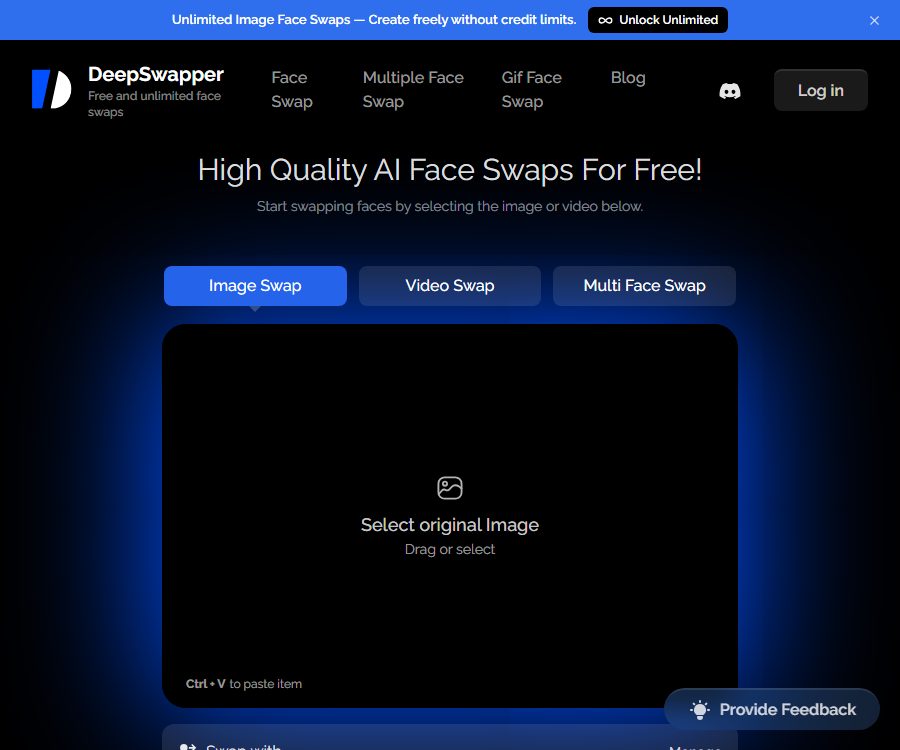
DeepSwapper is a browser-based AI face-swapping tool; its old database name, “Free AI Face Swap Online”, referred to its free image-processing feature. The platform can handle single images, multiple images, batches of images, GIFs, and videos, and it also offers a dedicated iPhone app.
For ordinary images, face swapping can be done without logging in, with unlimited repetitions and no watermarks; however, videos and some advanced tools require a subscription. Some videos on the site as well as multi-user features redirect to the external DreamHour service, so it is necessary to determine who is actually handling the processing before using them.
Main functions
Face swap for a single image
Users upload the original image along with a photo of the face that is to be replaced, and the system automatically identifies and replaces that face. Images that are clear, frontal, well-lit, and have a high resolution tend to yield more natural results.
Selective face swapping for multiple people
The system can detect multiple faces in group photos, allowing users to choose to replace all of them or only specific individuals. Different angles, occlusions, and similar faces may lead to incorrect matches, so it is necessary to check each face individually.
Batch image face replacement
The batch tool allows the addition of up to 50 original images at a time, all of which are processed using the same target face. It is suitable for sets of profile pictures or marketing sketches, but it is still necessary to examine each image individually to check for any changes in identity.
GIF face swap
GIF tools allow for the replacement of faces within animation frames; they support both GIF and WebP formats. Dynamic expressions, rapid head movements, occlusions, and low resolution can lead to flickering or discontinuous edges.
Video face swap
The video feature supports processing of single or multiple faces, and it accepts MP4, WebM, and MOV formats. The current FAQ states that video face swapping requires a subscription, and the buttons on the homepage may lead to external services.
FaceSwapper iPhone app
The website links to FaceSwapper AI: Face Swap, an application developed by Piyush Mangukiya; it allows for face swapping on photos, videos, and templates. It is designed specifically for iPhone devices, requires iOS 18.6 or a higher version, and includes in-app purchases.
Account history and face database
Logged-in users can choose to save their past and frequently used faces, and manage or delete them on their account page. If saving is not enabled, the website’s FAQ states that the uploaded photos or videos will not be retained.
Supported formats and platforms
| Type | Supported formats or platforms | Key capabilities | Restrictions |
|---|---|---|---|
| Image | JPEG, PNG, WebP | Single-face, multi-person, and batch face swapping | A maximum of 50 original images per batch. |
| GIF | GIF, WebP | Animated face swap | A subscription reminder is required. |
| Video | MP4, WebM, MOV | Single-face and multi-person video face swapping | A subscription is required; the duration depends on the package chosen. |
| Web page | Desktop and mobile browsers | Online uploading and downloading | Some entries redirect to external services. |
| iPhone apps | iOS 18.6 or higher | Photos, videos, templates, and history | The information of the application publisher differs from that of the website owner. |
Tutorial on image face swapping
- Prepare an original image and a photo of the target face that has the necessary permissions.
- Choose between image, multi-person, or batch face-swapping mode.
- Upload the original image and wait for the system to detect all faces.
- Upload a clear front-facing image of the target face and specify the person who is to be replaced.
- Processing begins after the mapping relationship is confirmed.
- Check the edges of the face, skin tone, hair, glasses, teeth, and lighting.
- For multiple tasks or batch processing, each item should be checked individually to prevent mismatching of individuals.
- Download the results, and delete unnecessary historical data while saving the faces.
Video and GIF workflows
- Confirm whether the current button is used for processing within DeepSwapper or for navigating to an external platform.
- Log in and check your subscription, remaining points, and available seconds.
- Upload videos or GIFs in supported formats, and then upload the target face.
- Select the appropriate replacement face for each detected person.
- First, use short clips to test turning the head, blocking, and quick movements.
- Submit the complete task and wait for frame-by-frame processing.
- Check for flickering, lip synchronization, expressions, background, and audio-video synchronization.
- Before downloading, confirm the file’s purpose, permissions, and deletion settings.
Methods to improve the quality of face swapping
- Try to use angles and expressions that are similar for the original face and the target face.
- Avoid severe occlusion, overexposure, strong filters, and extremely low resolution.
- Select target photos with a clear facial contour and distinct eyes.
- The video is first cropped into short segments to reduce the cost of failure in handling long tasks.
- In multi-person tasks, check the facial numbers one by one; do not rely only on the first frame.
- The result is considered synthetic content and is not used for authentication.
Price packages
| Package or version | Price | Billing cycle | Core benefits or quota | Suitable for users |
|---|---|---|---|---|
| Free image mode | Free | Long-term entry | Face swapping on images is possible an unlimited number of times, with no watermarks; advanced features are not included. | Regular image users |
| Basic | 9.99 dollars | Monthly | 400 points, with a video duration limit of 300 seconds; options for videos, multi-user mode, historical content, ad-free version, and accelerated playback | Light video users |
| Standard | 19.99 dollars | Monthly | 2000 points, a video duration limit of 1800 seconds; full set of paid features | Continuous creation |
| Premium | 49.99 US dollars | Monthly | 6,000 points, and a video duration limit of 7,200 seconds; full set of paid features available. | Frequent users |
| Basic annual plan | 95.99 dollars | Every year | The page costs 8 dollars per month, which is equivalent to 4800 points. | Long-term mild use |
| Standard annual payment | 191.99 US dollars | Every year | The page costs 16 dollars per month, which is equivalent to 24,000 points. | Long-term continuous use |
| Premium annual payment | 479.99 US dollars | Every year | The page costs 40 dollars per month, which is equivalent to 48,000 points. | Long-term high dosage |
The web interface and the in-app purchases for the iPhone in the United States show the same monthly and annual subscription fees; in addition, 4.99 dollars is charged for additional points. Differences in taxes, exchange rates, and promotions across various regional stores can result in variations in the actual amount to be paid.
In the annual subscription plan, the video duration is still shown as 300, 1800, and 7200 seconds, but it is not clear whether these values refer to amounts reset on a monthly basis or to the total for the entire year. The validity period of points, the cost of mixed tasks, and any refunds in case of failure should also be confirmed before making the payment.
The difference between free and paid versions
- Normal image face swapping is claimed to be free, unlimited, and without watermarks.
- Subscriptions are required for videos, GIFs, and advanced multi-person processing.
- The paid package includes ad-free experience, faster loading, improved search results, and a history of face swaps.
- The main differences between Basic, Standard, and Premium lie in the points awarded and the length of videos.
- Account login is used for purchasing, saving history, storing facial data, and managing subscriptions.
Suitable for users and scenarios
- Social media users: Create fun avatars and memes with consent.
- Content creators: Produce short-video drafts using their own actors and materials.
- Marketing team: Tests the visual appearance of characters; does not replace official authorization and filming.
- Family and friends: Handling commemorative or recreational content agreed upon by all participants.
- Development team: Evaluate third-party face-swapping interfaces, but it is necessary to verify the API service provider separately.
Advantages
- Access to regular images is free and unlimited, with no need for points.
- Supports images, GIFs, videos, multiple users, and batch processing of up to 50 items.
- It supports a fairly comprehensive range of common image and video formats.
- Both web pages and iPhone apps offer a face-swapping workflow.
- The account allows for managing subscriptions, viewing history, and saving faces.
Restrictions and risks
- The official website’s descriptions of “videos available free of charge” and “videos that require a subscription” are not entirely consistent.
- The advanced entry on the home page redirects to DreamHour; the handling party and rules will change.
- The company names mentioned in the legal provisions are inconsistent, and there is limited transparency regarding the entities that are actually carrying out operations.
- The commercial FAQ is in direct conflict with the “for personal use only” clause.
- Facial data is highly sensitive information, and its misuse can lead to impersonation or infringement of rights.
- Deepfake outputs cannot be used for identity purposes, as evidence, in news reports, or for deceptive dissemination.
- Official Android apps and browser extensions have not been confirmed.
Privacy and facial data
The privacy policy states that facial data is transmitted to the servers in an encrypted form; once decryption and visual processing are completed, the data is deleted immediately and is not linked to any account information. The FAQ also explains that if the option to save history or facial images is enabled, such data will be retained, and users can disable this function or delete the relevant data on their account page.
The platform may also collect IP addresses, device names, operating systems, usage time, error logs, and statistical data, and it makes use of third-party services and cookies. Third-party providers may access personal information in order to carry out their tasks; therefore, sensitive data should still be uploaded with caution.
- Obtain clear, verifiable consent before using any real person’s face.
- Do not upload photos of identification documents, or images of the faces of children, patients, customers, or employees.
- Do not keep history saving and default face saving enabled.
- After the task is completed, delete the historical data, face database, and any account data that is no longer needed.
- After navigating to an external site, read the platform’s privacy and data retention policies again.
Copyright, Commercial Use, and Prohibited Uses
The website’s FAQ states that the resulting images can be used for commercial purposes, but Section 3 of the current terms of service specifies that the services and content are intended for personal use only; there is therefore a significant conflict between these two statements. Until written clarification is provided by the service provider, the face-changing results should not be used in any commercial projects.
- It is forbidden to create pornographic, harassing, extortionary, or hateful content without consent.
- It is forbidden to impersonate others in order to carry out fraud, political manipulation, or identity deception.
- Video clips, celebrity photos, music, and brand assets require separate licensing.
- The platform strictly prohibits NSFW images and can terminate accounts that violate these rules.
- When publishing, it should be clearly indicated that the content has been processed using AI face swapping.
Cancellation and refund
Subscriptions are automatically renewed, and cancellation must be requested at least 24 hours before the next billing period. Users can turn off auto-renewal on their account page; the cancellation is processed immediately, but the benefits remain valid until the end of the current billing period, with no proportional refund provided.
The cancellation policy for 2024 allows only accounts that have not used any points to contact support in order to request a refund; the old policy stated generally that a refund could be issued if customers were unsatisfied, with the process taking 2 to 3 business days. There is a contradiction between the statements on these two pages, and it is the later issued, more specific cancellation policy along with any written responses from support that should take precedence.
API, SDK, and open-source status
| Project | Current status | Explanation |
|---|---|---|
| DeepSwapper web tool | Available now | Image face swapping is the core feature; some advanced options are available through external links. |
| Commercial API | Abnormal entry | Points to MaxStudio; the current target page is not available. |
| DeepSwapper’s own API | Not confirmed yet | No available endpoints, authentication, and pricing documents were found. |
| SDK | Not yet made public | The official development package has not been confirmed. |
| GitHub | Not confirmed yet | The official product warehouse has not been confirmed. |
| DeepSwapperX model | Not open source | Only the product name is provided; no weights or licenses are disclosed. |
Frequently Asked Questions
Is DeepSwapper truly unlimited and free for image face swapping?
The current page clearly states that there are no limits on the number of times ordinary images can have their faces changed, and no points are required for this. However, features such as videos, GIFs, advanced multi-user functions, and access to acceleration history may still require a subscription.
Which file formats are supported?
Images are supported in JPEG, PNG, and WebP formats; videos are supported in MP4, WebM, and MOV formats. The GIF tool supports GIF and WebP formats.
How many images can be processed at once in batch?
The batch tool allows uploading up to 50 original images, which can then be replaced with a single target face.
Will the face be saved after it is uploaded?
The default setting indicates that the data will be deleted immediately, but it remains if history is enabled or faces are saved. Users should check the account settings and delete the data manually once the process is complete.
Can it be used for commercial projects?
It is not recommended for direct commercial use at the moment. The FAQ permits commercial use, but the current terms state that it is intended for personal use only; written clarification must be obtained first.
Is there an official mobile app available?
The website provides a link to the iPhone app FaceSwapper AI; an Android version is not currently available. The app’s publisher and privacy policy differ from those of the website, so they need to be examined separately.
Can I request a refund?
The cancellation policy states that a refund can be requested by contacting support only if there are unused points; no guarantee is provided for used points, partial billing periods, or other exceptions.
Can the API be connected directly?
It cannot be confirmed at the moment. The website directs users to MaxStudio for the API, but the target page is not available, and there are no DeepSwapper SDK or development documentation available for verification.
Summary
The advantage of DeepSwapper is that it allows for free photo face swapping with low barriers to entry, and it supports multiple people, batch processing, GIFs, videos, as well as iPhone use cases. Ordinary entertainment photos can be quickly tested after obtaining consent.
There are clear discrepancies regarding face privacy, external links, entity names, commercial terms, and refund policies. When payment is involved, when content is shared by real people, or for commercial purposes, it is necessary to obtain authorization first and verify the actual service provider as well as the written rules.
Tools similar to Free AI Face Swap Online




 Guigong Network Security Registration No. 45132202000164