






Flutter Starter Kit
Flutter Starter Kit – makes AI-based image processing more efficient and simpler.
Tags:Common AI image toolsWhat is ShipFlutter?
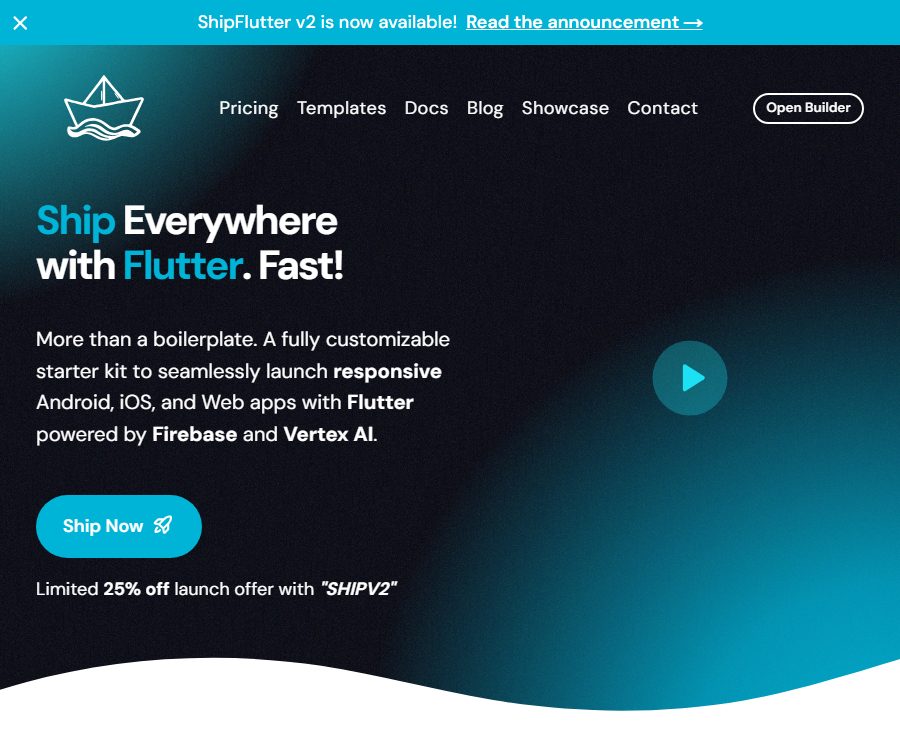
ShipFlutter is a Flutter application launch kit created by Marcel Pinto Biescas, and it is managed by the team associated with pibi.studio. It uses a web-based builder to combine templates and modules in order to generate downloadable code for Flutter, Firebase Functions, and landing pages; it is designed for use on Android, iOS, and the Web.
It is neither an AI-based image processing tool nor a generator for ready-to-use applications that require no programming. Users still need to have expertise in Flutter, Dart, Firebase, as well as the skills to publish applications on app stores and to configure the backend; they are also responsible for developing, testing, and maintaining the generated projects.
Main functions
Cross-platform project skeleton
The core modules include GoRouter for navigation, Signals for state management, lite_ref for dependency injection, the Material theme, slang for multilingual support, and common UI components. The project structure separates the Flutter application, cloud functions, landing pages, and deployment settings, which facilitates further expansion.
Firebase backend
The Firebase modules cover Authentication, Firestore, Cloud Functions, Storage, App Check, security rules, and offline data. Users are responsible for creating their own Firebase project, selecting a region, enabling the required services, and bearing the associated cloud costs.
- Firestore supports real-time monitoring, data transformation, examples of create, read, update, and delete operations, as well as offline use.
- The second generation of Cloud Functions can handle payment Webhooks and backend interfaces.
- App Check is used to reduce unauthorized client requests, but it must be configured and enforced properly.
- Firebase security rules are just a starting point; production data still needs to be reviewed in accordance with the business model.
Logging in and Accounts
The account module offers anonymous logging in, login using email and password, social login via Google, Facebook, and Twitter, as well as responsive registration, login, and profile pages. The permission status can be combined with payment benefits and custom declarations from Firebase.
Mobile and web payments
Mobile apps use RevenueCat to manage subscriptions and purchases on the App Store and Google Play, while the web version makes use of LemonSqueezy. The suite provides a responsive paywall, trial pages, entitlement objects, and Firebase Functions Webhook support.
Developers must create products and packages on each payment platform, and configure Webhooks, tax handling, refund processes, as well as compliance requirements related to the store. ShipFlutter only provides integration code; it does not replace merchant accounts, platform approvals, or payment service fees.
Notifications and user feedback
The notification module covers local, remote, in-app, and background notifications, and it is compatible with Android, iOS, and the Web. The feedback module allows for in-app rating, issue reporting, and satisfaction surveys; however, actual functionality is still subject to the permissions and policies of each platform.
Monitoring and consent management
The monitoring module integrates with Google Analytics, Crashlytics, Performance, and Remote Config, and provides a interface for user consent. By default, tracking is disabled until the user gives consent; however, developers still need to check the regulations applicable in their region as well as the SDKs they have installed.
Landing pages and content
The optional landing page is built using the Astro technology stack and includes sections for the home page, a pricing table, contact and subscription forms, social sharing metadata, a sitemap, as well as frameworks for Markdown blogs and legal pages. It can be deployed on Firebase Hosting, but the text, policies, images, and search optimization still need to be completed by the user.
Vertex AI and Genkit
The AI module can be integrated with Vertex AI, Firebase Genkit, DotPrompt, and in-app prompt management systems, and it provides a responsive chat interface. It is suitable for use in Q&A applications, content generation, and applications that require context awareness, but it is not designed to carry out the entire product development process on behalf of the user.
Some AI and Cloud Functions features require the Firebase Blaze subscription plan, and there are also separate costs associated with invoking models. Developers must also set up security rules, call limits, content safety measures, and handle prompt data.
Templates and modules
| Category | Included content | Additional configuration is required. | Suitable scenarios |
|---|---|---|---|
| Basic template | Navigation, status, dependency injection, themes, and multilingual support | Brand, routing, and business pages | Universal MVP |
| Matcher template | Card sliding and matching-based interaction | Recommendation logic, data, and security | Social, discovery, and matching apps |
| Firebase module | Logging in, databases, functions, storage, and App Check | Firebase projects and rules | Cloud applications |
| Payment module | RevenueCat, LemonSqueezy, paywalls, and privileges | Merchants, products, Webhooks, and taxation | Subscriptions and digital products |
| AI module | Vertex AI, Genkit, DotPrompt, and the chat interface | Cloud billing, models, quotas, and security | Generative AI applications |
| Landing page module | Skeletons for marketing pages, blogs, SEO, and legal pages | Domain names, content, and compliance texts | Product launch and customer acquisition |
The process from purchase to operation
- First, check the public demonstrations and the MIT basic templates to ensure that the project structure aligns with the team’s preferences.
- Choose a one-year Starter or Lifetime license, and save the price and terms before completing the payment.
- Register in Builder and activate the license, then select the template, platform, and desired modules.
- Use the generator to configure the project name, theme, and basic content, then download the source code archive.
- Install the Flutter SDK, the development environment, Firebase CLI, and FlutterFire CLI.
- Unzip the project and run the accompanying initialization script in the application directory.
- Create or select a Firebase project, generate configurations for various platforms, and associate them with the default project.
- Enable Firestore, Authentication, App Check, and any other services that are required.
- Configure separate third-party accounts for the payment, notification, monitoring, AI, and landing page modules.
- Conduct testing on Android, iOS, and the web, and then prepare for signing, privacy disclosures, and store release.
Payment function configuration process
- Create mobile products, benefits, and packages in the app store and RevenueCat.
- Create web product, price, tax, and payment settings in LemonSqueezy.
- Map the two types of packages to a unified application benefit identifier.
- Deploy Firebase Functions and register payment event Webhooks separately.
- Test purchasing, trials, renewals, cancellations, billing failures, resuming purchases, and refunds.
- Verify that the client’s permissions are synchronized with Firestore, to avoid relying solely on the potentially manipulable interface state.
- Display the price, subscription period, auto-renewal details, and cancellation instructions in accordance with the platform’s rules.
AI feature configuration process
- Verify that the Firebase project has the required billing plan and Vertex AI capabilities enabled.
- Select the allowed models and regions, and read the model data and content policies.
- Place the prompt words in DotPrompt or within the app’s settings, and ensure proper version control.
- By invoking the model through a controlled backend, sensitive credentials are prevented from being placed on the client side.
- Set limits, timeouts, and abuse protection for single-user and global requests.
- Test scenarios for rejection, hallucinations, sensitive inputs, long content, and network failures.
- Explain to end users how AI is used, data is processed, and manual review is carried out.
Price and Licensing
| Package or version | Price | Billing cycle | Core benefits or quota | Suitable for users |
|---|---|---|---|---|
| Starter | The current price is $99; the original price was $132. | One-time purchase, with one year of access. | Builder, main features, basic and Matcher templates, community, and annual updates | Short-term projects and first-time users |
| Lifetime | The current price is $164; the original price was $205. | Buy once, access for life | All rights for Starter, current and future templates, lifetime updates and priority support | A team that is continuously working on multiple projects |
| Public basic template | Free | No subscription required | Source code of the minimal basic module, without the complete paid modules | Evaluate code structure |
| Third-party services | According to the prices of each platform | Usage, subscription, or transaction | Firebase, Vertex AI, RevenueCat, LemonSqueezy, and app stores | All officially launched projects |
The current page displays both time-limited discounts and promo codes; the actual amount may vary depending on promotions, taxes, region, and payment method. Purchasing a license does not include costs related to cloud resources, model calls, payment processing, domain names, or app store accounts.
The “one year” period for Starter refers to the duration for use, access, and updates; the downloaded source code does not disappear automatically when this period expires. Whether it is possible to create new projects, download the code again, or obtain support after the expiration date depends on the information provided on the settlement page and the account privileges.
Commercial licenses and significant conflicts
The official license grants a non-exclusive, non-transferable, and non-sub licensable personal license that allows the creation of an unlimited number of personal or commercial applications and websites. Users are not allowed to rent out, transfer, sublicense, or resell the ShipFlutter startup kit.
However, the license text prohibits modification, adaptation, and the creation of derivative works, which is in direct conflict with the statements on the product page that it can be fully customized and that its code can be modified. Since modifying the source code is the main purpose of such starter kits, commercial projects should obtain written clarification regarding the rights to make modifications and the scope of use for customer projects and team members before making a purchase.
- The ability to create commercial applications does not mean that the source code of those templates can be sold.
- It is necessary to obtain written confirmation to determine whether a project developed for a customer falls under the licensee’s projects.
- It is not clear whether team members, contractors, and various legal entities can share licenses.
- Third-party packages, AstroWind, Flutter, and Firebase are still subject to their respective licenses and terms.
Open-source status, API, and GitHub
| Project | Current status | Explanation |
|---|---|---|
| ShipFlutter complete paid package | Exclusive licensing | After purchase, you gain the right to use the source code within the scope of the license. |
| Public basic template | MIT | It contains only the infrastructure; it is not equivalent to the full paid version. |
| ShipFlutter public API | Not confirmed yet | The products are primarily delivered in the form of a Builder and source code. |
| Third-party SDK | Extensive use | Flutter, Firebase, RevenueCat, Vertex AI, etc., each have their own licensing requirements. |
| Developer GitHub | Public | Includes basic templates and other mobile development projects |
The public MIT template can be used to evaluate state management, dependency injection, theming, and multilingual capabilities, but this does not mean that modules related to payment processing, AI, notifications, monitoring, and landing pages also follow the MIT license. Purchasers should keep the version of the license that was provided at the time of delivery.
Suitable for users and scenarios
- Independent Flutter developers: Quickly set up the basics for logging in, databases, payments, and publishing.
- Small startup teams: Use the same codebase to validate MVPs for Android, iOS, and the web.
- Subscription app developers: Combine mobile store purchases with Web payment options.
- AI Application Team: Integrates Vertex AI and Genkit into the Firebase architecture.
- Agency developer: Reuse the project structure, but it is necessary to first confirm the scope of authorization for the client’s project.
- Product teams with a foundation in Flutter: this reduces the time required to create generic modules repeatedly.
Advantages
- It covers the entire project framework, from the client and Firebase backend to the landing page.
- Different providers are used for mobile and web payments, but they are all unified under an application benefits model.
- It includes modules such as notifications, monitoring, feedback, and consent management, which are easily overlooked in an MVP.
- The source code can be downloaded, allowing the team to continue developing and deploying it in their own repository.
- The public basic template allows you to check part of the code style before making a purchase.
Restrictions and additional costs
- It is not a no-code platform; programming, debugging, testing, and experience with app stores are still required.
- Firebase, Vertex AI, payment platforms, and store accounts can all generate ongoing costs.
- Certain AI and Functions modules require the Firebase Blaze paid plan.
- The template does not guarantee approval by Apple or Google; developers need to stay informed of any changes in policies.
- Upgrading third-party SDKs may lead to compatibility issues with APIs, build systems, or the platform.
- The future chat, e-commerce, and analytics templates listed on the page cannot be considered as capabilities that have already been delivered.
- The restrictions on modifications imposed by official licenses conflict with the product specifications; this is a risk that must be addressed before making a purchase.
Privacy and security
The specific duration for which data is stored independently by ShipFlutter Builder, the mechanisms for deleting that data, and a complete list of the service providers involved are not yet clearly disclosed. The privacy policy relevant to this site points to the general policies available at pibi.studio. It is necessary to confirm with the service providers in advance whether project configurations, brand content, and other data uploaded to Builder will be retained.
- The user data generated by the application is primarily processed by the developer’s own Firebase project.
- RevenueCat, LemonSqueezy, Google Analytics, Crashlytics, and Vertex AI will form separate data pathways.
- App Check and security rules must be enabled by developers; the existence of configuration templates does not mean that the production environment is secure.
- It is agreed that banners cannot automatically meet the requirements of GDPR, CCPA, or store privacy labels.
- Production keys, payment keys, or debugging tokens must not be submitted to the client or code repositories.
- Developers need to create a genuine privacy policy, specify retention periods, and define procedures for data deletion for the final application.
Notes on refunds
The product page states that refunds are generally not possible after the source code is delivered, as the code is retained permanently. If a user is extremely dissatisfied, they can contact the support team to discuss potential solutions, but this does not constitute an explicit guarantee of unconditional refund.
Before making a purchase, it is necessary to run the public basic template and watch the demonstration in order to verify the version of Flutter, its architecture, and the level of detail in the documentation. When paying, it is also important to check the promotional price, taxes, the license terms, the update schedule, and LemonSqueezy’s payment conditions.
Frequently Asked Questions
Is ShipFlutter a code-free tool?
No. Builder can generate and combine components, but users still need to use Flutter, Dart, Firebase, and development tools to create the final product.
Can multiple applications be developed after purchase?
The license text states that an unlimited number of personal or commercial projects can be created, but customer projects, team sharing, and multi-legal entity scenarios require additional approval.
What is the difference between Starter and Lifetime?
Starter provides one year of access and updates, while Lifetime offers lifetime access, updates, future templates, and priority support. Both options are available as one-time purchases at the moment.
Does the ShipFlutter package include costs for cloud services?
Not included. Costs related to Firebase, Vertex AI, payment processing, app stores, and domain names are to be borne by the developer separately.
Can the purchased source code be modified?
The product page allows for customization and modification, but the official license prohibits any changes or creation of derivative works, which represents a direct conflict. It is recommended to obtain clear written permission before making such changes.
Is the complete suite open source?
No. Only the publicly available basic templates use the MIT license; the full Builder and paid modules employ proprietary licenses.
Is it compatible with desktop applications?
The current main product offerings are focused on Android, iOS, and the Web; Windows, macOS, or Linux are not included as part of the standard delivery scope.
Can I get a refund after purchasing?
In principle, no refund is available after the source code is delivered; the service provider only indicates that negotiations can be held in cases of extreme dissatisfaction. It is advisable to try out the public templates and demonstrations before making a purchase.
Summary
ShipFlutter is suitable for individuals or small teams who already have a basic understanding of Flutter and wish to reduce the need for repeated development in areas such as accounts, payments, notifications, monitoring, AI, and landing pages. What it provides are project source codes that can be further developed; it is not a fully functional product that is ready to go live automatically.
When making a purchase, in addition to comparing the one-year and lifetime pricing, it is also necessary to estimate the costs associated with Firebase and third-party services; moreover, any conflicts arising from the license terms regarding modifications to the source code should be resolved first. Only after setting up security rules, ensuring privacy, handling payment processes, and conducting tests across multiple platforms is it appropriate to proceed with a production release.
Tools similar to the Flutter Starter Kit




 Guigong Network Security Registration No. 45132202000164