






Anime AI Generator
Anime AI Generator – makes AI-based image processing more efficient and simpler.
Tags:Common AI image toolsWhat is an Anime AI Generator?
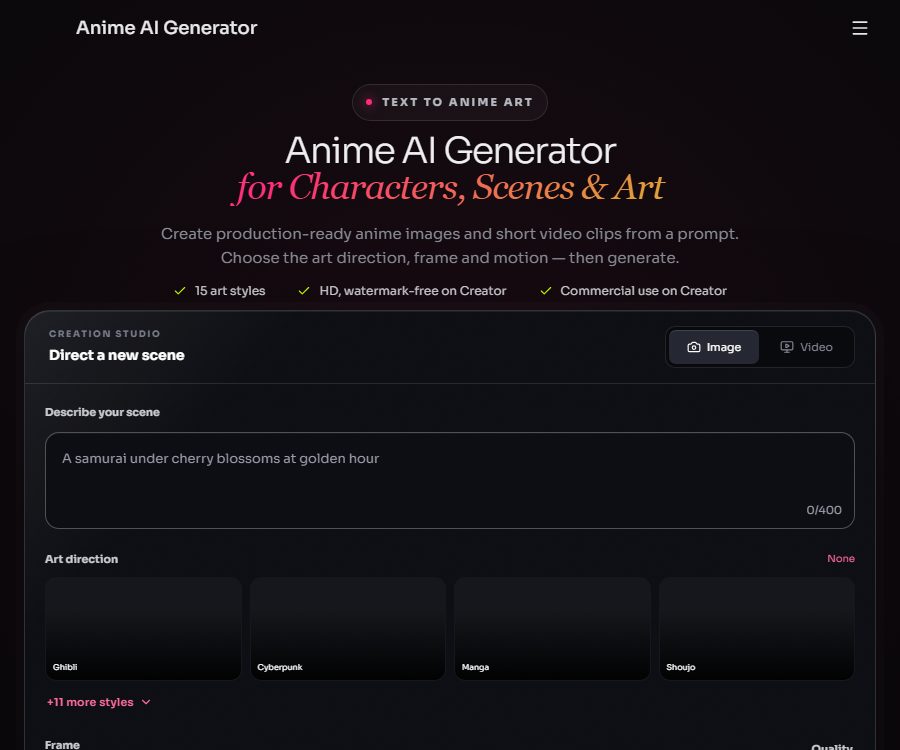
Anime AI Generator is a web-based tool designed for animated visual creation; it allows text descriptions to be converted into images and short videos in an anime style. Users do not need to install any drawing software – they can set the artistic direction, frame dimensions, and motion effects, and thus create character concepts, scenes, keyframes, or short videos for social media.
The platform emphasizes \"director-style prompts,\" suggesting that the subject, actions, environment, lighting, camera angle, and mood should all be included in the same description. It is suitable for quickly exploring various visual directions, but the resulting images still require manual selection and further editing.
Main functions
Convert text into animated images
After entering a description of the character or scene, the system will automatically handle composition, colors, and lighting. The cost for one image starts at 21 points, with the actual amount varying depending on the model chosen or the quality desired.
Creation of animated short videos
Users can create videos directly from text, or they can first generate or upload images and then add actions, atmospheres, and camera instructions. A single video segment can be 5 seconds, 8 seconds, or 10 seconds long; longer sequences can be created by combining various segments using a storyboard.
15 anime art styles
The official website currently lists 15 preset styles, including comic, girl, cyberpunk, watercolor, chibi, mecha, film-like, boy, ukiyo-e, pixel art, 3D rendering, steampunk, minimalism, and film noir.
Style names are used to describe visual characteristics; they do not imply any authorization from related studios, brands, or works. The platform also makes it clear that it is an independent product, with no affiliation or endorsement relationship to any studio, brand, or work.
Various frame sizes
The creation interface supports 1:1, 4:3, 3:4, 16:9, and 9:16 ratios. Square formats are suitable for profile pictures and social media posts, while vertical formats are ideal for short videos; horizontal formats are better suited for scene concept art and storyboards.
Multiple models and high-definition output
The official website states that the platform supports four different generation models, allowing users to choose the appropriate option depending on their task. The Creator subscription includes high-resolution outputs without watermarks, while the free trial offers only standard-quality outputs with watermarks.
Characters, storyboards, and game concepts
The platform can be used for the creation of original character designs, testing of scene atmospheres, drafting of storyboards, and developing visual concepts for games. To ensure that a particular character appears consistently, it is necessary to keep its description unchanged, adjusting only the actions, scenes, and camera angles.
Usage tutorial
- Open the creation studio and select the image or video mode.
- Identify the subject and actions, such as the identity of the characters, their poses, and the events that are taking place.
- Add elements such as environment, lighting, camera angle, and mood, and avoid using only generic terms.
- Choose the artistic style and image format; decide between landscape, portrait, or square shape depending on the intended use.
- Confirm the quality and the estimated points consumption before submitting for creation.
- Check the facial features, hands, text elements, and logical structure of the background; if it does not meet the standards, simplify the prompt and try again.
- When creating a video, first determine the key frames, and then add motion and camera instructions.
- Before downloading, verify that the watermark, resolution, and commercial licensing suit the intended use case.
How to write prompts
A more practical structure is “subject + action + environment + lighting + camera angle + mood”. For example, one first describes the character and the action, and then adds information such as the time of the scene, the main light source, the camera perspective, and the overall atmosphere.
- Character design: fixed hairstyle, clothing, color scheme, age appearance, and signature accessories.
- Cinematic visuals: Define the direction of the light source, depth of field, focus, and color tone.
- Chibi characters: Specify the expression, exaggerated accessories, and a simple background.
- Pixel or comic style: supplementary media information such as color palettes, black and white, line drawings, or dot patterns.
- Video tips: Focus on describing actions, wind, rain, smoke, and camera movement; avoid changing the appearance frequently.
Which users are it suitable for
- Illustrator and concept designer: Quickly explore ideas for characters, costumes, props, and settings.
- Comic and animation creators: Generate keyframes, mood boards, and early storyboards.
- Game team: Creates character cards, environmental concepts, and proposal visuals.
- Short-video creators: Generate 5 to 10-second vertical animated clips.
- Brand and content team: Creates authorized anime-style covers and social media materials.
Product advantages
- Images and videos are created in the same studio, resulting in a more centralized workflow.
- It offers 15 styles and 5 common frame sizes, allowing for quick changes in the visual style.
- It is possible to generate motion from images; it is suitable for first controlling key frames and then creating a video.
- The Creator plan supports high resolution, watermark-free content, and commercial use.
- The official website clearly lists the points required and the length of the videos, making it easy to estimate the costs.
Usage restrictions and copyright notes
- The free version outputs content with a watermark and can only be used for personal, non-commercial purposes.
- The commercial permissions of Creator are still subject to the terms of service, applicable laws, third-party model rules, and intellectual property regulations.
- Do not create copyrighted characters, trademarks, or works that imitate those of specific living artists for use in commercial promotions.
- AI-generated hands, text, multi-person interactions, and continuous movements may contain errors, and they need to be manually checked before being published.
- The same points are used for images and videos; the number indicated on the official website is an approximate estimate only, and it does not represent the total amount of points that can be obtained for both types of content simultaneously.
- As of the verification date, no public official API documentation or official open-source code repository has been found.
Price of Anime AI Generator
As of August 26, 2026, the home page of the official website displays three options: the free version, the monthly Creator plan, and the annual Creator plan. Older pages in different languages may still show historical prices; the information shown on the current English home page is applicable, and the final cost will be based on what is displayed on the settlement page.
| Plan | Price | Limit | Output and authorization |
|---|---|---|---|
| Free | $ | 1 free image | Standard quality, with watermark, for personal non-commercial use only |
| Creator Monthly | $ | 4,000 points per month | High definition, watermark-free, with commercial usage rights |
| Creator Annual | $ | 4,000 points are issued each month. | High definition, watermark-free, with commercial usage rights |
The annual subscription plan costs around 6.67 dollars per month, which represents a savings of approximately 49% compared to the monthly payment option. The subscription points are updated on a monthly basis; any rules regarding their carryover or handling in case of cancellation are specified on the payment page and in the account terms.
Reference for point consumption
| Generation type | Specifications | Integration |
|---|---|---|
| Anime images | Single sheet | Around 21 to 27 points |
| Anime videos | 5 seconds, 480p | 753 points |
| Anime videos | 8 seconds, 480p | 1,205 points |
| Anime videos | 10 seconds, 480p | 1,506 points |
4,000 points are sufficient to generate around 148 to 190 images, or approximately 5 videos of 5 seconds each. The amount of resources used can vary depending on the model, resolution, and other settings; it is advisable to check the real-time cost display on the interface before submitting a request.
Platform and openness
- Platform used: Web interface.
- Free trial: No bank card is required; one image in standard quality with a watermark can be generated.
- Public API: Not yet made public as of the verification date.
- Open source status: It is not confirmed to be open source; no official GitHub repository corresponding to this website has been found.
- Content rules: Inappropriate content, violence, hate speech, and illegal content are prohibited.
Frequently Asked Questions
Is the Anime AI Generator free?
A free tier is available; no bank card is required, and one image in standard quality with a watermark can be generated. The free results are intended for personal, non-commercial use only.
How long can an anime video be?
It supports segments of 5 seconds, 8 seconds, and 10 seconds each. For longer content, multiple short segments can be combined in storyboard mode.
Can the Creator solution be used for commercial purposes?
It can be used for commercial purposes within the limits permitted by the terms of service, but it is still necessary to comply with applicable laws as well as any restrictions related to third-party models, characters, trademarks, and intellectual property rights.
Why can’t 4,000 points be used to generate 190 images and 5 videos at the same time?
The official website indicates that the number of images and the number of videos represent two alternative ways of estimation; both use the same pool of credits. Once images are created, the remaining credits available for videos decrease accordingly.
How to maintain character consistency?
Fix the character’s hairstyle, clothing, color scheme, facial features, and signature accessories, and only adjust the scene, actions, and camera angles. It is usually better to create satisfactory keyframes first and then convert them into a video.
Does Anime AI Generator provide an API or open-source code?
As of August 26, 2026, no public official API documentation has been found, nor has an open-source repository corresponding to this commercial website been identified.
Tools similar to Anime AI Generator




 Guigong Network Security Registration No. 45132202000164