






GPT Hotline
GPT Hotline, an intelligent tool specialized in AI-generated images
Tags:Common AI image toolsA one-sentence summary
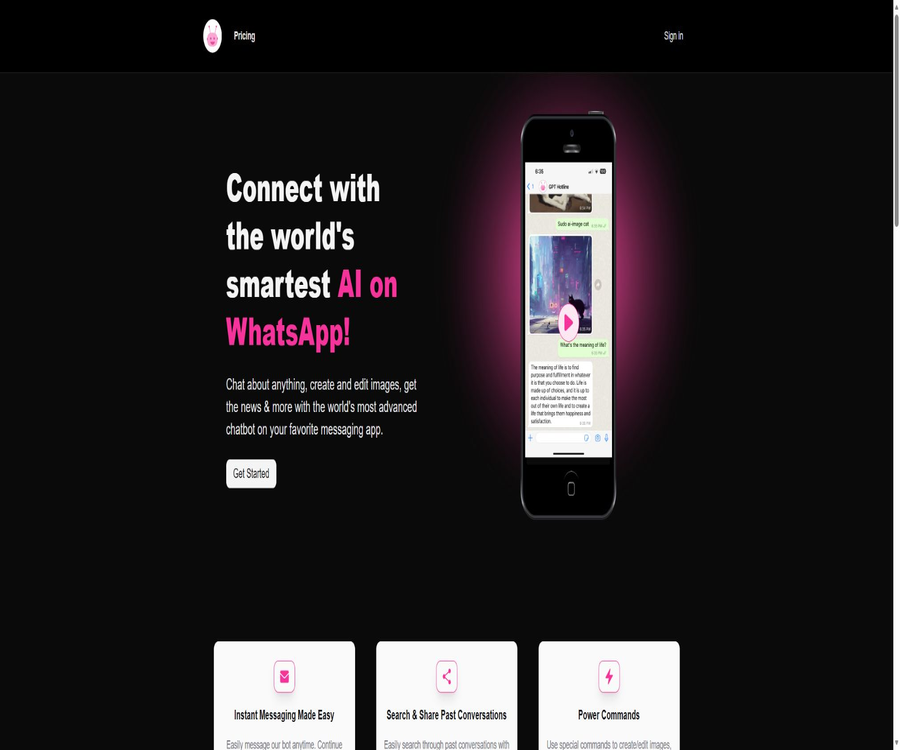
GPT Hotline is a third-party subscription service that integrates features such as AI-powered Q&A, conversation history, and images into WhatsApp, allowing users to utilize the AI assistant just as they would when sending messages to regular contacts.
Tool Introduction
GPT Hotline offers AI services through a WhatsApp chat interface; users need to register for an account and provide their phone number on the official website, after which they can start conversations via the messaging app. It emphasizes that no new dedicated AI app needs to be installed, and it is also easy to forward and share the responses obtained.
This product uses names such as GPT and ChatGPT to describe its capabilities, but the official website does not indicate that it is operated by OpenAI. It should be clearly labeled in the listings as a third-party WhatsApp AI service, and it must not be confused with the official ChatGPT WhatsApp interface.
Main functions
WhatsApp AI Q&A
Users can pose knowledge, writing, creative, and everyday questions in WhatsApp threads and receive text-based answers. The responses are generated automatically by AI and may contain errors, omissions, or outdated information.
Continuous dialogue
The service retains a limited amount of recent conversation text to maintain context, allowing users to continue the previous topic. The privacy policy states that the server keeps a sliding window of the last 1,000 words, with older content being overwritten.
Chat history and sharing
The official website mentions that past conversations can be searched, and answers can be sent using WhatsApp’s built-in sharing functions. Users should avoid forwarding answers that contain personal information or confidential data to unauthorized persons.
Image generation and editing
The product page outlines the capabilities for creating and editing images; users can send commands or images via chat. The privacy policy states that images are deleted from the server once processing is complete, but third-party AI services and messaging platforms may still be involved in their transmission and processing.
News inquiries
The official website lists news retrieval as one of its functions, allowing for a quick overview of various topics. In cases involving time-sensitive events, users should still check the date of publication of the news, the time when the event occurred, and any official statements.
Power Commands
The service offers special commands for resetting conversations, checking monthly usage, and viewing available commands. The official website also mentions that it is possible to create or edit images and videos using these commands, but it does not provide a complete list of the commands or the associated quotas.
Quantity inquiry
Pro users can check the number of messages they have for the current month as well as their Token balance, so as to avoid running out of these resources at a critical moment. There are separate limits on the number of messages and on the Token amount; reaching either of these limits can prevent further use of the service.
Its difference from the official ChatGPT service
| Comparison items | GPT Hotline | Official ChatGPT service |
|---|---|---|
| Operational relationships | Third-party independent services | Provided by OpenAI |
| Main entrance | The WhatsApp session designated by GPT Hotline | Official website, apps, and officially supported phone or messaging channels |
| Account | GPT Hotline account and registered phone number | Rules for OpenAI accounts or the official entry point |
| Price | Pro costs $9.99 per month. | Pricing is based on official product and regional standards. |
| Data Policy | Subject to the GPT Hotline Privacy Policy and the rules of third-party platforms. | Complies with OpenAI and the relevant platform policies. |
| Functional commitments | Subject to the GPT Hotline page and packages. | The information provided in OpenAI’s current product descriptions applies. |
| Customer service and refunds | Contact the GPT Hotline | Through OpenAI’s official support channels |
Both may appear on WhatsApp, but they differ in terms of phone numbers, accounts, fees, data processing methods, and the entities providing support. It is necessary to verify the identity of the developer before adding a contact or making a payment, in order to avoid sending messages to fake accounts.
Usage tutorial
Register and start chatting.
- Open the official GPT Hotline website and first read the current prices, privacy policy, and terms of service.
- Verify that WhatsApp and this service are available for normal use in your area.
- Create an account and verify the phone number used for WhatsApp.
- Select the Pro package and check the monthly fee, currency, discounts, and renewal rules.
- Open the correct WhatsApp contact through the link provided on the official website.
- First, send simple questions that do not contain sensitive information to confirm that the service is active.
- View the available commands, and test the usage query and conversation reset.
- When uploading an image, first remove the location data, identity information, and other sensitive metadata.
- Check the remaining messages and tokens regularly, and cancel the subscription when it is no longer needed.
Handle a conversation safely
- Rewrite the task as a description that does not include real names, account numbers, keys, or internal data.
- First, clarify the goal, context, output format, and length limits.
- For important issues, it is required to identify the points of uncertainty rather than seeking absolute conclusions.
- After receiving the response, verify the facts, figures, dates, and professional advice.
- Do not carry out directly the payment, logging in, medical, or legal actions suggested by AI.
- After dealing with sensitive topics, use the reset command to clear the server-side context window.
- Check whether the local WhatsApp backup, notification previews, and forwarding records still contain the relevant content.
Which users are it suitable for
- Frequent WhatsApp users: Those who wish to utilize AI directly within their existing messaging apps.
- Mobile office users: For temporary tasks such as writing, summarizing, translating, and brainstorming.
- Content creators: Generate copy or visual ideas on mobile devices.
- Student: Used for explaining concepts and providing study outlines, but course materials need to be checked.
- Small teams: Quickly discuss public information and share non-sensitive responses.
- Users who do not wish to install additional AI applications: they can use the service through the familiar chat interface.
Typical use cases
- Create drafts for emails, messages, or social media posts quickly on your way to work.
- Ask continuous questions around a theme while maintaining the recent context.
- Forward the AI response to colleagues for further discussion.
- Generate image ideas or submit editing requests for non-sensitive images.
- Check the current news overview and verify important information further.
- Use the command to reset the topic or check the remaining quota for this month.
- Use WhatsApp for light translation, rewriting, and brainstorming.
Product advantages
- Use WhatsApp directly; there’s no need to learn a new messaging interface.
- It supports continuous conversations and retains a limited amount of recent context.
- Messages can make use of WhatsApp’s existing sharing and forwarding functions.
- In addition to text-based Q&A, it also supports image promotion, news, and special command functions.
- The pricing page shows the monthly fee, the number of messages, and the token limit.
- The subscription portal provides a option to cancel subscriptions manually.
- There are public guidelines available regarding the server-side deletion rules for processed images after they are uploaded.
Usage restrictions and precautions
- It is not an official OpenAI product, and the OpenAI customer service should not be used to handle invoices for this service.
- Currently, there is only one public Pro plan available; no information is provided regarding a long-term free version.
- There is a limit of 1,000 messages and 1 million Tokens per month.
- The specific limits for news, image, and video commands are not publicly specified.
- AI responses are not guaranteed to be accurate, complete, up-to-date, or suitable for high-risk decisions.
- The service relies on WhatsApp, cloud infrastructure, and third-party AI; any change in any of these elements can affect its availability.
- The terms on the official website are rather brief; they do not clearly specify the model versions, refund policies, data training procedures, or the duration for which data is retained.
- Phone numbers, accounts, message contents, and payment records are processed across multiple services.
- Chat messages may remain on the WhatsApp device, in notifications, and in cloud backups.
- The terms of service allow for adjustments to products and prices without prior notice.
Prices and packages
GPT Hotline currently offers the GPT Hotline Pro Plan at a price of $9.99 per month. This plan provides up to 1,000 messages per month as well as 1 million tokens; the website estimates that this amount is equivalent to around 750,000 English words.
| Package | Price | Billing cycle | Monthly messages | Monthly Tokens | Method of cancellation |
|---|---|---|---|---|---|
| GPT Hotline Pro | 9.99 dollars | Monthly subscription | Up to 1,000 items | Up to 1 million | Subscription to the portal can be canceled at any time. |
On August 23, 2026, the home page will still display the discount code offering 20% off for the first month, but this promotion may end at any time and there may be certain conditions applicable. Users should refer to the amount due for the first payment, the original price for subsequent payments, the taxes, and the currency indicated on the settlement page.
How to understand the quota?
| Limit | Public upper limit | Factors affecting it | Usage suggestions |
|---|---|---|---|
| Number of messages | 1,000 per month | The rules for counting messages from users or robots are not specified in detail. | Check the actual balance in the account. |
| Token | 1 million per month | Prompt words, context, and responses all affect consumption. | Compress the context for long tasks first. |
| Text length conversion | About 750,000 English words | The language, word segmentation, and format will cause changes in the conversion. | Do not treat approximations as guarantees. |
| Image | No separate undisclosed quota. | Creating or editing may involve costs and limitations. | Confirm with customer service before subscribing. |
| Video commands | No separate undisclosed quota. | The official website only provides a brief mention of it. | First, check the availability in the command list. |
| News inquiries | No separate undisclosed quota. | Affected by real-time searches and third-party services | Important events will be verified separately. |
Subscription, cancellation, and refunds
The official website states that users can cancel their subscription at any time through the Subscription Portal, but it does not specify whether the cancellation takes effect immediately or remains valid until the end of the current billing cycle. Before canceling, users should check the next payment date and the remaining usage rights in the subscription portal.
No separate refund policy was found this time, and the general terms do not specify a deadline for refunds. Before making a payment, it is necessary to inquire about the rules regarding refunds for first-time purchases, incorrect charges, renewals, service failures, and promotional orders, and to obtain a written response.
- Confirm that $9.99 is the monthly fee and not a one-time charge.
- The promotion only applies to the first month; it is necessary to check the price that will be in effect from the second month onward.
- Cancel through the subscription portal before the renewal date.
- Save cancellation confirmations, bills, and communications with customer service.
- Do not prepay for long-term fees without any rules regarding refunds.
- If you notice duplicate deductions or unauthorized payments, contact the merchant and the payment service provider promptly.
Privacy and data processing
During registration, information such as email address, password, and phone details is collected; paid users also have transaction records including the amount paid and the payment date. When visiting the website, data such as the browser used, IP address, time zone, cookies, as well as information on page views and interactions is gathered.
The service uses Google Cloud and Supabase to process data, and it may employ third-party service providers. The privacy policy only provides a general overview of how third parties access information in order to deliver services; it does not disclose the full list of such processors, the locations where data is stored, or any information related to cross-border data transfers.
| Data type | Public handling method | Retention notes | Risk control |
|---|---|---|---|
| Account information | Registration and Login | The specific deadline has not been disclosed. | Use a unique password and protect your email address. |
| Phone number | Connect to a WhatsApp account | The specific deadline has not been disclosed. | Verify the correct contact person and account. |
| Recent chat messages | Maintain the conversation context | Sliding window of the last 1,000 words | Use the reset command after discussing sensitive topics. |
| Upload image | Perform image processing | Deleted from the server after processing. | Mask and remove metadata before uploading. |
| Transaction records | Confirm subscription and payment | The specific deadline has not been disclosed. | Avoid sending card information via chat. |
| Website technical information | Security, analysis, and site operation | The specific deadline has not been disclosed. | Manage cookies and browser permissions |
| Copy of WhatsApp chat | Processed by the messaging platform and user devices | It depends on the device and platform settings. | Check backups, notifications, and forwards. |
Resetting does not mean deleting the entire pathway.
Sending \"sudo reset\" will clear the most recent chat windows used by GPT Hotline for context purposes, but it does not mean that WhatsApp messages, cloud backups, forwarded messages, transaction records, and essential logs will also be deleted. To completely delete an account, it is necessary to contact the service provider directly for confirmation.
Suggestions for safe use
- Do not send passwords, verification codes, API keys, bank cards, or identification documents.
- Do not upload medical records, confidential contracts, or original customer data.
- Ensure that the contact number matches the one on the official website, and be cautious of fake accounts.
- Be cautious with payment requests, links, and download requests.
- Enable multi-factor authentication for the account email and use a unique password.
- Use the reset command regularly and delete unnecessary WhatsApp sessions.
- Check the cloud-based AI processing pipeline in addition to WhatsApp’s end-to-end encryption.
- Important answers must be referred back to authoritative sources or verified by professionals.
APIs, GitHub, and open source status
The official website does not provide any public APIs, SDKs, or documentation for creating WhatsApp bots aimed at developers. GPT Hotline is a subscription service for end-users; just because it connects AI to WhatsApp, it does not mean that it can be used by companies for further development.
No official GitHub organization or code repository confirmed by the official website was found this time. The repositories related to phone AI, Twilio, and WhatsApp bots that appeared in the search results belong to other projects and have no confirmed connection to GPT Hotline.
| Project | Current status | Conclusion |
|---|---|---|
| WhatsApp messaging service | Currently online | Primary delivery methods |
| Public API | Not disclosed | It cannot be used as promotional material for development interfaces. |
| Official SDK | Not disclosed | No confirmed software development packages available. |
| Official GitHub | Not found | Do not associate projects with the same name. |
| Core source code | Not disclosed | Closed-source cloud services |
| Self-hosting | Not provided | Reliance on third-party clouds and WhatsApp |
Supported platforms
| Platform | Support status | Usage method | Precautions |
|---|---|---|---|
| WhatsApp mobile app | Support | Chat with robot contacts | Core use cases |
| WhatsApp Web | It can be used with the same account. | Continue chatting in the browser | Be careful to log out when using a shared computer. |
| WhatsApp Desktop Version | It can be used with the same account. | Desktop chat | Notifications may reveal content. |
| GPT Hotline webpage | Support | Registration, login, price, and subscription management | It’s not the main AI chat interface. |
| iOS and Android | Indirect support | Depends on the corresponding WhatsApp client. | It is not a standalone native application. |
| Developer API | Not supported or not publicly available | No document entry point | Not suitable for system integration |
Basic information
| Project | Content |
|---|---|
| Tool name | GPT Hotline |
| Tool type | Third-party WhatsApp AI chatbot |
| Relationship with OpenAI | Not an official OpenAI service |
| Main functions | AI Q&A, limited context, images, news, and commands |
| Price pattern | $ |
| Free version | Not disclosed |
| Monthly quota | 1,000 messages and 1 million Tokens |
| Main platforms | WhatsApp and the subscription management page |
| Registration is required. | Yes |
| Public API | Not disclosed |
| Official GitHub | Not found |
| Is it open source? | No |
| Verification date | August 23, 2026 |
Recommendation score
Recommendation score: 3.4 / 5. GPT Hotline integrates AI into WhatsApp; it has a low barrier to use, and it reveals the monthly fee, the limit on the number of messages, the limit on tokens, as well as the mechanism for saving limited amounts of chat history.
The main shortcomings are that the product is easily confused with OpenAI’s official services; the terms and privacy details are rather brief, and there is a lack of information regarding refunds, model versions, the available quota for commands, as well as corporate compliance requirements. This service should not be relied on for sensitive or professional tasks.
Frequently Asked Questions
What is the GPT Hotline?
It is a third-party WhatsApp AI chat subscription service that allows for asking questions and answering them within message threads, maintaining the context of recent conversations, and using features such as images and special commands.
Is it an official product of OpenAI?
No. The product uses GPT-related terminology, but operations, accounts, pricing, privacy, and customer service are all handled by GPT Hotline itself.
Is the GPT Hotline free?
The official website currently offers only the Pro plan at a price of 9.99 dollars per month; there is no mention of a permanent free version or a free trial period. The promotional price for the first month cannot be considered equivalent to permanent free access.
How many messages can be sent per month?
The Pro package allows up to 1,000 messages per month and 1 million Tokens. The exact method for counting messages, as well as the rules that apply once either limit is reached, are not detailed in public.
How long are chat records stored?
The privacy policy states that the server stores the last 1,000 words of the text in a sliding context, with older texts being overwritten. Different storage rules apply to WhatsApp messages, backups, and forwarded copies.
How to clear the context?
It is possible to use the command sudo reset to reset the conversation context. This command does not necessarily delete accounts, bills, logs, local WhatsApp sessions, or backups.
Will the image be saved?
The privacy policy states that the images sent to the robot are deleted from its servers once processing is complete. During transmission and processing, they may still pass through WhatsApp, cloud platforms, and third-party AI services.
Can it be canceled at any time?
The official website states that cancellation can be done at any time through the subscription portal. The date when the cancellation takes effect, the remaining balance for the current period, and the rules regarding refunds need to be checked in the account.
Is a refund available?
No clear refund policy was found this time. Before making a purchase, it is necessary to verify with the service provider the conditions for refunds in cases of the initial payment, renewals, incorrect charges, and technical issues.
Are APIs provided?
There are no public developer APIs or SDKs available. It is a WhatsApp chat service intended for end-users, rather than a platform for developing enterprise bots.
Is GPT Hotline open source?
It is not open source. No official GitHub repository confirmed by the official website was found this time, and other AI projects via phone or WhatsApp cannot be linked to it.
Summary
GPT Hotline is suitable for individual users who wish to carry out simple AI-based tasks such as answering questions, writing text, searching for images, and getting news updates via WhatsApp. Its greatest advantage lies in the ability to make use of existing messaging apps and their forwarding functions.
Before subscribing, make sure it is not an official OpenAI product, and consider the monthly fee of 9.99 dollars, the dual quota system, the vague refund policies, as well as any third-party data connections involved. For important or sensitive tasks, it is better to choose services that offer more comprehensive policies and greater control over permissions.
Tools similar to GPT Hotline




 Guigong Network Security Registration No. 45132202000164